Introduction
This manual provides detailed instructions for the installation, operation, and maintenance of your Pyle PLCM7200 Backup Car Camera System. This system is designed to enhance visibility and safety when reversing your vehicle, offering a clear view of the area behind you.

The Pyle PLCM7200 system includes a 7-inch LCD display mirror and a license plate mountable backup camera, designed for clear rear visibility.
Маанилүү коопсуздук маалыматы
ЭСКЕРТҮҮ: Бул продукт Калифорния штатында ракка жана тубаса кемтиктерге же башка репродуктивдик зыяндарга алып келүүчү химиялык заттарды камтыйт.
Always ensure your vehicle is parked safely and the engine is off before attempting any installation or maintenance procedures. Disconnect the vehicle's battery to prevent electrical shorts during installation. Consult a professional if you are unsure about any installation steps.
Пакеттин мазмуну
Орнотууну баштоодон мурун пакетте бардык компоненттер бар экенин текшериңиз:
- 7" TFT/LCD Mirror Monitor
- Лицейге орнотулган камера
- RCA видео кабели
- Монитор үчүн электр кабели
- Power Cable for Camera

Illustration of the Pyle PLCM7200 system components, including the 7-inch LCD mirror, license plate camera, RCA cable, and power cable.
Орнотуу жана орнотуу
Камера орнотуу
The slim-style camera is designed to mount easily above your vehicle's license plate. Ensure the mounting location does not obstruct the license plate or vehicle lights.
- Secure the camera to the license plate frame using the provided screws or appropriate fasteners.
- Carefully route the camera's video cable (RCA) and power cable through a suitable opening into the vehicle's interior. This may require drilling a small hole if no existing access point is available. Seal any drilled holes to prevent water entry.
- Connect the camera's red power wire to the vehicle's reverse light positive (+) wire. This allows the camera to power on automatically when the vehicle is in reverse.
- Connect the camera's black ground wire to a clean, unpainted metal chassis ground point (-) within the vehicle.
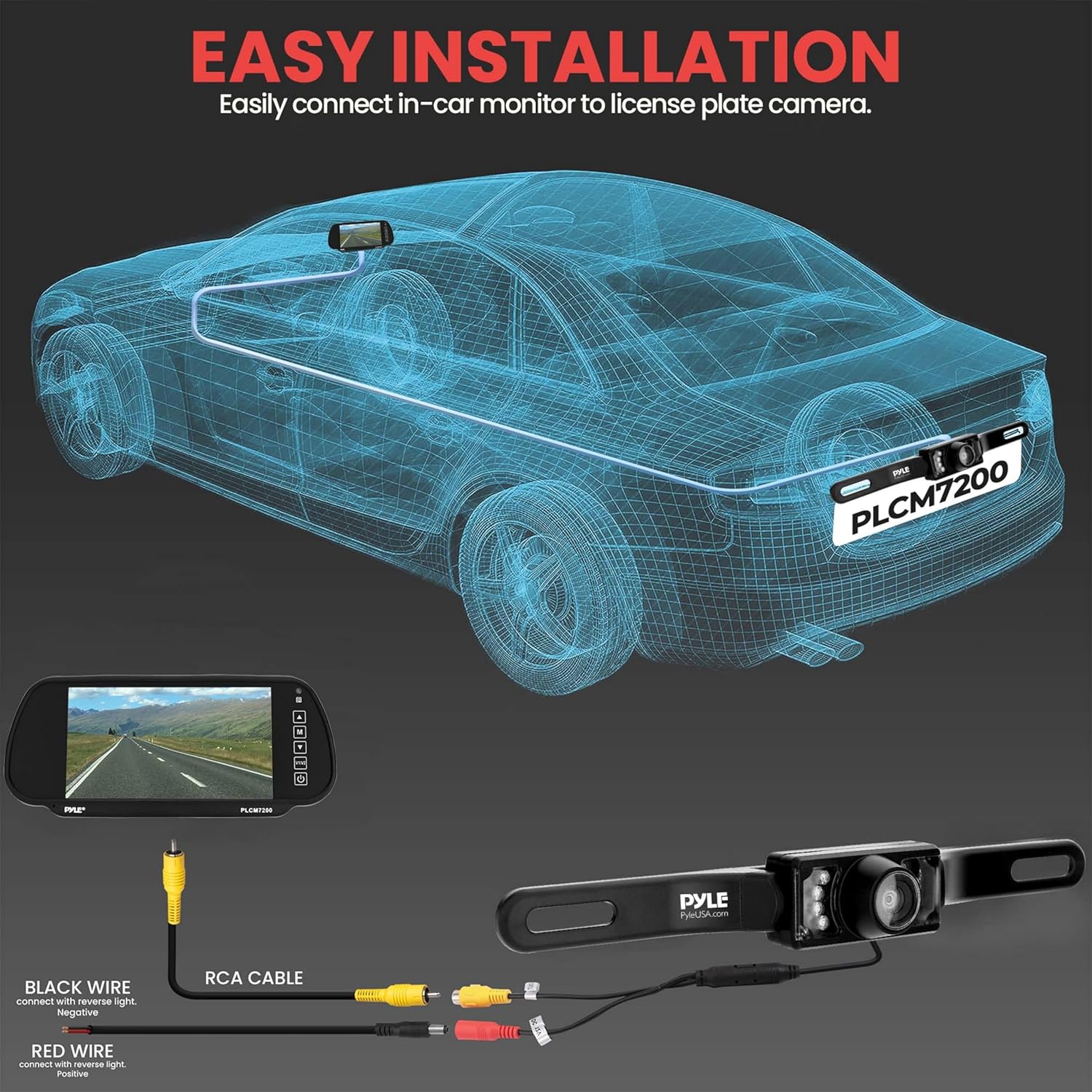
Diagram showing the connection of the camera's RCA cable to the monitor and the power wires (red to positive, black to negative) for easy installation.
Монитор орнотуу
The 7" LCD monitor is designed to clip securely onto your existing rearview күзгү.
- Gently clip the monitor securely over your vehicle's existing rearview mirror. Ensure it is firmly seated and does not obstruct your view.
- Connect the RCA video cable from the camera to one of the video input ports (V1 or V2) on the monitor.
- Connect the monitor's power cable to a 12V power source in your vehicle. This can be a switched accessory power source or directly to the vehicle's battery (with an inline fuse) if you desire constant power.

The 7-inch TFT/LCD mirror monitor clipped onto a vehicle's rearview mirror, displaying a clear view артындагы жолдун.
Иштөө нускамалары
Күйгүзүү/өчүрүү
The system is designed for automatic operation. When the vehicle is shifted into reverse, the camera will power on and the monitor will automatically display the camera feed. When taken out of reverse, the monitor will return to its previous state or turn off.
Distance Scale Lines
The camera provides visual parking assistance with accurate distance scale lines displayed on the monitor. These lines help in judging distances to obstacles behind your vehicle, aiding in safer parking and reversing maneuvers.

A clear reversing image displayed on the monitor, showing distance scale lines and a person walking behind the vehicle, demonstrating enhanced safety.
Түнкү көрүнүш
The camera is equipped with integrated IR LED lights and boasts a low lux capability (0.1 Lux), providing superior night vision. This ensures clear and visible images even in challenging low-light conditions, enhancing safety during nighttime driving or parking.

Comparison image showing the camera's view in daylight and at night, highlighting the effectiveness of the IR night vision feature.
Wide Viewбурч
камера кенен сунуш кылат viewing angle of 170 degrees. This broad perspective helps to minimize blind spots and provides a comprehensive view of the area directly behind your vehicle, increasing awareness of surroundings.
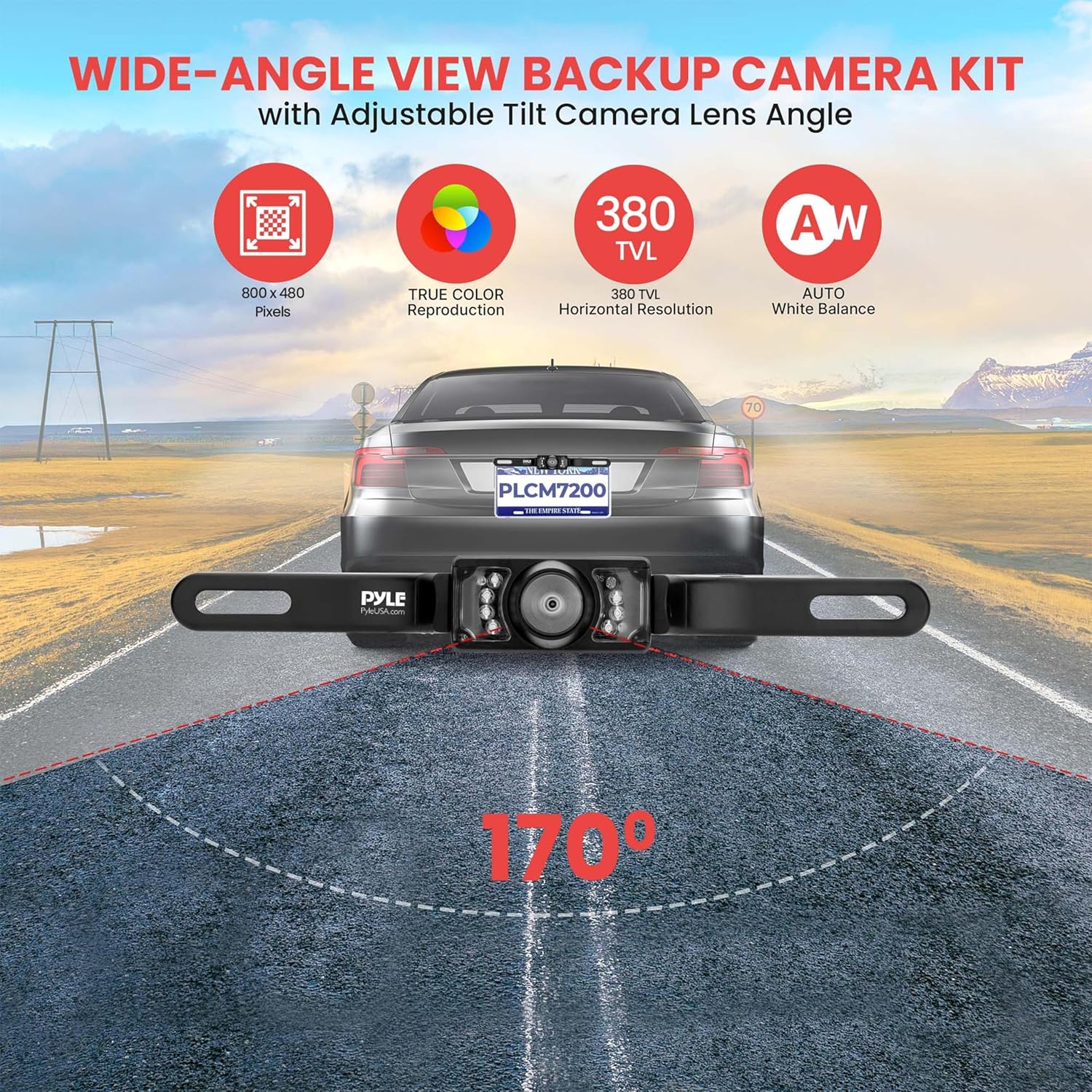
An illustration demonstrating the 170-degree wide-angle view of the backup camera, showing its broad coverage behind a vehicle.
Кароо жана тейлөө
To ensure optimal performance and longevity of your Pyle PLCM7200 system, follow these guidelines:
- Камеранын линзасын жана монитор экранын дайыма жумшак, гamp cloth. Avoid using abrasive cleaners, solvents, or harsh chemicals, as these can damage the surfaces.
- Ensure all cable connections remain secure and free from corrosion. Periodically check connections, especially after driving through harsh weather conditions.
- The camera is IP68 marine-grade waterproof, designed to withstand harsh weather. However, avoid directing high-pressure water jets directly onto the camera lens or housing, as this could potentially compromise the seal over time.
- If the system will not be used for an extended period, consider disconnecting it from the power source to prevent battery drain.

Image illustrating the IP68 waterproof and fog-resistant features of the camera, showing water droplets on the lens.
Кыйынчылыктарды табуу боюнча колдонмо
If you encounter issues with your Pyle PLCM7200 system, refer to the table below for common problems and their solutions:
| Көйгөй | Мүмкүн себеп | Чечим |
|---|---|---|
| Монитордо сүрөт жок | Кабель туташуу бош | Check all RCA and power cable connections to ensure they are secure. |
| Монитордо сүрөт жок | No power to camera/monitor | Verify power supply to both camera and monitor. Check vehicle fuses related to the power source. |
| Жаркылдаган же бурмаланган сүрөт | Electrical interference or poor connection | Ensure cables are not routed near high-voltage wires or other sources of electrical interference. Re-seat all connections firmly. |
| Түнкү көрүү начар | Camera lens obstruction or insufficient IR light | Clean the camera lens thoroughly. Ensure the IR LEDs are not blocked by dirt or debris. |
| Monitor does not turn on automatically in reverse | Incorrect power connection for camera or monitor | Confirm the camera's red power wire is connected to the reverse light positive (+) and the monitor's power is correctly wired. |
Техникалык мүнөздөмөлөр
| Өзгөчөлүк | Деталь |
|---|---|
| Дисплей түрү | 7" TFT/LCD Mirror |
| Display Resolution | 800x480 пиксел |
| Камера түрү | Exterior License Plate Mount Cam |
| Суу өткөрбөйт рейтинги | IP68 Marine-Grade |
| TV Lines | 380 телевидение линиясы |
| Түнкү көрүнүш | Yes, with IR LED lights (0.1 Lux) |
| Viewбурч | 170 градус |
| Video Inputs | Dual (V1/V2) |
| Электр камсыздоо | 12 вольт DC |
| Продукциянын өлчөмдөрү (монитор) | 10.25"L x 4.25"W x 1"H |
| Product Dimensions (Camera) | 8.46"L x 1.29"H (approx.) |
| Элемент Салмагы | 14.1 ounces (system) |
Кепилдик жана колдоо
This Pyle product comes with a 2 жылдык кепилдик, backed by a USA-based manufacturer. This warranty covers defects in materials and workmanship under normal use. For warranty service or technical support, please contact Pyle customer service directly.
You can find additional support and product information, including detailed installation guides and certificates, by referring to the following PDF documents:
Note: No official product videos with 'Seller' as 'creator_type' were found in the provided data for embedding.


