1. Киришүү
The Extech EX310 is a compact, manual-ranging digital multimeter designed for a variety of electrical measurements. It features an extra-large 2000-count LCD and a built-in Non-Contact AC Voltage Detector (NCV) for enhanced safety. This device is capable of measuring AC/DC Voltage, AC/DC Current, Resistance, Diode, and Continuity, and includes a battery test function for 1.5V and 9V batteries. Its robust design, including a protective rubber holster and tilt stand, makes it suitable for field use.
2. Коопсуздук маалыматы
Always adhere to safety precautions when using any electrical testing equipment. Failure to do so may result in injury or damage to the meter or equipment under test.
- The Extech EX310 is UL listed with a CAT III – 600 Volt safety rating.
- Баалангандан ашык колдонбоңузtage, as marked on the meter, between terminals or between any terminal and ground.
- Always inspect test leads for damage before use. Replace if insulation is compromised.
- Ток чынжырлары менен иштөөдө өтө этият болуңуз.
- Контактсыз томду колдонуңузtage (NCV) detector as a preliminary check for live AC voltage, but always verify with direct contact measurements when possible.
- Өлчөөлөрдү жүргүзүүдөн мурун, функция которгучу туура диапазонго коюлганын текшериңиз.
3. Продукциянын өзгөчөлүктөрү
- 9-Function Manual-Ranging DMM: Чаралар AC/DC тtage, AC/DC current (up to 10 A), resistance, diode, continuity, plus 1.5 V/9 V battery tests.
- Байланышсыз томtage (NCV) Detector: Built-in NCV with red LED and audible beeper alerts to the presence of live AC (100-600 VAC) without probes.
- Extra-Large 2000-Count Display: Clear, easy-to-read 1-inch digits on a high-count LCD ensure readability.
- Rugged, Portable Design: Compact meter (5.7 × 2.9 × 1.6 in, 9 oz) with protective rubber holster, tilt stand, and low-battery indicator.
- Reliable Safety & Accuracy: 0.5% basic accuracy. Designed to UL/CAT II-1000 V & CAT III-600 V safety standards.
4. Пакеттин мазмуну
The Extech EX310 package includes the following items:
- Extech EX310 Mini Digital Multimeter
- Сыноо Лидер
- 9 вольт батарейка
- Tilt Stand
5. Продукт бүтүп калдыview (Controls and Display)
Familiarize yourself with the components of your EX310 multimeter:

Сүрөт: алдыңкы view of the Extech EX310 Mini Digital Multimeter, showing the large LCD display, function dial, NCV button, and input jacks.
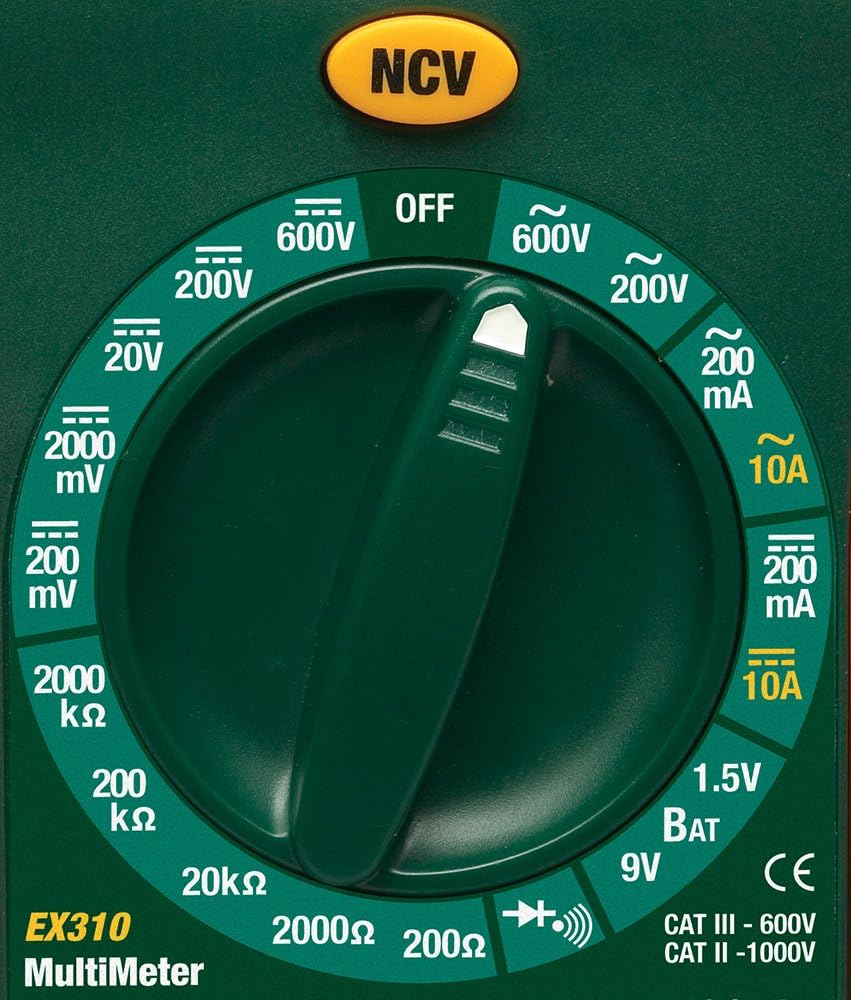
Image: Close-up of the Extech EX310's function dial, illustrating the various measurement ranges and functions such as voltage, current, resistance, diode, continuity, and battery test.
- LCD дисплей: Өлчөө көрсөткүчтөрүн, бирдиктерин жана функциянын көрсөткүчтөрүн көрсөтөт.
- Функция которуу: Rotary dial to select the desired measurement function and range.
- NCV баскычы: Activates the Non-Contact Voltage detection feature.
- Киргизүү уячалары: Сыноо өткөргүчтөрүн туташтыруу үчүн терминалдар (COM, VΩmA, 10A).
6. Орнотуу
6.1. Батареяны орнотуу
- Мультиметр өчүрүлгөнүн текшериңиз.
- Эсептегичтин арткы бетиндеги батарея бөлүмүнүн капкагын табыңыз.
- Кармап туруучу бурам(дарды) бурап, капкакты алып салыңыз.
- Туура полярдуулукту сактап, жаңы 9V батареяны салыңыз.
- Replace the cover and secure with the screw(s).
A low battery indicator will appear on the display when the battery needs replacement.
6.2. Сыноо линияларын туташтыруу
Сыноо өткөргүчтөрүн тиешелүү киргизүү уячаларына туташтырыңыз:
- Кара сыноо өткөргүчтү орнотуңуз COM (жалпы) джек.
- Көпчүлүк өлчөөлөр үчүн (Тtage, Resistance, Diode, Continuity, mA Current), insert the red test lead into the VΩmA джек.
- Жогорку токту өлчөө үчүн (10А чейин) кызыл сыноо өткөргүчтү орнотуңуз 10A джек.
7. Иштөө нускамалары
Before making any measurement, ensure the test leads are correctly connected and the function switch is set to the desired range.
7.1. AC/DC Voltage Өлчөө
- Set the function switch to the desired ACV (~) or DCV (---) range (e.g., 200V, 600V).
- Кызыл сыноо өткөргүчтү VΩmA уячасына жана кара сыноо өткөргүчтү COM уячасына туташтырыңыз.
- Сыноочу зонддорду чынжырдын чекиттерине тийгизиңиз, анда тtagе өлчөө керек.
- Томду окуңузtagLCDдеги e мааниси.
7.2. AC/DC Ток өлчөө
Абайлаңыз: Never attempt to measure current on a circuit with voltage present across the current terminals. This can blow the fuse or damage the meter.
- Электр чынжырын өчүрүңүз.
- Set the function switch to the desired ACA (~) or DCA (---) range (e.g., 200mA, 10A).
- Connect the red test lead to the appropriate current jack (VΩmA for mA, 10A for 10A) and the black test lead to the COM jack.
- Ток өлчөнө турган схеманы ачып, эсептегичти катарга туташтырыңыз.
- Apply power to the circuit and read the current value on the LCD.
7.3. Каршылык Өлчөө
- Схема же компоненттин энергиясы өчүрүлгөнүн текшериңиз.
- Set the function switch to the desired Resistance (Ω) range (e.g., 200Ω, 20kΩ).
- Кызыл сыноо өткөргүчтү VΩmA уячасына жана кара сыноо өткөргүчтү COM уячасына туташтырыңыз.
- Өлчөнө турган компоненттин же чынжырдын үстүндөгү сыноо зонддоруна тийиңиз.
- LCD дисплейдеги каршылыктын маанисин окуңуз.

Image: The Extech EX310 Multimeter displaying a reading while test leads are connected to a circuit board, demonstrating a typical measurement scenario.
7.4. Диод сыноо
- Компоненттин энергиясы өчүп калганын текшериңиз.
- Set the function switch to the Diode (→|) position.
- Кызыл сыноо өткөргүчтү VΩmA уячасына жана кара сыноо өткөргүчтү COM уячасына туташтырыңыз.
- Кызыл зондту анодка, кара зондду диоддун катодуна тийгизиңиз.
- Алдыдагы томду окуңузtage drop on the LCD. Reverse the probes to check for an open circuit (OL).
7.5. Үзгүлтүксүздүк тести
- Схема же компоненттин энергиясы өчүрүлгөнүн текшериңиз.
- Set the function switch to the Continuity (→))) position.
- Кызыл сыноо өткөргүчтү VΩmA уячасына жана кара сыноо өткөргүчтү COM уячасына туташтырыңыз.
- Touch the test probes across the circuit or component.
- An audible tone will sound if continuity exists (resistance below approximately 30Ω).

Сүрөт: жакын план view of the Extech EX310 Multimeter with its test leads connected to an internal electronic circuit, demonstrating precise measurement capabilities.
7.6. Контактсыз томtage (NCV) аныктоо
- Функция которгучун каалаган абалга коюңуз.
- Press and hold the NCV button.
- Move the top of the meter (where the NCV sensor is located) close to the suspected AC voltage source (e.g., wire, outlet).
- A red LED will illuminate and an audible beeper will sound, increasing in intensity as the meter gets closer to the live AC voltage.

Image: A hand holding the Extech EX310 Multimeter near an electrical wall outlet, demonstrating the use of the Non-Contact Voltage (NCV) detection feature to identify live circuits.
7.7. Battery Test (1.5V/9V)
- Set the function switch to the 1.5V BAT or 9V BAT position.
- Кызыл сыноо өткөргүчтү VΩmA уячасына жана кара сыноо өткөргүчтү COM уячасына туташтырыңыз.
- Touch the red probe to the positive terminal and the black probe to the negative terminal of the battery.
- Батареянын көлөмүн окууtagЖКда e.
8. Техникалык тейлөө
8.1. Батареяны алмаштыруу
Refer to Section 6.1 for detailed instructions on replacing the 9V battery when the low battery indicator appears.
8.2. Сактагычты алмаштыруу
If the current measurement functions cease to operate, the internal fuse(s) may need replacement. The fuses are typically located beneath the battery compartment. Refer to the full product manual for specific fuse ratings and replacement procedures. Always replace with fuses of the identical type and rating.
8.3. Тазалоо
Мезгил-мезгили менен ишти жарнама менен сүртүп туруңузamp кездеме жана жумшак жуугуч. Абразивдерди же эриткичтерди колдонбоңуз. Колдонуудан мурун эсептегич толугу менен кургатылганын текшериңиз.
9. Кыйынчылыктарды
- Дисплей жок: Check the 9V battery. Ensure it is correctly installed and has sufficient charge.
- Туура эмес окуулар: Verify that the function switch is set to the correct measurement type and range. Ensure test leads are properly connected and making good contact with the circuit.
- Учурдагы өлчөө иштебей жатат: Check the internal fuse(s). Refer to the Maintenance section for fuse replacement.
- NCV аныкталбай жатат: Ensure the NCV button is pressed and held. Confirm the presence of AC voltage (100-600 VAC) in the area being tested.
10. Техникалык шарттар
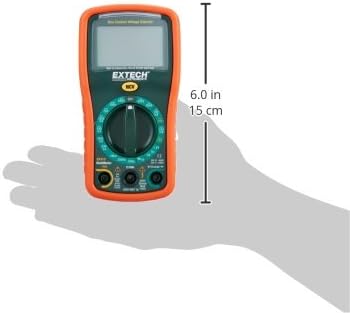
Image: Diagram illustrating the physical dimensions of the Extech EX310 Multimeter, showing a length of 6.0 inches (15 cm).
| Спецификация | Нарк |
|---|---|
| Бренд | Extech |
| Модель номери | EX310 |
| Өлчөө түрү | Мультиметр |
| Стиль | Manual Ranging |
| Негизги тактык | +/-0.5% |
| Дисплей | 2000-Count LCD |
| Коопсуздук рейтинги | UL listed CAT III - 600V, CAT II - 1000V |
| Power Source | 9V Батарея |
| Элементтин өлчөмдөрү (L x W x Y) | 5.7 x 1.6 x 2.9 дюйм (14.5 x 4.1 x 7.4 см) |
| Элемент Салмагы | 0.704 унция (0.02 килограмм) |
| Камтылган компоненттер | Test leads, 9 Volt battery, tilt stand |
11. Кепилдик маалыматы
The Extech EX310 Mini Digital Multimeter is covered by a 1 жылдык тетиктерге жана эмгек гарантиясына from the date of purchase. Please retain your proof of purchase for warranty claims. This warranty covers manufacturing defects and workmanship under normal use.
12. Кардарларды колдоо кызматы
For technical assistance, troubleshooting beyond this manual, or warranty service, please contact Extech customer support. Refer to the official Extech webакыркы байланыш маалыматы үчүн сайт же продукт таңгак.


