Introduction
This manual provides detailed instructions for the installation, operation, and maintenance of the goobay 11307 RCA Jack. This component is designed for housing mounting and features a gold-plated structure with colored insulating washers, specifically red, for clear channel identification. It is intended for solder connections, ensuring a secure and reliable audio or video signal transmission.
The goobay 11307 RCA jack is a standard connector used in various audio and video applications, allowing for the transmission of analog electrical signals. Its robust design ensures durability and consistent performance when properly installed.
Продукт бүттүview
The goobay 11307 RCA Jack is a panel-mount connector. Key features include:
- Түрү: RCA Jack (female connector)
- Монтаждоо: Designed for housing or panel mounting.
- Байланыш: Solder connection for secure wiring.
- Материал: Gold-plated structure for optimal signal conductivity and corrosion resistance.
- Изоляция: Includes colored insulating washers, with this specific model featuring a red washer for channel identification (e.g., right audio channel).
- Өлчөмдөрү: Approximately 20 x 20 x 20 millimeters.
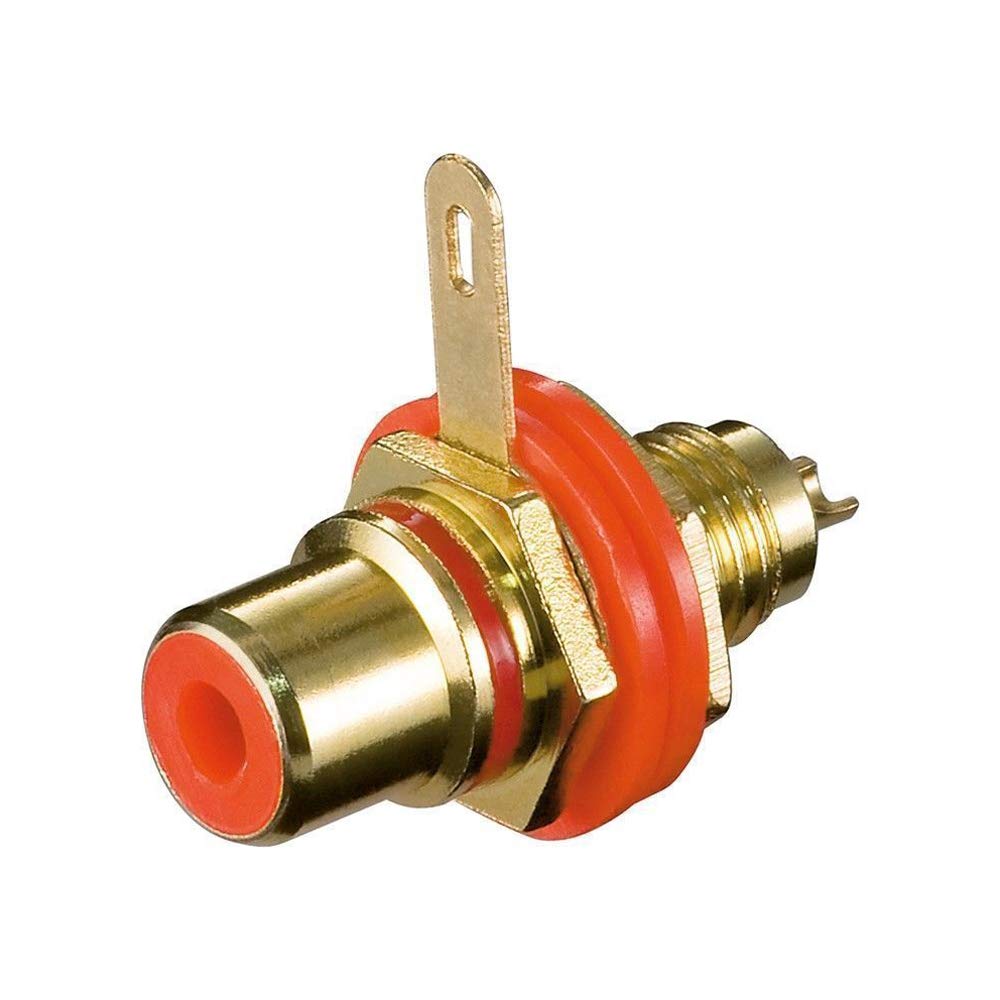
Сүрөт 1: Алдыңкы view of the goobay 11307 RCA Jack, showing the gold-plated connector and red insulating washer.

2-сүрөт: Каптал view of the goobay 11307 RCA Jack, illustrating the solder connection points for wiring.
Орнотуу жана орнотуу
Proper installation is crucial for optimal performance and safety. This RCA jack requires panel mounting and soldering.
Керектүү куралдар жана материалдар:
- Сварка жана ширетүү
- Зымдарды сыйрып алуучулар
- Drill with appropriate bit size for panel mounting hole
- Nut and washer (typically included with the jack, or ensure correct size)
- Audio/video cables for connection
Орнотуу кадамдары:
- Монтаждоо тешиктерин даярдоо: Drill a hole of the appropriate diameter in the desired panel or housing. Ensure the hole is clean and free of burrs. The diameter should allow the threaded portion of the RCA jack to pass through snugly.
- Insert Jack: Insert the RCA jack through the prepared hole from the front of the panel.
- Secure Jack: Place the insulating washer (if separate from the main body) and then the metal washer and nut onto the threaded portion of the jack from the rear of the panel. Tighten the nut firmly but do not overtighten, as this could damage the jack or panel. The red insulating washer should be visible on the front of the panel.
- Зымдарды даярдоо: Strip a small amount of insulation from the ends of the audio/video signal wires that will be connected to the jack.
- Ширетүүчү байланыштар:
- Identify the center pin (signal) and the outer tab (ground) on the RCA jack.
- Carefully solder the signal wire to the center pin of the jack.
- Solder the ground wire (shield) to the outer tab of the jack.
- Ensure solder joints are clean, strong, and free of shorts. Avoid excessive heat to prevent damage to the jack's insulation.
- Сыноо байланышы: Before final assembly, test the connection to ensure proper signal flow and absence of shorts.
Safety Note: Always disconnect power from any equipment before performing soldering or installation work. Use appropriate personal protective equipment (PPE) such as safety glasses.
Иштөө нускамалары
Once the goobay 11307 RCA Jack is correctly installed and wired, its operation is straightforward:
- RCA кабелин туташтырыңыз: Insert a standard RCA plug from your audio or video source/destination into the installed goobay 11307 RCA jack. The plug should fit snugly.
- Коопсуз туташууну камсыз кылуу: Verify that the RCA plug is fully inserted into the jack to ensure proper signal transmission and to prevent intermittent connections.
- Сигнал берүү: The jack will now facilitate the transmission of the analog audio or video signal between the connected devices.
The red color of the insulating washer typically indicates the right audio channel in stereo applications or a specific video signal, depending on the system's convention. Always refer to your equipment's documentation for correct channel assignments.
Техникалык тейлөө
The goobay 11307 RCA Jack is a passive component and requires minimal maintenance. However, following these guidelines can prolong its lifespan and ensure consistent performance:
- Тазалыкты сактоо: Periodically inspect the jack for dust, dirt, or debris. Use a soft, dry cloth or a cotton swab to gently clean the contact surfaces. Avoid using abrasive cleaners or solvents.
- Байланыштарды текшерүү: Occasionally check the soldered connections for any signs of corrosion or loosening. Re-solder if necessary.
- Физикалык стресстен качыңыз: Do not apply excessive force when inserting or removing RCA plugs. Avoid bending or twisting the jack, which could damage the internal contacts or the solder joints.
- Экологиялык шарттар: Store and operate the equipment containing the jack in a dry environment, away from extreme temperatures and humidity, to prevent corrosion.
Проблемаларды чечүү
Эгерде сизде сигналды өткөрүүдө көйгөйлөр пайда болсо, көйгөйлөрдү чечүүнүн төмөнкү кадамдарын карап көрүңүз:
- Сигнал жок / Үзгүлтүктүү сигнал:
- Кабелди текшерүү: Ensure the RCA cable connected to the jack is not damaged and is fully inserted into both the goobay jack and the connected device. Try a different cable if possible.
- Ширетүүчү муундарды текшерүү: Verify that the solder connections on the back of the goobay 11307 jack are solid and free of cold joints or shorts. Re-solder if necessary.
- Check Source/Destination: Ensure the audio/video source and destination devices are powered on and functioning correctly.
- Poor Audio/Video Quality (Noise, Distortion):
- Негиздөө маселеси: Ensure the ground connection (outer tab) is properly soldered and making good contact. Poor grounding can introduce hum or noise.
- Кабелдин сапаты: Use high-quality, shielded RCA cables to minimize interference.
- Таза байланыштар: Clean the contacts of both the jack and the RCA plug to remove any oxidation or dirt.
If problems persist after following these steps, consult a qualified technician.
Техникалык шарттар
| Бренд | губай |
| Модель номери | 11307 |
| Сериялар | CBGP R |
| Түс | Кызыл |
| Элементтин өлчөмдөрү (L x W x Y) | 20 x 20 x 20 миллиметр |
| Туташтыргыч түрү | RCA |
| Туташуу түрү | Solder |
| Структура | Алтын менен капталган |
| Изоляция | Colored insulating washers (Red) |
| Пакеттеги саны | 1 |
| ASIN | B000L0XHSQ |
| Биринчи жеткиликтүү күн | 21-январь, 2011-жыл |
Кепилдик жана колдоо
Specific warranty information for the goobay 11307 RCA Jack is not provided in the product details. For warranty claims or technical support, please contact the manufacturer, goobay, or your point of purchase directly. Retain your proof of purchase for any warranty inquiries.
For general inquiries or further assistance, you may visit the official goobay webсайтка же кардарларды тейлөө бөлүмүнө кайрылыңыз.