1. Киришүү
The Logicool Classic Keyboard 200 (model iK-21BK) is a compact, wired USB keyboard designed for comfortable and efficient typing. It features a silent key design and a spill-resistant structure to protect against accidental liquid spills. This manual provides essential information for the proper use and care of your keyboard.
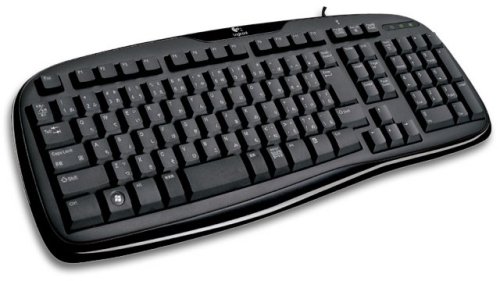
1-сүрөт: Logicool Classic Keyboard 200 iK-21BK. This image displays the Logicool Classic Keyboard 200 iK-21BK, a black wired USB keyboard with a standard Japanese 108-key layout.
2. Пакеттин мазмуну
Пакетте бардык буюмдар бар экенин текшериңиз:
- Logicool Classic Keyboard 200 (iK-21BK)
- Интегралдык USB кабели
- Колдонуучунун Колдонмосу (бул документ)
3. Орнотуу
- Баскычтопту туташтыруу: Locate an available USB port on your computer. Insert the USB connector of the keyboard cable into the USB port.
- Автоматтык таануу: The keyboard is plug-and-play. Your operating system should automatically detect and install the necessary drivers. No additional software installation is required.
- Позициялоо: Place the keyboard on a flat, stable surface. The keyboard features a zero-degree tilt design, which helps reduce wrist strain during extended use.
4. Иштөө нускамалары
The Logicool Classic Keyboard 200 provides a standard 108-key Japanese layout. Simply begin typing after connecting the keyboard. The responsive key touch and silent design ensure a comfortable typing experience.
Негизги өзгөчөлүктөрү:
- Тынч дизайн: Engineered to minimize typing noise, providing a quieter work environment.
- Spill-Resistant Structure: Designed to allow liquids to drain away from critical components, reducing the risk of damage from accidental spills. Note: This keyboard is spill-resistant, not waterproof. Do not immerse in liquid.
- Zero-Degree Tilt: The flat profile of the keyboard helps maintain a neutral wrist position, enhancing comfort during prolonged use.
5. Техникалык тейлөө
Үзгүлтүксүз тазалоо клавиатуранын иштешин жана көрүнүшүн сактоого жардам берет.
- Бетти тазалоо: жумшак колдонуу, damp cloth to wipe the keyboard surface. Avoid abrasive cleaners or solvents.
- Removing Debris: Баскычтардын ортосундагы чаңды жана калдыктарды тазалоо үчүн кысылган абаны колдонуңуз.
- төгүлүүчү башкаруу: In case of a liquid spill, immediately disconnect the keyboard from your computer. Turn the keyboard upside down to allow liquid to drain. Let it dry completely before reconnecting.
6. Кыйынчылыктарды
If you encounter issues with your keyboard, try the following steps:
- Баскычтоп жооп бербейт:
- USB кабели клавиатурага жана компьютерге бекем туташып турганын текшериңиз.
- Баскычтопту компьютериңиздин башка USB портуна туташтырууга аракет кылыңыз.
- Компьютериңизди өчүрүп күйгүзүңүз.
- Ачкычтар туура иштебейт:
- Check for any debris or foreign objects lodged under the keys. Clean as described in the Maintenance section.
- If a specific key is not working, it might be a hardware issue.
- Күтүлбөгөн жүрүм-турум:
- Иштөө тутумуңуз жаңыртылганын текшериңиз.
- If using with a KVM switch or USB hub, try connecting directly to the computer.
Бул кадамдарды жасагандан кийин көйгөй чечилбесе, кошумча жардам алуу үчүн Кепилдик жана колдоо бөлүмүнө кайрылыңыз.
7. Техникалык шарттар
| Бренд | Logicool |
| Модель номери | iK-21BK |
| Туташуу түрү | Зымдуу USB |
| Баскычтоптун жайгашуусу | 108-key Japanese (QWERTY) |
| Ачкыч түрү | Мембрана |
| Өзгөчөлүктөр | Silent Design, Spill-Resistant Structure |
| Түс | Кара |
| Key Pitch | 19 мм |
| Кабелдин узундугу | 165 см |
| Өлчөмдөрү (L x W x Y) | 47.4 x 20.2 x 3.6 см |
| Салмагы | 739 г |
| OS шайкештиги | Not machine specific (Windows, macOS, Linux compatible via USB) |
8. Кепилдик жана колдоо
For warranty information, please refer to the documentation included with your purchase or visit the official Logicool website. For technical support or further assistance, please contact Logicool customer service through their official support channels.
Logicool Official Webсайт: https://www.logicool.co.jp/en-jp/support


