1. Киришүү
The Seagate FreeAgent Desktop USB Portable Hard Drive is designed to provide reliable and convenient external storage for your digital content. This device allows you to easily back up and access your important photos, videos, music, and documents. Its compact design and simple connectivity make it an ideal solution for expanding your storage capacity.

Figure 1.1: Seagate FreeAgent 500 GB External Hard Drive retail packaging (front view).
2. Пакеттин мазмуну
Verify that all items are present in your Seagate FreeAgent package:
- FreeAgent Desktop drive
- USB 2.0 кабели
- AC кубат адаптери
- Тез баштоо колдонмосу

Figure 2.1: Back of the product packaging, detailing package contents and system requirements.
3. Орнотуу
The Seagate FreeAgent drive is designed for simple plug-and-play operation. Follow these steps to set up your device:
- Кубат адаптерин туташтыруу: Plug the AC power adapter into the power port on the back of the FreeAgent drive. Then, plug the other end of the power adapter into a wall outlet.
- USB кабелин туташтыруу: Connect one end of the USB 2.0 cable to the USB port on the FreeAgent drive.
- Компьютерге туташуу: Plug the other end of the USB 2.0 cable into an available USB port on your computer (PC or Mac).
- Системаны таануу: Your operating system (Windows XP, Windows 2000, Windows Vista, or Mac OS X 10.4.8 or higher) should automatically detect and configure the drive. No additional drivers are typically required.
- Колдонууга даяр: Once recognized, the drive will appear as an available storage device in 'My Computer' (Windows) or on the 'Desktop' (Mac).
4. Операция
Using your Seagate FreeAgent drive is similar to using any other external storage device:
- Өткөрүлүүдө Files: Сүйрөп барып таштаңыз files or folders directly to and from the FreeAgent drive icon. You can also use your operating system's copy and paste functions.
- Backup Software: The drive may come with pre-loaded software for automatic file copying and retrieval. Refer to the quick start guide for details on utilizing this feature.
- Коопсуз алып салуу: Always safely remove or eject the drive before disconnecting it from your computer. This prevents data corruption. For Windows, use the 'Safely Remove Hardware and Eject Media' icon in the system tray. For Mac, drag the drive icon to the Trash or use 'Eject' from the File меню.
5. Техникалык тейлөө
To ensure the longevity and optimal performance of your Seagate FreeAgent drive, consider the following maintenance tips:
- Физикалык коргоо: Handle the drive with care. Avoid dropping it or subjecting it to physical shocks, as this can damage internal components.
- Вентиляция: Ensure the drive is placed in a location with adequate airflow to prevent overheating. Do not block the ventilation slots.
- Тазалык: Keep the drive clean and free from dust. Use a soft, dry cloth for cleaning the exterior.
- Экологиялык шарттар: Store and operate the drive within recommended temperature and humidity ranges. Avoid extreme conditions.
6. Кыйынчылыктарды
If you encounter issues with your Seagate FreeAgent drive, try the following solutions:
- Диск аныкталган жок:
- Ensure the power adapter is securely connected to both the drive and a working power outlet.
- Verify the USB cable is firmly connected to both the drive and your computer. Try a different USB port on your computer.
- Компьютериңизди өчүрүп күйгүзүңүз.
- Жай аткаруу:
- Ensure you are using a USB 2.0 port for optimal transfer speeds.
- Close any unnecessary applications running on your computer.
- Дискте жетиштүү бош орун бар экендигин текшериңиз.
- Маалыматтарга жетүү көйгөйлөрү:
- Always perform a safe removal before disconnecting the drive. If data corruption occurs due to improper disconnection, run a disk check utility on your operating system.
- Иштөө тутумуңуз жаңыртылганын текшериңиз.
For further assistance, refer to the official Seagate support resources.
7. Техникалык шарттар
| Модель номери | ST305004FDA1E1-RK |
| Санариптик сактоо сыйымдуулугу | 500 ГБ |
| Катуу диск интерфейси | USB 2.0 |
| Байланыш технологиясы | USB |
| Катуу диск форма фактору | 3.5 дюйм |
| Hard Disk Description | Механикалык катуу диск |
| Шайкеш түзмөктөр | Иш такта |
| Орнотуу түрү | Тышкы катуу диск |
| Түс | Кара |
| Продукциянын өлчөмдөрү | 10.83 x 6.38 x 7.48 дюйм |
| Элемент Салмагы | 1.98 фунт |
| Өндүрүүчү | SEAGATE - RETAIL |
| UPC | 0763649003008 |
| Сериялык номери (Мисampле) | 9QM2VE08 |
| Бөлүмдүн номери (Мисampле) | 9NF2AL-575 |
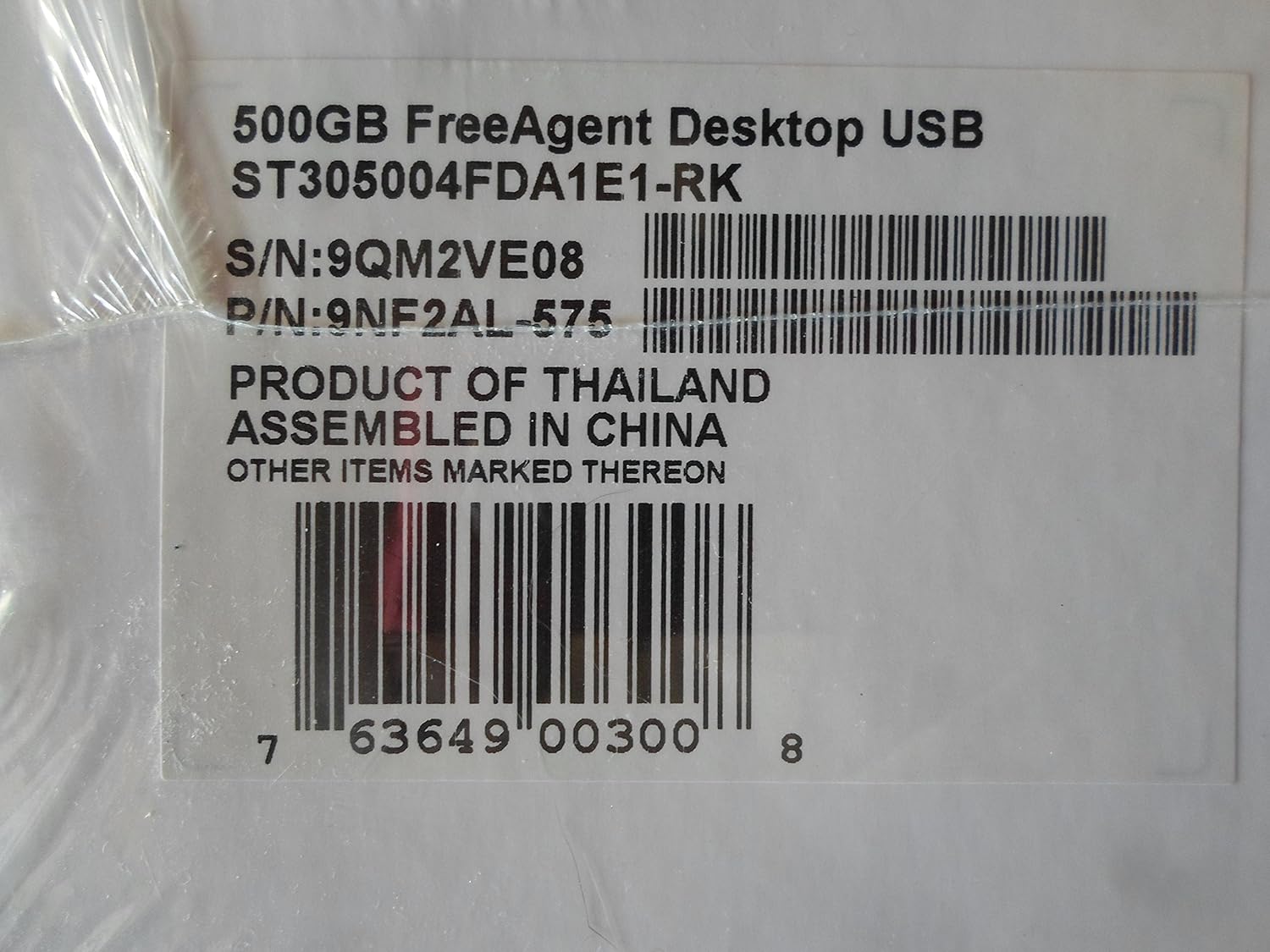
Figure 7.1: Product label showing model, serial, and part numbers.
8. Кепилдик жана колдоо
The Seagate FreeAgent 500 GB External Hard Drive comes with a беш жылдык чектелген кепилдик, инвестицияңызга байланыштуу жан дүйнө тынчтыгын камсыз кылуу.
For detailed warranty terms, technical support, or additional resources, please visit the official Seagate webсайт. Көбүрөөк маалымат жана колдоо таба аласыз Amazonдагы Seagate дүкөнү or the main Seagate support portal.


