Introduction
The Nikon D40x is a compact and user-friendly digital SLR camera designed to deliver exceptional image quality. Featuring a 10.2-effective megapixel CCD image sensor and Nikon’s exclusive image processing engine, it produces stunning sharpness and color, suitable for large prints and creative cropping. This manual provides essential information for setting up, operating, and maintaining your D40x camera to help you capture crisp and detailed photographs.
Жайгашуу
1. Объективди бекитүү
Align the mounting mark on the lens with the lens mount mark on the camera body. Rotate the lens counter-clockwise until it clicks into place. Ensure the lens is securely attached before use.

Сүрөт 1: Алдыңкы view of the Nikon D40x with the 18-55mm lens attached.
2. Батареяны салуу
Open the battery chamber cover located at the bottom of the camera. Insert the supplied EN-EL9 rechargeable battery, ensuring the correct orientation. Close the cover securely.

2-сүрөт: Төмөнкү view of the Nikon D40x, illustrating the battery compartment.
3. Эстутум картасын салуу
Open the memory card slot cover on the side of the camera. Insert a compatible SD or SDHC memory card with the contacts facing the correct direction. Close the cover until it clicks.
3-сүрөт: Каптал view of the Nikon D40x, highlighting the memory card slot.
Камераны иштетүү
1. Күйгүзүү/өчүрүү
To turn the camera on or off, rotate the power switch located near the shutter-release button.

4-сүрөт: Жогорку view of the Nikon D40x, indicating the power switch and mode dial.
2. Негизги атуу режимдери
The D40x features a mode dial for selecting various shooting modes. For beginners, the АВТО mode is recommended as the camera automatically adjusts settings for optimal results. Other Digital-Vari Program Modes include:
- Auto Flash-OFF: For situations where flash is not desired.
- Портрет: Optimizes settings for flattering portraits.
- Пейзаж: Көрүнүктүү көрүнүш үчүн түстөрдү жана курчтукту күчөтөт views.
- Бала: Freezes motion for active subjects.
- Спорт: Uses faster shutter speeds to capture fast-moving action.
- Close Up: Ideal for shooting close-up subjects like flowers or insects.
- Night Portrait: Balances flash and ambient light for night portraits.
3. Камтылган Flash колдонуу
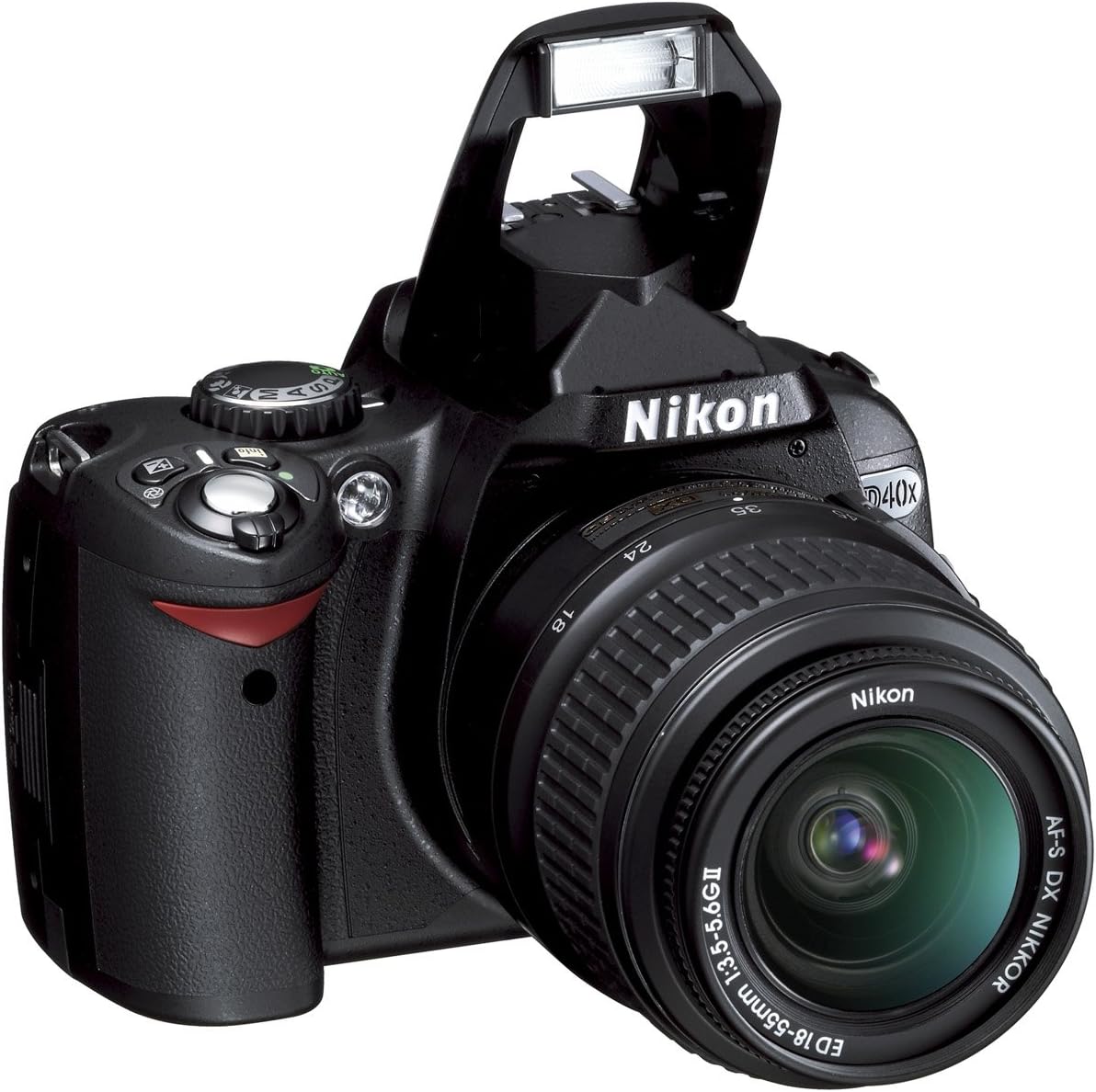
The built-in Speedlight with i-TTL automatic flash control provides balanced flash exposure. In low-light or backlit conditions, the flash can be used to add illumination. The flash can be manually raised or will pop up automatically in certain modes.

Сүрөт 5: Алдыңкы view of the Nikon D40x with the built-in flash in the raised position.
4. LCD Monitor and Navigation
The 2.5-inch, 230,000-pixel color LCD monitor allows for easy image review and menu navigation. Use the multi-selector (OK button in the center) to navigate menus and select options. The monitor also features 3 colorful display options: Classic, Graphic, and Wallpaper.

6-сүрөт: Арткы view of the Nikon D40x, displaying the LCD monitor and various control buttons.
5. In-Camera Editing Functions
The D40x offers versatile in-camera editing features through the Retouch Menu. These include Nikon D-Lighting, Red-Eye Correction, Image Trim, Image Overlay, Monochrome (Black and White, Sepia, Cyanotype), Skylight, Warm Tone, and Color Balance filter effects. This allows for creative adjustments without needing a computer.
Техникалык тейлөө
1. Камераны жана линзаны тазалоо
Use a soft, lint-free cloth to clean the camera body. For the lens and LCD screen, use a specialized lens cleaning cloth and solution. Avoid touching the lens or sensor directly with your fingers. Keep lens caps on when not in use to prevent dust and scratches.
2. Батареяга кам көрүү
Always use the supplied EN-EL9 rechargeable battery and charger. Charge the battery fully before use. Store the battery in a cool, dry place when not in use. Avoid exposing the battery to extreme temperatures.
3. Memory Card Handling
Format new memory cards in the camera before first use. Always turn off the camera before inserting or removing a memory card to prevent data corruption. Store memory cards in a protective case.
Проблемаларды чечүү
1. Камера күйбөй жатат
Батарея толук заряддалганын жана туура салынганын текшериңиз. Кубат которгучу "КҮЙҮК" абалында экенин текшериңиз.
2. бүдөмүк сүрөттөр
Check the focus mode (Autofocus or Manual). Ensure sufficient lighting. If using the 18-55mm VR lens, ensure Vibration Reduction (VR) is enabled in low light or when shooting handheld. Clean the lens if smudges are present.
3. Жарк этпейт
Verify that the flash is raised. Check the shooting mode; some modes (e.g., Auto Flash-OFF) disable the flash. Ensure the battery has sufficient charge.
4. "Memory Full" Message
Delete unwanted images or insert a new, empty memory card. Transfer images to a computer to free up space.
5. Using the HELP Menu
The D40x features an advanced HELP Menu system with "Assist Images." If a Question Mark icon (?) appears, press the HELP button beside the LCD monitor for context-sensitive assistance.
Техникалык шарттар
| Модель аты | Nikon D40x |
| Натыйжалуу дагы эле чечим | 10.2 депутат |
| Фото сенсор технологиясы | CCD |
| Линзанын түрү | 18-55mm f/3.5-5.6G ED II AF-S DX Zoom-Nikkor lens |
| Оптикалык масштаб | 3x |
| Image Stabilization | Dual |
| Screen Size | 2.5 дюйм |
| ISO диапазону | 100-1600, ISO auto |
| Үзгүлтүксүз атуу | секундасына 2.5 кадр |
| Колдоого алынган File Формат | JPEG, RAW |
| Байланыш технологиясы | Зымдуу |
| Flash эс тутум түрү | SD; SDHC |
Кепилдик жана колдоо
Кепилдик жөнүндө маалымат жана техникалык колдоо алуу үчүн, өнүмүңүз менен кошо берилген документтерди караңыз же расмий Nikon дүкөнүнө баш багыңыз. webсайт. Бул колдонмодо каралбаган маселелер боюнча жардам алуу үчүн кардарларды тейлөө кызматына кайрылыңыз.


