1. Киришүү
This manual provides comprehensive instructions for the installation, operation, and maintenance of your Power Acoustik PTID-4003 in-dash monitor with integrated DVD player and AM/FM tuner. Please read this manual thoroughly before using the product to ensure proper operation and to prevent damage.
2. Маанилүү коопсуздук нускамалары
- Always have the unit professionally installed by a qualified technician to ensure correct wiring and functionality.
- Агрегатты айдоодон алаксыта тургандай иштетпеңиз. Ар дайым жол коопсуздугун биринчи орунга коюу.
- Ensure all connections are secure and properly insulated to prevent short circuits and electrical hazards.
- Аппаратты экстремалдык температурага, түз күн нуруна узак убакытка же ашыкча нымдуулукка дуушар кылуудан алыс болуңуз.
- Агрегатты ажыратууга же өзгөртүүгө аракет кылбаңыз. Бул кепилдикти жокко чыгарып, зыян келтириши мүмкүн.
3. Пакеттин мазмуну
Пакетиңизде бардык буюмдар бар экенин текшериңиз:
- Power Acoustik PTID-4003 Main Unit
- Электр зымдары
- Монтаждоочу жабдык
- Remote Control (may vary by region)
- Колдонуучунун Колдонмосу (бул документ)
4. Продукт бүтүп калдыview
Familiarize yourself with the front panel controls and features of your PTID-4003 unit:
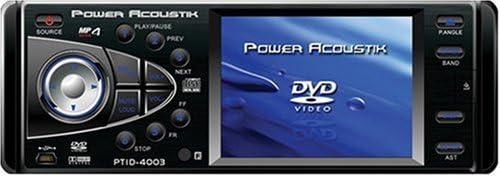
Figure 1: Front Panel Layout of the Power Acoustik PTID-4003. This image displays the unit's front face, featuring a 3.6-inch LCD screen on the right and various control buttons and a central rotary knob on the left. Key controls visible include SOURCE, MP4 indicator, PLAY/PAUSE, PREV, NEXT, MUTE/LOUD, PANGLE, BAND, AST, and STOP buttons. A USB port is also visible on the lower left, and the model number PTID-4003 is printed below the central controls.
- SOURCE баскычы: Selects the input source (e.g., DVD, Radio, Auxiliary).
- ОЙНОО/ТЫНДЫРУУ баскычы: Медиа булактарын ойнотууну башкарат.
- PREV/NEXT баскычтары: Navigates tracks, chapters, or radio presets.
- MUTE/LOUD Button: Mutes audio or activates loudness enhancement.
- PANGLE Button: тууралайт viewing angle of the monitor screen.
- БАНД баскычы: Switches between radio bands (FM1, FM2, FM3, AM1, AM2).
- AST Button: Activates Auto Store for radio stations.
- STOP баскычы: Медиа ойнотууну токтотот.
- Central Rotary Knob/Joystick: Primarily controls volume and menu navigation.
- USB порт: For connecting compatible USB devices.
- 3.6-Inch LCD Monitor: Displays video content and system information.
5. Орнотуу боюнча колдонмо
Proper installation is crucial for optimal performance and safety. It is highly recommended that a qualified professional performs the installation.
- Даярдоо: Кандайдыр бир электр иштерин баштоодон мурун унаанын терс батарея терминалын ажыратыңыз.
- Монтаждоо: Securely mount the PTID-4003 unit into the vehicle's dashboard using the provided mounting hardware. Ensure it is firmly in place to prevent movement during driving.
- Зымдарды туташтыруу: Connect the main wiring harness to the vehicle's power, ground, and speaker wires according to the wiring diagram provided with the unit (not included in this manual).
- Көмөкчү киргизүү:
- Connect a backup camera to the dedicated Auxiliary Input for Back-Up Camera.
- Connect secondary audio/video sources to the A/V Input for Secondary Source Input.
- Антенна туташуу: Connect the vehicle's AM/FM antenna to the unit.
- Акыркы текшерүүлөр: Before reconnecting the battery, double-check all wiring connections for correctness and security.
- Батареяны кайра туташтыруу: Терс батарея терминалын кайра туташтырыңыз.
6. Негизги операция
6.1 Күйгүзүү/өчүрүү
басыңыз БУЛАК button briefly to turn the unit on. Press and hold the БУЛАК аппаратты өчүрүү үчүн баскыч.
6.2 Булакты тандоо
кайра-кайра басыңыз БУЛАК button to cycle through available input sources such as DVD, AM/FM Radio, and Auxiliary Input.
6.3 DVD ойнотуу
Insert a DVD disc into the disc slot. The unit should automatically switch to DVD mode and begin playback. Use the following controls:
- ОЙНОО/ТЫНДЫРУУ: Toggles between playing and pausing the DVD.
- АЛГА/КИЙИНКИ: Мурунку же кийинки бөлүмгө/трекке өткөрөт.
- ТОКТОТУУ: Stops DVD playback.
- Central Rotary Knob: Үн көлөмүн тууралайт.
6.4 AM/FM радиосу
Select the Radio source using the БУЛАК баскычы.
- Шайман: Press to switch between FM1, FM2, FM3, AM1, and AM2 bands.
- тюнинг: Use the central rotary knob or PREV/NEXT buttons for manual or seek tuning.
- AST (Auto Store): басып, кармап туруңуз АСТ button to automatically scan and store strong stations into presets.
6.5 Монитордун башкаруу элементтери
- PANGLE: басыңыз PANGLE жөндөө үчүн баскыч viewing angle of the screen for optimal visibility.
- Жарыктык: Screen brightness is set to 300 Nit. Adjustments may be available through the system menu (refer to on-screen display options).
6.6 Аудио башкаруу каражаттары
- Көлөмү: Rotate the central knob to increase or decrease the volume.
- MUTE/LOUD: Press to mute the audio. Press again to restore. Hold to activate/deactivate loudness.
- Equalizer/Sound Settings: Access through the system menu for bass, treble, balance, and fader adjustments.
7. Кароо жана тейлөө
- Экранды тазалоо: Экранды акырын сүртүү үчүн жумшак, түксүз чүпүрөктү колдонуңуз. өжөр белгилери үчүн, бир аз гampчүпүрөккө суу же экранды тазалоочу каражат. Катуу химиялык заттардан алыс болуңуз.
- Агрегатты тазалоо: Аппараттын сыртын жумшак, кургак чүпүрөк менен сүртүңүз. Абразивдүү тазалагычтарды колдонбоңуз.
- Дискке кам көрүү: Handle DVD discs by their edges. Keep them clean and free of scratches to ensure proper playback.
- Температура: Avoid operating the unit in extremely hot or cold conditions.
8. Көйгөйлөрдү чечүү боюнча колдонмо
If you encounter issues with your PTID-4003, refer to the table below for common problems and solutions.
| Көйгөй | Мүмкүн себеп | Чечим |
|---|---|---|
| Түзмөк күйбөйт. | Электр энергиясы жок, зымдары туура эмес, сактагычы күйүп кеткен. | Check power and ground connections. Verify vehicle fuse and unit's inline fuse. Ensure ignition wire is connected. |
| Аудио чыгышы жок. | Volume too low, Mute activated, incorrect speaker wiring. | Increase volume. Deactivate MUTE. Check speaker connections and polarity. |
| DVD disc does not play. | Диск кир, чийилген же форматы шайкеш келбейт. | Clean the disc. Try a different disc. Ensure the disc format is supported (DVD R). |
| Радио кабыл алуу начар. | Antenna not connected, weak signal. | Ensure antenna is securely connected. Try tuning to a stronger station. |
| Clock settings are inconsistent. | Internal clock issue, power interruption. | Reset the clock through the system menu. If the issue persists after power cycles, contact customer support. |
| PANGLE (angle) button does not work. | Button malfunction, internal fault. | Ensure the unit is powered on and in a mode where angle adjustment is applicable. If the button remains unresponsive, contact customer support. |
If the problem persists after attempting these solutions, please contact Power Acoustik customer support.
9. Техникалык шарттар
- Модель номери: PTID-4003
- Экрандын өлчөмү: 3.6 дюйм
- Дисплей түрү: LCD
- Панелдин жарыктыгы: 300 Нит
- Медиа түрү: DVD R
- Аудио чыгуулар: 5.1 Outputs Dolby Digital Output
- Көмөкчү киргизүү: 1 Auxiliary Input for Back-Up Camera, 1 A/V Input for Secondary Source Input
- Байланыш технологиясы: Көмөкчү
- Элемент Салмагы: 5 фунт
- Продукциянын өлчөмдөрү: 12.1 x 9.4 x 3.8 дюйм
10. Кепилдик маалыматы
The Power Acoustik PTID-4003 comes with a БИР ЖЫЛ КЕПИЛДИК from the date of purchase. This warranty covers manufacturing defects and workmanship under normal use. Please retain your proof of purchase for warranty claims. The warranty does not cover damage caused by improper installation, accident, misuse, abuse, negligence, unauthorized modification, or normal wear and tear. For detailed warranty terms and conditions, please refer to the warranty card included with your product or contact Power Acoustik customer support.
11. Кардарларды колдоо кызматы
For technical assistance, troubleshooting beyond this guide, or warranty inquiries, please contact Power Acoustik customer support. Refer to the official Power Acoustik webакыркы байланыш маалыматы үчүн сайтка же продуктунун таңгагына кайрылыңыз.


