1. Киришүү
The Iwata-Medea Studio Series Smart Jet Pro is a single-piston, oil-less air compressor designed for airbrush applications. This unit features an auto shut-off function, an adjustable air-pressure gauge, and a moisture filter. It is engineered for quiet operation and reliability, making it suitable for both occasional and professional artists.
This manual provides essential information for the safe and efficient operation, setup, and maintenance of your Smart Jet Pro compressor.
2. Коопсуздук маалыматы
Please read and understand all safety instructions before operating the compressor. Failure to follow these instructions may result in electric shock, fire, or serious injury.
- Компрессорду ар дайым жакшы желдетилген жерде иштетиңиз.
- Күйүүчү суюктуктардын же газдардын жанында колдонбоңуз.
- Ensure the power cord is undamaged and properly grounded.
- Кандайдыр бир тейлөө же тазалоо иштерин жүргүзүүдөн мурун электр энергиясын өчүрүңүз.
- Балдарды жана үй жаныбарларын компрессордон алыс кармаңыз.
- Бул продукт Калифорния штатында рак жана тубаса кемтик же башка репродуктивдүү зыян алып келген химиялык заттарды камтыйт.
3. Пакеттин мазмуну
Пакетте бардык буюмдар бар экенин текшериңиз:
- Iwata-Medea Studio Series Smart Jet Pro Air Compressor (Model IS 875)
- High-strength polyurethane air hose
- Moisture filter (pre-installed)
- Көрсөтмө (бул документ)
4. Продукт бүтүп калдыview
The Smart Jet Pro compressor features a compact design with an all-metal protective case and a convenient carrying handle. Key components include the air pressure gauge, pressure regulator knob, and moisture filter.

Сүрөт 1: Алдыңкы view of the Iwata-Medea Smart Jet Pro Air Compressor, showing the pressure gauge, regulator, and included air hose.
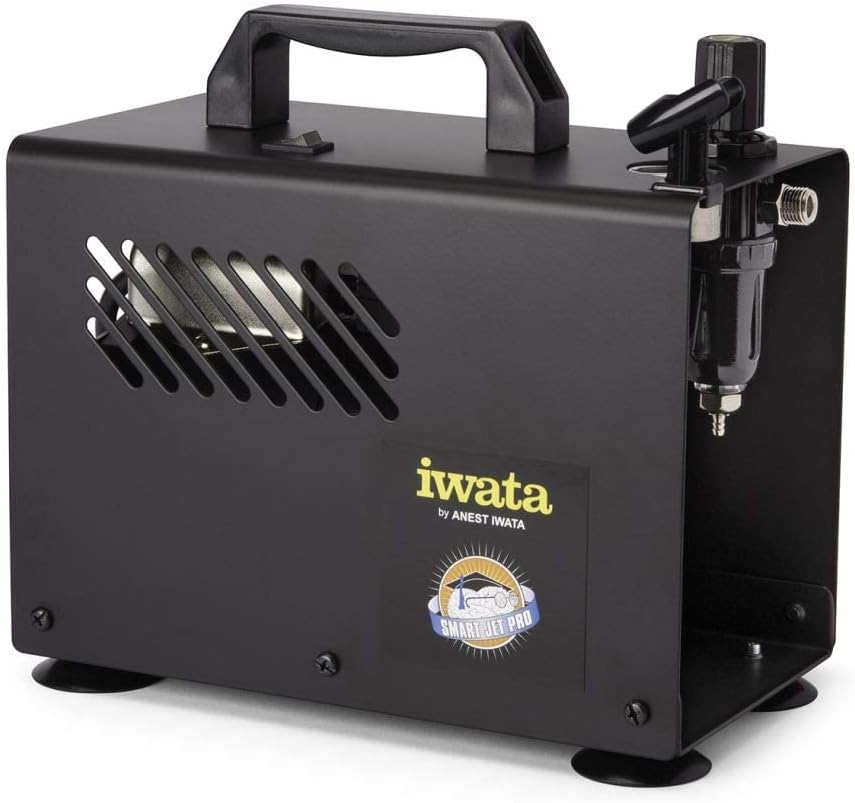
2-сүрөт: Каптал view of the compressor, highlighting the integrated moisture filter and pressure adjustment knob.
5. Орнотуу
- Жайгашкан жери: Place the compressor on a stable, level surface in a clean, well-ventilated area. Ensure adequate space around the unit for air circulation.
- Аба түтүгүн туташтыруу: Connect one end of the provided air hose to the air outlet on the compressor. Connect the other end to your airbrush. Ensure connections are secure to prevent air leaks.
- Кубат туташуу: Plug the compressor's power cord into a standard 120V AC electrical outlet.
6. Иштөө нускамалары
- Күйгүзүү: Flip the power switch located on the top of the compressor to the "ON" position. The compressor will start running.
- Абанын басымын жөнгө салуу: Use the pressure regulator knob (typically located near the air outlet and gauge) to adjust the desired air pressure. Turn clockwise to increase pressure and counter-clockwise to decrease. Monitor the air pressure gauge for accurate readings. The maximum operating pressure is 35 PSI.
- Автоматтык өчүрүү өзгөчөлүгү: The Smart Jet Pro features an automatic shut-off function. When the airbrush trigger is released and air flow stops, the compressor will automatically turn off to conserve energy and reduce wear. It will restart automatically when the airbrush trigger is pressed again.
- Begin Airbrushing: Once the desired pressure is set, you can begin your airbrushing work.
- Өчүрүү: After use, flip the power switch to the "OFF" position and unplug the compressor from the power outlet.
7. Техникалык тейлөө
Компрессордун үзгүлтүксүз техникалык тейлөөсү анын оптималдуу иштешин жана узак мөөнөттүү иштешин камсыз кылат.
- Moisture Filter Drainage: The integrated moisture filter collects condensation. Periodically check the filter bowl for accumulated water. To drain, ensure the compressor is off and depress the small valve at the bottom of the filter bowl to release the water.
- Тазалоо: Wipe the exterior of the compressor with a clean, damp cloth. Do not use harsh chemicals or abrasive cleaners. Ensure no liquids enter the internal components.
- Аба чыпкасы: The compressor is designed with an internal air filter. No user-serviceable air filter replacement is typically required for this model.
8. Кыйынчылыктарды
Жалпы маселелер жана алардын чечимдери үчүн бул бөлүмдү караңыз.
| Көйгөй | Мүмкүн себеп | Чечим |
|---|---|---|
| Компрессор иштебейт. | Электр кубаты жок, туташуу үзгүлтүккө учурайт, кубат өчүрүлөт. | Check power cord connection, ensure outlet is functional, verify power switch is ON. |
| Төмөн же аба басымы жок. | Regulator set too low, air leaks, clogged airbrush. | Adjust pressure regulator, check hose connections for leaks, clean airbrush. |
| Компрессор тынымсыз иштейт. | Air leak in system, airbrush trigger stuck open. | Check all connections for leaks, ensure airbrush trigger is fully released. |
| Excessive moisture in air line. | Moisture filter needs draining. | Drain the moisture filter as described in the Maintenance section. |
9. Техникалык шарттар
Technical specifications for the Iwata-Medea Studio Series Smart Jet Pro Air Compressor (Model IS 875).

Figure 3: Product dimensions of the Iwata-Medea Smart Jet Pro Air Compressor.
| Өзгөчөлүк | Спецификация |
|---|---|
| Модель аты | IS 875 |
| Бренд | Iwata |
| Тtage | 120 вольт |
| Power Source | Электр зымдары |
| Ызы-чуу деңгээли | 50 децибел |
| Максималдуу иштөө басымы | 35 PSI (бир чарчы дюйм үчүн фунт) |
| Мотор кубаты | 0.13 HP (1/8 hp) |
| Элемент Салмагы | 12.67 фунт (5.76 килограмм) |
| Продукциянын өлчөмдөрү (L x W x Y) | 6.18" x 8.65" x 2.25" |
| Өзгөчө өзгөчөлүк | Moisture Filter, Auto Shut-Off |
| Камтылган компоненттер | Filter, Air Hose |
10. Кепилдик жана колдоо
For warranty information or technical support, please refer to the documentation included with your purchase or contact Iwata customer service. Keep your purchase receipt as proof of purchase for warranty claims.
For further assistance, visit the official Iwata webсайтына же алардын ыйгарым укуктуу тейлөө борборлоруна кайрылыңыз.


