1. Киришүү
This manual provides detailed instructions for the installation, operation, maintenance, and troubleshooting of your Antec TPQ-1000 TruePower Quattro 1000W Power Supply. Please read this manual thoroughly before installation and use to ensure proper functionality and safety.
The Antec TPQ-1000 is a high-performance power supply designed for demanding computer systems, featuring 1000 watts of continuous power, 80PLUS certification for efficiency, and a modular cable design for improved cable management.
2. Коопсуздук маалыматы
ЭСКЕРТҮҮ: Improper installation or use can lead to equipment damage, electric shock, or serious injury. Always follow these safety guidelines:
- Орнотуудан же иштетүүдөн мурун, кубат булагынын AC розеткасынан ажыратылганын текшериңиз.
- Электр жабдыгын ачпаңыз casinг. Жогорку томtages are present inside, even when disconnected. There are no user-serviceable parts.
- Install the power supply in a well-ventilated area. Do not block any ventilation openings.
- Use only the modular cables provided with the power supply.
- Тутумду күйгүзүүдөн мурун бардык кабелдер ишенимдүү туташтырылганын текшериңиз.
- Бул продукт жеке компьютерлер менен колдонуу үчүн иштелип чыккан. Аны башка эч кандай максатта колдонбоңуз.
3. Пакеттин мазмуну
Пакетиңизде төмөнкү заттар бар экенин текшериңиз:
- Antec TPQ-1000 TruePower Quattro 1000W Power Supply Unit
- Modular Cable Set (including ATX 20+4 pin, EPS12V 8-pin, PCI-E 6+2 pin, SATA, Molex)
- AC Power Cord
- Монтаждоо бурамалар
- Колдонуучунун Колдонмосу (бул документ)
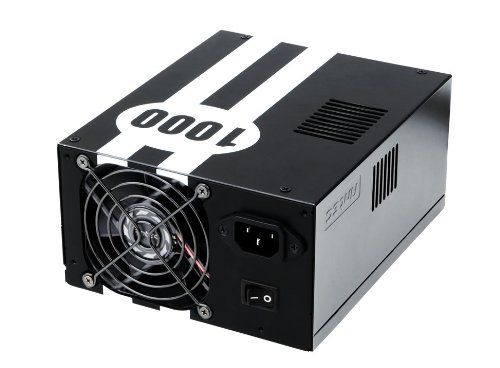
Image: The Antec TPQ-1000 TruePower Quattro 1000W Power Supply unit, typically shown with its modular cables. This image illustrates the main power supply unit and its various connectors.
4. Орнотуу жана орнотуу
4.1 Алдын ала орнотуу текшерүү тизмеси
- Ensure your computer case supports ATX power supplies.
- Керектүү шаймандарды чогултуңуз: Филлипс баштуу бурагыч.
- Unplug your computer from the wall outlet and discharge any residual power by pressing the power button.
- Компьютериңиздин каптал панелин алып салыңыз.
4.2 Installing the Power Supply
- Carefully place the Antec TPQ-1000 into the power supply mounting bay of your computer case. Ensure the fan is oriented correctly for optimal airflow (usually facing down if there's a bottom vent, or facing into the case if top-mounted).
- Берилген монтаждоо бурамалар менен корпуска кубат менен камсыздоону бекитиңиз.
4.3 Модулдук кабелдерди туташтыруу
Connect only the necessary modular cables to the power supply and your components. This reduces cable clutter and improves airflow.
- 20+4 Pin ATX Motherboard Power: Connect the main ATX cable to the corresponding port on your motherboard.
- 4+4 Pin EPS12V CPU Power: Connect this cable to the CPU power connector on your motherboard. Modern motherboards typically use an 8-pin connector.
- 6+2 Pin PCI-E Power: For graphics cards. The TPQ-1000 provides multiple PCI-E connectors. Connect as many as required by your graphics card(s).
- SATA күчү: Connect to SATA devices such as hard drives, SSDs, and optical drives.
- Молекс күчү: Molex туташтыргычтарын колдонгон эски перифериялык түзүлүштөргө же корпус желдеткичтерине туташтырыңыз.
Ensure all connections are firm and properly seated. Route cables neatly to avoid obstructing airflow.
4.4 Баштапкы күйгүзүү
- Once all components are connected, replace the computer case side panel.
- AC кубат шнурын кубат булагына, андан кийин розеткага туташтырыңыз.
- Flip the power switch on the back of the power supply to the "ON" position (usually marked with "I").
- Системаны баштоо үчүн компьютериңиздин корпусундагы кубат баскычын басыңыз.
5. Иштөө нускамалары
The Antec TPQ-1000 TruePower Quattro is designed for continuous and stable operation once properly installed. It features:
- 80PLUS Certification: This indicates high power efficiency, reducing wasted energy and heat generation.
- Универсалдуу киргизүү: Automatically adjusts for 100V to 240V power grids, making it suitable for global use.
- Active Power Factor Correction (PFC): Improves power efficiency and reduces electrical waste.
- Multiple 12V Rails: Provides stable power delivery to critical components.
No specific user interaction is required during normal operation beyond ensuring adequate ventilation and a stable power source.
6. Техникалык тейлөө
Электр менен камсыздооңуздун узак мөөнөттүү иштешин жана оптималдуу иштешин камсыз кылуу үчүн төмөнкү техникалык тейлөө кеңештерин карап чыгыңыз:
- Чаңды тазалоо: Periodically (e.g., every 6-12 months), disconnect the power supply from the AC outlet and use compressed air to gently clean dust from the fan grille and ventilation openings. Do not open the power supply casing.
- Вентиляция: Ensure that the power supply's fan and ventilation openings are not obstructed by cables or other components within the PC case. Maintain good airflow within the entire system.
- Кабелдик башкаруу: Keep cables tidy to prevent them from interfering with airflow or fan operation.
7. Кыйынчылыктарды
If you encounter issues with your Antec TPQ-1000 power supply, refer to the following common troubleshooting steps:
- Система күйбөй жатат:
- AC кубат шнурунун кубат булагына жана розеткага бекем туташкандыгын текшериңиз.
- Кубат булагынын арткы жагындагы кубат которгучу "ON" (I) абалында экенин текшериңиз.
- Verify that the 20+4 pin ATX and 4+4 pin EPS12V CPU power cables are correctly and firmly connected to the motherboard.
- Дубалдагы розеткада кубат бар экенин ырастоо үчүн башка аспап менен сынап көрүңүз.
- System Powers On but Shuts Down Immediately:
- This could indicate a short circuit or an overloaded component. Disconnect all non-essential components (e.g., extra drives, graphics card if integrated graphics are available) and try again.
- Ensure all modular cables are correctly seated at both the power supply and component ends.
- System Instability or Random Restarts:
- Ensure adequate ventilation within the PC case to prevent overheating of components, including the PSU.
- Системаңыздын кубаттуулук талаптары кубат булагынын 1000 Вт кубаттуулугунан ашпаганын текшериңиз.
- Кабелдик туташуулардын боштугун текшериңиз.
If issues persist after performing these steps, contact Antec customer support or a qualified technician.
8. Техникалык шарттар
| Өзгөчөлүк | Спецификация |
|---|---|
| Модель номери | TPQ-1000 |
| Чыгуу Wattage | 1000 Ватт |
| Форма фактору | ATX12V |
| Натыйжалуулуктун сертификациясы | 80PLUS Certified |
| Киргизүү көлөмүtage | 100V - 240V (Universal Input) |
| Power Factor Correction | Активдүү PFC |
| Өлчөмдөрү (L x W x Y) | 7.1 x 5.9 x 3.4 дюйм |
| Элемент Салмагы | 8.3 фунт |
| Муздатуу ыкмасы | Аба |
| Туташтыргычтын түрлөрү | PCI-E, PCI-Express |
9. Кепилдик жана колдоо
Antec products are manufactured to the highest quality standards. This product is covered by Antec's limited warranty. For specific warranty terms and conditions, please refer to the warranty card included with your product or visit the official Antec webсайт.
For technical support, troubleshooting assistance, or warranty claims, please contact Antec Customer Service:
- Webсайт: www.antec.com/support (Чыгampшилтеме, чыныгы шилтеме ар кандай болушу мүмкүн)
- Электрондук почта: Refer to the Antec webаймактык байланыш маалыматы үчүн сайт.
- Телефон: Refer to the Antec webаймактык байланыш маалыматы үчүн сайт.
Please have your product model number (TPQ-1000) and purchase date available when contacting support.


