1. Продукт бүтүп калдыview
The Finder 12.22.8.230.0000 is an electronic time switch designed for daily and weekly programming within modular distribution boards. This device offers precise control over electrical circuits, making it ideal for various applications requiring automated switching.
It features 30 programmable memory locations, allowing for flexible scheduling. The minimum switching time is 1 minute, providing granular control. With a robust design, it handles significant loads, including incandescent, halogen, and fluorescent lamps.
2. Коопсуздук маалыматы
Please read and understand all safety instructions before installing or operating this device. Failure to comply with these instructions may result in electric shock, fire, or serious injury.
- Орнотуу бардык жергиликтүү жана улуттук электр эрежелерине ылайык квалификациялуу электрик тарабынан аткарылышы керек.
- Орнотуу, зымдарды тартуу же техникалык тейлөө иштеринен мурун электр менен камсыздоонун өчүрүлгөнүн текшериңиз.
- Аппаратты нымдуулукка, экстремалдык температурага же коррозиялуу чөйрөгө тийгизбеңиз.
- тtage and current ratings of the device match your application requirements.
- Аппаратты ачууга же оңдоого аракет кылбаңыз. Бардык тейлөөлөрдү квалификациялуу кызматкерлерге тапшырыңыз.
3. Продукциянын өзгөчөлүктөрү
- Electronic time switch with daily and weekly programming.
- 30 programmable memory locations.
- Minimum switching time: 1 minute.
- Power reserve: 6 years (approximately 52,596 hours).
- Жайкы/кышкы убакытты автоматтык түрдө алмаштыруу.
- Two independent changeover contacts (channels).
- Nominal switching current at 250 V AC: 16 A.
- Suitable for DIN rail mounting.
- IP20 коргоо рейтинги.
4. Компоненттер жана башкаруу элементтери
The Finder 12.22.8.230.0000 time switch features a clear display and intuitive control buttons for easy programming.

Сүрөт 4.1: Алдыңкы View of the Time Switch. This image shows the front of the Finder 12.22.8.230.0000 electronic time switch, highlighting its digital display and control buttons (M, A, B, OK) at the bottom. Terminal connections are visible at the top and bottom for power input and output.
- Дисплей: Shows current time, date, and programming information.
- M (Меню) баскычы: Accesses the main menu for settings and programming.
- A (-) Button: Decreases values or navigates backward in menus.
- B (+) Button: Increases values or navigates forward in menus.
- OK баскычы: Confirms selections and saves settings.
- Терминалдар: Connections for power supply and load circuits.
5. Орнотуу жана орнотуу
5.1. Монтаждоо
The time switch is designed for mounting on a standard DIN rail (35mm). Ensure sufficient space for ventilation and wiring connections.
5.2. Электр схемасы
Refer to the following diagram for correct wiring connections. Always ensure power is disconnected before wiring.
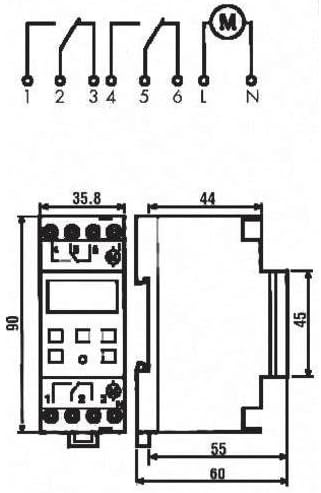
Figure 5.1: Wiring Diagram and Dimensions. This diagram illustrates the electrical connections for the Finder 12.22.8.230.0000 time switch, showing input (L, N) and output terminals (1, 2, 3, 4, 5, 6). It also provides detailed dimensions of the device in millimeters, crucial for installation planning.
Киргизүү күчү: Connect the main power supply (230V AC, 50-60 Hz) to the designated input terminals (L and N).
Чыгуучу каналдар: The device has two independent changeover contacts. Connect your loads to terminals 1, 2, 3 (for Channel 1) and 4, 5, 6 (for Channel 2) as per your application's requirements. Refer to the diagram for common (C), normally open (NO), and normally closed (NC) connections.
6. Иштөө нускамалары
6.1. Баштапкы орнотуу (Убакыт жана дата)
- Upon first power-up or after a long power outage, the display may prompt for time and date settings.
- колдонуу A (-) жана B (+) buttons to adjust the values (year, month, day, hour, minute).
- Басыңыз OK ар бир жөндөөнү ырастап, кийинкисине өтүү үчүн басыңыз.
- The device supports automatic summer/winter time changeover, which can be enabled or disabled in the settings menu.
6.2. Programming Switching Times
The time switch allows for daily and weekly programming with up to 30 memory locations.
- басыңыз M (Меню) программалоо режимине кирүү үчүн баскычты басыңыз.
- Navigate through the menu options using A (-) жана B (+). Look for "PROGRAM" or "SCHED".
- Басыңыз OK to select. You will typically be prompted to select a program number (e.g., P01, P02).
- Set the desired ON time (hour and minute) for the program using A (-) жана B (+), анда OK.
- Set the desired OFF time (hour and minute) for the program using A (-) жана B (+), анда OK.
- Select the days of the week for which this program should be active (e.g., Mon-Fri, Sat-Sun, or individual days). Use A (-) жана B (+) to toggle days, and OK ырастоо үчүн.
- Зарылчылыкка жараша кошумча программаларды кайталаңыз.
- Exit the programming menu by pressing M repeatedly until the main display is shown.
6.3. Кол менен өзгөртүү
The device typically allows for a temporary or permanent manual override of the programmed schedule. Consult the on-screen prompts or a quick press of a specific button (often OK or M in standby mode) to cycle through ON/OFF/AUTO modes.
7. Техникалык тейлөө
The Finder 12.22.8.230.0000 time switch requires minimal maintenance. Keep the device clean and free from dust. Use a soft, dry cloth for cleaning. Do not use abrasive cleaners or solvents. Ensure proper ventilation around the device to prevent overheating.
8. Кыйынчылыктарды
| Көйгөй | Мүмкүн себеп | Чечим |
|---|---|---|
| Дисплей бош. | Электр энергиясы жок. | Check power connections and circuit breaker. Ensure 230V AC is supplied. |
| Device not switching at programmed times. | Incorrect programming; Manual override active; Incorrect time/date. | Verify programming steps. Check if manual override is engaged. Correct time and date settings. |
| Убакыт так эмес. | Internal clock drift (minimal); Power reserve depleted. | The device has a 6-year power reserve. If power has been off for extended periods, reset the time. Accuracy is 1.5 seconds per day. |
| Баскычтар жооп бербейт. | Убактылуу программалык ката. | Disconnect power for a few minutes, then reconnect. If problem persists, contact support. |
9. Техникалык шарттар
| Параметр | Нарк |
|---|---|
| Модель номери | 12.22.8.230.0000 |
| Бренд | Finder |
| Монтаж түрү | Темир менен |
| Каналдардын саны | 2 |
| Supply Voltage | 230V AC |
| Жеткирүү жыштыгы | 50-60 Гц |
| Power Reserve | 6 years (approx. 52,596 hours) |
| Accuracy per day | 1.5 секунд |
| Minimum Switching Time | 1 мүнөт |
| Number of Memory Locations | 30 |
| Automatic Summer/Winter Time Changeover | Ооба |
| Switching Contact Type | Changeover contact (potential-free) |
| Nominal Switching Current (250V AC) | 16 А |
| Breaking Capacity (AC1) | 4000 VA |
| Breaking Capacity (AC15, 230V) | 750 VA |
| Жылытуу/Галоген Lamp Жүктөө | 2000 Вт |
| Compensated Fluorescent Lamp Жүктөө | 420 Вт |
| Uncompensated Fluorescent Lamp Жүктөө | 1000 Вт |
| Коргоо рейтинги | IP20 |
| Width (in division units) | 2 |
| Өлчөмдөрү (L x W x Y) | 1 x 1 x 1 cm (Product); 35.8 mm (W) x 90 mm (H) x 63 mm (D) (Device) |
| Салмагы | 7 килограмм |
| Материал | Полиэстер |
10. Кепилдик жана колдоо
For warranty information and technical support, please contact your local Finder distributor or visit the official Finder webсайт. Сатып алганыңыздын далили катары сатып алуу дүмүрчөгүңүздү сактаңыз.
Information regarding spare parts availability is currently unavailable. For any issues not covered in this manual, please seek assistance from qualified technical personnel.


