1. Киришүү
The Microsoft Reclusa Gaming Keyboard, model 9VU-00015, is a high-performance peripheral designed for an optimized gaming and computing experience. Co-developed with Razer, this keyboard integrates advanced features to provide precision and customization.
Key features include customizable game control functions, allowing users to create macros and assign specific game operations, which can be saved as profiles for different games. It utilizes Razer's HYPERESPONSE keys for rapid and accurate key input. For convenience, a gold-plated USB hub is built into the side of the unit, enabling easy connection of additional USB devices. The keyboard also features an elegant blue backlight, enhancing its aesthetic appeal and visibility in low-light conditions.
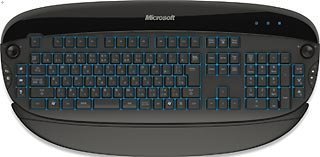
Figure 1: The Microsoft Reclusa Game Keyboard, showcasing анын толук макети жана дизайны.
2. Орнотуу
2.1 Системалык талаптар
- Operating System: Compatible with Windows Vista, Windows XP, and Windows Media Center Edition.
- Available USB Port: Required for keyboard connection.
- Internet Connection: May be required for driver and software updates.
2.2 Баскычтопту туташтыруу
- Компьютериңизден жеткиликтүү USB портун табыңыз.
- Plug the USB connector of the Reclusa Gaming Keyboard into the USB port.
- Your operating system should automatically detect the keyboard. For advanced features and customization, install the dedicated software (drivers) from the manufacturer's webсайт же камтылган медиа.
2.3 Драйверди орнотуу
While the keyboard offers basic plug-and-play functionality, installing the official Microsoft/Razer drivers and utility software is recommended to unlock all features, including macro programming and profile management. Visit the official Microsoft support webакыркы айдоочулар үчүн сайт.
3. Иштөө нускамалары
3.1 Негизги баскычтоп функциялары
The Reclusa keyboard functions as a standard 104-key keyboard for general typing and computer navigation. All standard keys (alphanumeric, function keys, numeric keypad) operate as expected.
3.2 Жарыкты башкаруу
The keyboard features a blue backlight. Specific keys or software controls may be available to adjust the brightness or toggle the backlight on/off. Refer to the software utility for detailed backlight customization options.
3.3 Integrated USB Hub
The keyboard includes a gold-plated USB hub located on its side. This allows for convenient connection of other USB devices such as a mouse, headset, or flash drive directly through the keyboard.
3.4 Volume Control Dial
A dedicated volume control dial is integrated into the keyboard, providing direct control over your system's audio output. Rotate the dial to adjust the volume up or down.
4. Customization and Macro Programming
The Reclusa Gaming Keyboard offers extensive customization through its dedicated software utility. This includes:
- Программалануучу ачкычтар: The keyboard features additional programmable keys, including 4 bumper keys, 6 hotkeys, and 2 jog dials. These can be assigned to perform specific actions, launch applications, or execute complex macros.
- Макро түзүү: Create and record sequences of keystrokes and mouse clicks (macros) to automate repetitive tasks or execute complex in-game commands with a single key press.
- Profile Башкаруу: Save different key assignments and macro configurations as profileс. Бул проfiles can be linked to specific games or applications, allowing the keyboard to automatically switch to the appropriate settings when the program is launched.
- HYPERESPONSE Key Settings: Fine-tune the responsiveness of the HYPERESPONSE keys for optimal performance.
Refer to the keyboard's software utility for detailed instructions on programming and managing these features.
5. Техникалык тейлөө
5.1 Баскычтопту тазалоо
Оптималдуу иштешин жана көрүнүшүн сактоо үчүн клавиатураңызды дайыма тазалаңыз:
- Тазалоодон мурун клавиатураны компьютерден ажыратыңыз.
- Бир аз жумшак, түксүз кездемени колдонуңуз dampened with water or a mild cleaning solution to wipe the keycaps and surfaces.
- Катуу химиялык заттарды, абразивдүү тазалагычтарды колдонуудан же суюктуктарды түздөн-түз клавиатурага чачуудан качыңыз.
- Баскычтардын ортосундагы чаңды жана калдыктарды тазалоо үчүн кысылган абаны колдонуңуз.
5.2 Сактоо
Узак мөөнөткө колдонулбаганда, клавиатураны кургак, салкын чөйрөдө күндүн тике тийген нурунан жана экстремалдык температурадан алыс сактаңыз.
6. Кыйынчылыктарды
If you encounter issues with your Microsoft Reclusa Gaming Keyboard, refer to the following common troubleshooting steps:
- Баскычтоп жооп бербейт:
- USB кабели компьютериңизге коопсуз туташканын текшериңиз.
- Баскычтопту башка USB портуна туташтырууга аракет кылыңыз.
- Компьютериңизди өчүрүп күйгүзүңүз.
- Check if the keyboard drivers are properly installed and up to date.
- Арткы жарык иштебейт:
- Verify that the backlight function is enabled through the keyboard's software utility.
- Check for any dedicated backlight control keys on the keyboard.
- Programmable Keys/Macros Not Working:
- Ensure the keyboard's software utility is running and the correct profile активдүү.
- Verify that the macros and key assignments are correctly configured within the software.
- Some games or applications may override keyboard macros; check in-game settings.
- Integrated USB Hub Issues:
- Ensure the device connected to the hub is functioning correctly when plugged directly into the computer.
- Some high-power USB devices may require a direct connection to the computer or a powered USB hub.
If the issue persists after attempting these steps, please contact Microsoft or Razer support for further assistance.
7. Техникалык шарттар
| Өзгөчөлүк | Деталь |
|---|---|
| Бренд | Microsoft |
| Модель номери | 9VU-00015 |
| Туташуу технологиясы | Зымдуу USB |
| Продукт Салмагы | 2.08 килограмм |
| Сунушталган колдонуу | Оюндар |
| Шайкеш түзмөктөр | PC |
| Колдун багыты | Ambidextrous (Left/Right Common) |
| Өзгөчөлүктөр | Programmable keys, Blue Backlight, Integrated USB Hub, HYPERESPONSE Keys, Volume Dial |
8. Кепилдик жана колдоо
8.1 Продукциянын кепилдиги
Бул өнүмгө а Продукцияга 3 жылдык кепилдик сатып алынган күндөн тартып. Кепилдик дооматтары үчүн сатып алганыңыздын далилин сактап коюңуз. Кепилдик нормалдуу колдонуудагы материалдардагы жана жасалгадагы кемчиликтерди камтыйт.
8.2 Техникалык колдоо
For technical assistance, driver downloads, or further information, please visit the official Microsoft support website or contact their customer service department. You may also find resources on the Razer support website due to the co-development of this product.
- Microsoft колдоо кызматы: support.microsoft.com
- Razer колдоо: support.razer.com


