1. Киришүү
Thank you for choosing the Roadstar CD-853 USMP car stereo. This manual provides detailed instructions for the proper installation, operation, and maintenance of your new car audio system. Please read this manual thoroughly before using the product to ensure correct usage and to prevent damage.
The Roadstar CD-853 USMP is designed to provide high-quality audio entertainment in your vehicle, featuring CD, MP3, CD-R, and CD-RW playback capabilities, along with an FM/AM radio tuner.
2. Коопсуздук маалыматы
- Кесиптик орнотуу сунушталат: Оптималдуу иштөө жана коопсуздук үчүн, бул түзүлүштү квалификациялуу адис орноткону сунушталат.
- Электр камсыздоо: Бул түзүлүш 12 В туруктуу токтун терс жерлештирилген электр системасы үчүн иштелип чыккан. Кыска туташуулардын же бузулуулардын алдын алуу үчүн зымдардын туура туташтырылганын текшериңиз.
- Суу жана нымдуулуктан качыңыз: Түзмөктү сууга же ашыкча нымдуулукка дуушар кылбаңыз. Бул электр тогуна урунууга же өрткө алып келиши мүмкүн.
- Температура: Avoid extreme temperatures. Ensure proper ventilation around the unit.
- Айдоо коопсуздугу: Агрегатты айдоодон алаксыта тургандай иштетпеңиз. Ар дайым жол коопсуздугун биринчи орунга коюу.
- Үндү көзөмөлдөө: Keep the volume at a level where you can still hear outside traffic sounds. Prolonged exposure to high volume levels can cause hearing damage.
3. Продукт бүтүп калдыview
Front Panel Layout
The following image illustrates the main controls and features on the front panel of your Roadstar CD-853 USMP car stereo.
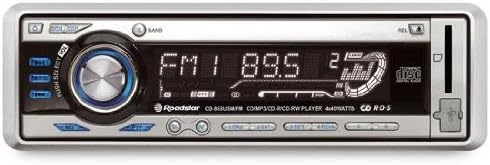
Figure 1: Front panel of the Roadstar CD-853 USMP car stereo. This image displays the front panel of the Roadstar CD-853 USMP car stereo, highlighting the main controls and display. Key features visible include the central volume/select knob, radio band selection, CD slot, and display showing radio frequency and playback information.
- Кубат баскычы: Located on the top left, used to turn the unit on or off.
- EQ/DSP Button: Adjusts equalizer and digital sound processing settings.
- PUSH SELECT / VOL Knob: Central rotary knob for volume control. Pressing it typically accesses menu options or selection.
- БАНД баскычы: Selects between different radio bands (FM1, FM2, FM3, AM1, AM2).
- Дисплей: Shows current status, radio frequency, track information, and menu options.
- CD Slot: For inserting audio CDs, MP3 CDs, CD-R, and CD-RW discs.
- REL баскычы: Release button, typically for detaching the front panel.
- Чыгаруу баскычы: Located near the CD slot, used to eject discs.
- USB/AUX киргизүү: (If present, typically indicated by an icon) For connecting external audio devices or USB storage.
4. Орнотуу
4.1 Орнотуу
Due to the complexity of vehicle electrical systems, professional installation is strongly recommended. Incorrect installation can lead to damage to the unit, your vehicle, or personal injury. Refer to your vehicle's service manual for specific wiring diagrams and dashboard disassembly instructions.
4.2 Зымдарды туташтыруу
Ensure all wiring connections are secure and correctly matched. Common wiring colors include:
- Сары: Туруктуу 12V (батарея)
- Кызыл: Которуу 12V (от алдыруучу/аксессуар)
- Кара: Жер
- Көк: Күч антеннасы / Ampкөтөргүчтү алыстан күйгүзүү
- Динамиктердин зымдары: Typically pairs of solid and striped wires (e.g., White/White-Black for Left Front, Grey/Grey-Black for Right Front, Green/Green-Black for Left Rear, Purple/Purple-Black for Right Rear).
Always consult the wiring diagram provided with your unit and your vehicle's specific wiring information.
4.3 Баштапкы күйгүзүү
After installation, turn on your vehicle's ignition. Press the Power button on the unit. The display should illuminate, indicating successful power-up. If the unit does not power on, recheck all wiring connections and your vehicle's fuse box.
5. Иштөө нускамалары
5.1 Негизги операция
- Күйгүзүү/өчүрүү: басыңыз Күч button (top left) to turn the unit on. Press and hold the Power button for a few seconds to turn it off.
- Үндү көзөмөлдөө: Борбордук бөлүгүн айландырыңыз PUSH SELECT / VOL үндү катуулатуу үчүн баскычты сааттын жебеси боюнча, ал эми үндү азайтуу үчүн сааттын жебесине каршы басыңыз.
- Булак тандоо: басыңыз РЕЖИМ or SRC button (if present, typically below the volume knob) to cycle through available audio sources (e.g., Radio, CD, USB, AUX).
5.2 Радио менен иштөө
- Тандоо тобу: басыңыз БАНД FM1, FM2, FM3, AM1 жана AM2 диапазондорунун ортосунда которулуу үчүн баскычты басыңыз.
- Кол менен жөндөө: колдонуу КОНУН buttons (typically left/right arrows) to manually adjust the frequency.
- Автоматтык издөө жөндөөлөрү: басып, кармап туруңуз КОНУН кийинки күчтүү станцияны автоматтык түрдө издөө үчүн баскычтар.
- Алдын ала коюлган станциялар: To store a station, tune to the desired frequency, then press and hold one of the numbered preset buttons (1-6) until you hear a beep. To recall a preset, simply press the corresponding numbered button.
5.3 CD/MP3 ойнотуу
- Дискти салуу: Gently insert a CD (audio CD, MP3 CD, CD-R, or CD-RW) into the CD Slot with the label side facing up. The unit will automatically pull the disc in and begin playback.
- Дискти чыгаруу: басыңыз Чыгаруу button (located near the CD slot) to remove the disc.
- Ойнотуу/тындыруу: басыңыз ОЙНОО/ТЫНЫТТЫРУ button (if present, often integrated with the volume knob press) to pause or resume playback.
- Track Skip: колдонуу ӨТКӨРҮҮ buttons (typically forward/backward arrows) to skip to the next or previous track.
- Тез алдыга/артка: басып, кармап туруңуз ӨТКӨРҮҮ buttons to fast forward or reverse within a track.
- Folder Navigation (MP3): MP3 CDлери үчүн, төмөнкүнү колдонуңуз ПАПКАНЫ ӨЙДӨ/ТӨМӨН buttons (if present) to navigate between folders.
5.4 Үн орнотуулары
- Эквалайзер (EQ): басыңыз EQ/DSP button to cycle through preset equalizer modes (e.g., Pop, Rock, Classic) or to access manual bass/treble adjustments.
- Бас/жогорку: When in EQ adjustment mode, rotate the PUSH SELECT / VOL knob to adjust bass or treble levels. Press the knob to confirm selection or move to the next setting.
6. Техникалык тейлөө
- Агрегатты тазалоо: Use a soft, dry cloth to clean the front panel. For stubborn dirt, dampen the cloth lightly with water. Never use harsh chemicals, abrasive cleaners, or solvents.
- Диск менен иштөө: Handle discs by their edges. Keep them clean and free from scratches. Store discs in their cases when not in use. Do not use cracked, warped, or irregularly shaped discs, as they can damage the player mechanism.
- Алынуучу алдыңкы панел: If your unit has a detachable front panel, remove it when leaving your vehicle to deter theft. Store it in a protective case.
7. Кыйынчылыктарды
If you encounter problems with your unit, refer to the following table for common issues and solutions.
| Көйгөй | Мүмкүн себеп | Чечим |
|---|---|---|
| Күч жок | Туура эмес зымдар; күйгүзүлгөн сактагыч; Унаа от алдыруу өчүрүлгөн. | Check power and ground connections. Replace fuse if necessary. Turn vehicle ignition to ACC or ON position. |
| Үн жок | Үн өтө төмөн; Үнсүз функция активдүү; Динамиктин зымдары туура эмес. | Үнүн жогорулатуу. Үнсүз калтыруу. Динамик байланыштарын текшериңиз. |
| Disc error / Disc not playing | Disc is dirty, scratched, or inserted incorrectly; Disc format not supported. | Clean the disc. Insert disc correctly. Use supported disc formats (CD, MP3, CD-R, CD-RW). |
| Радио кабыл алуу начар | Антенна туташкан эмес; Сигнал аймагы алсыз; Антенна бузулган. | Ensure antenna is securely connected. Try tuning to a stronger station. Check antenna for damage. |
| Баскычтар жооп бербейт | Unit frozen; Detachable panel not properly seated. | Reset the unit (refer to manual for reset button location, often a small pinhole). Re-attach the front panel securely. |
Эгерде бул чечимдерди колдонуп көргөндөн кийин да көйгөй чечилбесе, кардарларды колдоо кызматына же квалификациялуу тейлөө адисине кайрылыңыз.
8. Техникалык шарттар
- Модел: Roadstar CD-853 USMP
- Чыгуу кубаттуулугу: 160 Ватт (4 x 40 Ватт)
- Колдоого алынган медиа: CD, MP3, CD-R, CD-RW
- тюнер: FM/AM радиосу
- Электр камсыздоо: 12V DC (терс негиз)
- ASIN: B000YSFRMY
9. Кепилдик жана колдоо
Roadstar products are manufactured to high-quality standards. This product is covered by a limited warranty from the date of purchase. Please refer to the warranty card included with your product for specific terms and conditions.
For technical support, service inquiries, or further assistance, please visit the official Roadstar website or contact your authorized Roadstar dealer. Keep your proof of purchase for warranty claims.


