1. Киришүү
The Olympus LS-10 Linear PCM Recorder is a portable device designed for high-fidelity audio recording. It captures sound with exceptional clarity, making it suitable for various applications, including live music, nature sounds, and interviews. This manual provides detailed instructions for the proper use and maintenance of your LS-10 recorder.
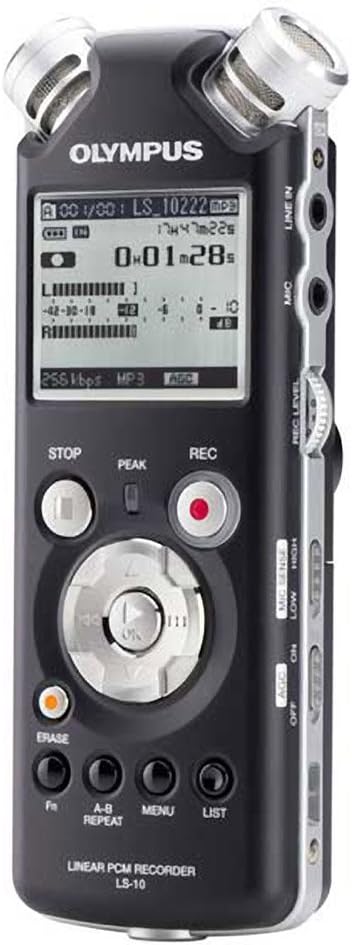
Сүрөт 1: Алдыңкы view of the Olympus LS-10 Linear PCM Recorder, showing the display, control buttons, and built-in microphones.
2. Орнотуу
2.1 Батареяны орнотуу
The LS-10 operates on two AA batteries. For optimal performance, use alkaline, lithium, or NiMH rechargeable batteries.
- Аппараттын артындагы батарея бөлүкчөсүнүн капкагын табыңыз.
- Капкакты ачуу үчүн аны жебе менен көрсөтүлгөн багытта жылдырыңыз.
- Insert two AA batteries, ensuring correct polarity (+/-) as marked inside the compartment.
- Батарея уясынын капкагын бекем жабыңыз.

2-сүрөт: Артка view of the LS-10, illustrating the location of the battery compartment and built-in speakers.
2.2 Күйгүзүү/өчүрүү
Аппаратты күйгүзүү үчүн басып, кармап туруңуз КҮЧ Дисплей күйгөнгө чейин баскычын басыңыз. Өчүрүү үчүн, баскычын басып кармап туруңуз КҮЧ дисплей өчмөйүнчө кайра басыңыз.
2.3 Inserting an SD/SDHC Card
The LS-10 features an SD/SDHC card slot for expanded storage capacity.
- Locate the SD card slot on the side of the recorder.
- Insert an SD or SDHC card into the slot until it clicks into place. Ensure the card is inserted in the correct orientation.
- To remove the card, gently push it inward until it clicks, then release to eject.
3. Операция
3.1 Аудио жаздыруу
The LS-10 supports uncompressed 24-bit/96kHz Linear PCM recording, as well as WAV, MP3, and WMA formats.
- Жаздыруу режимин тандоо: колдонуу МЕНЮ button to navigate to the recording settings and select your desired format (WAV, MP3, or WMA) and quality.
- Adjust Microphone Sensitivity: колдонуу MIC Sense switch (LOW/HIGH) on the side of the device to match the recording environment. Use LOW for loud sounds and HIGH for quiet sounds.
- Set Recording Level: колдонуу REC LEVEL dial to adjust the input level. Monitor the level meter on the display to prevent clipping (distortion).
- Жаздырууну баштоо: басыңыз REC button (red circle) to begin recording. The REC indicator will illuminate.
- Жаздырууну токтотуу: басыңыз ТОКТОТ жазууну аяктоо үчүн баскыч.

Figure 3: Front panel of the LS-10, highlighting the REC, STOP, and navigation buttons essential for recording and playback.

4-сүрөт: Жогорку view of the LS-10, displaying the two high-quality built-in stereo microphones.
3.2 Ойнотуу
Recordings can be played back through the built-in stereo speakers or via headphones.
- Тандоо File: Use the navigation buttons to browse through your recorded fileс жана каалаган тректи тандаңыз.
- Ойнотуп баштоо: басыңыз PLAY/OK ойнотууну баштоо үчүн баскыч.
- Үндү тууралоо: колдонуу VOLUME dial on the side of the unit to increase or decrease playback volume.
- Ойнотууну токтотуу: басыңыз ТОКТОТ баскычы.
- AB кайталоо: колдонуу AB REPEAT button to loop a specific section of a recording.

5-сүрөт: Каптал view of the LS-10, showing the LINE IN, MIC, and EAR (headphone) jacks, along with the REC LEVEL and VOLUME controls.
3.3 Меню багыттоо жана орнотуулар
The LS-10 features a menu system for configuring various settings.
- басыңыз МЕНЮ негизги менюга кирүү үчүн баскычты басыңыз.
- Use the navigation buttons (up/down) to scroll through menu options.
- Басыңыз PLAY/OK to select an option or enter a sub-menu.
- Common settings include:
- Rec Mode: Adjust recording quality and format.
- Системасы жөнүндө маалымат: View түзмөк маалыматы.
- Убактысы жана датасы: Учурдагы убакытты жана күндү коюу.
- Авто өчүрүү: Configure automatic power-off duration.
- басыңыз ТИЗМЕ менюдан чыгуу үчүн баскыч.

Figure 6: The LS-10 display screen, illustrating the menu interface with various system settings.
3.4 File Башкаруу
The recorder organizes files into folders and allows for easy transfer to a computer.
- Папкалар: The LS-10 supports 5 folders, each capable of holding up to 200 messages, plus a dedicated MUSIC folder.
- Erasing Files: тандаңыз file you wish to delete and press the ТАЗАЛУУ button. Confirm the deletion when prompted.
- Компьютерге туташуу: Connect the LS-10 to your computer using a USB cable. The device will appear as a removable drive, allowing you to transfer files. Compatible with Windows 2000/XP/VISTA and Mac OS 10.2 or later.
4. Техникалык тейлөө
4.1 Тазалоо
To maintain the recorder's performance and appearance:
- Агрегатты жумшак, кургак чүпүрөк менен сүртүңүз.
- өжөр кир үчүн, жеңил гampчүпүрөккө суу куюп, анан кургатып сүртүңүз.
- Do not use abrasive cleaners, solvents, or alcohol, as these can damage the surface.
4.2 Батареяга кам көрүү
- Агып кетүүнүн алдын алуу үчүн бирдик узак убакыт бою колдонулбай турган болсо, батарейкаларды алып салыңыз.
- Колдонулган батарейкаларды жергиликтүү эрежелерге ылайык жок кылыңыз.
4.3 Сактоо
Store the LS-10 in a cool, dry place away from direct sunlight, extreme temperatures, and high humidity.
5. Кыйынчылыктарды
If you encounter issues with your LS-10, refer to the following common problems and solutions:
- Кубат жок:
- Батареялар туура полярдуулук менен туура салынганын текшериңиз.
- Жаңы батареялар менен алмаштырыңыз.
- Кубат баскычы басылып, жетиштүү кармалып турганын текшериңиз.
- Cannot Record:
- Check available memory on internal storage or SD card. Delete unnecessary fileэгерде сактагыч толуп калса.
- Ensure the device is not in playback mode.
- Verify microphone sensitivity and recording level settings.
- Үн сапаты начар:
- Adjust microphone sensitivity (MIC SENSE) to match the environment.
- Ensure the recording level is not too high (causing distortion) or too low (causing noise).
- Record in a quiet environment if possible.
- Check if external microphones or line-in sources are properly connected.
- Computer Does Not Recognize Device:
- USB кабелинин жаздыргычка да, компьютерге да бекем туташтырылганын текшериңиз.
- Компьютериңиздеги башка USB портун колдонуп көрүңүз.
- Restart your computer and the LS-10.
6. Техникалык шарттар
| Өзгөчөлүк | Деталь |
|---|---|
| Жазуу форматтары | WAV (Linear PCM), MP3, WMA |
| Ички эс тутум | 2 ГБ |
| Тышкы эс | SD/SDHC карта уячасы |
| Батареянын иштөө мөөнөтү | Болжол менен 14 саат (жаздыруу) |
| Батареялар | 2 x AA (Alkaline, Lithium, or NiMH) |
| Микрофон Джек | 3.5mm stereo mini-jack, impedance 2 kohms |
| Line-In Jack | 3.5mm stereo mini-jack, impedance 2 kohms |
| Наушник уясы | 3.5mm stereo mini-jack, impedance 8 ohms |
| Камтылган динамик | 2 x 16mm round dynamic speakers, 8 ohms, 200 mW output |
| Шайкеш түзмөктөр | Персоналдык компьютер |
| Аппараттык интерфейс | USB |
| Өлчөмдөрү (W x Y x D) | 3.4 x 6.3 x 6.5 дюйм (болжол менен) |
| Салмагы | 1 фунт (болжол менен) |
7. Колдоо маалыматы
For further assistance, technical support, or information regarding warranty, please refer to the official Olympus webсайтка же кардарларды тейлөө бөлүмүнө кайрылыңыз. Сатып алуу дүмүрчөгүңүздүн жана продуктунун сериялык номерин колдоо издеп жатканда колдо болуңуз.


