1. Киришүү
This manual provides comprehensive instructions for the installation, operation, and maintenance of your AT&T 993 2-Line Corded Phone. Designed for efficiency, this phone supports two distinct telephone lines, features a speakerphone, and includes Caller ID capabilities, making it suitable for home offices or small business environments.
Please read this manual thoroughly before using your new phone to ensure proper setup and to take full advantagанын өзгөчөлүктөрүнүн д.
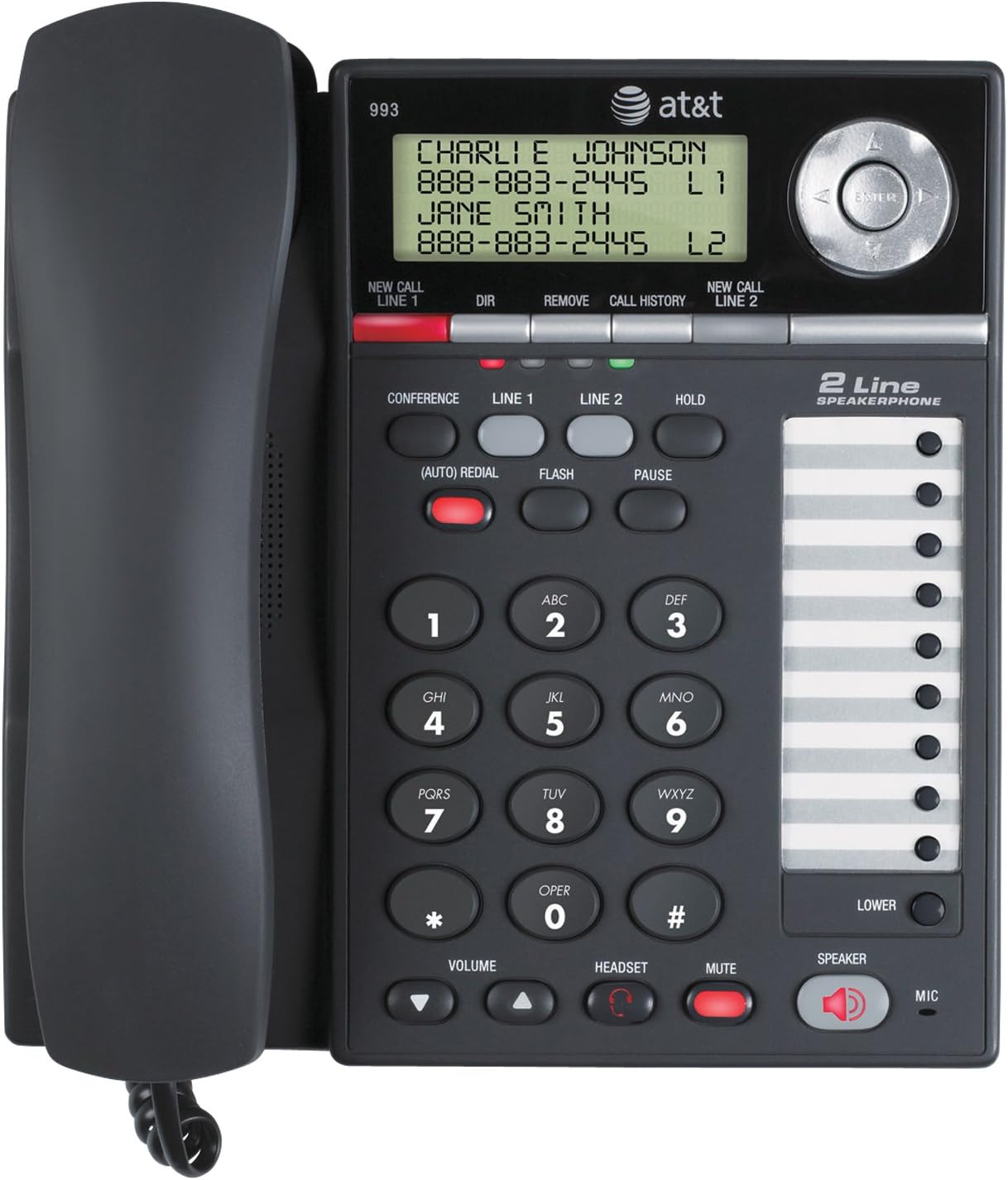
Сүрөт 1: Алдыңкы view of the AT&T 993 2-Line Corded Phone, displaying the handset, keypad, display screen, and speakerphone.
2. Коопсуздук маалыматы
Өрт, электр тогуна урунуу же жаракат алуу коркунучун азайтуу үчүн, бул продуктуну колдонууда ар дайым негизги коопсуздук чараларын сактаңыз.
- Бардык нускамаларды окуп, түшүнүңүз.
- Буюмда белгиленген бардык эскертүүлөрдү жана нускамаларды аткарыңыз.
- Тазалоодон мурун бул продуктуну розеткадан сууруп алыңыз. Суюктук же аэрозоль тазалоочу каражаттарды колдонбоңуз. Жарнама колдонууamp тазалоо үчүн кездеме.
- Do not use this product near water, such as a bathtub, wash bowl, kitchen sink, or laundry tub, in a wet basement, or near a swimming pool.
- Бул продуктуну туруксуз арабага, стендге же столго койбоңуз.
- Avoid placing the phone in areas with extreme temperatures, direct sunlight, or other heat sources.
- This product should be operated only from the type of power source indicated on the marking label. If you are not sure of the type of power supply to your home or office, consult your dealer or local power company.
- Do not allow anything to rest on the power cord. Do not locate this product where the cord will be walked on.
- Never push objects of any kind into this product through slots in the base or handset as they may touch dangerous voltage упайлары же кыска туташуу түзүү.
- Do not disassemble this product. Refer servicing to qualified service personnel.
3. Орнотуу
3.1 Пакеттин мазмуну
Пакетиңизде бардык буюмдар бар экенин текшериңиз:
- AT&T 993 Phone Base
- Телефон
- Handset Curly Корд
- 2 Telephone Line Cords
- AC кубат адаптери
- Replacement Directory Card
- Колдонуучунун колдонмосу (бул документ)
- Quick Start Guide
3.2 Телефонду туташтыруу
Follow these steps to connect your AT&T 993 phone:
- Телефонду туташтыруу: внун бир учуна сайыңызurly handset cord into the handset and the other end into the jack labeled сүйл on the side of the phone base.
- Connect Telephone Line 1: Plug one end of a telephone line cord into the jack labeled 1-САП on the back of the phone base. Plug the other end into your telephone wall jack for Line 1.
- Connect Telephone Line 2: Plug one end of the second telephone line cord into the jack labeled 2-САП on the back of the phone base. Plug the other end into your telephone wall jack for Line 2.
- Туташуу кубаты: Plug the small end of the AC power adapter into the DC IN 9V jack on the back of the phone base. Plug the large end into a standard electrical wall outlet.
- Battery Installation (Optional/Required for some features): The phone requires 12V batteries for certain features (e.g., display backlight, memory retention during power outages). Refer to the battery compartment for specific instructions on installation.

2-сүрөт: Арткы view of the AT&T 993 2-Line Corded Phone, illustrating the connection points for power, handset, and telephone lines.
3.3 Дубалга орнотуу (кошумча)
The phone base is designed for wall mounting. Use the integrated wall mount holes on the back of the unit and appropriate screws (not included) to secure it to a wall. Ensure the phone is securely fastened before use.
4. Иштөө нускамалары
4.1 Чалууларды кабыл алуу жана кабыл алуу
- Чалуу үчүн:
- Телефонду көтөрүңүз же басыңыз СПИКЕР баскычы.
- Select the desired line by pressing 1-САП or 2-САП.
- Телефон номерин териңиз.
- Чакырууну кабыл алуу үчүн:
- Телефон шыңгыраганда, телефонду көтөрүңүз же басыңыз СПИКЕР button. The phone will automatically connect to the ringing line.
- Чалууну аяктоо үчүн: Телефонду коюңуз же басыңыз СПИКЕР динамик колдонулса, кайра баскычын басыңыз.
4.2 2-Line Operation
The AT&T 993 supports two independent telephone lines. You can switch between lines, place a call on hold, or use three-party conferencing.
- Switching Lines: During a call on one line, press the button for the other line (1-САП or 2-САП). The current call will automatically be placed on hold.
- Чалууну күтүү режимине коюу: басыңыз БЕРҮҮ button. The line indicator will flash. To retrieve the call, press the corresponding line button.
- Distinct Ringtones: Each line can be assigned a distinct ringtone to easily identify which line is ringing. Refer to the phone's menu settings for customization.
4.3 Динамик
To use the speakerphone function:
- басыңыз СПИКЕР динамикти иштетүү же өчүрүү үчүн баскыч.
- Динамиктин үнүн төмөнкү менен тууралаңыз VOLUME баскычтар.
4.4 чалуучу ID
The phone stores up to 99 names and numbers in its Caller ID history. This feature requires a subscription to Caller ID service from your telephone service provider.
- ViewЧалуучуну аныктоо тарыхын алуу: Use the navigation buttons (up/down arrows) to scroll through the Caller ID log.
- Dialing from Caller ID: Select an entry from the Caller ID history and press the ТЕРҮҮ button (or lift handset/press speaker) to call the number.
- Call Waiting Caller ID: If you subscribe to Call Waiting service, the display will show the incoming caller's information even if you are already on a call.
4.5 Directory and Speed Dial
The phone features a 100-entry directory and supports speed dialing for frequently called numbers.
- Storing Directory Entries: Access the directory menu to add, edit, or delete contact entries. Each entry can store a name and number.
- Тез терүү: The phone allows for programming up to 18 speed dial numbers. Refer to the specific instructions in the phone's menu for programming these slots. To use, press the designated speed dial button.
4.6 Three-Party Conferencing
This feature allows three parties to converse simultaneously on three different lines (two external calls and your phone).
- Establish a call on Line 1.
- Басыңыз 2-САП to place Line 1 on hold and get a dial tone on Line 2.
- Dial the second party's number on Line 2.
- Экинчи тарапка туташкандан кийин, басыңыз КОНФЕРЕНЦИЯ button to join all three parties.
4.7 Voicemail Indicator
If you subscribe to a voicemail service from your telephone service provider, a red light on the phone will blink when you have new voicemail messages waiting.
4.8 Headset Operation
For hands-free operation, you can connect a 2.5mm headset (not included) to the headset jack on the side of the phone base.
- Plug your 2.5mm headset into the dedicated headset jack.
- басыңыз КУЛАКЧА button to activate or deactivate headset mode.
5. Техникалык тейлөө
5.1 Телефонду тазалоо
Телефонуңузду жакшы абалда кармоо үчүн:
- Unplug the phone from the wall outlet and power source before cleaning.
- жумшак колдонуу, damp cloth to clean the exterior surfaces of the phone.
- Do not use liquid or aerosol cleaners, or harsh chemicals.
- Ар кандай тешиктерге ным кирүүдөн сактаңыз.
5.2 Жалпы кам көрүү
- Protect the phone from extreme temperatures, direct sunlight, and moisture.
- Телефонду түшүрүп алуудан же катуу соккуга кабылтуудан алыс болуңуз.
- Ensure cords are not tangled or pinched.
6. Кыйынчылыктарды
If you experience issues with your AT&T 993 phone, try the following solutions:
- Терүү үнү жок:
- Ensure all phone line cords are securely plugged into the phone and the wall jacks.
- Verify the AC power adapter is properly connected to the phone and a working electrical outlet.
- Телефон линиясын башка белгилүү иштеген телефон менен сынап көрүңүз.
- Чалуучунун ID көрсөтүлбөйт:
- Confirm you have subscribed to Caller ID service from your telephone service provider.
- Ensure the phone is connected to a compatible telephone line.
- Speakerphone Volume Low/Distorted:
- Үнүн колдонуп, үнүн жөндөңүз VOLUME buttons during a call.
- Микрофондун тоскоол болбогонун текшериңиз.
- Phone Not Ringing:
- Check the ringer volume settings in the phone's menu.
- Ensure the phone is not in "Do Not Disturb" or similar silent mode if such a feature exists.
- Buttons Sticky or Unresponsive:
- Clean the keypad area with a soft, slightly damp кездеме.
- Эгер көйгөй чечилбесе, кардарларды колдоо менен байланышыңыз.
Көбүрөөк жардам алуу үчүн, колдоо бөлүмүнө кайрылыңыз.
7. Техникалык шарттар
| Бренд | AT&T |
| Модель номери | 993 |
| Телефон түрү | жоон |
| Саны саптар | 2 |
| Түс | Көмүр |
| Материал | Пластик |
| Power Source | Электр зымдары |
| Батареялар талап кылынат | 12V batteries (for certain features) |
| Элемент Салмагы | 3.05 фунт (болжол менен 1.38 кг) |
| Продукциянын өлчөмдөрү (L x W x Y) | 3.98 x 7.87 x 8.27 дюйм (болжол менен 10.1 x 20 x 21 см) |
| Дисплей | LCD, 2-3/4 by 1 inches |
| Чалуучуну аныктоо тарыхы | 99 ысымдар жана сандар |
| Directory Memory | 100 жазуу |
| Гарнитура Jack | 2.5мм |
| Угуу аппараты шайкеш келет | Ооба |
8. Кепилдик жана колдоо
8.1 Кепилдик маалыматы
This product is covered by a limited warranty. Please refer to the warranty card included in your original packaging for details regarding the warranty period and terms. Keep your purchase receipt as proof of purchase.
8.2 Кардарларды колдоо
For technical support, troubleshooting assistance, or warranty claims, please contact AT&T customer service. Contact information can typically be found on the AT&T official webсайтында же продуктунун таңгагында.
Онлайн ресурстар: For the most up-to-date support information, FAQs, and additional resources, visit the official AT&T support webсайт.


