Introduction
This manual provides comprehensive instructions for the safe and proper installation, operation, and maintenance of your Peerless-AV Paramount Articulating Wall Mount, model PA740. Please read all instructions carefully before beginning installation.
Маанилүү коопсуздук маалыматы
- Монтаждоо бети монтаждын жана дисплейдин жалпы салмагын коопсуз көтөрө аларын текшериңиз.
- 80 фунттан (36.3 кг) ашпаңыз.
- Always use appropriate tools and safety equipment during installation.
- Орнотуу процессинин кандайдыр бир бөлүгүнө ишенбесеңиз, квалификациялуу адиске кайрылыңыз.
- Бул продукт ички колдонуу үчүн гана иштелип чыккан.
Пакеттин мазмуну
Орнотууну баштоодон мурун бардык компоненттер бар экендигин текшериңиз:
- Peerless-AV PA740 Articulating Wall Mount
- VESA Adapter Plate
- Mounting Hardware (for wall attachment)
- Screen Attachment Hardware (various sizes for display compatibility)
- Орнотуу боюнча колдонмо (бул документ)
Орнотуу жана орнотуу
This section outlines the steps for mounting the PA740 to your wall and attaching your display.
1. Монтаждоо ордун даярдаңыз
Identify a suitable wall stud for mounting. The mount is designed to attach to a single wall stud. Use a stud finder to locate the center of the stud. Ensure there are no electrical wires or plumbing in the drilling path.
Эскертүү: When folded flat against the wall, the display will be centered approximately 2.81 inches to the left of the stud center. Plan your mounting location accordingly.
2. Дубал плитасын бекитиңиз
- Hold the wall plate against the wall at the desired height and mark the two drilling locations for the lag screws.
- Drill pilot holes into the center of the stud at the marked locations. Refer to the installation manual for recommended drill bit size (typically 1/4 inch, but verify).
- Secure the wall plate to the stud using the provided lag screws. Ensure the plate is level before fully tightening.

Сүрөт 1: Фронт view of the Peerless-AV PA740 Articulating Wall Mount. This image shows the main components of the mount, including the wall plate, articulating arm, and the VESA compliant display attachment plate. The mount is black and appears robust.
3. Attach VESA Adapter to Display
The PA740 is compatible with VESA 75/100, 200x100, and 200x200 mm mounting patterns.
- Carefully place your display face down on a soft, clean surface.
- Identify the correct size screws from the provided hardware kit that fit your display's VESA mounting holes. Refer to your display's manual for screw size recommendations.
- Attach the VESA adapter plate to the back of your display using the selected screws. Do not overtighten.
4. Mount Display to Wall Arm
- With assistance, carefully lift the display and align the VESA adapter plate on the display with the arm assembly on the wall mount.
- Slide the display onto the arm until it is securely seated.
- Secure the display to the arm using the small set screw, as indicated in the detailed installation guide.
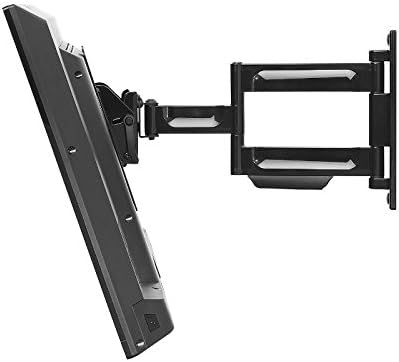
Сүрөт 2: Side view of the Peerless-AV PA740 Articulating Wall Mount with a television attached. The image demonstrates the mount's extension capability from the wall and its articulating arm design, allowing for flexible display positioning.
Иштөө нускамалары
The PA740 mount offers versatile positioning for optimal viewing.
Позицияны тууралоо
- Кеңейтүү жана артка тартуу: Gently pull the display away from the wall to extend the arm. Push the display back towards the wall to retract it. The mount extends up to 15.6 inches and retracts to 2.93 inches.
- Айлануучу: The articulating arm allows for 180 degrees of swivel. Carefully pivot the display left or right to achieve the desired viewбурч.
- Россия: The mount features +15° to -5° of continuous one-touch tilt. Adjust the tilt by gently pushing the top or bottom of the display forward or backward. No tools are required for this adjustment.
- Түздөө: The mount includes a leveling feature that allows for +/-5 degrees of roll adjustment. This can be used to fine-tune the display's horizontal alignment after installation. Refer to the detailed manual for specific screw adjustments.
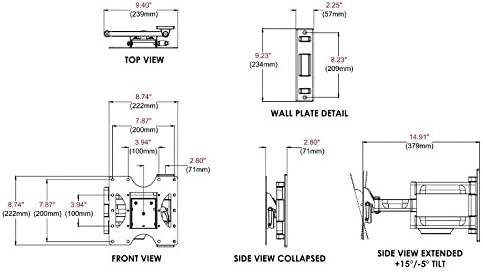
Сүрөт 3: Technical diagram illustrating the dimensions and movement capabilities of the Peerless-AV PA740 Articulating Wall Mount. This includes top, front, side collapsed, and side extended views with tilt angles, providing precise measurements for planning and installation.
Кабель башкаруу
The PA740 features integrated cable management to keep cables organized and out of sight. Route your display's input/output cables along the arm and through the designated channels to maintain a clean appearance, even when the display is extended or retracted.
Техникалык тейлөө
- Periodically check all mounting screws and connections to ensure they remain secure.
- Монтажды жумшак, кургак чүпүрөк менен тазалаңыз. Абразивдүү тазалагычтардан же эриткичтерден качыңыз.
- The articulating joints are designed for smooth operation. If movement becomes stiff, consult the manufacturer's support for guidance; do not apply lubricants unless specifically instructed.
Проблемаларды чечүү
| Көйгөй | Мүмкүн себеп | Чечим |
|---|---|---|
| Display is not level after installation. | Орнотуу учурунда кичинекей туура эмес жайгашуу. | Use the +/-5 degree roll adjustment feature. Refer to the detailed manual for specific screw adjustments to level the screen. |
| Mount movement is too stiff or too loose. | Joint tension requires adjustment. | The pivot adjustment screws can be adjusted. Do not loosen more than 1/2 turn. If unsure, contact support. |
| Display does not fit the mount. | Incorrect VESA pattern or display size. | Verify your display's VESA pattern (75/100, 200x100, 200x200 mm) and weight (max 80 lbs). Ensure display size is between 22" and 43". |
| Маунт туруксуз сезилет. | Improper wall attachment or overloaded. | Ensure lag screws are securely fastened into a wall stud. Do not exceed the 80 lb weight capacity. Re-check all connections. If instability persists, consult a professional. |
Техникалык шарттар
- Модел: PA740
- Бренд: Peerless-AV
- Display Size Compatibility: 22-43"
- Салмак сыйымдуулугу: 80 фунт (36.3 кг)
- VESA шайкештиги: 75x75mm, 100x100mm, 200x100mm, 200x200mm
- Дубалдан кеңейтүү: 2.93" (кичирейтилген) 15.6" (узартылган) чейин
- Россия: +15° / -5° continuous one-touch
- Айлануучу: 180°
- Roll (Leveling): +/-5°
- Материал: Durable Metal (Fused Epoxy Coated)
- Түсү: Кара
- Продукциянын өлчөмдөрү: 8.75 x 2.93 x 9.35 inches (Wall Plate: 9.23" H x 2.25" W)
- Элемент Салмагы: 5.28 фунт
- Сертификаттар: UL тизмеленген
Кепилдик маалымат
The Peerless-AV PA740 Articulating Wall Mount is backed by a limited five-year warranty. This warranty covers defects in materials and workmanship under normal use. For full warranty terms and conditions, please refer to the official Peerless-AV webсайтка же кардарларды колдоо менен байланышыңыз.
Колдоо жана Байланыш
For technical assistance, troubleshooting, or warranty inquiries, please contact Peerless-AV customer support:
- Webсайт: www.peerless-av.com
- Refer to the official Peerless-AV webакыркы байланыш маалыматы жана колдоо булактары үчүн сайт.


