Introduction
Welcome to the user manual for your new Karlsson KA4548 Gummy Alarm Clock. This battery-powered LCD alarm clock is designed for simplicity and functionality, featuring a unique rubberized casing that seamlessly integrates all control buttons. Its clear LCD display provides time at a glance, and the blue backlight activates only when the light button is pressed, ensuring no disruptive light emission during the night. This manual will guide you through the setup, operation, maintenance, and troubleshooting of your alarm clock.
Коопсуздук маалыматы
- Батареянын коопсуздугу: Always use the specified battery type (3 AAA batteries). Do not mix old and new batteries, or different types of batteries. Remove batteries if the clock will not be used for an extended period to prevent leakage. Dispose of used batteries responsibly.
- Жайгашкан жери: Place the alarm clock on a stable, flat surface. Avoid placing it in direct sunlight, near heat sources, or in areas with high humidity.
- Тазалоо: Clean the clock with a soft, dry cloth. Do not use abrasive cleaners or immerse the clock in water.
- Балдар: Keep out of reach of small children. This product is not a toy.
Продукт бүттүview
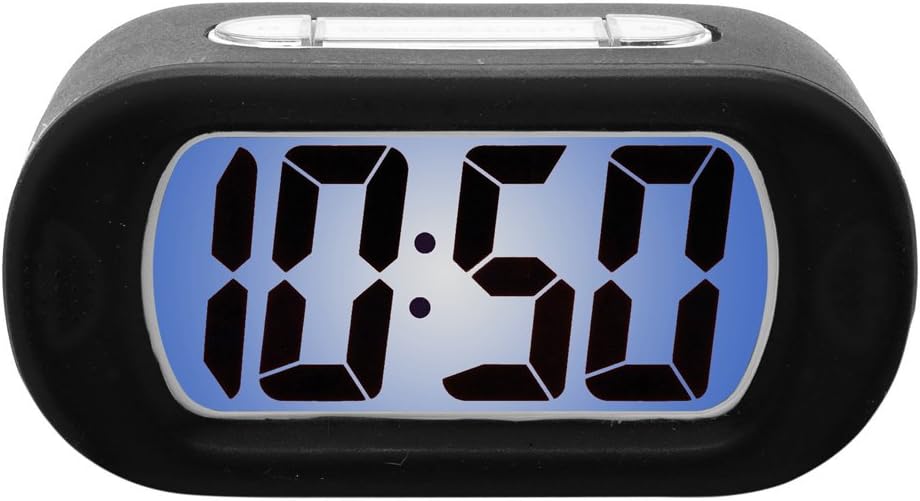
Figure 1: Karlsson KA4548 Gummy Alarm Clock. This image displays the Karlsson KA4548 Gummy Alarm Clock from a front-facing perspective. The clock features a black rubberized casing and a clear LCD screen with a blue backlight, currently displaying the time '10:50' in large, digital segments. The top of the clock shows subtle outlines of control buttons integrated into the rubber material.
Компоненттери:
- LCD дисплей: Убакытты, ойготкучтун абалын жана башка көрсөткүчтөрдү көрсөтөт.
- Rubberized Casing: Durable and provides integrated button access.
- Башкаруу баскычтары: (Located on top/back, integrated into rubber) For setting time, alarm, snooze, and activating backlight.
- Батарея бөлүмү: Located on the back, for 3 AAA batteries.
Жайгашуу
Батарея орнотуу:
- Ойготкуч сааттын артындагы батарея бөлүкчөсүн табыңыз.
- Батарея уясынын капкагын ачыңыз.
- Insert 3 new AAA batteries, ensuring correct polarity (+ and -) as indicated inside the compartment.
- Close the battery compartment cover securely. The LCD display should now turn on.
Иштөө нускамалары
Убакытты коюу:
- Press the 'SET' button (or equivalent, typically integrated into the rubber casing). The hour digits will start flashing.
- Use the '+' or '-' buttons (or up/down arrows) to adjust the hour.
- Press 'SET' again to confirm the hour and move to the minute setting. The minute digits will flash.
- Мүнөттөрдү тууралоо үчүн '+' же '-' баскычтарын колдонуңуз.
- Press 'SET' one more time to confirm the minutes and exit time setting mode.
Ойготкучту орнотуу:
- Press the 'ALARM SET' button (or similar, often labeled with an alarm icon). The alarm hour digits will start flashing.
- Ойготкучтун саатын тууралоо үчүн '+' же '-' баскычтарын колдонуңуз.
- Press 'ALARM SET' again to confirm the alarm hour and move to the alarm minute setting. The alarm minute digits will flash.
- Ойготкучтун мүнөттөрүн тууралоо үчүн '+' же '-' баскычтарын колдонуңуз.
- Press 'ALARM SET' one more time to confirm the alarm minutes and exit alarm setting mode.
- Ensure the alarm is activated. There is usually a dedicated 'ALARM ON/OFF' switch or button. A small alarm icon should appear on the display when the alarm is active.
Чырым Function:
When the alarm sounds, press the 'SNOOZE' button (typically a large button on top). The alarm will temporarily stop and sound again after a few minutes (usually 5-9 minutes, depending on the model).
Арткы жарык функциясы:
To illuminate the display in the dark, press the 'LIGHT' button (often integrated with the snooze button). The blue backlight will activate for a few seconds and then turn off automatically to conserve battery life. The display does not remain continuously lit.
Техникалык тейлөө
Тазалоо:
Wipe the clock's surface with a soft, dry, lint-free cloth. For stubborn marks on the rubber casing, бир аз damp cloth can be used, but ensure no moisture enters the electronic components. Do not use chemical cleaners, solvents, or abrasive materials.
Батареяны алмаштыруу:
When the display dims or the alarm function becomes unreliable, it is time to replace the batteries. Follow the battery installation steps outlined in the 'Setup' section. Always replace all three AAA batteries at the same time with new ones.
Проблемаларды чечүү
- Дисплей бош же күңүрт:
Чечим: Батареянын полярдуулугун текшериңиз. Жаңы AAA батарейкалары менен алмаштырыңыз. - Ойготкуч угулбайт:
Чечим: Ensure the alarm is set and activated (check for alarm icon on display). Verify that the time and alarm time are correctly set. Replace batteries if they are low. - Backlight does not work or is very dim:
Чечим: Press the 'LIGHT' button firmly. If it still doesn't work, replace the batteries. Note that the backlight is designed to be momentary, not continuously lit. - Баскычтар жооп бербейт:
Чечим: Ensure batteries are correctly installed and have sufficient power. Try removing and reinserting batteries to reset the device. - Туура эмес убакыт көрсөтүлүшү:
Чечим: Reset the time following the 'Setting the Time' instructions.
Техникалык шарттар
| Өзгөчөлүк | Деталь |
|---|---|
| Модель номери | KA4548 |
| Бренд | Карлссон |
| Продукциянын өлчөмдөрү | 14.73 x 5.08 x 7.62 см |
| Салмагы | 220 г |
| Түс | Кара |
| Дисплей түрү | Санарип LCD |
| Power Source | Battery (3 x AAA required) |
| Батареялар камтылган | Жок |
| Өзгөчөлүктөр | Alarm, Momentary Backlight |
| Стиль | Заманбап дизайн |
| Ассамблея талап кылынат | Жок |
Кепилдик жана колдоо
Karlsson өнүмдөрү жогорку сапат стандарттарына ылайык өндүрүлөт. Кепилдиктин камтылышы жөнүндө маалымат алуу үчүн, сатып алууңузга тиркелген кепилдик картасын караңыз же Karlsson компаниясынын расмий дүкөнүнө баш багыңыз. website. For technical support or further assistance, please contact Karlsson customer service through their official channels.


