1. Продукт бүтүп калдыview
The RCA RS2135I is a compact audio system designed for versatile audio playback. It features a 5-disc CD changer, a universal dock for iPod devices, an AM/FM radio tuner, and a USB port for playing and recording audio. This system is equipped with a 160-watt digital amplifier for clear sound output.
Негизги өзгөчөлүктөрү:
- Universal iPod dock with charging capability.
- 5-disc CD changer supporting CD-DA, MP3, and WMA formats.
- AM/FM stereo radio tuner.
- USB port for playback of MP3/WMA files and recording from CD, radio, or auxiliary input.
- Integrated clock function.
- Includes main unit, two speakers, AM loop antenna, and remote control.
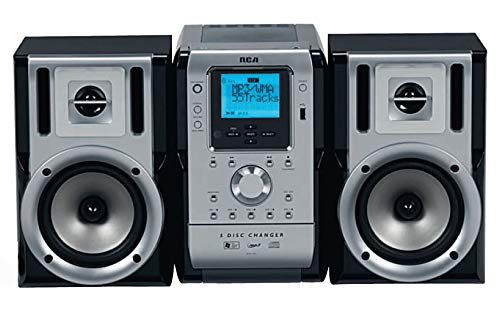
Сүрөт 1: Алдыңкы view of the RCA RS2135I Compact Audio System, showing the central unit with a 5-disc changer and two detached speakers.
2. Орнотуу нускамалары
2.1 Пакеттен чыгаруу жана жайгаштыруу
Carefully remove all components from the packaging. Place the main unit and speakers on a stable, flat surface. Ensure adequate ventilation around the unit.
2.2 Динамиктин туташуусу
Connect the speaker wires from the main unit to the corresponding terminals on each speaker. Ensure correct polarity (positive to positive, negative to negative) for optimal sound quality.
2.3 Антеннаны туташтыруу
- AM антенна: Connect the supplied AM loop antenna to the AM antenna terminals on the rear of the main unit. Position the antenna for best reception.
- FM антеннасы: Extend the FM wire antenna fully for optimal FM reception.
2.4 Кубат туташтыруу
Plug the AC power cord into a standard wall outlet. The unit will enter standby mode.
2.5 iPod Dock Setup
The universal iPod dock connects to the main unit via a single cable. Insert the appropriate dock adapter for your iPod model into the dock. Place your iPod into the dock for playback and charging.

Figure 2: The RCA RS2135I with an iPod device securely placed in its universal docking station, ready for playback and charging.
3. Иштөө нускамалары
3.1 Күйгүзүү/өчүрүү
басыңыз КҮЧ Системаны күйгүзүү же өчүрүү үчүн түзмөктөгү же алыстан башкаруу пультундагы баскычты басыңыз (күтүү режими).
3.2 Булакты тандоо
басыңыз БУЛАК button repeatedly to cycle through available input sources: CD, iPod, AM, FM, USB, AUX.
3.3 CD ойноткучтун иштеши
- басыңыз CD button or select CD as the source.
- басыңыз АЧУУ/ЖАБУУ баскычын басыңыз.
- Place up to five CDs onto the disc trays.
- Басыңыз АЧУУ/ЖАБУУ лотокту жабуу үчүн дагы.
- Басыңыз ОЙНОО/ТЫНЫТТЫРУ ойнотууну баштоо үчүн.
- Колдонуу ӨТКӨРҮҮ тректерди багыттоо үчүн баскычтар жана ТОКТОТ ойнотууну аяктоо үчүн.
- The system supports CD-DA, MP3, and WMA formats on CD-R/RW discs.
3.4 iPod иштетүү
- Сиздин iPod туура орнотулганын текшериңиз.
- Тандоо iPod булагы катары.
- Use the system's controls or the supplied remote to play, pause, skip tracks, and adjust volume. The iPod will charge while docked.
3.5 Радио операциясы (AM/FM)
- Тандоо AM or FM булагы катары.
- колдонуу ТУНЕ +/- станцияга кол менен күүлдөө үчүн баскычтар.
- Басып кармап туруңуз ТУНЕ +/- for automatic station scanning.
- To save a station, press ПРОГРАММА, андан кийин колдонуңуз АЛДЫН АЛА +/- алдын ала коюлган номерди тандоого жана басыңыз ПРОГРАММА ырастоо үчүн дагы.
3.6 USB ойнотуу жана жаздыруу
- USB аспапты USB портуна салыңыз.
- Тандоо USB as the source for playback of MP3/WMA files.
- To record (Rip & Go technology), select the desired source (CD, Radio, AUX). Press the ЖАЗУУ button. The system will record the audio to the connected USB device. Refer to the full manual for detailed recording options.
3.7 Саатты орнотуу
Күтүү режиминде басып, кармап туруңуз СААТ баскычы. колдонуу ТУНЕ +/- саатты жана мүнөттү коюу үчүн баскычтарын басыңыз, андан кийин СААТ ар бир жөндөөнү ырастоо үчүн.

Figure 3: The RCA RS2135I system shown with its included remote control, highlighting the various control options available for the user.
4. Техникалык тейлөө
4.1 Агрегатты тазалоо
Wipe the exterior of the unit with a soft, dry cloth. Do not use abrasive cleaners, waxes, or solvents as they may damage the finish. Ensure the unit is unplugged before cleaning.
4.2 CD объективине кам көрүү
Avoid touching the CD lens. If the lens becomes dirty, use a commercially available CD lens cleaner disc. Do not attempt to clean the lens manually.
4.3 Speaker Care
Keep speakers free from dust. Do not place heavy objects on the speakers or expose them to direct sunlight or moisture.
5. Кыйынчылыктарды
Кызматка кайрылуудан мурун, төмөнкү жалпы маселелерди текшериңиз:
| Көйгөй | Мүмкүн себеп | Чечим |
|---|---|---|
| Күч жок | Электр зымы жакшы сайылган эмес. | Электр шнурунун түзүлүшкө жана розеткага туташуусун текшериңиз. |
| Үн жок | Үн өтө төмөн; туура эмес булак тандалды; динамиктин зымдары ажыратылды. | Increase volume; select correct source; check speaker wire connections. |
| CD ойнобой жатат | CD inserted incorrectly; disc is dirty or scratched; disc format not supported. | Insert CD with label side up; clean or replace disc; ensure disc is CD-DA, MP3, or WMA. |
| iPod ойнобой/заряддалбай жатат | iPod not properly docked; incorrect dock adapter; iPod software issue. | Reseat iPod; ensure correct dock adapter is used; try resetting iPod. |
| Радио кабыл алуу начар | Antenna not properly positioned or connected; local interference. | Adjust AM loop antenna or FM wire antenna position; check antenna connections. |
| Окуу кыйын дисплей | Viewing angle or distance. | Тууралоо viewing position. Note: Display visibility can vary based on ambient light and distance. |
6. Техникалык шарттар
- Модел: RS2135I
- Бренд: RCA
- Чыгуу күчү: 160W (RMS)
- CD Capacity: 5 дисктер
- Ойнотуу режимдери: CD-DA, MP3, WMA
- Медиа колдоо: CD-R/RW
- тюнер: AM/FM стерео
- Байланыш: Universal iPod Dock, USB, Auxiliary Input
- Өлчөмдөрү (L x W x Y): Болжол менен 48.3 x 47.6 x 35.6 см (19 x 18.7 x 14 дюйм)
- Салмагы: Болжол менен 10.32 кг (22.75 фунт)
- Түсү: Кара
7. Кепилдик жана колдоо
7.1 Чектелген Кепилдик
This RCA RS2135I Compact Audio System comes with a 1 жылдык Чектелген Кепилдик from the date of purchase. This warranty covers manufacturing defects in materials and workmanship under normal use. It does not cover damage caused by misuse, accident, modification, or unauthorized repair. Please retain your proof of purchase for warranty claims.
7.2 Кардарларды колдоо
For technical assistance, warranty service, or further inquiries, please refer to the contact information provided in your product's packaging or visit the official RCA support website. When contacting support, please have your model number (RS2135I) and proof of purchase readily available.