Introduction
This manual provides detailed instructions for the effective use and maintenance of your Texas Instruments TI-30X IIS 2-Line Scientific Calculator. Designed for fundamental math, statistics, and science functionality, this calculator is a robust tool for high school and college-level studies.
The TI-30X IIS features a two-line display, allowing you to view both the entry and the calculated result simultaneously. It supports various calculations including trigonometry, logarithms, fractions, statistics, and more. Its dual power source (solar and battery) ensures reliable operation.
Продукт бүттүview

Сүрөт 1: Алдыңкы view of the Texas Instruments TI-30X IIS scientific calculator in pink. The two-line display shows an example calculation, and the solar panel is visible above the screen.

Figure 2: A direct frontal view of the TI-30X IIS calculator, highlighting the key layout and screen.
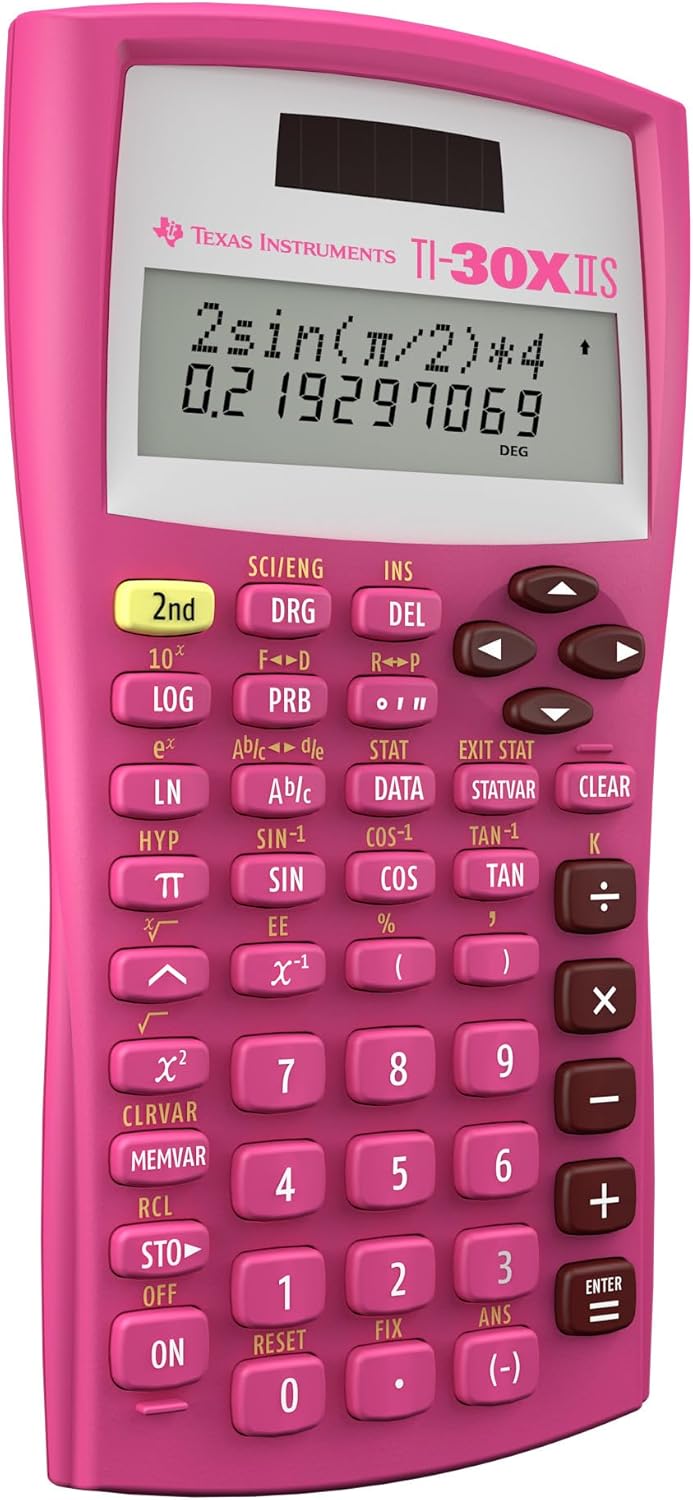
Figure 3: A side angle view of the calculator, showing its slim profile.

Figure 4: The back of the TI-30X IIS calculator, showing the battery compartment and product information.

Сүрөт 5: Алдыңкы view of the product packaging, highlighting key features like protective cover, dual power, and 2-line screen, along with exam permissions.

6-сүрөт: Артка view of the product packaging, showing a comparison table of scientific calculator features and a QR code for more information.

Figure 7: Image illustrating the dimensions of the TI-30X IIS calculator: approximately 6.1 inches in length and 3.2 inches in width.
Жайгашуу
Күйгүзүлүүдө
The TI-30X IIS calculator is dual-powered, utilizing both solar energy and a lithium metal battery (included). To power on the calculator, press the ON баскычы баскычтоптун төмөнкү сол бурчунда жайгашкан.
Баштапкы орнотуу
Upon first use, or after a prolonged period of inactivity, the calculator should power on automatically when exposed to light or when the ON button is pressed. No specific initial setup is required beyond ensuring adequate light for solar power or sufficient battery charge.
Батареяны орнотуу/алмаштыруу
The calculator uses 1 Lithium Metal battery. If the display becomes dim or unresponsive in adequate light, the battery may need replacement. Refer to the back of the calculator for the battery compartment. Ensure proper polarity when installing a new battery.
Иштөө нускамалары
Негизги операциялар
Perform standard arithmetic operations using the number keys and operators (+, -, ×, ÷). Басыңыз ENTER натыйжасын эсептөө үчүн.
Two-Line Display
The upper line of the display shows the entered expression, while the lower line shows the result. This allows for easy review and editing of calculations.
Илимий функциялар
Access scientific functions such as logarithms (LOG, LN), trigonometric functions (КҮНӨӨ, COS, ТАН), and their inverses using the corresponding keys. Many functions require pressing the 2nd key first to access the secondary function printed above the button.
Статистикалык эсептөөлөр
The calculator handles 1- and 2-variable statistical calculations. Use the DATA key to enter data points and the СТАТВАР key to access statistical variables.
Бурч режимдери
Switch between three angle modes: Degrees (DEG), Radians (RAD), and Grads (GRAD). The current mode is indicated on the display. Press the DRG key to cycle through the modes.
Fractions and Conversions
Enter and perform calculations with fractions using the n/d key. Convert between fractions and decimals, or mixed numbers and improper fractions, as needed.
Эс тутум функциялары
Store and recall values using the memory keys (СТО, RCL). The calculator has multiple memory registers.
Ката билдирүүлөрү
If an error occurs, an error message will appear on the display. Refer to the full user guide for a list of error codes and their meanings.
Техникалык тейлөө
Тазалоо
To clean the calculator, use a soft, dry cloth. Do not use abrasive cleaners or solvents, as these may damage the casing же экран.
Сактагыч
When not in use, store the calculator in its protective slide case to prevent scratches and damage. Avoid exposing the calculator to extreme temperatures or humidity.
Батареяга кам көрүү
While the calculator is solar-powered, it also relies on a lithium metal battery. If storing the calculator for an extended period, ensure it is in a well-lit area to allow the solar panel to maintain the battery charge. If the battery is completely depleted, replace it as described in the Setup section.
Проблемаларды чечүү
- Калькулятор күйбөйт:
- Калькулятор күн энергиясы үчүн жетиштүү жарыкка туш болушун камсыз кылыңыз.
- Check the battery. If the battery is low or depleted, replace it.
- басыңыз ON баскычын бекем.
- Дисплей күңүрт же бош:
- Move the calculator to a brighter area.
- Эгер маселе чечилбесе, батареяны алмаштырыңыз.
- Туура эмес жыйынтыктар:
- Verify the input values and the order of operations.
- Check the current angle mode (DEG, RAD, GRAD) if performing trigonometric calculations.
- Clear the calculator's memory by pressing 2nd анда RESET.
- Баскычтар жооп бербейт:
- Ensure the calculator is clean and free of debris around the buttons.
- If the calculator has been dropped or subjected to impact, internal damage may have occurred.
For further assistance, please refer to the official Texas Instruments support resources.
Техникалык шарттар
| Өзгөчөлүк | Деталь |
|---|---|
| Модель номери | 30XIIS/TBL/1L1/BL |
| Дисплей түрү | 2-Line дисплей |
| Power Source | Solar and Battery Powered (1 Lithium Metal battery included) |
| Өлчөмдөр | 6.12 x 3.23 x 0.1 дюйм |
| Элемент Салмагы | 5.6 унция |
| Калькулятор түрү | Scientific / Engineering |
| Permitted for Exams | SAT, ACT, AP (Advanced Placement) |
| Негизги функциялар | Trigonometry, Logarithms, Statistics (1- & 2-variable), Fractions, Conversions, Scientific/Engineering Notation |
Кепилдик жана колдоо
Кепилдик маалымат
The Texas Instruments TI-30X IIS calculator comes with a 1-year limited warranty. Please retain your proof of purchase for warranty claims.
Кардарларды колдоо
For detailed user guides, FAQs, and technical support, please visit the official Texas Instruments education webсайт:
Additional support documents, including a User Guide (PDF) and User Manual (PDF), are available online.


