1. Киришүү
The GEFU Digital Thermometer Scala® is a precision instrument designed for accurate temperature measurement in various culinary applications. Its quick-read system and durable stainless steel probe make it ideal for ensuring food safety and achieving perfect cooking results. This manual provides essential information on setting up, operating, maintaining, and troubleshooting your thermometer.

This image shows the GEFU Digital Thermometer Scala® in use, measuring the internal temperature of a steak, highlighting its application in cooking.
2. Орнотуу
2.1 Батареяны орнотуу
Your GEFU Digital Thermometer Scala® comes with one LR44 battery included. To install or replace the battery:
- Locate the battery compartment on the back of the thermometer's handle.
- Батареянын капкагын акырын жылдырып ачыңыз.
- Insert the LR44 battery, ensuring the correct polarity (+/-) as indicated inside the compartment.
- Батареянын капкагын бекем жабыңыз.
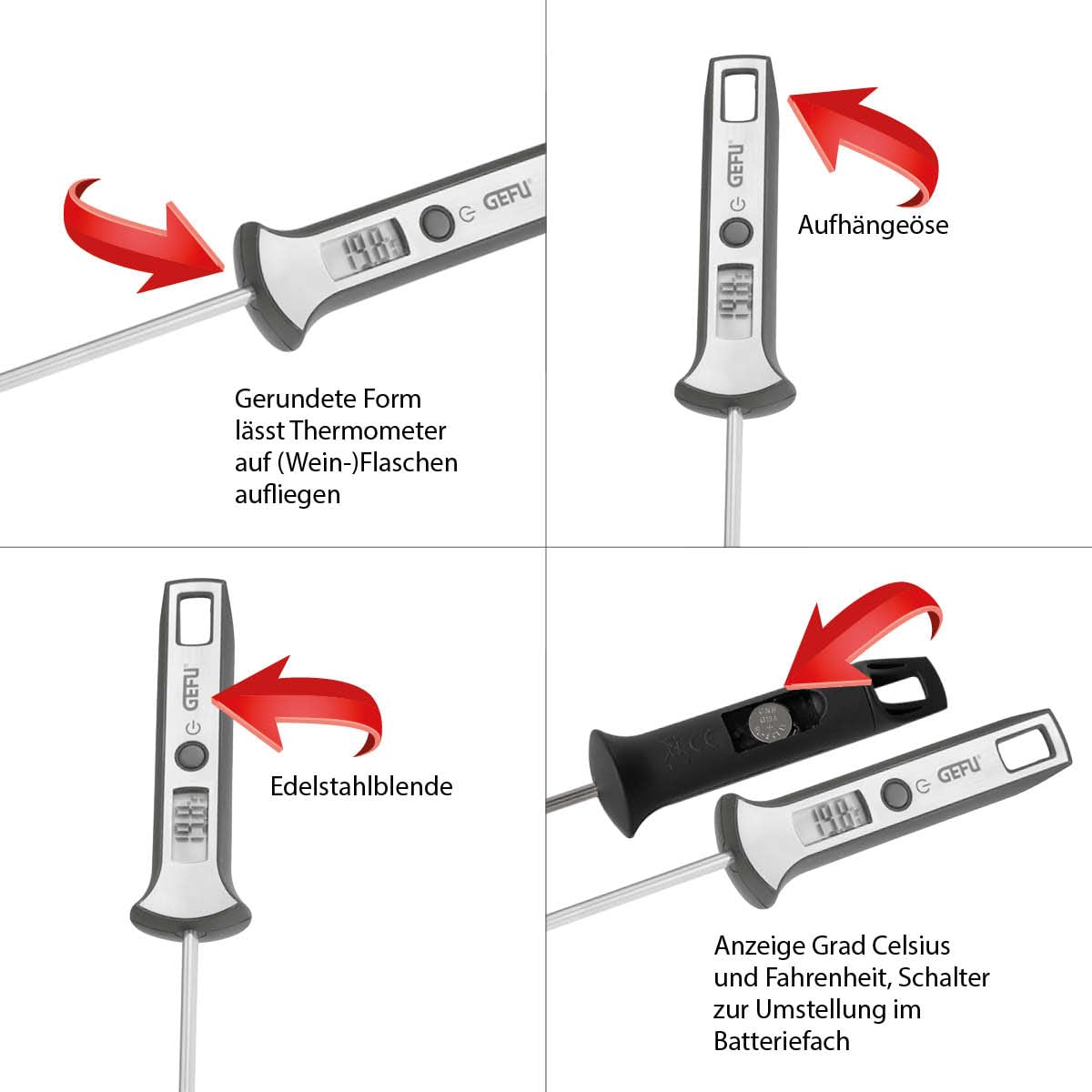
This image illustrates the handle of the thermometer, detailing how to access the battery compartment and the switch for changing temperature units between Celsius and Fahrenheit.
3. Операция
3.1 Температураны өлчөө
To measure the temperature of food or liquids:
- Термометрди күйгүзүү үчүн "КҮЙГҮЗҮҮ/ӨЧҮРҮҮ" баскычын басыңыз.
- Carefully insert the stainless steel probe into the thickest part of the food, avoiding bones. For liquids, immerse the probe without touching the bottom or sides of the container.
- Wait a few seconds for the digital display to stabilize and show the accurate temperature. The thermometer features a quick-read system for rapid results.
- Once the reading is complete, remove the probe and press the 'ON/OFF' button to turn off the device.
3.2 Temperature Unit Selection (Celsius/Fahrenheit)
The thermometer allows you to switch between Celsius (°C) and Fahrenheit (°F) units. The switch is located inside the battery compartment. After opening the battery cover, you will find a small switch to toggle between the two units.

This image demonstrates the thermometer's primary function: accurately measuring the core temperature of food, such as meat, for precise cooking.

This image highlights the broad temperature measurement capabilities of the thermometer, suitable for various culinary applications, including roasting poultry.

This image showcases the thermometer's clear LCD display, making temperature readings simple and quick, even for liquids like wine.

This image illustrates the thermometer's precision, making it suitable for sensitive applications such as ensuring the correct temperature of baby food.
4. Техникалык тейлөө
4.1 Тазалоо боюнча нускамалар
To ensure the longevity and hygiene of your thermometer, follow these cleaning guidelines:
- Always clean the probe thoroughly after each use, especially when used with different food types.
- Дат баспас болоттон жасалган зондду жарнама менен сүртүңүзamp кездеме жана жумшак жуугуч.
- Do not immerse the entire thermometer in water, as this can damage the electronic components. The main body is not waterproof.
- Dry the probe and body completely before storing.
4.2 Сактоо
Store the thermometer in a clean, dry place away from extreme temperatures and direct sunlight. The integrated hanging loop allows for convenient storage.
5. Кыйынчылыктарды
5.1 Жалпы маселелер
- Туура эмес окуулар: Ensure the probe is inserted deeply enough into the food and not touching bones or the bottom of the pan. Calibrate if necessary (refer to specific calibration instructions if provided with packaging, not detailed here).
- Дисплей иштебейт: Check the battery. Replace the LR44 battery if the display is dim or blank. Ensure the battery is inserted with correct polarity.
- Thermometer Does Not Turn Off Automatically: Some models may not feature an automatic shut-off. Always manually turn off the thermometer after use to conserve battery life.
6. Техникалык шарттар
| Өзгөчөлүк | Деталь |
|---|---|
| Модель номери | 21820 |
| Бренд | GEFU |
| Батарея | 1 x LR44 (кошулган) |
| Сырткы материал | Дат баспаган болот |
| Дисплей түрү | Санарип LCD |
| Өзгөчө өзгөчөлүк | Quick Read System |
| Температура диапазону | -45°Cден +200°Cге чейин (-49°Fтен +392°Fке чейин) |
| Өлчөмдөрү (болжол менен) | 23.8 cm (Length) x 3.1 cm (Height of display unit) |
| Care Instructions | Clean (Do not immerse) |

This image provides a clear visual representation of the thermometer's dimensions, including its overall length and the height of the display unit.
7. Кепилдик жана колдоо
For information regarding warranty coverage, product registration, or technical support, please refer to the documentation included with your purchase or visit the official GEFU webсайт. Кардарларды тейлөө кызматынын байланыш маалыматтарын, адатта, ал жерден тапса болот.


