Introduction
The Altec Lansing M302 Moondance Home is a versatile alarm clock radio and speaker system designed for use with iPod and MP3 players. It offers clear audio, multiple alarm options, and a compact design suitable for various spaces. This manual provides detailed instructions for setting up, operating, and maintaining your device.
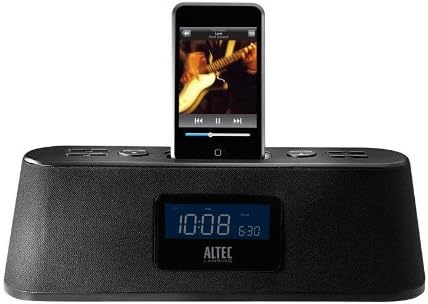
Figure 1: Altec Lansing M302 Moondance Home Alarm Clock Radio with an iPod docked. The front display shows the current time and alarm setting, while the top panel features control buttons.
Пакеттин мазмуну
Баштоодон мурун, бардык компоненттердин бар экендигин текшериңиз:
- Altec Lansing Moondance Home speaker system
- Adapters for iPod (various sizes)
- AC адаптер
- FM радио антеннасы
- Wireless remote control (includes 2 batteries)
- Колдонуучунун колдонмосу
- Тез туташуу боюнча көрсөтмөлөр
Жайгашуу
1. Power Connection
- Connect the AC adapter to the DC IN port on the back of the Moondance Home unit.
- AC адаптерин стандарттуу розеткага сайыңыз.
- Түзмөк күйүп, дисплей күйөт.
2. FM антеннага туташуу
- Locate the FM antenna port on the back of the unit.
- Connect the provided FM wire antenna to this port.
- Extend the antenna for optimal radio reception.
3. iPod/iPhone Docking
- Select the appropriate iPod adapter for your specific iPod or iPhone model.
- Insert the adapter into the docking well on top of the Moondance Home.
- Carefully place your iPod or iPhone onto the dock connector within the adapter. Ensure it is seated firmly.
- Түзмөк автоматтык түрдө кубатталып баштайт.
Note: While adapters provide better support, some iPod/iPhone models may function without a specific adapter by directly connecting to the dock connector. However, using the correct adapter is recommended for stability and protection of the dock connector. This unit is not compatible with the newest iPhone/iPod units without an extension purchased separately.
4. Көмөкчү киргизүү туташуу
To connect other audio devices (CD player, DVD player, other MP3 players):
- Use a standard 3.5mm audio cable (not included).
- Connect one end of the cable to the headphone jack or line-out port of your external audio device.
- Connect the other end to the AUX IN port on the back of the Moondance Home unit.
Иштөө нускамалары
Basic Controls (Onboard and Remote)
The Moondance Home can be operated using the buttons on the unit's top panel or the included wireless remote control. The remote offers full functionality for convenience.
- Кубат баскычы: Агрегатты күйгүзөт же өчүрөт.
- Үнүн жогорулатуу/төмөндөтүү: Аудио чыгаруу деңгээлин тууралайт.
- Режим баскычы: Switches between iPod, FM Radio, and Auxiliary input modes.
- Тындыргыч/Күнкүртүүчү баскычы: Activates snooze during an alarm; also adjusts display brightness.
- Ойготкуч топтому: Сигнал орнотуу режимине кирет.
- Убакытты орнотуу: Убакытты орнотуу режимине кирет.
- Tuning/Track Skip: Navigates radio frequencies or skips tracks on iPod.
Убакытты коюу
- басыңыз Убакыт коюу баскычы. Саат дисплейи жарк этет.
- колдонуу Tuning/Track Skip buttons (or Up/Down on remote) to adjust the hour.
- Басыңыз Убакыт коюу саатты ырастоо жана мүнөттөргө жылдыруу үчүн кайрадан басыңыз.
- Adjust minutes using the Tuning/Track Skip баскычтар.
- Басыңыз Убакыт коюу убакытты үнөмдөө үчүн дагы бир жолу.
Setting Alarms (Dual Alarms)
The unit supports two independent alarms (Alarm 1 and Alarm 2).
- басыңыз Ойготкуч орнотулган button. "AL1" will appear, and the hour will flash.
- колдонуу Tuning/Track Skip каалаган ойготкуч саатын коюу үчүн баскычтар.
- Басыңыз Ойготкуч орнотулган саатты ырастап, мүнөттөргө өтүү үчүн басыңыз.
- Adjust minutes using the Tuning/Track Skip баскычтар.
- Басыңыз Ойготкуч орнотулган to select the alarm source (iPod, Radio, or Buzzer). Use Tuning/Track Skip опциялар аркылуу айлануу.
- Басыңыз Ойготкуч орнотулган again to save Alarm 1 settings.
- To set Alarm 2, repeat steps 1-6, pressing Ойготкуч орнотулган until "AL2" appears.
- To activate/deactivate an alarm, press the corresponding Alarm button (e.g., AL1 or AL2 on remote) until the alarm icon appears/disappears on the display.
Note: Alarms feature progressive alert volume, starting softly and gradually increasing.
FM радиосун колдонуу
- басыңыз Mode баскычын дисплейде "FM" пайда болгонго чейин басыңыз.
- колдонуу Tuning/Track Skip каалаган жыштыкка кол менен тууралоо үчүн баскычтар.
- Станцияларды автоматтык түрдө издөө үчүн, баскычын басып кармап туруңуз Tuning/Track Skip баскычтар.
- To save a preset station, tune to the station, then press and hold a Алдын ала коюлган номер button (on remote) until the display flashes. Use Tuning/Track Skip to select a preset number, then press the Алдын ала коюлган номер сактоо үчүн кайра басыңыз.
- Алдын ала коюлган орнотууну кайра чакырып алуу үчүн, жөн гана тиешелүү баскычты басыңыз Алдын ала коюлган номер баскычы.
iPod/iPhone колдонуу
- Ensure your iPod/iPhone is properly docked.
- басыңыз Mode button until "iPod" appears on the display.
- колдонуу Ойнотуу/Тыныгуу, Кийинки трек, жана Мурунку трек buttons (on unit or remote) to control playback.
- Volume is controlled by the unit's volume buttons.
Көмөкчү киргизүүнү колдонуу
- Ensure your external audio device is connected to the AUX IN port.
- басыңыз Mode баскычын дисплейде "AUX" пайда болгонго чейин басыңыз.
- Control playback directly from your external audio device.
- Volume is controlled by the Moondance Home unit's volume buttons.
Уйку таймери
The sleep timer allows you to fall asleep to music, with the unit automatically turning off after a set period.
- While the unit is playing, press the Уйку button (on remote).
- Each press will cycle through available sleep times (e.g., 15, 30, 60, 90 minutes, OFF).
- Select your desired sleep duration. The unit will turn off automatically after this time.
Диммерди көрсөтүү
Adjust the brightness of the LCD display to your preference.
- басыңыз Тындыруу/Диммер button repeatedly to cycle through different brightness levels, including off.
- Note: Some users may find the lowest setting still too bright or the contrast difficult to read at very low brightness. Adjust to a comfortable level.
Техникалык тейлөө
Тазалоо
- Тазалоодон мурун кубат адаптерин ажыратыңыз.
- Аппараттын сырткы беттерин сүртүү үчүн жумшак, кургак чүпүрөктү колдонуңуз.
- Суюк тазалоочу каражаттарды, аэрозолдорду же абразивдүү тазалоочу каражаттарды колдонбоңуз.
- Keep the docking connector free of dust and debris.
Алыстан башкаруунун батареясын алмаштыруу
The remote control uses two AAA batteries (included). Replace them when the remote's range or responsiveness decreases.
- Пульттун артындагы батарея бөлүкчөсүн ачыңыз.
- Эски батарейкаларды алып салыңыз.
- Туура полярдуулукту (+/-) сактап, эки жаңы AAA батарейкасын салыңыз.
- Батарея отсегин бекем жабыңыз.
Проблемаларды чечүү
| Көйгөй | Мүмкүн себеп | Чечим |
|---|---|---|
| Түзмөк күйбөйт. | AC adapter not connected or faulty. | AC адаптери блокко жана жумушчу розеткага бекем сайылганын текшериңиз. Башка розеткадан аракет кылып көрүңүз. |
| No sound from iPod/iPhone. | iPod/iPhone not properly docked; unit in wrong mode; volume too low. | Re-seat iPod/iPhone firmly. Press Mode button to select iPod mode. Increase unit volume. Ensure iPod/iPhone volume is not muted or too low. |
| FM радиосун кабыл алуу начар. | Antenna not extended or positioned incorrectly; weak signal. | Fully extend the FM wire antenna and reposition it for better reception. Try auto-scanning for stations. |
| Пульт иштебей жатат. | Batteries dead or incorrectly inserted; obstruction between remote and unit. | Replace remote batteries, ensuring correct polarity. Remove any obstructions. Point remote directly at the unit. |
| Ойготкуч угулбайт. | Alarm not set or activated; volume too low. | Verify alarm time and source are correctly set. Ensure alarm icon is visible on display. Increase unit volume. |
| Дисплей өтө жарык же өтө күңүрт. | Диммерди жөндөө тууралоону талап кылат. | басыңыз Тындыруу/Диммер button repeatedly to cycle through brightness levels until desired setting is reached. |
| Buttons are confusing/non-intuitive. | Unfamiliarity with control logic. | Refer to the "Operating Instructions" section of this manual for detailed steps on specific functions. Practice using the controls. |
Техникалык шарттар
- Модел: M302 Moondance Home
- Бренд: Altec Lansing
- Продукциянын өлчөмдөрү: 2.3 x 11 x 3.5 дюйм (Ж x В x D)
- Элемент Салмагы: 2 фунт
- Түсү: Кара
- Шайкеш түзмөктөр: iPhone, iPod (models with Universal Dock Connector; newer models may require adapter)
- Аппараттык интерфейс: Чагылган
- Порттардын саны: 1 (Docking) + Auxiliary Input
- Ватtage: 100.00 Вт
- UPC: 021986800088
- Өндүрүүчү: Altec Lansing
- Биринчи жеткиликтүү датасы: 23-сентябрь, 2008-жыл
Кепилдик жана колдоо
Чектелген Кепилдик
The Altec Lansing M302 Moondance Home comes with a 1 жылдык чектелген кепилдик. Бул кепилдик нормалдуу колдонуудагы материалдардагы жана жасалгадагы кемчиликтерди камтыйт. Кепилдик дооматтары үчүн сатып алганыңыздын далилин сактап коюңуз.
Юридикалык баш тартуу
This item is not compatible with the newest iPhone/iPod units. An extension must be purchased separately for compatibility with newer models.
Кардарларды колдоо
For technical assistance, warranty inquiries, or additional support, please visit the official Altec Lansing website or contact their customer service department. Refer to the packaging or the Altec Lansing webакыркы байланыш маалыматы үчүн сайт.
Note: While Altec Lansing aims to provide adapters for common models, not all iPod/iPhone models may have a perfectly fitting adapter included. Direct connection to the dock connector is often possible, but an adapter provides better physical support.


