1. Киришүү
This manual provides comprehensive instructions for the installation, operation, and maintenance of the MSD 6530 Digital Programmable 6AL-2 Ignition Box. The 6AL-2 is a high-performance ignition control unit designed to deliver precise spark control and advanced features for automotive applications. It offers PC programmability for custom timing curves and rev limits, enhancing engine performance and protection.

Image 1.1: The MSD 6530 Digital Programmable 6AL-2 Ignition Box with its wiring harness connected.
2. Негизги өзгөчөлүктөрү
- Тtage Шайкештик: Operates on 12-18 Volts, negative ground systems.
- Учурдагы чүчүкулак: Болжол менен 0.7 XNUMX Amp per 1,000 RPM.
- PC Programmability: Utilizes Windows-based Pro-Data+ Software for custom settings.
- Rev Limiter: Programmable 3-Step Rev Limiter with 100 RPM increments.
- Чыгындыларга ылайык келүү: EO # D-115-21 (verify local regulations).
3. Пакеттин мазмуну
Upon opening the package, ensure all components listed below are present and undamaged. If any items are missing or damaged, contact your retailer or MSD customer support immediately.
- MSD 6530 Digital Programmable 6AL-2 Ignition Box
- Негизги зымдар
- Programming Cable (Serial)
- Mounting Hardware (screws, vibration mounts)
- Assorted Electrical Connectors and Terminals
- Көрсөтмө (бул документ)

Сүрөт 3.1: Бүттүview of the complete MSD 6530 kit, including the ignition box, wiring harnesses, programming cable, and various installation accessories.
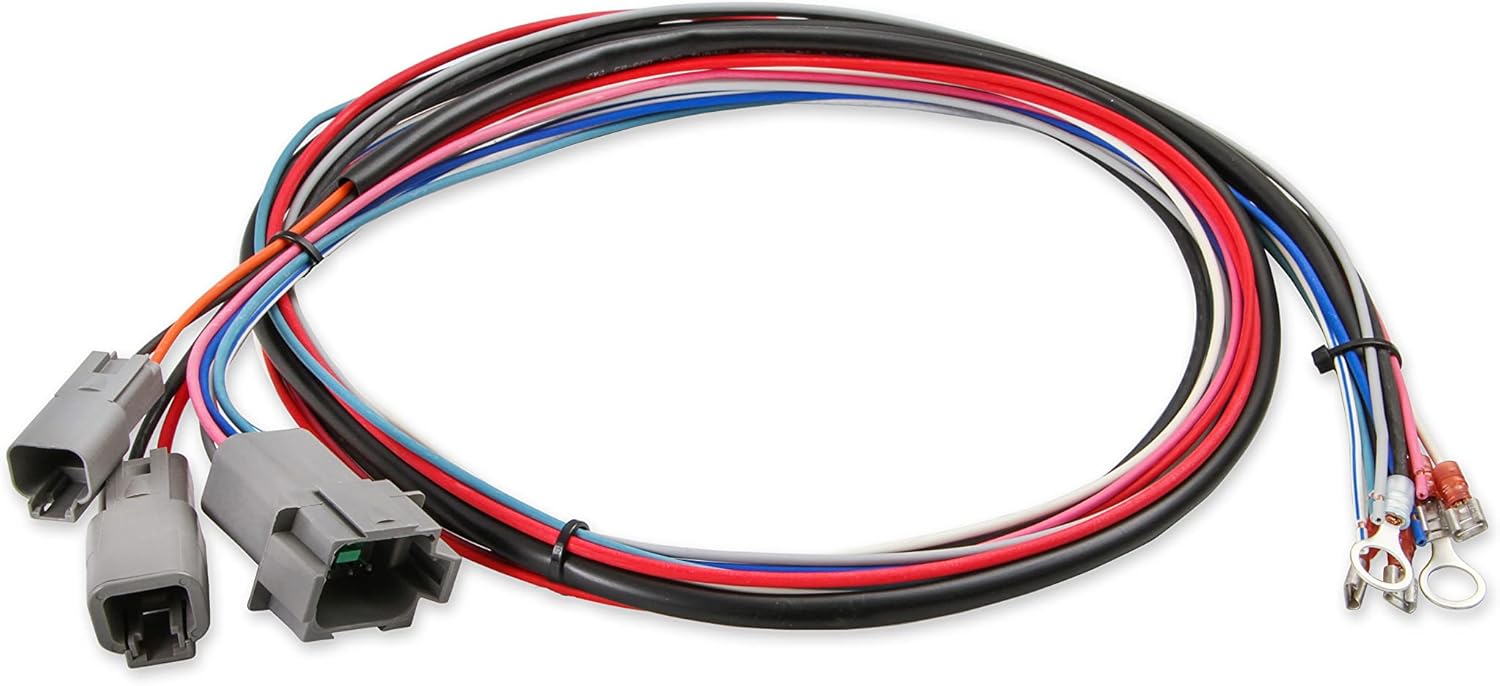
Image 3.2: The main wiring harness for the MSD 6530, showing multiple color-coded wires and connectors for various engine inputs and outputs.

Сүрөт 3.3: Детальдуу view of the connectors on the MSD 6530 wiring harness, designed for secure and reliable connections.

Image 3.4: The serial programming cable used to connect the MSD 6530 ignition box to a computer for configuration.
4. Коопсуздук маалыматы
Орнотуу жана эксплуатациялоо учурунда ар дайым төмөнкү коопсуздук чараларын сактаңыз:
- Электр иштерин жасоодон мурун унаанын аккумуляторун сууруп алыңыз.
- Ensure proper grounding of the ignition box to the vehicle chassis.
- Жогорку үн менен байланышуудан алыс болуңузtage ignition components when the engine is running.
- Коопсуздук көз айнегин кошо алганда, тиешелүү жеке коргонуу каражаттарын кийиңиз.
- Эгерде сиз орнотуунун кандайдыр бир кадамдары боюнча күмөн санасаңыз, квалификациялуу автоунаа технигине кайрылыңыз.
- Бул продукт Калифорния штатында рак жана тубаса кемтик же башка репродуктивдүү зыян алып келүүчү химиялык заттарды камтыйт (65 эскертүүсү).
5. Орнотуу жана орнотуу
5.1 Mounting the Ignition Box
Select a mounting location that is away from direct engine heat, excessive vibration, and moisture. The unit should be securely fastened using the provided mounting hardware. Ensure adequate airflow around the unit for cooling.
5.2 Зымдарды туташтыруу
Refer to the detailed wiring diagram provided in the separate MSD installation guide for specific connections. Key connections include:
- Күч жана жер: Connect directly to the battery for optimal performance.
- От алдыргыч: Connect to a switched 12V source.
- Катушкалардын туташуулары: Ensure correct polarity to the ignition coil.
- Триггер киргизүү: Connect to the distributor or crank trigger signal.
- MAP Sensor (Optional): For advanced timing control, a MAP sensor can be integrated. An extension cable may be required, as the sensor cable on the unit is short.
All connections should be crimped securely and insulated to prevent shorts and corrosion. Use the provided terminals where applicable.
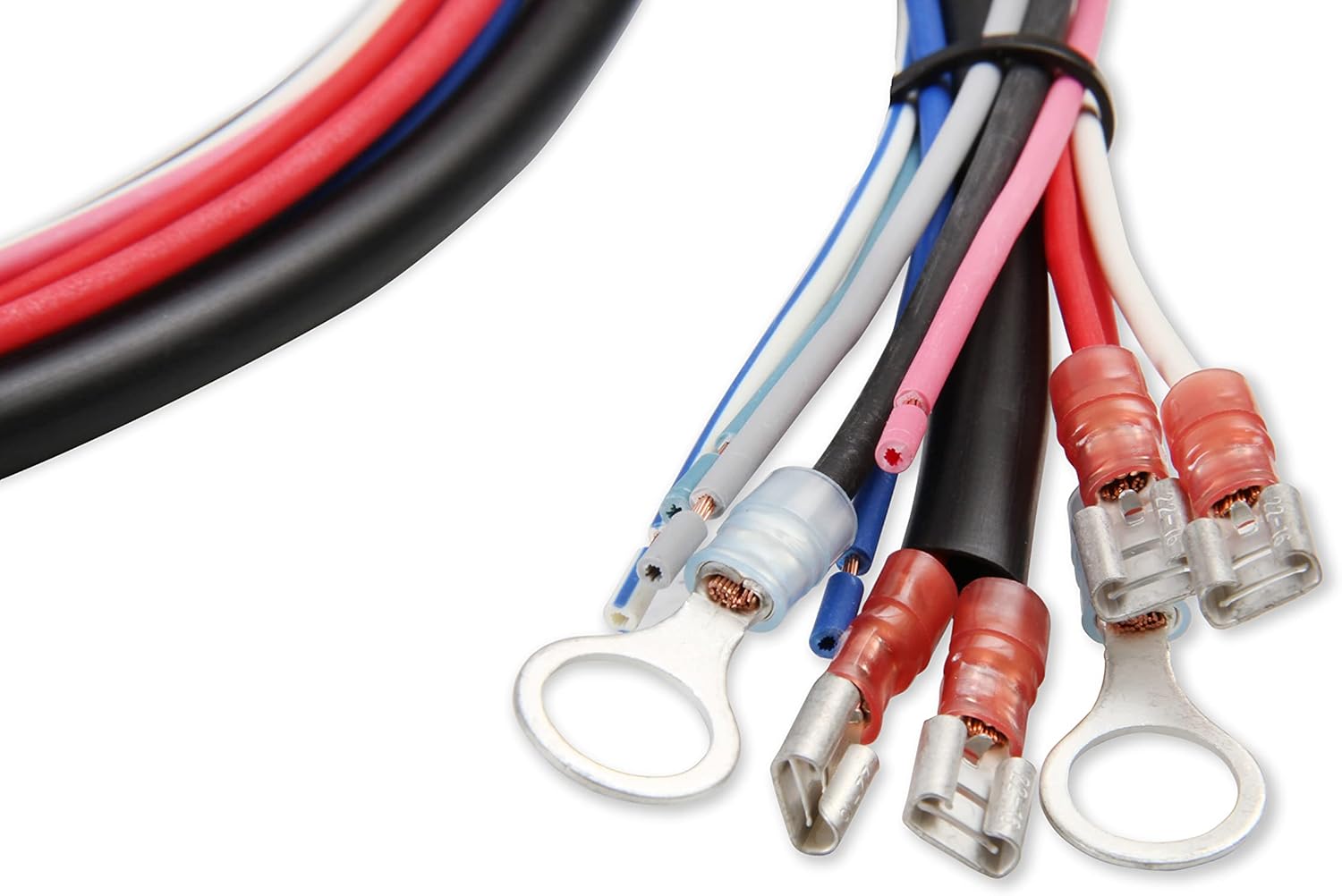
Image 5.1: Various electrical terminals and connectors included with the MSD 6530 for making secure wiring connections.
5.3 PC Connection for Programming
The MSD 6530 connects to a computer via a serial port for programming. Most modern laptops require a USB to serial adapter. Ensure the adapter is compatible and drivers are installed correctly. The Pro-Data+ Software is required for configuration.
6. Иштөө нускамалары
6.1 Pro-Data+ Software Overview
The Pro-Data+ Software provides an interface to customize the ignition box settings. This includes:
- Timing Curves: Create custom ignition timing curves based on RPM and manifold pressure (if MAP sensor is used).
- Rev Limits: Set up to three distinct rev limits for launch, burnout, and maximum RPM.
- Launch Control: Configure launch RPM for consistent starts.
- Shift Light: Program an external shift light output.
Install the Pro-Data+ Software on your Windows-based computer. Connect the serial cable to the ignition box and your computer (via adapter if necessary). Launch the software and establish communication with the unit. Follow the on-screen prompts and software manual for detailed programming steps.
6.2 Орнотууларды тууралоо
Within the Pro-Data+ software, you can graphically adjust timing curves and numerical values for rev limits. Changes made in the software must be uploaded to the ignition box to take effect. This process typically takes 30-45 seconds. It is recommended to save your configuration fileүзгүлтүксүз.
7. Техникалык тейлөө
The MSD 6530 Digital Programmable 6AL-2 Ignition Box is designed for durability and requires minimal maintenance. Periodically inspect the following:
- Зымдар: Check all wiring connections for tightness, signs of wear, or corrosion.
- Монтаждоо: Ensure the ignition box remains securely mounted and free from excessive vibration.
- Тазалык: Keep the unit clean and free of dirt, oil, and moisture. Do not use harsh chemicals for cleaning.
8. Кыйынчылыктарды
If you encounter issues with your MSD 6530, review төмөнкү жалпы көйгөйлөр жана чечимдер:
| Көйгөй | Мүмкүн себеп | Чечим |
|---|---|---|
| No Spark / Engine Cranks but Won't Start |
|
|
| Engine Misfires |
|
|
| Компьютерге туташуу мүмкүн эмес |
|
|
Көбүрөөк жардам алуу үчүн MSD техникалык колдоо кызматына кайрылыңыз.
9. Техникалык шарттар
| Атрибут | Деталь |
|---|---|
| Модель номери | 6530 |
| Бренд | MSD |
| Өндүрүүчү | MSD Ignition |
| Тtage | 12-18 Вольт |
| Элемент Салмагы | 3.08 фунт |
| Продукциянын өлчөмдөрү | 9.45 x 2.36 x 9.45 дюйм |
| Сырткы түс | Кызыл |
| PC Программалануучу | Yes, with Pro-Data+ Software |
| Rev Limiter | 3-Step, 100 RPM increments |
10. Кепилдик жана колдоо
10.1 Кепилдик маалыматы
Specific warranty details for the MSD 6530 Digital Programmable 6AL-2 Ignition Box are typically provided with the product packaging or available on the manufacturer's official webсайт. Сатып алууңузга тиркелген документтерди караңыз же сайтка кириңиз MSD Performance эң акыркы кепилдик саясаты үчүн.
10.2 Техникалык колдоо
For technical assistance, installation questions, or troubleshooting beyond the scope of this manual, please contact MSD Technical Support. Contact information can be found on the official MSD Performance webсайт.


