Motorola SURFboard SB6120 DOCSIS 3.0 Cable Modem User Manual
Модели: SB6120
1. Киришүү
The Motorola SURFboard SB6120 is a high-performance DOCSIS 3.0 cable modem designed to provide ultra-fast internet access. It is engineered to deliver exceptional broadband speeds, significantly enhancing your online experience for activities such as streaming, gaming, and large file transfers. This manual provides comprehensive instructions for setting up, operating, maintaining, and troubleshooting your SB6120 cable modem.
Негизги өзгөчөлүктөр төмөнкүлөрдү камтыйт:
- Next Generation DOCSIS 3.0; backwards compatible to DOCSIS 2.0
- Up to 4x faster than DOCSIS 2.0 cable modems
- 10/100/1000Base-T Gigabit Port for incredible wired network speeds
- Intuitive, easy-to-read front panel operational status LEDs
2. Пакеттин мазмуну
Продукцияңыздын таңгагында бардык элементтер бар экенин текшериңиз:
- Motorola SB6120 SURFboard eXtreme Cable Modem
- Quick Start Guide
- Орнотуу CD-ROM
- Ethernet кабели
- Адаптер жана шнур
- Sheetти орнотуу
- Кепилдик картасы
3. Продукт бүтүп калдыview
Алдыңкы панелдин көрсөткүчтөрү
The front panel of the SB6120 features several LED indicators that provide real-time status information about the modem's operation. Understanding these lights is crucial for proper setup and troubleshooting.
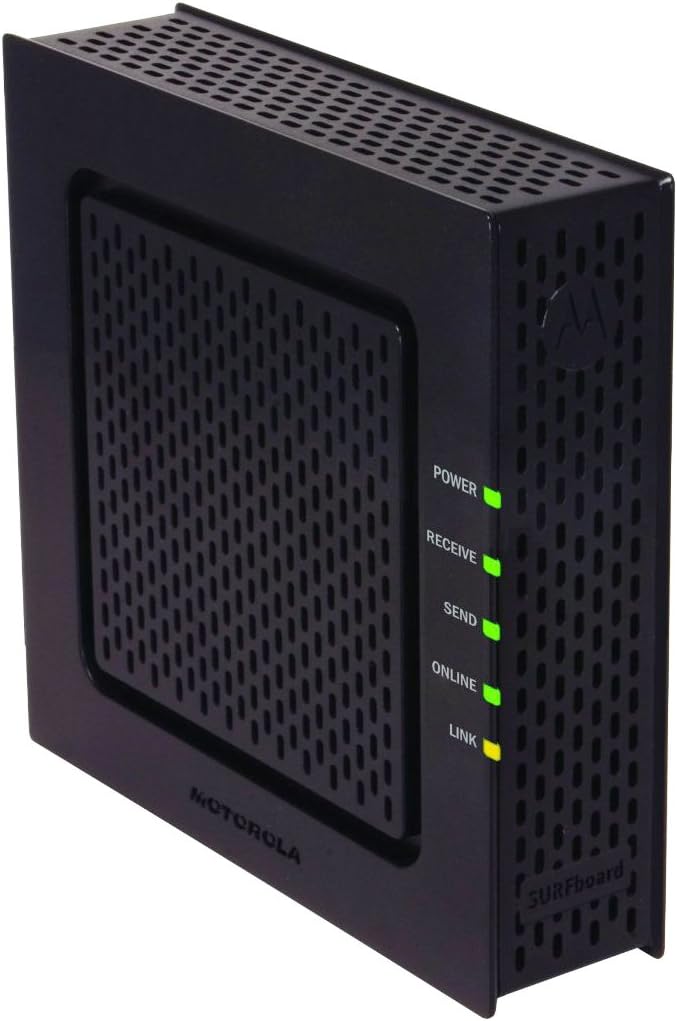
Сүрөт: алдыңкы view of the Motorola SB6120 cable modem, showing the Power, Receive, Send, Online, and Link LED indicators.
- Күч: Модем кубат алып жатканын көрсөтөт.
- Кабыл алуу: Indicates downstream channel connectivity. Blinking means scanning for a connection, solid means connected.
- Жөнөтүү: Indicates upstream channel connectivity. Blinking means scanning for a connection, solid means connected.
- Онлайн: Indicates internet connectivity. Blinking means registering, solid means online.
- Шилтеме: Indicates Ethernet connection to a computer or router. Blinking means data activity, solid means connected.
Арткы панелдик байланыштар
The rear panel provides all the necessary ports for connecting your modem to the cable network, your computer, and power.

Сүрөт: Арткы view of the Motorola SB6120 cable modem, highlighting the Ethernet port (top), Coaxial cable connector (middle), and Power input (bottom).
- Ethernet порту: Компьютериңизге же роутериңизге Ethernet кабели аркылуу туташат.
- Коаксиалдык кабель туташтыргычы: Connects to your cable wall outlet or cable splitter.
- Кубат киргизүү: Берилген кубат адаптерине туташат.
4. Орнотуу колдонмосу
Баштоодон мурун
Орнотууну баштоодон мурун төмөнкүлөрдүн бар экенине ынаныңыз:
- An active cable internet service subscription.
- A computer with an Ethernet port or a wireless router.
- Access to a cable wall outlet.
Кадам-кадам орнотуу
- Коаксиалдык кабелди туташтыруу: Connect one end of the coaxial cable to the cable wall outlet and the other end to the COAX connector on the rear of your SB6120 modem. Ensure the connections are finger-tight.
- Ethernet кабелин туташтыруу: Connect one end of the supplied Ethernet cable to the Ethernet port on the rear of your SB6120 modem. Connect the other end to the Ethernet port on your computer or the WAN/Internet port on your wireless router.
- Кубат адаптерин туташтыруу: Connect the power cord to the POWER port on the rear of your SB6120 modem. Plug the other end of the power adapter into an electrical outlet.
- Күйгүзүү: The modem will automatically power on. Allow a few minutes for the modem to initialize and connect to the cable network.
- LED абалын текшерүү: Observe the front panel LEDs. The Power, Receive, Send, and Online LEDs should eventually turn solid green. The Link LED should be solid or blinking yellow/green depending on your connection speed and activity. Refer to Section 5 for detailed LED status meanings.
- ISP менен активдештирүү: Contact your Internet Service Provider (ISP) to activate your new modem. You will typically need to provide them with the modem's MAC address, which is usually found on a sticker on the bottom or back of the modem.
5. Иштөө нускамалары
LED көрсөткүчтөрүн түшүнүү
The LEDs on the front panel provide important information about the modem's operational status. Refer to the table below for a detailed explanation of each indicator.
| LED аты | Статус | Description |
|---|---|---|
| Күч | Катуу жашыл | Модем күйгүзүлгөн. |
| Кабыл алуу | Былкылдаган жашыл | Төмөнкү канал байланышы изделүүдө. |
| Катуу жашыл | Төмөнкү канал туташты. | |
| Жөнөтүү | Былкылдаган жашыл | Жогорку агымдагы канал байланышы изделүүдө. |
| Катуу жашыл | Жогорку канал туташты. | |
| Онлайн | Былкылдаган жашыл | Registering IP address and configuration. |
| Катуу жашыл | Modem is online and ready for internet access. | |
| Шилтеме | Катуу сары | Ethernet connection at 10/100 Mbps. |
| Катуу жашыл | Ethernet connection at 1000 Mbps (Gigabit). | |
| Blinking Yellow/Green | Data activity over the Ethernet connection. |
Негизги операция
Once the SB6120 modem is successfully installed and activated with your ISP, it operates continuously to provide internet connectivity. There are no user-configurable settings directly on the modem itself. All network configurations, such as Wi-Fi settings or port forwarding, are managed through your connected router or computer's network settings.
6. Техникалык тейлөө
To ensure optimal performance and longevity of your Motorola SB6120 cable modem, consider the following maintenance tips:
- Вентиляция: Place the modem in a well-ventilated area, away from direct sunlight or heat sources. Ensure that the ventilation holes are not blocked.
- Тазалоо: Periodically wipe the exterior of the modem with a soft, dry cloth. Avoid using liquid cleaners or abrasive materials.
- Power Cycling: If you experience connectivity issues, a simple power cycle can often resolve them. Disconnect the power adapter from the modem, wait for 10-15 seconds, and then reconnect it. Allow the modem to fully restart and re-establish connection.
- Кабелдик байланыштар: Бардык коаксиалдык жана Ethernet кабелдеринин туташуулары бекем жана бош эмес экенин мезгил-мезгили менен текшерип туруңуз.
7. Кыйынчылыктарды
If you encounter issues with your SB6120 modem, refer to the table below for common problems and their solutions.
| Көйгөй | Мүмкүн себеп | Чечим |
|---|---|---|
| Кубат жок (Күч LED өчүк) | Кубат адаптери туташкан эмес же туура эмес розетка. | Ensure power adapter is securely connected to modem and a working electrical outlet. Try a different outlet. |
| Receive/Send LEDs Blinking | Modem is searching for a connection or having trouble locking onto channels. | Check coaxial cable connections. Ensure cable service is active. Power cycle the modem. If issue persists, contact your ISP. |
| Online LED Blinking | Modem is registering or unable to obtain an IP address. | Wait a few minutes. If it continues to blink, contact your ISP to ensure the modem is properly activated on their network. |
| Интернетке кирүү жок | Modem not online, router issue, or computer network settings. | Verify all modem LEDs are solid green. Power cycle modem and router (if applicable). Check computer's network settings. Contact ISP if modem LEDs are correct but no internet. |
| Жай Интернет ылдамдыгы | Network congestion, ISP issue, or modem signal quality. | Power cycle modem and router. Test speed with a wired connection directly to the modem. Contact your ISP to check signal levels and service plan. |
8. Техникалык шарттар
Below are the key technical specifications for the Motorola SB6120 SURFboard Cable Modem:
| Өзгөчөлүк | Спецификация |
|---|---|
| Модель номери | SB6120 (545101-011-00) |
| DOCSIS стандарты | DOCSIS 3.0 (Backward compatible with 2.0) |
| Data Transfer Rate (Downstream) | 343 Мбит/сек чейин |
| Data Transfer Rate (Upstream) | 120 Мбит/сек чейин |
| Ethernet порту | 1 x 10/100/1000Base-T Gigabit Ethernet |
| Байланыш технологиясы | Ethernet |
| Өлчөмдөрү (H x W x D) | 24.13 x 17.78 x 6.99 см |
| Салмагы | 453.59 г |
| Операциялык системанын шайкештиги | Windows, Macintosh, UNIX |
9. Кепилдик жана колдоо
Чектелген Кепилдик
The Motorola SB6120 SURFboard Cable Modem comes with a 2 жылдык чектелген кепилдик from the date of purchase. This warranty covers defects in materials and workmanship under normal use. Please refer to the warranty card included in your package for full terms and conditions.
Кардарларды колдоо
For technical assistance, troubleshooting beyond this manual, or warranty claims, please contact Motorola customer support. Have your modem's model number and serial number ready when you call. You may also visit the official Motorola support website for additional resources, FAQs, and updated drivers or firmware (if applicable).