Introduction
The Brookstone iDesign Flip Speaker Dock provides a compact and portable audio solution for your iPod and iPhone devices. It features a unique flip design, allowing for both vertical and horizontal device orientation, and delivers clear stereo sound through its two built-in speakers. This manual provides instructions for proper setup, operation, and maintenance of your speaker dock.
Пакеттин мазмуну
Пакетиңизде бардык буюмдар бар экенин текшериңиз:
- Brookstone iDesign Flip Speaker Dock
- AC кубат адаптери
- Audio Cable (3.5mm auxiliary)
- Колдонуучунун Колдонмосу (бул документ)
Продукт бүттүview
Familiarize yourself with the components of your speaker dock:
- Док туташтыргычы: For connecting your iPod or iPhone.
- Динамик торлору: Cover the two built-in stereo speakers.
- Кубат баскычы: Агрегатты күйгүзөт же өчүрөт.
- Көлөмдү көзөмөлдөө: Аудио чыгаруу деңгээлин тууралайт.
- Көмөкчү киргизүү (AUX IN): Тышкы аудио түзүлүштөрдү туташтыруу үчүн.
- DC IN Jack: AC кубат адаптерин туташтыруу үчүн.
- Батарея бөлүмү: Located on the underside for optional battery power.
- Rotational Base: Allows the dock to flip for horizontal viewing.
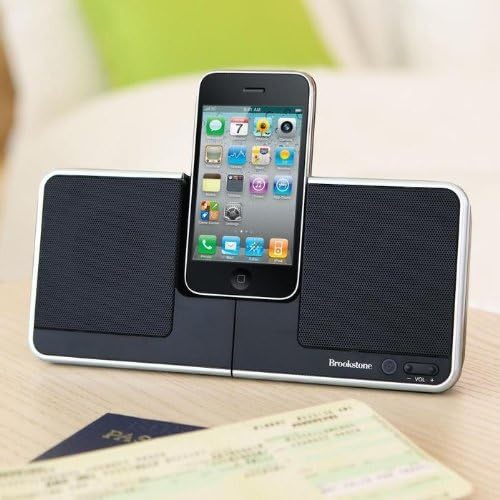
Image: The Brookstone iDesign Flip Speaker Dock with an iPhone device docked in the vertical position, showcasing its primary use.
Жайгашуу
Powering the Speaker Dock
The speaker dock can be powered by the included AC adapter or by batteries (not included).
- AC кубаттуулугу: Connect the small end of the AC power adapter to the DC IN jack on the back of the speaker dock. Plug the other end into a standard wall outlet.
- Батарея кубаттуулугу: Open the battery compartment on the underside of the unit. Insert the required number of batteries (refer to the compartment label for type and quantity), ensuring correct polarity. Close the compartment securely.
Docking Your Device
- Ensure the speaker dock is powered on.
- Carefully align your iPod or iPhone with the docking connector.
- Gently push your device down onto the connector until it is seated firmly.
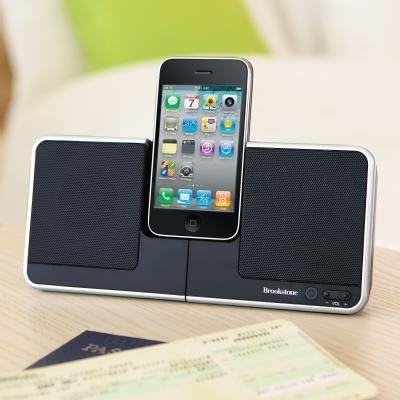
Сүрөт: жакын план view of the Brookstone iDesign Flip Speaker Dock with an iPhone securely docked in the upright, vertical position.
Connecting External Audio (AUX IN)
To play audio from devices without a docking connector:
- Connect one end of the 3.5mm audio cable to the AUX IN jack on the speaker dock.
- Аудио кабелдин экинчи учун тышкы аспабыңыздын гарнитура уячасына же аудио чыгышына туташтырыңыз.
- Ensure your external device's volume is set to a moderate level before playing audio.
Иштөө нускамалары
Күйгүзүү/өчүрүү
Press the Power button located on the front of the unit to turn the speaker dock on or off. An indicator light may illuminate when the unit is powered on.
Аудио ойнотулууда
Once your iPod, iPhone, or external device is connected and the speaker dock is powered on, begin playback on your device. Audio will be routed through the speaker dock's speakers.
Үндү көзөмөлдөө
Use the Volume Up (+) and Volume Down (-) buttons on the speaker dock to adjust the audio output level. Note that the volume control may have a slight delay in response and a limited number of distinct volume levels.
Using the Flip Feature
The speaker dock features a rotational base to change your device's orientation:
- With your device docked vertically, gently rotate the central section of the dock.
- The dock will pivot, allowing your device to rest in a horizontal (landscape) orientation.
- To return to vertical orientation, gently rotate the central section back.

Image: The Brookstone iDesign Flip Speaker Dock with an iPhone device docked in the horizontal (landscape) position, demonstrating the flip feature.
Автоматтык өчүрүү өзгөчөлүгү
The speaker dock is designed with an automatic shut-off feature to conserve power. If no audio is playing or no activity is detected for a period of time (typically 5-30 minutes), the unit may automatically power down. This feature cannot be disabled.
Техникалык тейлөө
Тазалоо
To clean the speaker dock, ensure it is powered off and unplugged. Use a soft, dry cloth to wipe down the surfaces. Do not use liquid cleaners or abrasive materials, as these may damage the finish or internal components.
Батареяны алмаштыруу
If using battery power and the unit's performance diminishes, replace all batteries with new ones of the specified type and quantity. Always dispose of used batteries responsibly according to local regulations.

Image: The Brookstone iDesign Flip Speaker Dock shown in its compact, folded configuration, ideal for travel and storage.
Проблемаларды чечүү
If you encounter issues with your speaker dock, please refer to the following common solutions:
| Көйгөй | Мүмкүн чечим |
|---|---|
| Күч жок | Ensure the AC adapter is securely connected to both the dock and a working power outlet. If using batteries, check that they are correctly inserted and not depleted. |
| Динамиктерден үн жок | Verify the speaker dock is powered on. Increase the volume on both the dock and your connected device. Ensure your device is properly docked or the AUX cable is fully inserted. If using AUX, try unplugging and re-plugging the cable. |
| Түзмөк заряддалбай жатат | Ensure the speaker dock is connected to AC power. Re-seat your device on the docking connector. Check for any debris in the docking port of your device or the dock. |
| Туруксуз электр байланышы | Ensure the AC power adapter is firmly seated in the DC IN jack. Avoid moving the unit excessively while connected to power. |
| Volume control unresponsive or limited | This unit may have a slight delay in volume adjustment and a limited number of volume steps. Adjust gradually. |
| Dock feels unstable / topples easily | Ensure the small feet on the underside of the dock are fully extended and locked into position. Place the dock on a flat, stable surface. |
| Автоматтык өчүрүү күтүлбөгөн жерден пайда болот | This is a built-in power-saving feature and cannot be disabled. The unit will power off after a period of inactivity or no audio playback. |
Техникалык шарттар
- Модел: iDesign Flip Speaker Dock
- Бренд: Brookstone
- ASIN: B0028P09RY
- Пакеттин өлчөмдөрү: 10.1 x 8 x 2.2 дюйм
- Элемент Салмагы: 1.5 фунт
- Кубат булагы: AC адаптер же батарейкалар (киргизилген эмес)
- Аудио чыгаруу: Стерео динамиктер
- Байланыш: Docking Connector for iPod/iPhone, 3.5mm Auxiliary Input
- Өндүрүүчү: Brookstone
- Биринчи жеткиликтүү болгон күнү: 5-май, 2003-жыл
Кепилдик жана колдоо
Specific warranty information for this product is not available in this manual. Please refer to the original product packaging or contact Brookstone customer support for details regarding warranty coverage and technical assistance.


