Introduction
The Master Lock No. 1500 is a 3-digit combination padlock designed for general security applications. It features a durable construction with a double-reinforced stainless steel body and a hardened steel shackle, providing enhanced resistance against cutting and tampering. This lock incorporates BlockGuard™ Anti-Shim Technology to protect against attempts to bypass the latch mechanism. The combination is factory-set and cannot be changed by the user. This manual provides instructions for locating the combination, operating the lock, and general care.
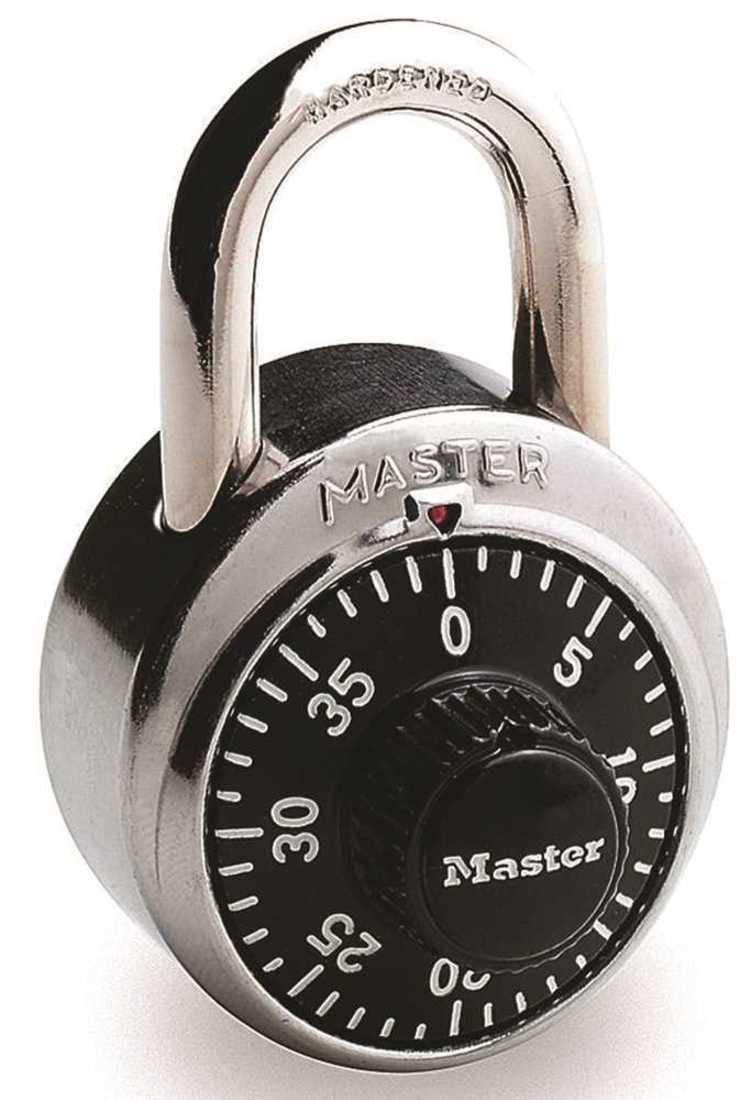
1-сүрөт: Фронт view of the Master Lock 1500 Combination Lock, showing the dial and shackle.
Setup: Locating Your Combination
The Master Lock 1500 combination padlock comes with a factory-set, permanent 3-digit combination. This combination cannot be reset by the user. To locate your lock's unique combination:
- Check the Packaging: The combination is typically printed on a sticker or label on the original packaging of your Master Lock 1500.
- Inspect the Lock Body: For some models, the combination may be found on a sticker located on the back of the lock body. Carefully peel off any temporary labels if present.
It is recommended to record your combination in a safe and memorable place for future reference. Do not store the combination directly with the lock.
Иштөө нускамалары
Кулпуну ачуу
To open your Master Lock 1500 combination padlock, follow these steps:
- Clear the Dial: Turn the dial clockwise two or more full turns, stopping at the first number of your combination. This clears any previous attempts.
- First Number: Turn the dial clockwise to the first number of your combination.
- Second Number: Turn the dial counter-clockwise one full turn past the first number, then continue to the second number of your combination.
- Third Number: Turn the dial clockwise directly to the third number of your combination.
- Ачык кишен: Pull up on the shackle to open the lock. If the shackle does not open, ensure the numbers are precisely aligned with the indicator mark and repeat the steps.

2-сүрөт: Жакын план view of the Master Lock 1500 dial, showing the numbers and indicator mark for combination entry.
Кулпуну жабуу
Кулпуну жабуу жана бекитүү үчүн:
- Insert the shackle firmly into the lock body.
- Scramble the dial by turning it a few turns in either direction. This ensures the combination is hidden and the lock is secured.
Техникалык тейлөө
Proper maintenance ensures the longevity and smooth operation of your Master Lock 1500.
- Майлоо: Periodically apply a small amount of graphite lubricant or a silicone-based spray to the shackle and the internal mechanism through the shackle holes. Avoid oil-based lubricants as they can attract dirt.
- Тазалоо: Wipe the lock body and shackle with a clean, dry cloth to remove dirt and grime. Do not use harsh chemicals or abrasive cleaners.
- Сактагыч: Store the lock in a dry environment when not in use to prevent rust, especially if exposed to moisture.
Проблемаларды чечүү
- Difficulty Opening:
- Ensure the combination numbers are precisely aligned with the indicator mark. Slight misalignment can prevent opening.
- Verify you are using the correct factory-set combination.
- Repeat the opening procedure carefully, ensuring the dial is turned two full turns clockwise to clear it before starting.
- Apply a lubricant as described in the Maintenance section if the dial feels stiff.
- Унутулган айкалыш: Since the Master Lock 1500 has a factory-set combination that cannot be changed, if you have lost or forgotten your combination and no longer have the original packaging or recorded it, you will need to contact Master Lock customer support with proof of ownership for assistance.
- Shackle Stuck: If the shackle is difficult to move, ensure the lock is fully open and apply a lubricant to the shackle entry points.
Техникалык шарттар
| Бренд | Master Lock |
| Модель номери | 1500 |
| Кулпу түрү | Комбинацияланган кулпу |
| Өзгөчө өзгөчөлүк | Keyless, BlockGuard™ Anti-Shim Technology |
| Body Width | 1-7/8 дюйм (48мм) |
| Shackle Length | 3/4 дюйм (19мм) |
| Кишендин диаметри | 9/32 дюйм (7мм) |
| Материал | Эритме болот, дат баспас болот |
| Түс | Кара |
| Элемент Салмагы | 5.6 унция |
| Өлчөмдөрү (L x W x Y) | 1 x 1 x 1 дюйм |
| Сунушталган Колдонуулар | Lockers, cabinets, school, employee & health club self-storage units |
Кепилдик жана колдоо
Master Lock products are manufactured to demanding standards and are backed by a limited lifetime warranty against mechanical defects. For specific warranty details, claims, or technical support, please visit the official Master Lock website or contact their customer service department directly. Proof of purchase may be required.
For additional information or to explore other Master Lock products, you can visit the Master Lock Store on Amazon.


