Introduction
Сатып алганыңыз үчүн рахматasing the Muse M-12 CR Radio Alarm Clock. This compact and versatile device combines an FM radio with a dual alarm clock, offering convenience and functionality for your daily routine. Featuring a clear red LED display and intuitive controls, the M-12 CR is designed for ease of use. Please read this manual carefully to ensure proper operation and to fully utilize all features of your new alarm clock.
Пакеттин мазмуну
Сураныч, бардык буюмдар бар экенин жана жакшы абалда экендигин текшериңиз:
- Muse M-12 CR Radio Alarm Clock Unit
- Кубаттуу адаптер
- Колдонуучунун Колдонмосу (бул документ)
Продукт бүттүview жана Controls
Familiarize yourself with the various parts and controls of your Muse M-12 CR Radio Alarm Clock.

1-сүрөт: Алды менен үстү view of the Muse M-12 CR Radio Alarm Clock, highlighting the red LED display and the arrangement of control buttons.
Башкаруу баскычтары (жогорку панель):
- SNOOZE / DIMMER Button: Press to temporarily silence the alarm (snooze function). Press and hold to adjust display brightness.
- ALARM 1 Button: Press to activate/deactivate Alarm 1. Press and hold to set Alarm 1 time.
- ALARM 2 Button: Press to activate/deactivate Alarm 2. Press and hold to set Alarm 2 time.
- TIME SET баскычы: Press and hold to set the current time.
- HR (Hour) Button: Used to adjust the hour during time or alarm setting.
- MIN (Minute) Button: Used to adjust the minute during time or alarm setting.
- VOL- / PREV Button: Decreases volume. In radio mode, short press for previous preset station, long press for backward auto-scan.
- VOL+ / NEXT Button: Increases volume. In radio mode, short press for next preset station, long press for forward auto-scan.
- FM / MEM Button: Press to switch to FM radio mode. Press and hold to automatically scan and store FM stations.
- SLEEP баскычы: Уйку таймер функциясын иштетет.
- NAP Button: Activates the nap timer function.
Жайгашуу
1. Power Connection
- Unpack the Muse M-12 CR unit and the power adapter.
- Insert the DC plug of the power adapter into the DC IN jack located at the back of the unit.
- Plug the power adapter into a standard AC wall outlet (100-240V, 50/60Hz). The display will light up, and the clock will be ready for time setting.
2. Батареянын камдык көчүрмөсү (милдеттүү эмес)
To maintain time and alarm settings during a power outage, you can install backup batteries (not supplied). The unit typically uses AAA batteries. Refer to the battery compartment on the bottom of the unit for correct battery type and polarity.
Иштөө нускамалары
Убакытты коюу
- басып, кармап туруңуз УБАКЫТТЫ ОРНОТУУ баскычын сааттын цифралары жаркылдай баштаганга чейин басыңыз.
- басыңыз HR button repeatedly to adjust the hour.
- басыңыз MIN Мүнөттү тууралоо үчүн баскычын кайра-кайра басыңыз.
- басыңыз УБАКЫТТЫ ОРНОТУУ ырастоо жана убакыт орнотуу режиминен чыгуу үчүн кайра баскычын басыңыз.
Ойготкучтарды орнотуу (1-ойготкуч жана 2-ойготкуч)
The M-12 CR features two independent alarms.
- басып, кармап туруңуз 1-ДАБЛ or 2-ДАБЛ ойготкуч сааттын цифралары жарк этмейинче басыңыз.
- басыңыз HR каалаган ойготкуч саатын коюу үчүн баскыч.
- басыңыз MIN каалаган ойготкуч мүнөттү орнотуу үчүн.
- басыңыз 1-ДАБЛ or 2-ДАБЛ button again to select the alarm source (Radio or Buzzer). The corresponding indicator will light up.
- басыңыз 1-ДАБЛ or 2-ДАБЛ button one more time to confirm and activate the alarm. The alarm indicator (1 or 2) will appear on the display.
Ойготкучту өчүрүү үчүн, тиешелүү баскычты басыңыз 1-ДАБЛ or 2-ДАБЛ button until its indicator disappears from the display.
Radio Operation (FM)
- басыңыз FM / MEM button to switch to FM radio mode. The frequency will be displayed.
- Automatic Scan and Store: басып, кармап туруңуз FM / MEM button to automatically scan for and store available FM stations (up to 20 presets).
- Кол менен жөндөө: колдонуу VOL- / PREV жана VOL+ / NEXT buttons to manually tune to a specific frequency. Long press for auto-scan to the next strong station.
- Алдын ала орнотууларды тандоо: баскычын кыска басыңыз VOL- / PREV or VOL+ / NEXT buttons to cycle through stored preset stations.
- Үндү тууралоо: колдонуу VOL- / PREV жана VOL+ / NEXT buttons (when not in tuning mode) to adjust the radio volume.
Тындырма функциясы
Ойготкуч басылганда, басыңыз КАЙРЫЛУУ / КӨҢҮЛГӨТ button to temporarily silence the alarm. The alarm will sound again after a few minutes (default snooze time is usually 9 minutes, refer to specific product behavior if different).
Уйку таймери функциясы
Уйку таймери сизге радио менен уктап калууга мүмкүндүк берет, ал белгиленген убакыттан кийин автоматтык түрдө өчөт.
- Радио ойноп жатканда, баскычын басыңыз УЙКУ button repeatedly to cycle through available sleep timer durations (e.g., 120, 90, 60, 30, 15, 10, 5 minutes, or OFF).
- Тандалган убакыттан кийин радио автоматтык түрдө өчөт.
Nap Timer функциясы
The nap timer sets an alarm to sound after a short, predefined period.
- басыңыз NAP button repeatedly to select a nap duration (e.g., 120, 90, 60, 30, 15, 10, 5 minutes, or OFF).
- The alarm will sound after the selected nap time has elapsed.
Диммерди көрсөтүү
LED дисплейдин жарыктыгын тууралоо үчүн:
- басыңыз КАЙРЫЛУУ / КӨҢҮЛГӨТ button (when the alarm is not sounding) to cycle through different brightness levels (e.g., High, Medium, Low, Off).
Техникалык тейлөө
- Тазалоо: Түзмөктүн сыртын тазалоо үчүн жумшак, кургак чүпүрөктү колдонуңуз. Абразивдүү тазалоочу каражаттарды, момдорду же эриткичтерди колдонбоңуз, анткени алар капталына зыян келтириши мүмкүн.
- Жайгашкан жери: Аппаратты түз күн нурунан, жылуулук булактарынан жана ашыкча чаңдан же нымдан алыс, туруктуу, жалпак бетке коюңуз.
- Вентиляция: Ашыкча ысып кетүүнүн алдын алуу үчүн аппараттын айланасында жетиштүү желдетүүнү камсыз кылыңыз. Вентиляция тешиктерин жаап албаңыз.
- Электр энергиясын өчүрүү: If the unit is not going to be used for a long period, unplug the power adapter from the wall outlet.
Проблемаларды чечүү
| Көйгөй | Мүмкүн себеп | Чечим |
|---|---|---|
| Кубат жок / Дисплей өчүк | Power adapter not connected or faulty. Power outlet not active. | Кубат адаптери түзмөккө жана иштеп жаткан розеткага бекем сайылганын текшериңиз. Башка розетканы колдонуп көрүңүз. |
| Ойготкуч угулбайт | Alarm not activated. Alarm volume too low (for radio alarm). Incorrect alarm time set. | Ensure the alarm indicator (1 or 2) is visible on the display. Increase radio volume if using radio alarm. Verify alarm time is correctly set. |
| Радио кабыл алуу начар | Antenna not extended or positioned correctly. Interference from other electronic devices. Weak signal in the area. | Fully extend and adjust the FM wire antenna for best reception. Move the unit away from other electronics. Try auto-scanning for stronger stations. |
| Баскычтар жооп бербейт | Убактылуу системалык мүчүлүштүк. | Түзмөктү бир нече мүнөткө электр розеткасынан сууруп, андан кийин баштапкы абалга келтирүү үчүн кайра сайыңыз. |
Техникалык шарттар
| Модел | M-12 CR |
| Дисплей түрү | LED (кызыл) |
| Дисплей өлчөмү | 1.5 см (0.6 дюйм) |
| Радио жыштыгы | FM (with 20 preset stations) |
| Сигнал функциялары | Dual Alarm (Radio or Buzzer), Snooze, Sleep, Timer (Nap) |
| Power Source | Wired (AC Power Adapter) |
| Өлчөмдөрү (L x W x Y) | 12.9 x 5.3 x 6.5 см (болжол менен) |
| Салмагы | 290 г (болжол менен) |
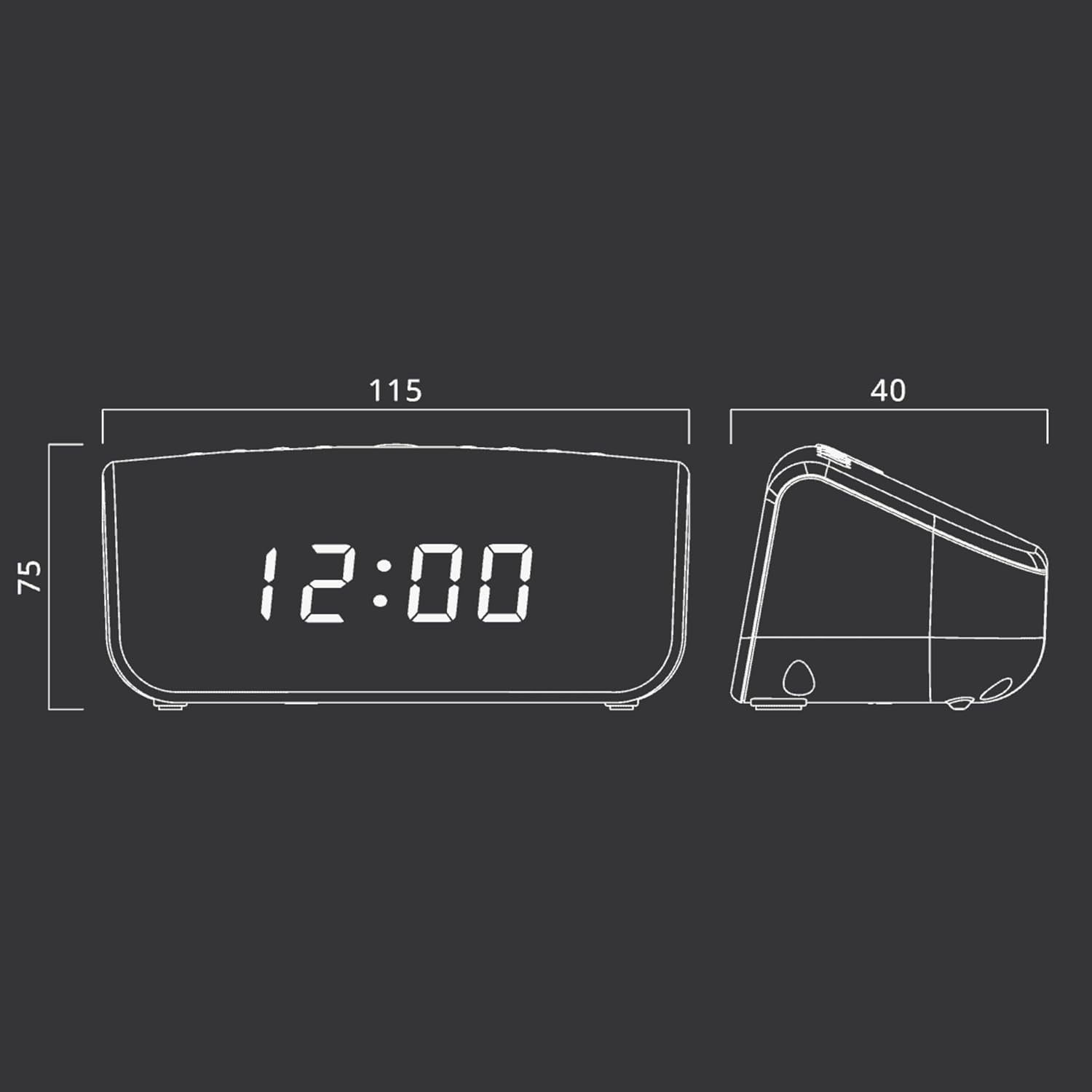
2-сүрөт: Approximate dimensions of the Muse M-12 CR unit.
Кепилдик жана колдоо
Кепилдик жөнүндө маалымат жана техникалык колдоо алуу үчүн, өнүмүңүз менен кошо берилген кепилдик картасын караңыз же расмий Muse веб-сайтына кириңиз. webсайт. Сатып алуу квитанциясын кепилдик дооматтары үчүн сатып алуунун далили катары сактаңыз.
For further assistance, please contact Muse customer service.


