Introduction
This manual provides detailed instructions for the Panasonic CN-MW200D 7V-inch Wide Monitor 2DIN AV System. This system integrates digital TV, DVD, CD, and SD card navigation functionalities into a single unit. It features a customizable 'Two-Top Menu' that allows users to tailor the main menu to their preferences. For frequent searches by genre or address, you can set these as 'frequently used buttons' for more convenient operation. Please read this manual thoroughly before use to ensure proper installation, operation, and maintenance.
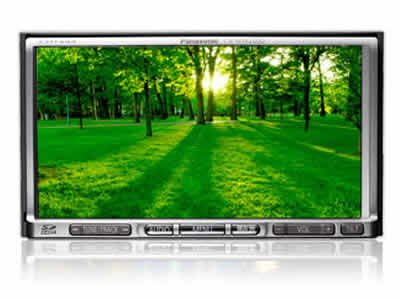
Фронт view of the Panasonic CN-MW200D car navigation system, showing the 7V-inch wide monitor and control buttons.
Жайгашуу
Туура орнотуу оптималдуу аткаруу жана коопсуздук үчүн өтө маанилүү болуп саналат. Орнотуу квалификациялуу адис тарабынан аткарылышы сунушталат.
1. Орнотуу жери
Ensure the 2DIN unit is securely mounted in the vehicle's dashboard. Verify that the unit does not obstruct the driver's view же транспорт каражаттарын башкарууга тоскоолдук кылуу.
2. Power Connection
- Connect the yellow wire (battery) to a constant 12V power source.
- Connect the red wire (accessory) to a switched 12V power source that turns on/off with the ignition.
- Connect the black wire (ground) to a clean metal point on the vehicle chassis.
- Кыска туташуунун алдын алуу үчүн бардык туташуулардын коопсуз жана изоляцияланганын текшериңиз.
3. Антенна туташуулары
- Connect the GPS antenna to the designated port on the rear of the unit. Position the GPS antenna in a location with a clear view асмандын, адатта, башкаруу панелинде.
- Connect the digital TV antenna(s) to the corresponding ports. Ensure antennas are properly installed for optimal signal reception.
4. Баштапкы орнотуулар
After power-up, follow the on-screen prompts to configure initial settings such as language, time zone, and navigation preferences. Perform a GPS signal acquisition test to confirm proper antenna function.
Иштеп жатат
This section details the primary functions of your Panasonic CN-MW200D system.
1. Навигация системасы
- Көздөгөн жерди издөө: From the main menu, select 'Navigation' and then choose your preferred search method (e.g., address, point of interest, genre, frequently used buttons).
- Маршруттук жетекчилик: Once a destination is set, the system will calculate and display the optimal route. Follow the voice prompts and on-screen map for guidance.
- Карта View: Adjust the map display (2D/3D, zoom level) using the on-screen controls. The clear and realistic map display provides confidence during travel.
2. AV System (Digital TV, DVD, CD, SD)
- Санариптик телекөрсөтүү: Select 'TV' from the main menu. Use the channel scan function to find available digital TV broadcasts.
- DVD/CD ойнотуу: Insert a DVD or CD into the disc slot. The system will automatically detect and begin playback. Use the on-screen controls for playback functions (play, pause, skip).
- SD картаны ойнотуу: Аудио же видео камтылган SD картаны салыңыз files into the SD card slot. Select 'SD' from the main menu to browse and play media files.
3. Two-Top Menu Customization
Access the 'Two-Top Menu' settings from the system menu to customize frequently used functions. Drag and drop icons to personalize your main screen for quick access to navigation, media, or other features.
Техникалык тейлөө
Regular maintenance helps ensure the longevity and optimal performance of your system.
1. Экранды тазалоо
Gently wipe the screen with a soft, dry cloth. For stubborn smudges, use a cloth lightly dampened with a screen cleaner specifically designed for electronic displays. Avoid abrasive materials or harsh chemicals.
2. Программалык камсыздоону жаңыртуу
Panasonic колдоосун мезгил-мезгили менен текшерип туруңуз website for available software or map updates. Follow the instructions provided with the update package carefully to ensure a successful update process. Typically, updates involve downloading files to an SD card and inserting it into the unit.
3. Disc Slot Care
Keep the disc slot free of dust and debris. Avoid inserting damaged or dirty discs, as this can harm the playback mechanism.
Проблемаларды чечүү
This section addresses common issues you might encounter with your CN-MW200D system.
| Көйгөй | Мүмкүн себеп | Чечим |
|---|---|---|
| Күч жок | Электр байланышы бош, сактагыч күйүп кетти | Check power wiring (yellow, red, black). Inspect vehicle fuses related to the AV system. |
| GPS сигналы жок | GPS antenna not connected, obstructed view of sky, faulty antenna | Ensure GPS antenna is securely connected and placed with a clear view of the sky. Test in an open area. |
| Үн жок | Үн өтө төмөн, үнүн өчүрүү иштетилди, динамиктин зымдары көйгөйү | Increase volume. Check if mute function is active. Verify speaker connections. |
| Диск ойнобой жатат | Disc is dirty, scratched, or incompatible format | Clean the disc. Try a different disc. Ensure the disc format is supported by the unit. |
| Сенсордук экран жооп бербейт | Системанын тоңушу, калибрлөө маселеси | Perform a soft reset (refer to the full manual for specific reset procedures). If available, recalibrate the touch screen. |
If the problem persists after attempting these solutions, please contact Panasonic customer support or a qualified service center.
Техникалык шарттар
Key technical specifications for the Panasonic CN-MW200D:
- Бренд: Panasonic
- Модел: CN-MW200D
- Экрандын өлчөмү: 7V-inch
- Дисплей түрү: LCD
- Медиа түрү: Memory (SD Card), DVD, CD
- Системанын түрү: 2DIN AV System with Digital TV and Navigation
- ASIN: B002OD8DHS
Кепилдик жана колдоо
Кепилдик боюнча кенен маалымат алуу үчүн продуктуңузга кошулган кепилдик картасын караңыз же расмий Panasonic компаниясына баш багыңыз. website. For technical support, service, or inquiries, please contact Panasonic customer service through their official channels. Keep your purchase receipt and product model number (CN-MW200D) handy when contacting support.


