1. Introduction and Overview
This manual provides comprehensive instructions for the Philips Sonicare FlexCare+ Electric Toothbrush, model HX6921/02. Please note that while the cosmetic box indicates model HX6921/02, the product handle base may be marked HX6950. This document covers product features, setup, operation, maintenance, and safety guidelines to ensure optimal performance and oral hygiene.
Продукт өзгөчөлүктөр:
- Brush head with wear indicator for timely replacement.
- Arch-shaped brush head designed for three-dimensional fit to tooth alignment.
- Features multiple brushing modes, including a dedicated Gum Care Mode.
- Utilizes Philips' unique Sonic Technology for effective plaque removal.

Image 1.1: Philips Sonicare FlexCare+ Electric Toothbrush with charging base and travel case.
2. Коопсуздук маалыматы
ЭСКЕРТҮҮ:
This product should be kept out of the reach of children's mouths to prevent accidental ingestion or injury. Always supervise children if they are using or near the device.
- Заряддагычты сууга же башка суюктуктарга салбаңыз.
- Do not use if the product or charger is damaged.
- Эгерде сизде оозеки операция же тиш оорусу бар болсо, бул продуктуну колдонуудан мурун тиш доктуруңуз менен кеңешиңиз.
- This appliance contains no user-serviceable parts. For repairs, contact Philips customer service.
3. Продукциянын өзгөчөлүктөрү
3.1. Щетка режимдери
The FlexCare+ offers 5 distinct brushing modes to cater to various oral care needs:
- Clean Mode (2 minutes): Standard mode for thorough daily cleaning.
- Gum Care Mode (3 minutes): Combines 2 minutes of Clean mode with 1 minute of gentle gum massage to promote gum health.
- Refresh Mode (1 minute): Ideal for a quick touch-up or refreshing your breath.
- Sensitive Mode (2 minutes): Provides gentle yet effective cleaning for sensitive teeth and gums.
- Massage Mode (2 minutes): Gently stimulates and massages the gums.
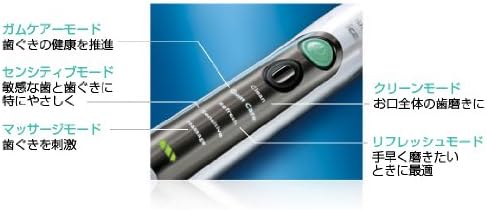
Image 3.1: The toothbrush handle displaying the various brushing modes and their descriptions.
3.2. Sonic Technology
Philips' unique Sonic Technology delivers approximately 31,000 ultra-high-speed brush strokes per minute with a wide amplitude. This creates a powerful 'Dynamic Cleaning Action' through fluid dynamics, effectively removing plaque from hard-to-reach interdental spaces and molars. This technology is supported by extensive clinical trials.
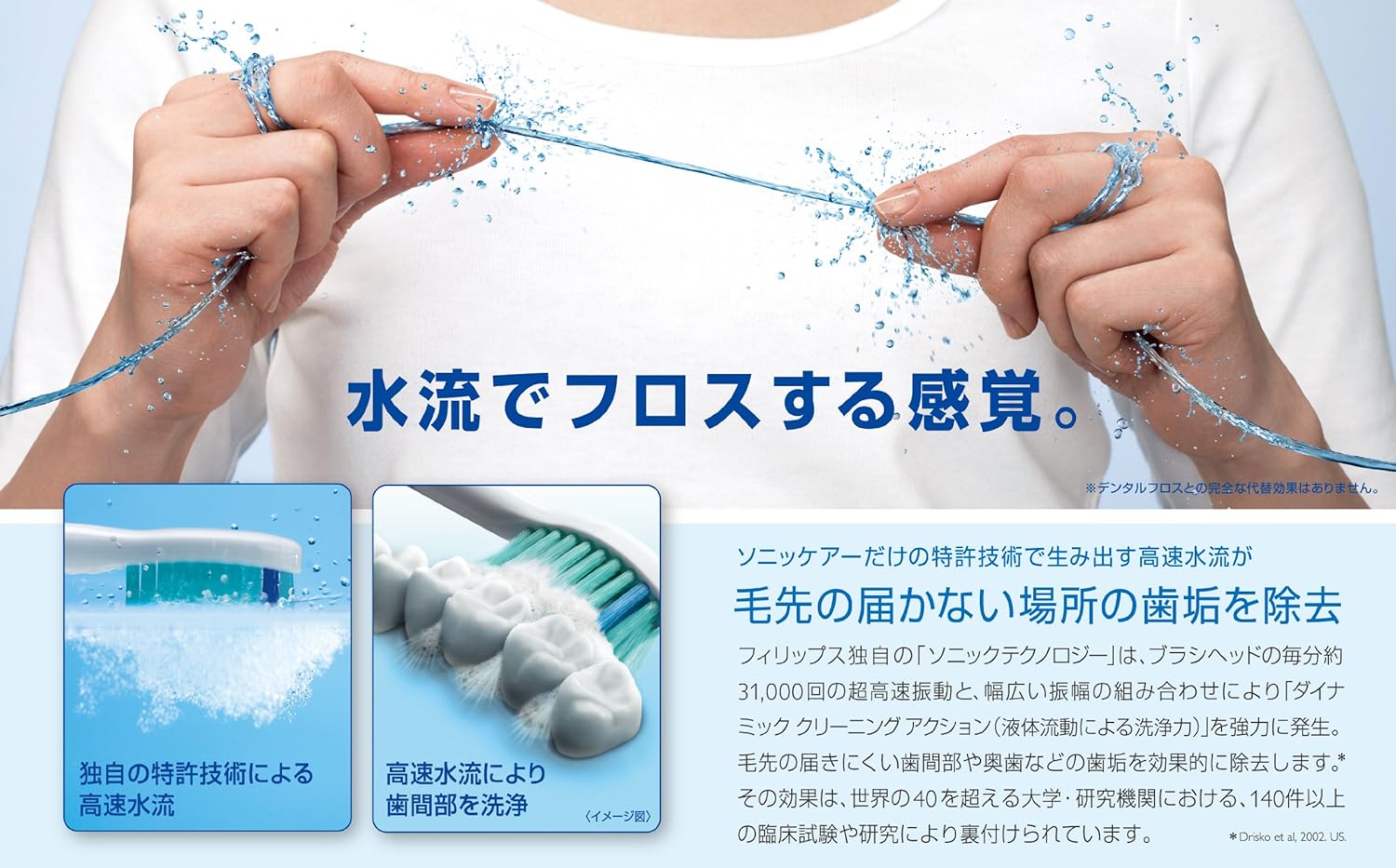
Image 3.2: Visual representation of Sonicare's high-speed water flow cleaning action between teeth.
3.3. Gentle on Teeth and Gums
The brushing pressure applied by Sonicare is approximately half that of manual brushing. This allows for thorough cleaning while being gentle and safe for delicate gums.
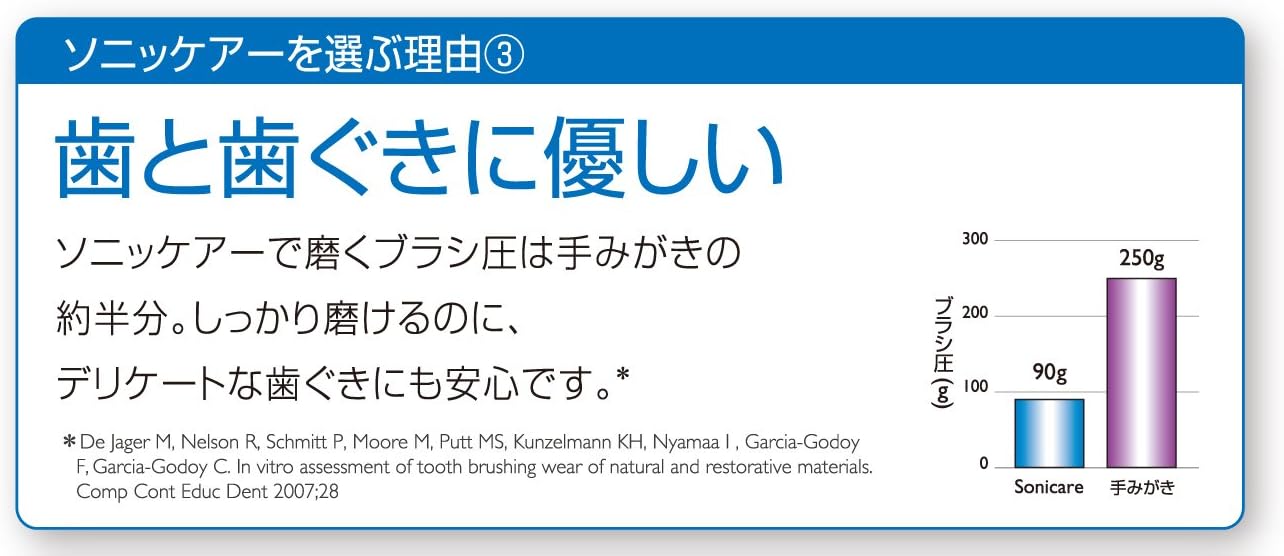
Image 3.3: Comparison of brush pressure, showing Sonicare is gentler than manual brushing.
3.4. Дакты кетирүү
The Sonicare FlexCare+ helps reduce stains and discoloration caused by coffee, tea, and tobacco, contributing to naturally whiter teeth in approximately 2 weeks.

Image 3.4: Visual demonstration of stain reduction after using Sonicare.
3.5. Smart Features
- QuadPacer: A timer that signals when to move to the next quadrant of your mouth, ensuring even brushing of all four sections (upper/lower, front/back).

Image 3.5.1: QuadPacer ensures balanced brushing.
- SmartTimer: Automatically stops after 2 minutes of brushing, aligning with dental professional recommendations.

Image 3.5.2: SmartTimer for optimal brushing duration.
- Easy-Start: Gradually increases brushing power over the first 14 uses to help new users adapt to the sonic vibration.

Image 3.5.3: Easy-Start feature for a smooth transition to sonic brushing.
- Заряддоо көрсөткүчү: A 3-level indicator on the handle shows the battery's remaining charge at a glance.

Image 3.5.4: 3-level charging indicator.
- Мульти-томtage Заряддагыч: The included charger supports multi-voltage (100V-240V), making it suitable for international travel. A power plug adapter may be required depending on the region.

Image 3.5.5: Multi-voltage charger for global use.
4. Орнотуу
4.1. Щетка башын бекитүү
- Align the brush head with the metal shaft on the handle.
- Push the brush head down firmly until it clicks into place. Ensure there is a small gap between the brush head and the handle.
4.2. Тиш щеткасын заряддоо
- Заряддагычты туруктуу, кургак бетке коюңуз.
- Заряддагычты электр розеткасына сайыңыз.
- Place the toothbrush handle onto the charging base. The charging indicator lights will illuminate to show charging status.
- For first use, charge the toothbrush for at least 24 hours to ensure a full battery.
5. Иштөө нускамалары
5.1. Тишиңизди тазалоо
- Кылчыктарды нымдап, аз өлчөмдө тиш пастасын сүйкөңүз.
- Щетканын башын тиштериңизге бир аз бурч менен тишиңизге коюңуз.
- Тиш щеткасын иштетүү үчүн кубат баскычын басыңыз.
- Gently glide the brush head across your teeth, allowing the sonic action to do the cleaning. Do not scrub.
- The QuadPacer will signal every 30 seconds to move to the next section of your mouth.
- The SmartTimer will automatically turn off the toothbrush after 2 minutes (or 3 minutes for Gum Care mode).
5.2. Changing Brushing Modes
While the toothbrush is operating, press the mode button repeatedly to cycle through the available modes (Clean, Gum Care, Refresh, Sensitive, Massage). The selected mode will illuminate on the handle.
6. Техникалык тейлөө
6.1. Тиш щеткасын тазалоо
- Ар бир колдонгондон кийин, щетканын башын агын суу менен жакшылап чайкаңыз.
- Тутканы жарнама менен сүртүңүзamp кездеме. Абразивдүү тазалагычтарды колдонбоңуз же тутканы сууга салбаңыз.
- Periodically remove the brush head and clean the metal shaft with a damp кездеме.
6.2. Щетка баштарын алмаштыруу
For optimal performance and hygiene, replace your brush head every 3 months, or sooner if the blue indicator bristles fade to white. The ProResults brush heads are designed with radially spread bristles to fit tooth alignment and effectively remove plaque.
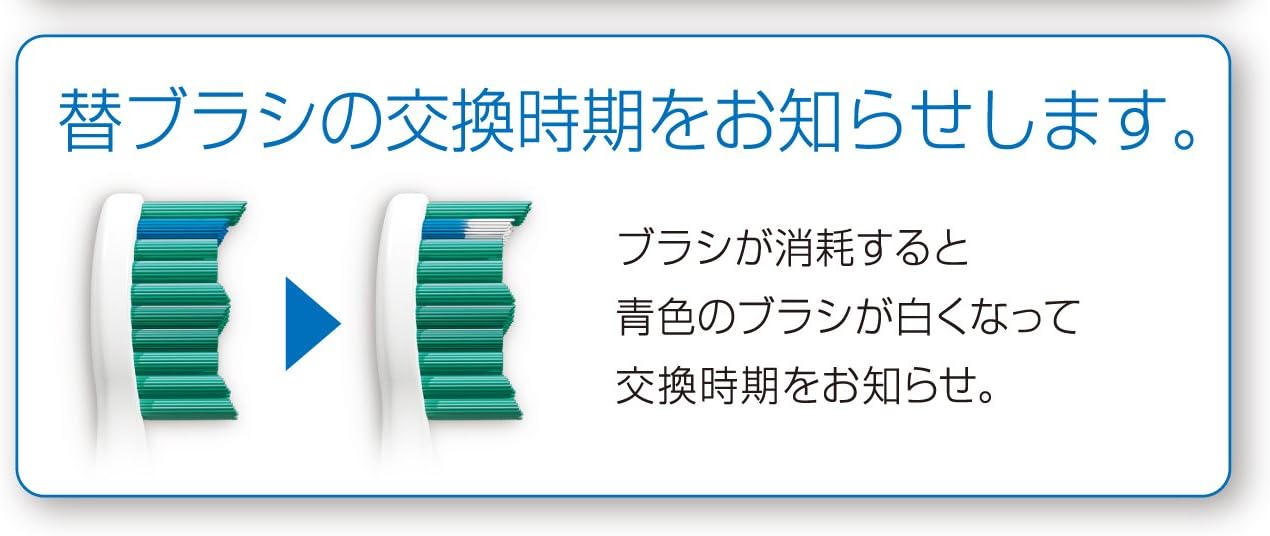
Image 6.2.1: Brush head wear indicator: blue bristles fade to white when replacement is needed.
Available Brush Head Types:
- Standard Brush: For brushing the entire mouth.
- Mini Brush: For carefully brushing individual teeth or for users with smaller mouths.
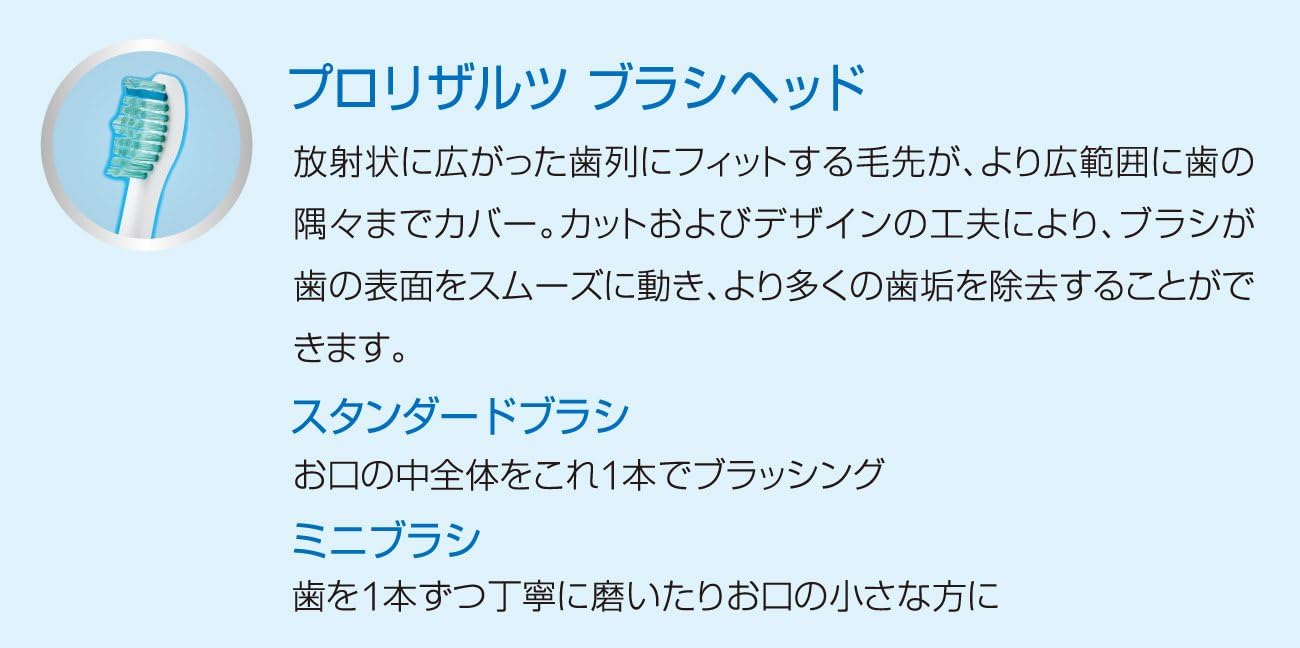
Image 6.2.2: ProResults brush head design and types.
7. Кыйынчылыктарды
If your Philips Sonicare FlexCare+ is not functioning as expected, please refer to the following common issues:
- No power/Not charging: Ensure the charger is properly plugged into a working outlet and the handle is correctly placed on the charging base. Check for any visible damage to the charger or handle.
- Reduced vibration: This could indicate a low battery. Charge the toothbrush fully. If the issue persists after charging, the internal mechanism may be faulty.
- Щетканын башы ордунда турбайт: Ensure the brush head is correctly aligned and pushed down firmly onto the metal shaft. If the shaft appears damaged, contact support.
For persistent issues or problems not listed here, please contact Philips customer support.
8. Техникалык шарттар
| Өзгөчөлүк | Спецификация |
|---|---|
| Өндүрүүчү | Philips |
| Модель номери | HX6921/02 (Handle may be marked HX6950) |
| Өлчөмдөрү (W x D x H) | 32 x 32 x 250 мм |
| Дене салмагы | 137 г |
| Handle Material | ABS |
| Country of Origin (Body) | Америка |
| Country of Origin (Charger) | Кытай |
| Power Source | Зарядкалуу |
| Заряддоочу тtage | 100V-240V (Multi-voltage) |
| Brush Movement | Sonic Vibration (approx. 31,000 strokes/minute) |
| Brushing режимдери | 5 (Clean, Gum Care, Refresh, Sensitive, Massage) |
| Таймердин өзгөчөлүктөрү | SmartTimer (2-minute auto-off), QuadPacer (30-second interval timer) |
| Камтылган аксессуарлар | 1 Standard brush head, 1 Mini brush head, Hard travel case, Charger, Deluxe charger cover with cord winder and brush head holder |
9. Кепилдик жана колдоо
9.1. Кепилдик маалыматы
The Philips Sonicare FlexCare+ typically comes with a 2-year manufacturer's warranty from the date of purchase. Please retain your proof of purchase for warranty claims. The warranty covers defects in materials and workmanship under normal use.
9.2. Кардарларды колдоо кызматы
For product registration, technical assistance, or warranty service, please visit the official Philips website or contact their customer support line. Contact information can usually be found in the product packaging or on the Philips official webсайт.
Онлайн колдоо: www.philips.com/support


