Introduction
This manual provides comprehensive instructions for setting up, operating, and maintaining your Pure Siesta FLOW digital radio alarm clock. Please read this manual thoroughly before using the device to ensure proper functionality and to maximize your user experience.

Фронт view of the Pure Siesta FLOW digital radio alarm clock, showcasing its display and front controls.
Жайгашуу
1. Пакеттен чыгаруу жана жайгаштыруу
- Carefully remove the Siesta FLOW from its packaging.
- Place the unit on a stable, flat surface, away from direct sunlight, heat sources, or excessive moisture.
- Агрегаттын айланасында жетиштүү желдетүүнү камсыз кылыңыз.
2. Power Connection
Connect the supplied power adapter to the DC input port on the back of the Siesta FLOW, then plug the adapter into a wall outlet. The unit will power on automatically.
3. Баштапкы орнотуу устасы
Upon first power-on, the Siesta FLOW will guide you through an initial setup wizard. Use the navigation buttons (Up/Down/Select) to configure the following:
- Тил: Каалаган тилиңизди тандаңыз.
- Убакыт жана дата: The unit can synchronize time via DAB or internet. You may set it manually if needed.
- Тармактык туташуу (Wi-Fi):
- Тизмеден Wi-Fi тармагыңызды тандаңыз.
- Enter your Wi-Fi password using the navigation controls. The touch-sensitive buttons on the front panel require a light touch for input.
- Байланышты ырастаңыз.

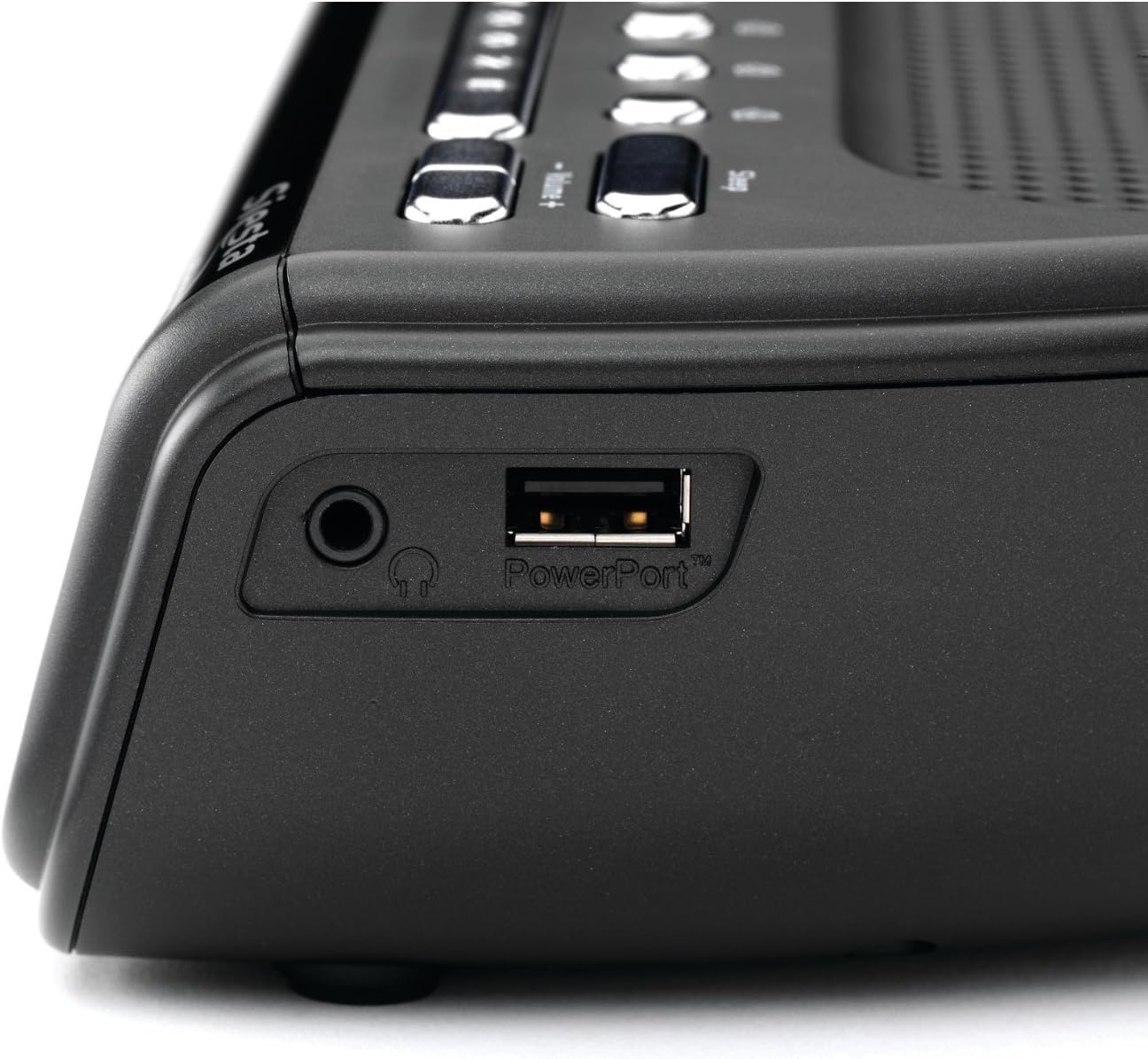
Side view of the Pure Siesta FLOW, highlighting the headphone jack and the PowerPort USB connection for charging external devices.
4. Антеннаны тууралоо
Extend the telescopic antenna fully for optimal DAB and FM radio reception. Adjust its position to improve signal strength if necessary.
Иштөө нускамалары
1. Controls Overview

Жогорку view of the Pure Siesta FLOW, illustrating the layout of the control buttons including Standby, Source, Presets, Snooze, and Volume.
- Күтүү баскычы: Powers the unit on or off (to standby mode).
- Булак баскычы: Cycles through available audio sources (DAB, FM, Internet Radio, Aux In).
- Алдын ала коюлган баскычтар (1-4): Quick access to saved radio stations.
- Тындырма баскычы: Temporarily silences an active alarm.
- Үн +/- баскычтары: Аудио чыгаруу деңгээлин тууралайт.
- Navigation Buttons (Up/Down/Select) & Back Button: Used for menu navigation and selection on the front panel. These are touch-sensitive.
2. Радио функциялары
- DAB/FM радиосу:
- басыңыз Булак button to select DAB or FM.
- The unit will scan for available stations. Use navigation buttons to browse and select.
- To save a preset, tune to the desired station, then press and hold one of the Алдын ала коюлган buttons (1-4) until "Preset Saved" appears.
- Интернет радиосу:
- Ensure the unit is connected to Wi-Fi.
- Булак катары "Интернет радиосун" тандаңыз.
- Browse stations by location, genre, or search. You can also manage favorites via the Pure Lounge webсайт.
3. Ойготкучтун функциялары
The Siesta FLOW supports multiple alarms (up to 4). Access alarm settings via the main menu.
- Ойготкуч коюу:
- Select an alarm slot (e.g., Alarm 1).
- Ойготкуч убакытын койду.
- Choose the alarm source: DAB, FM, Internet Radio, or built-in tones/sounds.
- Select the alarm frequency (Daily, Weekdays, Weekends, Once).
- Ойготкучтун үнүн тууралаңыз.
- Ensure the alarm is set to "On".
- Чырым: Ойготкуч чыкканда, басыңыз Тындыр button to temporarily pause it. The snooze duration can be configured in settings.
- Ойготкучту токтотуу: Press any button other than Snooze to turn off the active alarm.
The display of the Pure Siesta FLOW, showing the selection of a built-in sound, "Forest Birds," as an alarm or relaxation option.
4. Уйку таймери
The sleep timer allows the radio to play for a set duration before automatically turning off. Access the Sleep Timer option from the main menu and select your desired duration.
5. Дисплей орнотуулары
The Siesta FLOW features an auto-dimming display that adjusts to ambient light. You can also manually adjust the brightness or set a minimum brightness level in the display settings menu.
6. USB PowerPort
The USB PowerPort on the side of the unit (labeled "PowerPort") can be used to charge compatible external devices, such as smartphones or MP3 players. This port is for charging only and does not support data transfer.
Техникалык тейлөө
1. Тазалоо
- Тазалоодон мурун кубат адаптерин ажыратыңыз.
- Wipe the unit with a soft, dry, lint-free cloth.
- Абразивдүү тазалагычтарды, момдорду же эриткичтерди колдонбоңуз, анткени алар финишке зыян келтириши мүмкүн.
2. Программалык камсыздоону жаңыртуу
Periodically check for software updates via the system settings menu. Updates can provide new features and performance improvements. Follow the on-screen instructions to install any available updates.
Проблемаларды чечүү
| Көйгөй | Мүмкүн себеп | Чечим |
|---|---|---|
| No power / Unit unresponsive | Кубат адаптери туташкан эмес же туура эмес розетка. | Кубат адаптери бекем туташып турганын текшерип, башка розеткадан колдонуп көрүңүз. |
| Радио кабыл алуу начар (DAB/FM) | Антенна узартылган эмес же сигналдын начар аймагы. | Fully extend and adjust the telescopic antenna. Try relocating the unit to an area with better reception. |
| Интернет радиосу буферленүүдө же ажыратылууда | Weak Wi-Fi signal or network congestion. | Ensure the unit is within range of your Wi-Fi router. Restart your router. Check for other devices consuming bandwidth. |
| Touch buttons unresponsive or slow | Incorrect touch technique or temporary software glitch. | Use a light, firm touch. Restart the unit by unplugging and re-plugging the power. |
| Unit freezes or becomes unresponsive | Программалык камсыздоо катасы. | Disconnect the power adapter for 10 seconds, then reconnect it to perform a soft reset. If issues persist, consider a factory reset (see manual for specific steps). |
Заводдук абалга кайтаруу
If problems persist, a factory reset may resolve them. This will erase all saved settings, presets, and alarms. Refer to the system settings menu on your device for the "Factory Reset" option.
Техникалык шарттар
| Өзгөчөлүк | Деталь |
|---|---|
| Бренд | Таза |
| Модель номери | VL-61220 |
| Өлчөмдөрү (L x W x Y) | 16.6 x 18 x 6.6 см |
| Салмагы | 420 г |
| Power Output | 4.6 ватт |
| Өзгөчөлүктөр | Alarm, Snooze, Radio (DAB/FM/Internet), Timer, USB PowerPort |
| Power Source | Электр зымдары |
| Монтаж түрү | Стол үстү |
Кепилдик жана колдоо
Кепилдик жөнүндө маалымат жана техникалык колдоо алуу үчүн, сатып алууңуз менен кошо берилген документтерди караңыз же расмий Pure веб-сайтына кириңиз. webсайт. Кепилдик дооматтар үчүн сатып алганыңыздын далилин сактаңыз.


