1. Продукт бүтүп калдыview
The Aluratek AUV200F USB 2.0 to VGA Adapter is designed to extend your desktop by adding an additional display via a USB port. This adapter enables dual monitor support, enhancing multitasking capabilities for various applications.
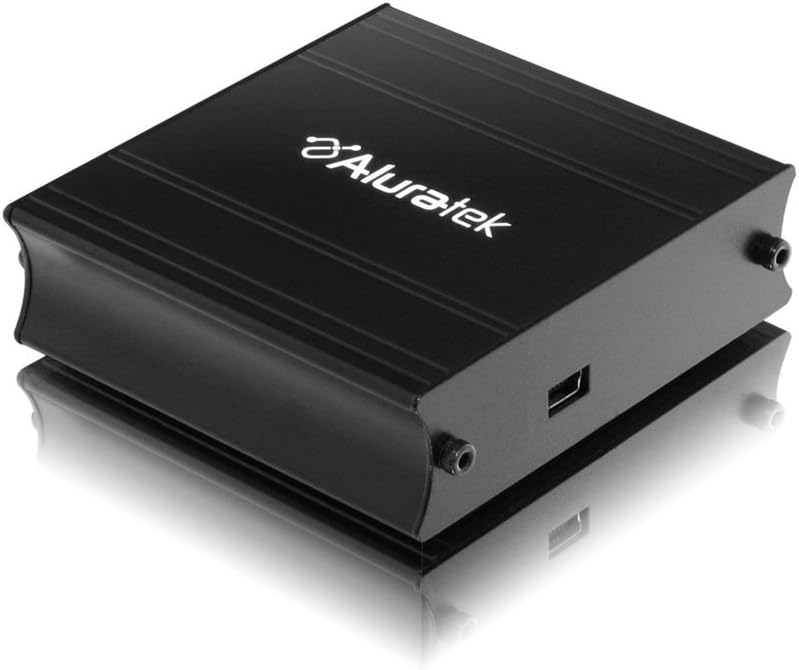
This image shows the Aluratek AUV200F USB to VGA Adapter. It is a compact, black rectangular device designed to connect a computer's USB port to a VGA monitor. The top surface displays the Aluratek logo, and one side features a USB input port, while the opposite side has screw holes for securing a VGA cable.
Негизги өзгөчөлүктөрү:
- Supports Primary, Extended, and Mirror display modes.
- Supports widescreen monitor resolutions up to 1680 x 1050.
- Supports standard monitor resolutions up to 1600 x 1200.
- Иштетилет viewing data across multiple screens or with display continuity.
- Facilitates more effective multitasking by reducing overlapping windows.
2. Пакеттин мазмуну
Орнотууну улантуудан мурун, пакетиңизде төмөнкү элементтер бар экенин текшериңиз:
- Aluratek AUV200F USB to VGA Adapter
- Driver Installation CD (or download instructions)
- Quick Start Guide
3. Системалык талаптар
To ensure proper functionality, your computer system must meet the following minimum requirements:
- Операция системасы: Windows XP-SP2/3, Vista, Windows 7, or Mac OS 10.4.11 or later (Intel-based only).
- Жеткиликтүү порттор: One available USB port and one available VGA port on the monitor.
- Процессор: Recommended 1.2 GHz or higher.
- RAM: Recommended 512 MB or higher.
4. Орнотуу жана орнотуу
4.1 Драйверди орнотуу
- Драйвердин CDсин салыңыз: Place the provided driver installation CD into your computer's optical drive. If your computer does not have an optical drive, download the latest drivers from the official Aluratek webсайт.
- Орноткучту иштетүү: Follow the on-screen instructions to install the necessary drivers. It is recommended to restart your computer after the driver installation is complete.
4.2 Аппараттык туташуу
- Connect VGA Cable: Connect one end of a VGA cable (not included) to the VGA port on your external monitor and the other end to the VGA port on the Aluratek AUV200F adapter. Secure the screws on the VGA connector for a stable connection.
- USB кабелин туташтыруу: Plug the USB connector of the Aluratek AUV200F adapter into an available USB 2.0 port on your computer.
- Күйгүзүү: Ensure your external monitor is powered on.
5. Иштөө нускамалары
Once the adapter is connected and drivers are installed, your operating system should detect the new display. You can configure the display settings through your computer's display control panel.
5.1 Configuring Display Modes (Windows)
- Дисплей орнотууларына кирүү: Right-click on an empty area of your desktop and select "Screen resolution" (Windows 7/Vista) or "Display settings" (Windows 10).
- Identify Displays: Click "Identify" to see which number corresponds to each monitor.
- Көрсөтүү режимин тандаңыз: In the "Multiple displays" dropdown menu, select one of the following options:
- Бул дисплейлерди кеңейтүү: This creates an extended desktop, allowing you to drag windows between monitors.
- Бул дисплейлердин көчүрмөсүн жасаңыз: This mirrors your primary display onto the second monitor.
- Show desktop only on 1/2: This disables one of the displays.
- Adjust Resolution: Select the desired resolution for each monitor. The Aluratek AUV200F supports up to 1680x1050 for widescreen and 1600x1200 for standard monitors.
- Орнотууларды колдонуу: Click "Apply" and then "OK" to save your changes.
5.2 Configuring Display Modes (Mac OS)
- Access Display Preferences: Go to "System Preferences" > "Displays".
- Arrangement Tab: In the "Arrangement" tab, you can drag the monitor icons to arrange them as desired for an extended desktop. To mirror displays, check the "Mirror Displays" box.
- Resolution Tab: In the "Display" tab for each monitor, select the desired resolution.
6. Кыйынчылыктарды
If you encounter issues with your Aluratek AUV200F adapter, please refer to the following common solutions:
- No Display on Second Monitor:
- Ensure all cables (USB and VGA) are securely connected.
- Verify that the external monitor is powered on and set to the correct input source (VGA).
- Check your computer's display settings to ensure the second monitor is detected and configured for "Extend" or "Duplicate" mode.
- Reinstall the device drivers from the Aluratek webсайт.
- Poor Display Quality or Lag:
- Ensure your computer meets the recommended system requirements.
- Adjust the display resolution to a lower setting to see if performance improves.
- Note that USB-to-VGA adapters are generally not recommended for high-motion video playback or demanding graphic applications like gaming due to potential latency.
- Драйверди орнотуу маселелери:
- Download the latest drivers directly from the official Aluratek support webсайт.
- Temporarily disable antivirus software during installation if it interferes.
- Try installing the drivers in Safe Mode if standard installation fails.
- Адаптер таанылган жок:
- Адаптерди компьютериңиздеги башка USB портуна туташтырып көрүңүз.
- Ensure the USB port is functional by testing it with another USB device.
7. Техникалык шарттар
| Модел | AUV200F |
| Бренд | Aluratek |
| Туташтыргыч түрү | VGA үчүн USB 2.0 |
| Supported Resolutions (Widescreen) | 1680 x 1050 чейин |
| Supported Resolutions (Standard) | 1600 x 1200 чейин |
| Шайкеш операциялык системалар | Windows XP-SP2/3, Vista, Windows 7, Mac OS 10.4.11 or later (Intel-based) |
| Шайкеш түзмөктөр | Laptop, Desktop Computers |
| Продукциянын өлчөмдөрү | 23.62 x 14.73 x 6.35 см |
| Элемент Салмагы | 181.44 г |
8. Техникалык тейлөө
To ensure the longevity and optimal performance of your Aluratek AUV200F adapter, follow these maintenance guidelines:
- Тазалоо: Адаптерди тазалоо үчүн жумшак, кургак чүпүрөктү колдонуңуз. Суюк тазалоочу каражаттарды же эриткичтерди колдонуудан алыс болуңуз.
- Сактагыч: Адаптерди салкын, кургак жерде күндүн тике тийген нурунан жана экстремалдык температурадан алыс сактаңыз.
- Колдонуу: Handle the adapter with care. Avoid dropping it or subjecting it to strong impacts. Do not force connectors.
9. Кепилдик жана колдоо
The Aluratek AUV200F USB to VGA Adapter comes with a 1 жылдык чектелген кепилдик сатып алынган күндөн тартып. Бул кепилдик нормалдуу колдонуудагы материалдардагы жана жасалгадагы кемчиликтерди камтыйт.
For technical support, warranty claims, or further assistance, please visit the official Aluratek webсайтка же кардарларды тейлөө бөлүмүнө кайрылыңыз. Кепилдикти текшерүү үчүн сатып алганыңыздын далилин сактаңыз.
Aluratek Official Webсайт: www.aluratek.com


