Introduction
The Razer DeathAdder is a high-performance gaming mouse designed for precision and comfort during extended gaming sessions. It features an ergonomic right-handed form factor and a 3500dpi Razer Precision 3.5G infrared sensor for accurate tracking. This manual provides essential information for setting up, operating, maintaining, and troubleshooting your Razer DeathAdder mouse.

Image: The Razer Deathadder Infrared Gaming Mouse, showcasing its ergonomic design and illuminated Razer logo.
Негизги өзгөчөлүктөрү
- Ergonomic Right-Handed Design: Provides optimal comfort for intense, extended gameplay.
- 3500dpi Razer Precision™ 3.5G инфракызыл сенсор: Offers 4x more precision than a standard 800dpi mouse.
- 1000Hz Ultrapolling™ / 1ms Response Time: Ensures instantaneous execution of commands.
- Five Independently Programmable Hyperesponse™ Buttons: Customize functions for enhanced control.
- On-The-Fly Sensitivity™ Adjustment: Allows for quick DPI changes during gameplay.
- Дайыма күйүк™ режими: Maintains sensor activity for immediate response.
- Ultra-Large Non-Slip Buttons: Designed for comfortable and secure clicking.
- 7-Foot Lightweight, Braided Fiber Cable: Durable and tangle-resistant for unrestricted movement.
- Gold-Plated USB Connector: Ensures optimal signal integrity.
- Scroll Wheel with 24 Individual Click Positions: Provides tactile feedback for precise scrolling.
Пакеттин мазмуну
Upon unboxing your Razer DeathAdder, please ensure all the following items are present:
- Razer DeathAdder 3500 dpi Gaming Mouse
- Аныктыгын тастыктаган сертификат
- Quick Start Guide
- Master Guide

Сүрөт: алдыңкы view of the Razer Deathadder product packaging, showing the mouse inside.
Жайгашуу
Системалык талаптар
- USB порту бар компьютер
- Windows® 7 / Windows Vista® / Windows® XP or Mac OS X (v10.4 or higher)
- Internet connection (for driver installation and software updates)
- Катуу дисктеги 100МБ бош орун
Орнотуу
- Чычканды туташтыруу: Plug the gold-plated USB connector of the Razer DeathAdder into an available USB port on your computer.
- Драйверди орнотуу: Your operating system should automatically detect the mouse and install basic drivers. For full functionality and customization, it is recommended to download and install the latest Razer Synapse software from the official Razer webсайт (www.razer.com).
- Программанын конфигурациясы: Once Razer Synapse is installed, launch the application to configure mouse settings, button assignments, DPI levels, and create profiles.

Сүрөт: каптал view of the Razer Deathadder, highlighting the illuminated scroll wheel and side buttons.
Чычканды иштетүү
Баскыч функциялары
The Razer DeathAdder features five independently programmable Hyperesponse™ buttons. By default, these buttons perform standard mouse functions:
- Сол чыкылдатуу: Негизги аракет.
- Оң чыкылдатуу: Кошумча аракет/контексттик меню.
- Сыдыруу дөңгөлөгүн чыкылдатыңыз: Ортоңку чыкылдатуу, көбүнчө жаңы өтмөктөрдөгү шилтемелерди ачуу же авто-сыдыруу үчүн колдонулат.
- Өйдө/ылдый жылдыруу: Вертикалдуу сыдыруу.
- Side Buttons (Forward/Back): Навигация web браузерлер же башка тиркемелер.
You can customize these button assignments using the Razer Synapse software to suit your gaming or productivity needs.
On-The-Fly Sensitivity™ Adjustment
The Razer DeathAdder allows for real-time sensitivity adjustments. By default, this feature is often mapped to specific button combinations or can be assigned to a dedicated button via Razer Synapse. This enables you to quickly switch between different DPI settings for various in-game scenarios, such as precise aiming or rapid movement.

Сүрөт: жогорудан төмөнгө view of the Razer Deathadder, showing the main buttons and scroll wheel.
Техникалык тейлөө
Чычканыңызды тазалоо
To ensure optimal performance and longevity of your Razer DeathAdder, regular cleaning is recommended:
- Сырткы: Жумшак, түксүз кездемени жеңил колдонуңуз dampсуу же жумшак тазалоо эритмеси менен. Катуу химиялык заттардан же абразивдүү материалдардан алыс болуңуз.
- Сенсор линзасы: Gently clean the infrared sensor lens on the underside of the mouse with a cotton swab or a soft, dry cloth. Do not use liquids directly on the sensor.
- Кабель: Wipe the braided fiber cable with a dry cloth to remove dust.
Always ensure the mouse is disconnected from your computer before cleaning.
Проблемаларды чечүү
Чычкан жооп бербейт
- USB туташуусун текшерүү: USB кабели компьютериңиздеги иштеген USB портуна бекем сайылганын текшериңиз. Башка USB портун колдонуп көрүңүз.
- Компьютерди кайра иштетүү: Жөнөкөй кайра күйгүзүү көбүнчө туташуу маселелерин чечет.
- Башка компьютерде сыноо: Мүмкүн болсо, маселе чычканда же системаңызда экенин аныктоо үчүн чычканды башка компьютерде сынап көрүңүз.
- Драйверлерди кайра орнотуу: Uninstall the Razer Synapse software and any related drivers, then reinstall them from the official Razer webсайт.
Tracking Issues / Jittery Cursor
- Таза сенсор: Dust or debris on the infrared sensor can cause tracking problems. Refer to the "Maintenance" section for cleaning instructions.
- Чычкандын бети: Ensure you are using the mouse on a clean, uniform, and non-reflective surface. Highly reflective or uneven surfaces can interfere with the sensor.
- DPI жөндөөлөрү: Adjust the DPI settings in Razer Synapse. Very high DPI settings can sometimes make the cursor appear jittery on certain surfaces.
Техникалык шарттар
| Өзгөчөлүк | Деталь |
|---|---|
| Модель номери | RZ01-00151400-R3U1 |
| Кыймылды аныктоо технологиясы | Optical (Infrared) |
| сенсор токтому | 3500 dpi (дюймге чекиттер) |
| Добуш берүү көрсөткүчү | 1000Hz Ultrapolling / 1ms response |
| Buttons | Five independently programmable Hyperesponse™ buttons |
| Ылдамдатуу | 15 г чейин |
| Көз салуу ылдамдыгы | Секундасына 60-120 дюйм |
| Байланыш | Wired USB (Gold-Plated Connector) |
| Кабелдин узундугу | 7-foot lightweight, braided fiber cable |
| Болжолдуу өлчөмдөр (L x W x H) | 128 мм x 70 мм x 42.5 мм (5.04" x 2.76" x 1.67") |
| Элемент Салмагы | 1 фунт (болжол менен 453 г) |
| Түс | Кара |
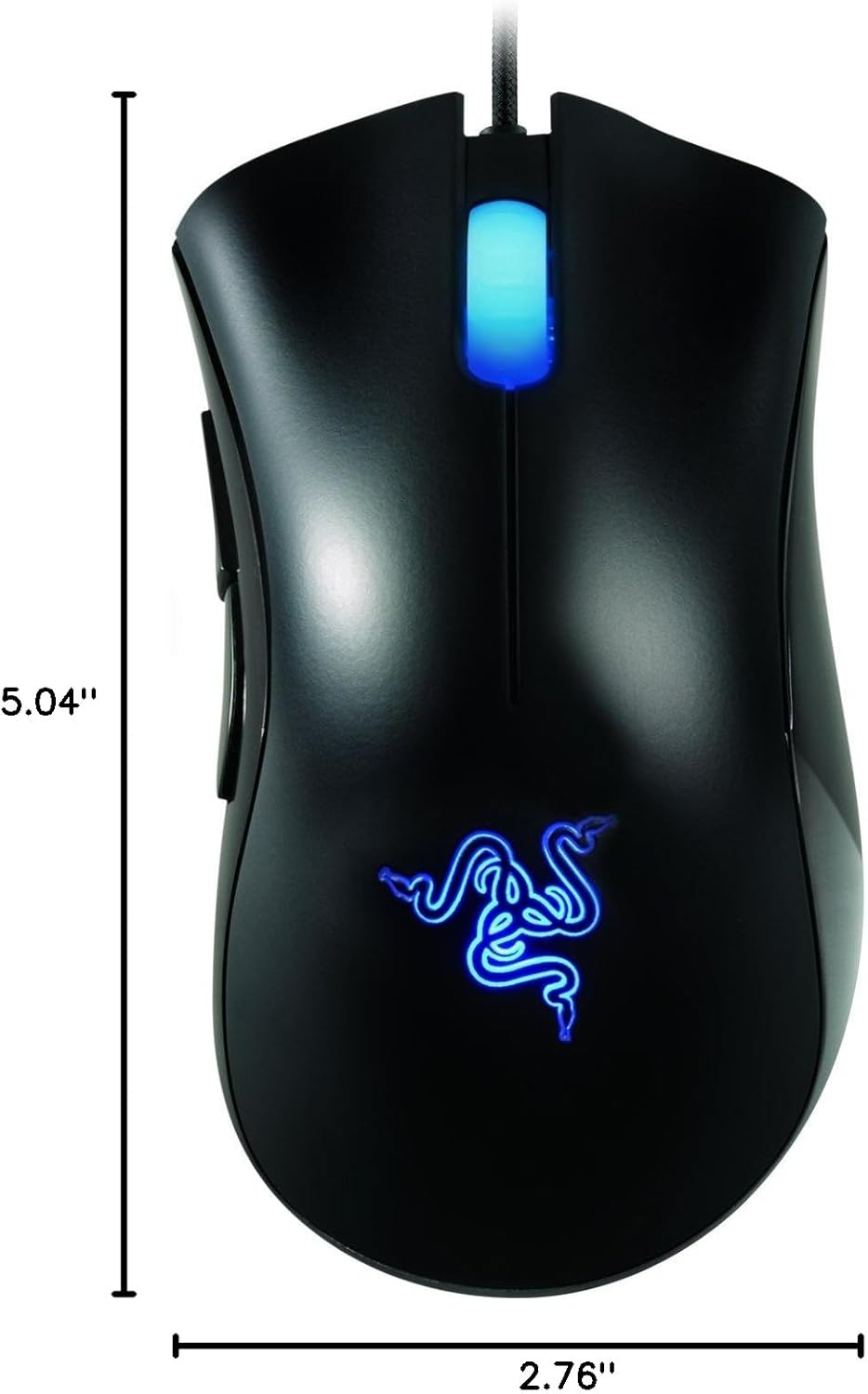
Image: Diagram showing the approximate dimensions of the Razer Deathadder mouse.
Маанилүү эскертүүлөр
Сураныч, төмөнкүлөрдөн кабардар болуңуз:
- No Returns: As per the product's legal disclaimer, this item may not be eligible for returns. Please verify return policies with your retailer at the time of purchase.
Колдоо
For further assistance, technical support, or to download the latest drivers and software, please visit the official Razer support webсайт:
You can also find more information about Razer products and accessories on the official Razer store:


