Creative Inspire S2 Bluetooth зымсыз мультимедиялык динамик системасынын колдонуучу колдонмосу
Model: Inspire S2 (51MF0390AA003)
Продукт бүттүview
The Creative Inspire S2 Bluetooth Wireless Multimedia Speaker System provides high-quality audio through its two satellite speakers and a subwoofer, with the added convenience of Bluetooth wireless connectivity. This system is designed for use with computers and other Bluetooth-enabled devices, offering a versatile audio solution.
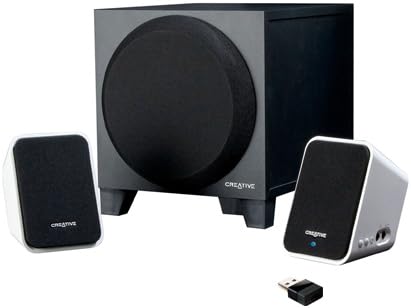
Image: The Creative Inspire S2 system, showing the central subwoofer unit, two compact satellite speakers, and a small USB Bluetooth transmitter. The satellite speakers are white with black grilles, and the subwoofer is black.
кутучанын мазмуну
Таңгакта бардык компоненттер бар экенин текшериңиз:
- Эки спутниктик динамик
- Бир сабвуфер
- USB Bluetooth өткөргүч
- Universal Power Adapter
- Ыкчам баштоо колдонмосу (деталдуу нускамалар үчүн бул колдонмону караңыз)
- Warranty/Technical Support Leaflet
Орнотуу нускамалары
1. Физикалык байланыш
- Позициялоо: Place the subwoofer on the floor or a sturdy surface. Position the two satellite speakers on either side of your computer monitor or listening area for optimal stereo separation.
- Спутник динамиктерин туташтыруу: Спутниктик динамиктерден чыккан кабелдерди сабвуфердин арткы жагындагы тиешелүү портторго туташтырыңыз. Ишенимдүү туташууну камсыз кылыңыз.
- Туташуу кубаты: Plug the universal power adapter into the subwoofer's power input, then connect the adapter to a wall outlet.
2. Bluetooth Connection (Wireless Audio)
For Computers (using included USB Bluetooth Transmitter):
- Insert Transmitter: Plug the included USB Bluetooth transmitter into an available USB port on your computer. Your computer may automatically install necessary drivers.
- Power On Speakers: Ensure the speaker system is powered on. The power button is typically located on one of the satellite speakers. A green light should indicate power.
- Автоматтык жупташтыруу: The speaker system and USB transmitter should automatically pair. A blue light on the satellite speaker will indicate a successful Bluetooth connection.
- Аудио чыгарууну тандоо: On your computer, navigate to your sound settings and select the "Creative Inspire S2" or similar Bluetooth audio device as your default playback device.
For Other Bluetooth Devices (e.g., Smartphones, Tablets, Laptops with built-in Bluetooth):
- Power Off Speakers: Ensure the speaker system is turned off.
- Жупташтыруу режимине кирүү: With the speakers off, press and hold the '+' (volume up) button on the satellite speaker. Continue holding until a blue light begins to flash rapidly. This indicates the speakers are in pairing mode.
- Түзмөктө Bluetooth'ту иштетүү: Смартфонуңузда, планшетиңизде же ноутбугуңузда Bluetooth жөндөөлөрүнө өтүп, Bluetooth иштетилгенин текшериңиз.
- Select "Inspire S2": In the list of available devices, select "Inspire S2" (or similar). If prompted for a passcode, enter "0000" (four zeros).
- Байланышты ырастоо: Once paired, the blue light on the satellite speaker will become solid, indicating a successful connection.
3. Wired Connection (Auxiliary Input)
The Inspire S2 system also supports a wired connection for devices without Bluetooth or for a direct audio link.
- Аудио кабелди туташтыруу: Connect a 3.5mm audio cable (not included) from the audio output of your device (e.g., MP3 player, laptop headphone jack) to the "Audio In" port on the side of the satellite speaker.
- Power On Speakers: Динамик системасы күйүп турганын текшериңиз.
- Ойнотуу: Begin audio playback from your connected device. The system will automatically prioritize the wired input if a cable is connected.
Иштөө нускамалары
Күйгүзүү/өчүрүү
- To power on the system, press the power button located on one of the satellite speakers. A green LED will illuminate.
- To power off, press the power button again. The LED will turn off.
Үндү көзөмөлдөө
- Use the '+' and '-' buttons on the satellite speaker to adjust the system's volume.
- You can also control the volume from your connected Bluetooth device or computer.
Аудио ойнотуу
- Once connected via Bluetooth or auxiliary cable, simply start playing audio from your source device.
- Ensure the volume on both the speaker system and your source device is adjusted appropriately.
Техникалык тейлөө
- Тазалоо: Use a soft, dry cloth to clean the surfaces of the speakers and subwoofer. Avoid using liquid cleaners or abrasive materials.
- Жайгашкан жери: Ensure the speakers are placed on stable surfaces to prevent accidental falls. Avoid placing them in direct sunlight, near heat sources, or in excessively humid environments.
- Вентиляция: Do not block the ventilation openings on the subwoofer to ensure proper airflow and prevent overheating.
- Кабелдик башкаруу: Keep cables organized and untangled to prevent damage and tripping hazards.
Проблемаларды чечүү
| Көйгөй | Мүмкүн чечим |
|---|---|
| Динамиктерден үн жок. |
|
| Bluetooth түзмөгү жупташтырылбай же туташа албай жатат. |
|
| Үн бурмаланган же үзгүлтүктүү угулат. |
|
| Speakers turn off unexpectedly when using auxiliary input. |
|
Техникалык шарттар
| Өзгөчөлүк | Деталь |
|---|---|
| Модель аты | Inspire S2 |
| Модель номери | 51MF0390AA003 |
| Динамик түрү | Desktop Multimedia Speaker System |
| Байланыш технологиясы | Bluetooth Wireless, Wired (3.5mm Auxiliary) |
| Динамиктин максималдуу чыгаруу күчү | 7 Ватт (RMS) |
| Ызы-чуунун катышы | 75 дБ |
| Product Dimensions (Satellite) | 2.9 x 2.9 x 4.05 дюйм (болжол менен) |
| Элемент Салмагы | 3 фунт (жалпы система) |
| Power Source | Электр зымдары |
| Өзгөчөлүктөр | USB Bluetooth technology, Creative DIRECT-THROW subwoofer, easy-access controls, Energy Star qualified |
Кепилдик жана колдоо
For warranty information and technical support, please refer to the warranty/technical support leaflet included in your product packaging. You may also visit the official Creative webакыркы колдоо булактары, көп берилүүчү суроолор жана байланыш маалыматы үчүн сайт.
Онлайн колдоо: www.creative.com/support


