1. Киришүү
This manual provides detailed instructions for the setup, operation, and maintenance of your Technoline WS 9120 Weather Station. Please read this manual thoroughly before using the device to ensure correct operation and to prevent damage.
The Technoline WS 9120 is a compact weather station featuring a quartz clock, indoor temperature and humidity display, weather forecast, and an alarm function with snooze.
2. Коопсуздук маалыматы
- Аппаратты экстремалдык температурага, түз күндүн нуруна же жогорку нымдуулукка дуушар кылбаңыз.
- Аппаратты жерге түшүрүүдөн же катуу таасирлерден сактаныңыз.
- Агрегатты өз алдынча бөлүүгө же оңдоого аракет кылбаңыз. Бардык тейлөөлөрдү квалификациялуу кызматкерлерге тапшырыңыз.
- Батареяларды балдар жетпеген жерде сактаңыз. Эгерде жутуп алса, дароо медициналык жардамга кайрылыъыз.
- Колдонулган батарейкаларды жергиликтүү эрежелерге ылайык жок кылыңыз.
3. Пакеттин мазмуну
Таңгактан чыгаргандан кийин, бардык буюмдар бар экенин жана жакшы абалда экендигин текшериңиз:
- Technoline WS 9120 Weather Station Unit
- Колдонуучунун Колдонмосу (бул документ)
Эскертүү: Батареялар камтылган эмес жана өзүнчө сатып алынышы керек.
4. Түзмөк бүттүview
Familiarize yourself with the main components and controls of your WS 9120 Weather Station.
4.1 Фронт View (Display and Buttons)

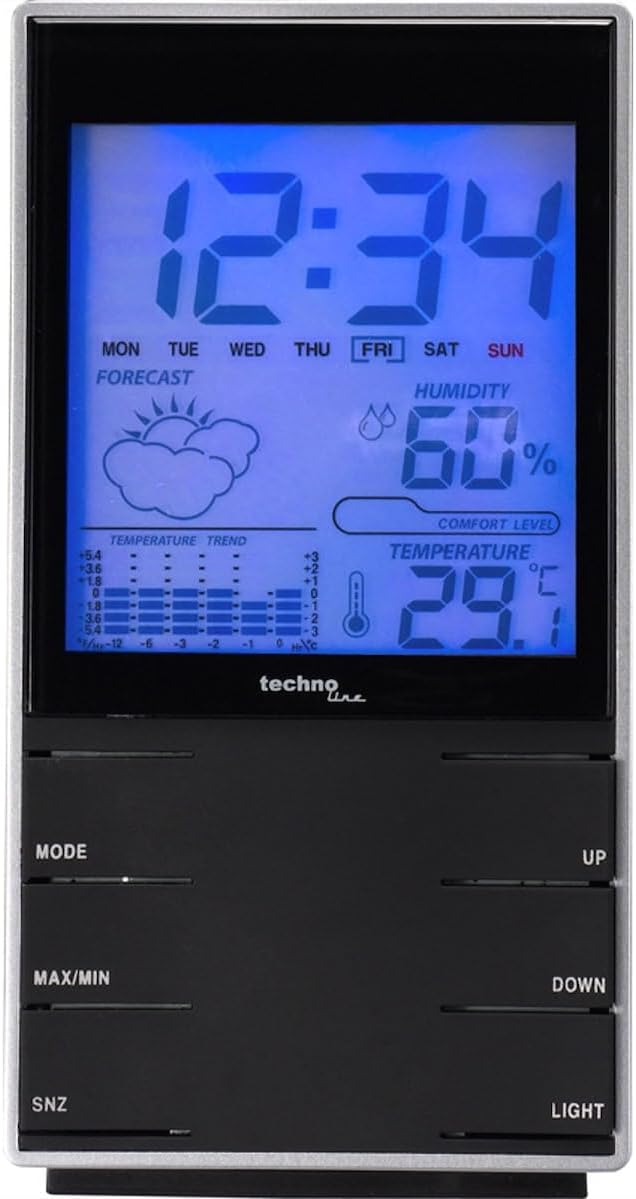
Сүрөт 1: Алдыңкы view of the Technoline WS 9120, displaying time, weekday, forecast, humidity, and temperature. Control buttons are visible at the bottom.
- LCD дисплей: Shows time, date, weekday, indoor temperature, indoor humidity, weather forecast symbols, and temperature trend.
- MODE баскычы: Used to switch between display modes and enter setting modes.
- MAX/MIN баскычы: Displays maximum and minimum recorded temperature and humidity.
- SNZ (Snooze) Button: Activates the snooze function for the alarm.
- UP баскычы: Adjusts values upwards in setting modes.
- ТӨМӨН баскычы: Adjusts values downwards in setting modes.
- ЖАРЫК баскычы: Activates the blue backlight for a few seconds.
4.2 Арткы View (Батарея бөлүмү)
2-сүрөт: Арткы view of the Technoline WS 9120, showing the battery compartment cover.
- Батарея бөлүмү: Located on the rear, holds 2 x AAA batteries.
- Стол стенди: Integrated stand for desktop placement.
5. Орнотуу
5.1 Батареяны орнотуу
- Түзмөктүн арткы жагындагы батарея бөлүмүнүн капкагын ачыңыз.
- Insert 2 new AAA batteries, observing the correct polarity (+ and - markings).
- Батарея уясынын капкагын бекем жабыңыз.
- The unit will power on and display default settings.
5.2 Баштапкы орнотуулар
After battery installation, the device will typically start in time display mode. You may need to set the time, date, and other preferences.
- Убакытты жана датаны коюу:
- басып, кармап туруңуз РЕЖИМ Убакытты коюу режимине өтүү үчүн баскычын болжол менен 3 секунд басыңыз. Сааттын саны күйүп-өчүп турат.
- колдонуу UP or ылдый саатты тууралоо үчүн баскычтар.
- Басыңыз РЕЖИМ again to confirm the hour and move to setting the minute.
- Бул процессти мүнөт, жыл, ай жана күн үчүн кайталаңыз.
- Басыңыз РЕЖИМ орнотуу режиминен чыгуу үчүн акыркы жолу.
- 12/24 саат форматы: Кадимки убакытты көрсөтүү режиминде турганда, баскычын басыңыз UP 12 сааттык жана 24 сааттык форматтардын ортосунда которулуу үчүн баскыч.
- Цельсий/Фаренгейт: Кадимки убакытты көрсөтүү режиминде турганда, баскычын басыңыз ылдый button to toggle between Celsius (°C) and Fahrenheit (°F) temperature units.
6. Иштөө нускамалары
6.1 Убакытты жана датаны көрсөтүү
The main display shows the current time, weekday, and date. The weekday automatically adjusts after setting the date.
6.2 Indoor Temperature and Humidity
The device continuously measures and displays the indoor temperature and relative humidity. The temperature trend indicator shows if the temperature is rising, falling, or stable.
6.3 Аба ырайы
The weather station provides a forecast using graphical symbols (e.g., sunny, cloudy, rainy). This forecast is based on changes in atmospheric pressure detected by the internal sensor and is an estimation for the next 12-24 hours.
6.4 Ойготкуч саат функциясы
- Ойготкучту орнотуу:
- Кадимки убакыт дисплейинен баскычын басыңыз РЕЖИМ button once to display the alarm time.
- басып, кармап туруңуз РЕЖИМ button for approximately 3 seconds. The alarm hour will flash.
- колдонуу UP or ылдый ойготкуч саатын тууралоо үчүн баскычтар.
- Басыңыз РЕЖИМ again to confirm the hour and move to setting the alarm minute.
- колдонуу UP or ылдый ойготкуч мүнөттү тууралоо үчүн баскычтар.
- Басыңыз РЕЖИМ ойготкуч орнотуу режиминен чыгуу үчүн акыркы жолу.
- Ойготкучту иштетүү/өчүрүү: While the alarm time is displayed (after pressing MODE once), press the UP button to toggle the alarm ON or OFF. An alarm icon will appear on the display when activated.
- Чырым Function: Ойготкуч басылганда, басыңыз АРОСА button to activate the snooze function. The alarm will sound again after approximately 5 minutes. To stop the alarm completely, press any other button.
6.5 Maximum and Minimum Readings
The device records the maximum and minimum indoor temperature and humidity values since the last reset.
- басыңыз МАКС/МИН button once to display the maximum recorded temperature and humidity.
- басыңыз МАКС/МИН button again to display the minimum recorded temperature and humidity.
- басыңыз МАКС/МИН button a third time to return to the current readings.
- To clear the MAX/MIN records, press and hold the МАКС/МИН button while the maximum or minimum values are displayed.
6.6 Арткы жарык
басыңыз ЖАРЫК button to activate the blue backlight for a few seconds, improving visibility in low-light conditions.
7. Техникалык тейлөө
- Тазалоо: Аппаратты жумшак менен сүртүңүз, гamp кездеме. Абразивдүү тазалагычтарды же эриткичтерди колдонбоңуз.
- Батареяны алмаштыруу: When the display becomes dim or functions are erratic, replace the batteries. Always replace both batteries at the same time with new AAA batteries.
- Сактагыч: Аппарат узак убакыт бою колдонулбаса, агып кетпеш үчүн батарейкаларды алып салыңыз.
8. Кыйынчылыктарды
| Көйгөй | Мүмкүн себеп | Чечим |
|---|---|---|
| Дисплей жок же күңүрт дисплей | Төмөн же өлүп калган батарейкалар; туура эмес батареянын полярдуулугу. | Туура полярдуулукту камсыз кылуу менен батарейкаларды жаңы AAA батарейкалары менен алмаштырыңыз. |
| Туура эмес убакыт/дата | Time/date not set correctly after battery installation or reset. | Refer to Section 5.2 "Initial Settings" to set the time and date. |
| Weather forecast seems inaccurate | Weather forecast is an estimation based on local pressure changes, not a professional forecast. | The forecast is a general indicator. For precise local weather, consult official weather services. |
| Баскычтар жооп бербейт | Temporary software glitch; low batteries. | Remove batteries for 1 minute, then reinsert. Replace batteries if issue persists. |
9. Техникалык шарттар
- Модел: WS9120
- Бренд: Технолайн
- Дисплей түрү: көк жарык менен LCD
- Функциялары: Quartz clock, Weekday display, Indoor temperature, Indoor humidity, Temperature trend, Weather forecast symbols, Alarm with snooze.
- Температура диапазону (ички): Typically 0°C to +50°C (32°F to 122°F)
- Humidity Range (Indoor): Typically 20% to 95% RH
- Кубат булагы: 2 x AAA 1.5V батарейкалар (кошулбайт)
- Өлчөмдөрү (болжол менен): 2.95 x 1.54 x 5.63 дюйм (7.5 x 3.9 x 14.3 см)
- Салмагы (болжол менен): 0.11 Kilograms / 3.87 ounces (without batteries)
10. Кепилдик жана колдоо
Technoline products are manufactured to high-quality standards. For warranty information or technical support, please refer to the warranty card included with your purchase or contact your local retailer or Technoline customer service. Please retain your proof of purchase for any warranty claims.
For further assistance, you may visit the official Technoline webсайтка же алардын колдоо каналдарына кайрылыңыз.


