1. Киришүү
This manual provides comprehensive instructions for the assembly, operation, and maintenance of your Celestron 114LCM Computerized Newtonian Telescope. The 114LCM features a computerized GoTo mount designed to automatically locate and track celestial objects. Its SkyAlign alignment procedure simplifies initial setup, making it accessible for users to explore the night sky.

Image 1.1: The Celestron 114LCM Computerized Newtonian Telescope with included eyepieces and StarPointer finderscope.
2. Кутуда эмне бар
Монтаждоону баштоодон мурун бардык компоненттердин бар экендигин текшериңиз:
- Оптикалык түтүк
- Штатив
- NexStar+ hand control
- 25mm eyepiece
- 9mm eyepiece
- StarPointer red dot finderscope
3. Орнотуу
3.1 Tripod and Mount Assembly
- Extend the tripod legs to a suitable height and secure them.
- Attach the accessory tray to the tripod spreader.
- Mount the computerized altazimuth mount head onto the tripod.
3.2 Optical Tube Installation
- Carefully attach the optical tube to the mount using the provided dovetail clampАнын бекем бекитилгенин текшериңиз.
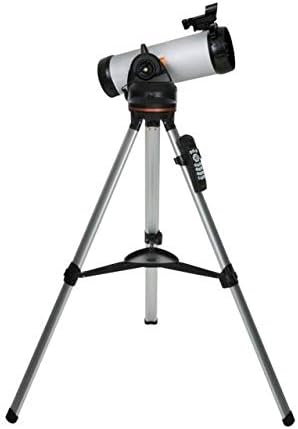
Image 3.1: The Celestron 114LCM telescope fully assembled on its tripod.
3.3 Финдерскопту жана окулярды орнотуу
- Slide the StarPointer red dot finderscope into its bracket on the optical tube and tighten the retaining screw.
- Insert the desired eyepiece (25mm or 9mm) into the focuser and secure it with the thumbscrew.
3.4 Powering the Telescope
The telescope requires batteries for the computerized mount. Install 8 AA batteries (not included) into the battery compartment located on the mount. Alternatively, an optional AC adapter can be used.
3.5 Initial Alignment (SkyAlign)
The SkyAlign procedure allows the telescope to orient itself to the night sky without requiring knowledge of celestial object names. This process is crucial for the GoTo functionality.
- Power on the telescope. The NexStar+ hand control will display 'LCM Ready'. Press ENTER.
- Follow the prompts on the hand control to enter your location and time information.
- Select 'SkyAlign' from the alignment options.
- Center any three bright celestial objects (stars, planets, or the Moon) in the telescope's eyepiece, one at a time, as prompted by the hand control. The system will then calculate its position.

Image 3.2: SkyAlign technology simplifies telescope alignment by requiring the user to center any three bright objects.
3.6 Finderscope Alignment
Align the StarPointer red dot finderscope with the main telescope's view. This is done by centering a distant terrestrial object in the main telescope's eyepiece, then adjusting the finderscope's knobs until the red dot is also centered on the same object.
4. Телескопту иштетүү
4.1 NexStar+ Hand Control
The NexStar+ hand control is the primary interface for operating the telescope. It features a backlit LCD screen and intuitive buttons for navigation, object selection, and alignment procedures.

Image 4.1: The NexStar+ hand control unit for the Celestron 114LCM telescope.
4.2 GoTo Functionality
After successful alignment, the GoTo mount can automatically slew to and track thousands of celestial objects. Use the hand control to select objects from categories such as Solar System, Stars, and Deep Sky. The telescope will then move to the selected object and keep it centered in the eyepiece as it moves across the sky.

Image 4.2: The computerized GoTo mount automatically locates and tracks celestial objects.
4.3 Sky Tour Feature
Press the 'Sky Tour' button on the hand control to generate a list of the best celestial objects visible from your location at that specific time. This feature is useful for discovering new objects to observe.
4.4 Using Eyepieces
The telescope includes two eyepieces: a 25mm eyepiece for lower magnification and a wider field of view, and a 9mm eyepiece for higher magnification and more detailed views. Start with the 25mm eyepiece to locate objects, then switch to the 9mm eyepiece for closer inspection.

Image 4.3: The 25mm eyepiece provides 40x magnification, while the 9mm eyepiece offers 111x magnification.
4.5 Программалык камсыздоону интеграциялоо
Enhance your observing experience with Celestron's free SkyPortal app for iOS and Android devices, which allows you to locate objects in real-time. The telescope also includes a free download of Starry Night Basic Edition astronomy software for interactive sky simulation and planning.

Image 4.4: The SkyPortal mobile app and Starry Night desktop software provide additional tools for astronomy enthusiasts.
5. Техникалык тейлөө
5.1 Оптиканы тазалоо
Dust and smudges on optical surfaces can degrade image quality. Use a soft brush to remove loose dust. For smudges, use a specialized optical cleaning solution and a microfiber cloth designed for optics. Avoid touching optical surfaces with bare hands.
5.2 Cleaning the Telescope Body
Wipe down the telescope's exterior surfaces with a soft, damp кездеме. Абразивдүү тазалагычтарды же эриткичтерди колдонуудан алыс болуңуз.
5.3 Сактоо
When not in use, store the telescope in a dry, dust-free environment. Replace all lens caps to protect the optics.
6. Кыйынчылыктарды
- No Power to Mount: Батареянын орнотулганын текшерип, батареялардын жаңы экенин текшериңиз. Кубат которгучу "КҮЙҮК" абалында экенин текшериңиз.
- бүдөмүк сүрөттөр: Ensure the focuser is properly adjusted. Allow the telescope to acclimate to the ambient temperature. Check for dew on the optics.
- Alignment Failure: Confirm accurate entry of time and location. Ensure the finderscope is aligned with the main telescope. Select bright, distinct objects for SkyAlign.
- GoTo так эместиги: Re-perform the alignment procedure. Ensure the tripod is stable and not vibrating.
For further assistance, refer to the detailed troubleshooting guides available on the Celestron support webсайт.
7. Техникалык шарттар
| Модель аты | 114LCM компьютердик телескобу |
| Оптикалык дизайн | Ньютондук рефлектор |
| Объективдүү линзанын диаметри | 114 мм |
| Телескоп тоосу | Motorized Altazimuth |
| Окулярлар камтылган | 25 мм, 9 мм |
| Finderscope | Built-on StarPointer™ red dot finderscope |
| Фокус түрү | Manual Focus |
| Power Source | Батарея менен иштейт (8 AA батарейка, камтылган эмес) |
| Продукциянын өлчөмдөрү | 27 x 45 x 24 дюйм |
| Элемент Салмагы | 13.2 фунт |
| Модель номери | 31150-CGL |

Image 7.1: The adjustable tripod allows for varying telescope heights, shown here at 38 inches and 52 inches.
8. Кепилдик жана колдоо
The Celestron 114LCM Computerized Newtonian Telescope comes with a 2-жыл АКШ Кепилдиги. For technical assistance, troubleshooting, or warranty claims, please contact Celestron's customer support team. Unlimited support is available from US-based experts.
For more information and support resources, visit the official Celestron webсайт: Celestron Store


