1. Киришүү
Thank you for choosing the SHARP KC850U Air Purifier and Humidifier. This appliance is designed to improve indoor air quality and maintain optimal humidity levels in medium-sized rooms. It combines a multi-stage filtration system with Plasmacluster Ion Technology to effectively reduce airborne particles, odors, and maintain a comfortable environment.
Коопсуз жана натыйжалуу колдонууну камсыз кылуу үчүн түзмөктү иштетүүдөн мурун бул колдонмону кылдаттык менен окуп чыгыңыз. Бул колдонмону келечекте колдонуу үчүн сактап коюңуз.
2. Коопсуздук маалыматы
To reduce the risk of electric shock, fire, or injury, always follow basic safety precautions when using electrical appliances:
- Аппаратты бузулган шнур же сайгыч менен иштетпеңиз.
- Аппаратты жылуулук булактарынын жанына же түз күн тийген жерге койбоңуз.
- Агрегаттын туруктуу, түз бетине коюлганын текшериңиз.
- Аба кирүүчү же чыгуучу жерлерди жаап албаңыз.
- Тазалоодон же техникалык тейлөөдөн мурун блокту электр розеткасынан сууруп алыңыз.
- Аспапты сууга же башка суюктуктарга батырбаңыз.
- Балдар жана үй жаныбарлары жетпеген жерде сактаңыз.
- Use only genuine SHARP replacement parts and filters.
3. Продукт бүтүп калдыview
The SHARP KC850U integrates air purification and humidification functions into a single unit. Key components include the air intake, air outlet, control panel, dust and humidity sensors, and water tank.

3.1-сүрөт: Фронт view of the SHARP KC850U Air Purifier and Humidifier, showing the control panel and display.
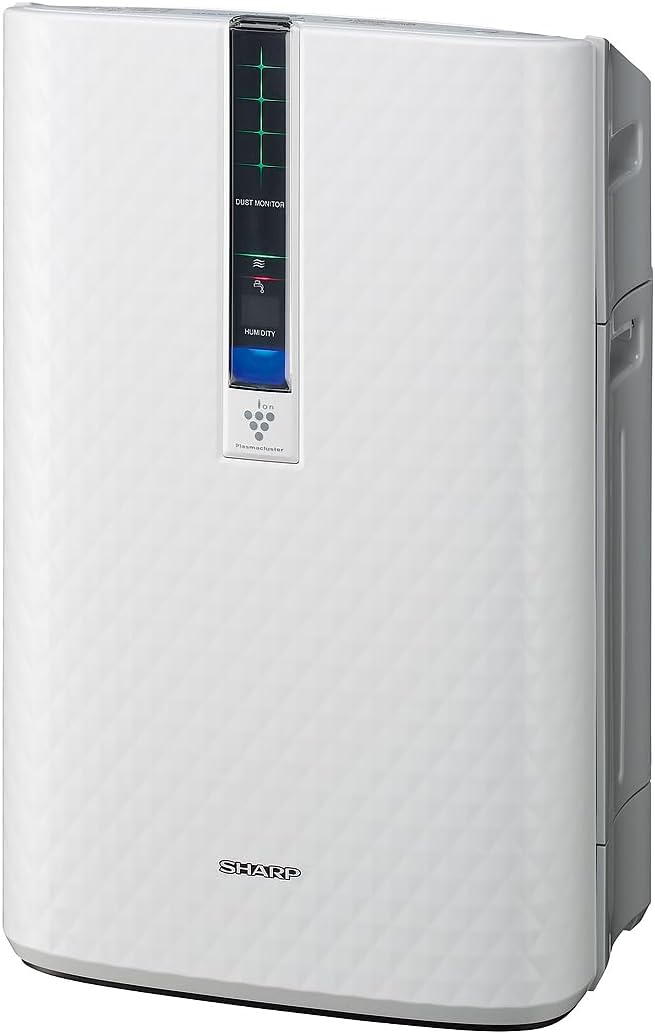
3.2-сүрөт: Side view of the SHARP KC850U, illustrating its compact design.
Башкаруу панели жана дисплей
The unit features an intuitive control panel and a display that provides real-time information on air quality and humidity levels.

3.3-сүрөт: Жогорку view of the control panel, showing buttons for power, fan speed, modes, and light control.
- Кубат баскычы: Агрегатты күйгүзөт же өчүрөт.
- Желдетүүчү ылдамдык баскычы: Cycles through Max, Med, and Low fan speeds.
- Режим баскычы: Selects operating modes including Auto, Pollen, and Quick Clean.
- Жарык баскычы: Adjusts the brightness of the display lights (Bright, Dim, Off).
- Dust Monitor: Visual indicator of air impurity levels (e.g., green for clean, red for high impurity).
- Нымдуулук дисплей: Учурдагы салыштырмалуу нымдуулуктун пайызын көрсөтөтtage.
4. Орнотуу
4.1 Пакеттен чыгаруу
- Агрегатты таңгагынан кылдаттык менен чыгарыңыз.
- Бардык коргоочу материалдарды жана желим баштыктарды алып салыңыз.
- Ensure all filters are properly installed before first use. Refer to the Maintenance section for filter installation details.
4.2 Орнотуу
For optimal performance, place the air purifier in a location where air can circulate freely. Avoid placing it directly against a wall or furniture that might obstruct air intake or output.
- Recommended for use in bedrooms, living rooms, studies, or exercise rooms.
- Ensure at least 12 inches (30 cm) of clear space around the unit.
- Place on a firm, level surface.
4.3 Filling the Water Tank (for Humidification)
If you intend to use the humidification function, fill the water tank:
- Remove the water tank from the side of the unit.
- Open the tank cap and fill with clean tap water.
- Securely close the cap and reinsert the water tank into the unit.
5. Иштөө нускамалары
5.1 Күйгүзүү/өчүрүү
басыңыз Күч аппаратты күйгүзүү же өчүрүү үчүн баскыч.
5.2 желдеткич ылдамдыгын тандоо
басыңыз Fan Speed button repeatedly to cycle through the available fan speeds:
- Макс: Highest air purification and humidification.
- Мед: Moderate operation.
- Төмөн: Quiet operation, suitable for sleeping (as quiet as 23 dBA).
5.3 Режимди тандоо
басыңыз Mode button repeatedly to select an operating mode:
- Авто режим: The unit automatically adjusts fan speed and humidification based on sensor readings for air quality and humidity.
- Чаңча режими: Optimized for pollen removal.
- Ыкчам тазалоо режими: Releases high-density Plasmacluster ions for rapid air purification.
5.4 Плазмалык кластер ион технологиясы
The Plasmacluster Ion Technology actively disperses positive and negative ions into the air to help reduce microscopic pollutants. This function operates automatically with the unit. A slight clicking sound may be audible during operation, which is normal.
5.5 Жарыкты башкаруу дисплей
басыңыз Жарыктар button to adjust the brightness of the display indicators:
- Жаркын: Full illumination.
- Күңүрт: Reduced illumination.
- Өчүк: Display lights are off, suitable for dark rooms.

5.1-сүрөт: Display showing 'Lo' for low humidity and green dust monitor indicators.

5.2-сүрөт: Display showing 'Hi' for high humidity and red dust monitor indicators, indicating higher impurity levels.
6. Техникалык тейлөө
Regular maintenance ensures optimal performance and extends the lifespan of your SHARP KC850U. Always unplug the unit before cleaning or replacing filters.
6.1 Чыпкалоо системасы бүттүview
The KC850U utilizes a triple filtration system:
- Жуучу алдын ала чыпка: Traps large airborne particles like dust and pet dander.
- Активдештирилген көмүртек жытын кетирүүчү чыпка: Helps reduce common household odors.
- Чыныгы HEPA чыпкасы: Captures 99.97% of particles 0.3 microns and larger.
- Humidifying Filter: Used for the humidification function.

6.1-сүрөт: Diagram showing the air purification process through the humidifying filter, True HEPA filter, carbon filter, and pre-filter.
6.2 Фильтрди тазалоо жана алмаштыруу
- Алдын ала чыпкалоо: Clean regularly by vacuuming or washing with water. Allow to dry completely before reinstallation.
- Активдештирилген көмүртек жытын кетирүүчү чыпка: May be washed. Refer to the filter's specific instructions for cleaning frequency and method. Replace as needed, typically every 2-5 years depending on usage and environment.
- Чыныгы HEPA чыпкасы: This filter is not washable. Replace typically every 2-5 years, depending on usage and environment. The unit will indicate when replacement is due.
- Humidifying Filter: Clean regularly to prevent mineral buildup. Replace as needed, typically every 2-5 years depending on water quality and usage.
Actual filter life may vary significantly based on air quality, usage frequency, and environmental conditions.
6.3 Жалпы тазалоо
- Агрегаттын сыртын жумшак менен сүртүңүз, гamp кездеме.
- Clean the dust and humidity sensors periodically to ensure accurate readings.
- Clean the water tank and humidifying tray regularly to prevent mold or bacteria growth.
7. Кыйынчылыктарды
If you encounter issues with your SHARP KC850U, refer to the following common problems and solutions:
| Көйгөй | Мүмкүн себеп | Чечим |
|---|---|---|
| Түзмөк күйбөйт. | Power cord not properly plugged in; no power at outlet. | Check power connection; test outlet with another device. |
| Air purification/humidification is ineffective. | Filters are dirty or clogged; water tank is empty (for humidification). | Clean or replace filters as per Maintenance section; refill water tank. |
| Unusual noise (e.g., clicking). | Normal operation of Plasmacluster Ion generator; foreign object in fan. | A slight clicking is normal. If noise is excessive, unplug and check for obstructions. |
| Odor persists or unit emits strange smell. | Carbon filter saturated; new unit odor; mold in water tank. | Replace carbon filter; new unit odor will dissipate; clean water tank and humidifying filter. |
| Нымдуулук деңгээли жогорулаган жокasing. | Water tank empty; humidifying filter dirty or damaged. | Refill water tank; clean or replace humidifying filter. |
Эгерде бул чечимдерди колдонуп көргөндөн кийин да көйгөй чечилбесе, SHARP кардарларды колдоо кызматына кайрылыңыз.
8. Техникалык шарттар
| Өзгөчөлүк | Спецификация |
|---|---|
| Модель номери | KC850U |
| Бренд | Sharp |
| Түс | Ак |
| Продукциянын өлчөмдөрү (D x W x Y) | 10.5" x 14.87" x 23.11" |
| Элемент Салмагы | 20.5 фунт |
| Сунушталган полдун аянты | 254 Square Feet (4.8 air changes/hour) |
| Ызы-чуу деңгээли | 23 dBA (Quiet Sleep setting) to 36 dB (typical) |
| Бөлүкчөлөрдү кармоо өлчөмү | 0.3 Micrometer (HEPA filter) |
| Controller Type | Control Button |
| Ватtage | 50 ватт |
| CADR (Smoke / Dust / Pollen) | 164 / 164 / 174 |
| Сертификаттар | ENERGY STAR рейтингине ээ, AHAM тарабынан текшерилген, CARB сертификатына ээ |

8.1-сүрөт: Dimensions of the SHARP KC850U unit.

8.2-сүрөт: Room coverage diagram, showing 254 sq. ft. for 4.8 air changes per hour.
9. Кепилдик жана колдоо
9.1 Кепилдик маалыматы
The SHARP KC850U Air Purifier and Humidifier comes with a 1 жылдык чектелген кепилдик. Please retain your proof of purchase for warranty claims. For detailed terms and conditions, refer to the warranty card included with your product or visit the official SHARP webсайт.
9.2 Кардарларды колдоо
For technical assistance, troubleshooting beyond this manual, or to inquire about replacement parts and filters, please contact SHARP customer support. Contact information can typically be found on the SHARP official webсайтында же продуктунун таңгагында.


