1. Киришүү
The J-Tech Digital JTD-EX-120M HDMI Extender is designed to transmit High-Definition Multimedia Interface (HDMI) signals over a single Cat5e/6/7 cable. This system converts the HDMI signal to standard TCP/IP for transmission, allowing for extension up to 120 meters (394 feet) while maintaining full HD 1080p resolution. It also includes Infrared (IR) extension functionality for remote control of source devices.
This manual provides detailed instructions for the installation, operation, and troubleshooting of your J-Tech Digital HDMI Extender.
2. Коопсуздук маалыматы
- Бул аппаратты сууга, нымдуулукка же ашыкча нымдуулукка дуушар кылбаңыз.
- Агрегатты туруксуз бетке койбоңуз.
- Use only the provided power adapters. Using unauthorized power adapters may damage the device and void the warranty.
- Ашыкча ысып кетүүнүн алдын алуу үчүн аппараттын айланасында туура желдетүүнү камсыз кылыңыз.
- Түзмөктү өз алдынча ачууга же оңдоого аракет кылбаңыз. Бардык тейлөө иштерин квалификациялуу адистерге тапшырыңыз.
- Агрегатты күн нурунан, жылуулук булактарынан жана күчтүү магнит талаасынан алыс кармаңыз.
3. Пакеттин мазмуну
Пакетиңизде бардык буюмдар бар экенин текшериңиз:
- 1x HDMI Extender Transmitter (JTD-EX-120M)
- 1x HDMI Extender Receiver (JTD-EX-120M)
- 2x DC 5V/1A Power Adapters
- 1x IR кабыл алуучу кабель
- 1x IR өткөргүч кабели
- 1x Колдонуучунун колдонмосу

Image: Contents of the J-Tech Digital HDMI Extender package, including the transmitter, receiver, power adapters, IR cables, and user manual.
4. Продукт бүтүп калдыview
The JTD-EX-120M system consists of a Transmitter unit and a Receiver unit. Both units feature an Ethernet port for Cat5e/6/7 cable connection, HDMI ports, power ports, and IR ports.
4.1 Өткөргүч бирдиги

Сүрөт: деталдуу view of the J-Tech Digital HDMI Extender Transmitter unit, showing the Ethernet Port, Power Port, IR TX Port, Reset Button, Status Indicator, Power Indicator, and HDMI Input.
- Ethernet порту: Connects to the Receiver unit via Cat5e/6/7 cable.
- Power Port (DC/5V): Connects to the included 5V power adapter.
- IR TX Port: Connects to the IR Transmitter cable to send IR signals to the source device.
- Калыбына келтирүү баскычы: Used to reset the unit.
- HDMI киргизүү: Connects to the HDMI source device (e.g., Blu-ray player, cable box).
- Статус көрсөткүчү: Түзмөктүн иштөө абалын көрсөтөт.
- Күч көрсөткүчү: Indicates if the unit is receiving power.
4.2 Кабыл алуучу бирдиги

Сүрөт: деталдуу view of the J-Tech Digital HDMI Extender Receiver unit, showing the Ethernet Port, Power Port, IR RX Port, Reset Button, Status Indicator, Power Indicator, and HDMI Output.
- Ethernet порту: Connects to the Transmitter unit via Cat5e/6/7 cable.
- Power Port (DC/5V): Connects to the included 5V power adapter.
- IR RX Port: Connects to the IR Receiver cable to receive IR signals from a remote control.
- Калыбына келтирүү баскычы: Used to reset the unit.
- HDMI чыгышы: Connects to the HDMI display device (e.g., TV, projector).
- Статус көрсөткүчү: Түзмөктүн иштөө абалын көрсөтөт.
- Күч көрсөткүчү: Indicates if the unit is receiving power.
5. Орнотуу жана орнотуу
Follow these steps to set up your J-Tech Digital HDMI Extender:
- Кабелдерди даярдоо: Ensure you have a high-quality Cat5e, Cat6, or Cat7 Ethernet cable of the appropriate length (up to 120m/394ft). Also, have your HDMI cables ready.
- HDMI булагын өткөргүчкө туташтырыңыз: Connect an HDMI cable from your source device (e.g., DVD player, game console, PC) to the HDMI киргизүү Өткөргүч блогундагы порт.
- Connect HDMI Display to Receiver: Connect an HDMI cable from your display device (e.g., HDTV, projector) to the HDMI чыгышы port on the Receiver unit.
- Ethernet кабелин туташтыруу: Connect one end of the Cat5e/6/7 cable to the Ethernet порту on the Transmitter unit and the other end to the Ethernet порту on the Receiver unit.
- Connect IR Cables (Optional):
- туташтыруу IR TX Cable -га IR TX Port on the Transmitter unit. Position the IR emitter head near the IR sensor of your source device.
- туташтыруу IR RX Cable -га IR RX Port on the Receiver unit. Position the IR receiver head in a location where it can receive signals from your remote control.
- Күчтү колдонуу: Connect the two included 5V power adapters to the Power Ports (DC/5V) on both the Transmitter and Receiver units, then plug them into power outlets. The Power Indicator LEDs on both units should illuminate.
- Байланышты текшерүү: Once all connections are made and power is supplied, turn on your HDMI source and display devices. The Status Indicator LEDs on both units should show a stable connection, and the video should appear on your display.
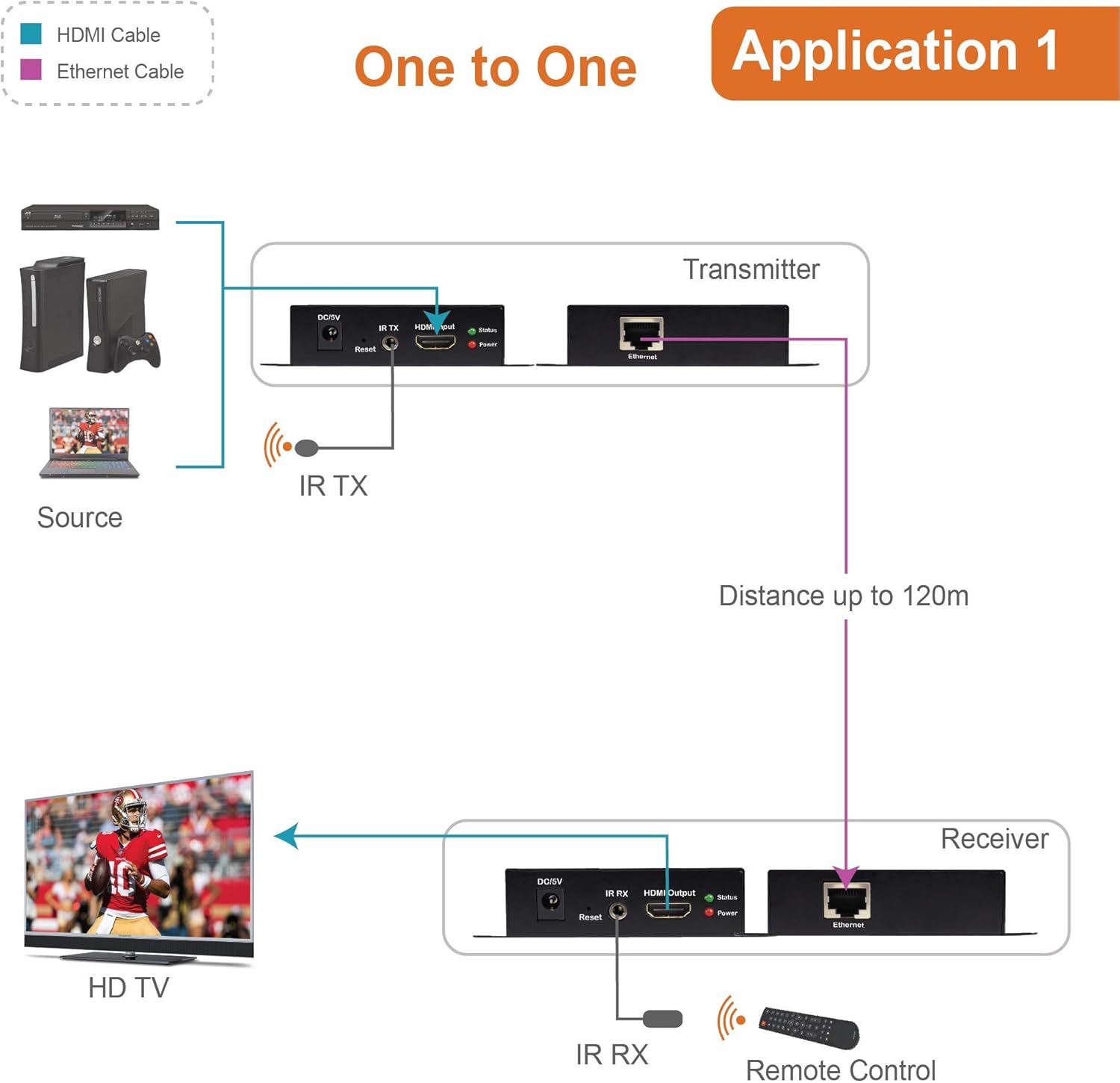
Image: Diagram illustrating a typical one-to-one setup for the J-Tech Digital HDMI Extender, showing a source device connected to the Transmitter, a Cat cable connecting Transmitter and Receiver, and the Receiver connected to an HD TV. IR cables are also shown for remote control functionality.
5.1 Multi-Receiver Application (via Ethernet Switch)
This extender supports a one-to-many configuration using an Ethernet switch. To achieve this, connect the HDMI Transmitter to an Ethernet switch, and then connect multiple HDMI Receivers to the same Ethernet switch. Each Receiver will then connect to its respective display.

Image: Diagram showing the J-Tech Digital HDMI Extender in a multi-receiver setup. A laptop (source) connects to the Transmitter, which then connects to an Ethernet switch. Multiple Receiver units are connected to the switch, each feeding a separate display, extending the signal up to 400ft.
6. Иштөө нускамалары
Once the setup is complete, the extender operates automatically. Ensure all devices are powered on in the correct sequence (source, then extender units, then display) for optimal performance.
6.1 IR Control Functionality
The IR extension feature allows you to control your HDMI source device from the location of your display. Point your remote control at the IR Receiver head connected to the Receiver unit. The signal will be transmitted through the Cat cable to the IR Emitter head connected to the Transmitter unit, which then relays the command to your source device.

Image: Diagram illustrating the IR extender control feature. A remote control sends a signal to the IR RX connected to the Receiver unit. This signal is then transmitted via the Cat cable to the IR TX connected to the Transmitter unit, which controls the source device.
7. Техникалык тейлөө
- Clean the unit with a soft, dry cloth. Do not use liquid or aerosol cleaners.
- Keep the unit free from dust and debris to ensure proper ventilation.
- Кабелдик байланыштарды дайыма текшерип туруңуз, алар коопсуз.
8. Кыйынчылыктарды
If you encounter issues with your HDMI Extender, refer to the following common problems and solutions:
| Көйгөй | Мүмкүн себеп | Чечим |
|---|---|---|
| Дисплейде видео же аудио жок. | Loose cable connections, power issue, incorrect input selection on display. | Check all HDMI and Ethernet cable connections. Ensure both Transmitter and Receiver units are powered on. Verify the display is set to the correct HDMI input. Try restarting all devices. |
| Poor video quality (flickering, distortion). | Low quality or damaged Cat cable, excessive cable length, interference. | Use a high-quality Cat6 or Cat7 cable. Ensure cable length does not exceed 120m (394ft). Avoid running Cat cable near strong electrical interference sources. |
| IR remote control not working. | IR emitter/receiver misaligned, IR cables not connected properly. | Ensure the IR emitter is directly over or very close to the IR sensor of the source device. Confirm the IR receiver is positioned to receive signals from your remote. Check that both IR cables are securely plugged into their respective ports. |
| Power indicator not lit. | Кубат адаптери туташкан эмес, розеткасы бузук. | Ensure the power adapter is securely connected to the unit and a working power outlet. Try a different power outlet. |
9. Техникалык шарттар
| Өзгөчөлүк | Деталь |
|---|---|
| Модель номери | JTD-EX-120M |
| HDMI версиясы | Supports 1080p, 3D, HDCP |
| Аудио колдоо | Dolby TrueHD, DTS Master Audio |
| Өткөрмө аралык | Up to 120m (394ft) over single Cat5e/6/7 cable |
| Video Color Support | 36bit (CAT7); 24bit (CAT6) |
| Сүрөттү кысуу | M-JPEG technique (no image quality loss) |
| IR кеңейтүүсү | Ооба |
| Электр камсыздоо | DC 5V/1A (x2) |
| Продукциянын өлчөмдөрү | 4 x 3 x 1 дюйм (ар бир бирдик) |
| Элемент Салмагы | 1 pound (total) |
10. Кепилдик жана колдоо
J-Tech Digital products are designed for reliability and performance. For warranty information and technical support, please refer to the official J-Tech Digital website or contact their customer service directly. Contact information is typically provided in the product packaging or on the manufacturer's webсайт.
Өндүрүүчү: J-Tech Digital INC
Webсайт: www.jtechdigital.com


