1. Продукт бүтүп калдыview
The Seiko Alba Picco Schoolmaster Timer ADMG001 is a versatile digital timer designed for ease of use in various settings, including educational environments. It features a large, clear display for easy readability and a non-slip rubber backing for stable placement. This device combines stopwatch, timer, and alarm functions, making it a practical tool for time management.
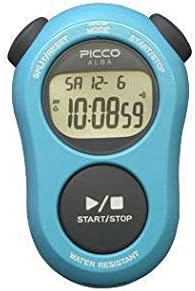
Figure 1: Seiko Alba Picco Schoolmaster Timer (Blue Model). This image displays the front view of the timer, highlighting its large digital screen and primary control buttons for mode selection and start/stop operations.
2. Орнотуу
2.1 Initial Battery Installation/Activation
The timer typically comes with a pre-installed battery. If the display is blank or dim, the battery may need activation or replacement. Refer to the "Maintenance" section for battery replacement instructions.
2.2 Убакытты жана датаны орнотуу
- басыңыз РЕЖИМ баскычын кайра-кайра басып убакытты орнотуу режими көрсөтүлөт.
- колдонуу START/STOP саатты жөндөө үчүн баскыч.
- басыңыз БӨЛҮҮ / КАЛДЫРУУ мүнөт жөндөөсүнө өтүү үчүн баскычын басыңыз.
- колдонуу START/STOP мүнөттөрдү жөндөө үчүн баскычты басыңыз.
- Repeat for setting the year, month, and day.
- басыңыз РЕЖИМ орнотуу режиминен чыгуу үчүн баскыч.
3. Иштөө нускамалары
3.1 Секундомер функциясы
- басыңыз РЕЖИМ button until the stopwatch display (00:00:00) appears.
- Басыңыз START/STOP убакытты баштоо үчүн.
- Басыңыз START/STOP кайра тыныгуу/ улантуу үчүн.
- Бөлүнгөн убакытты жаздыруу үчүн басыңыз БӨЛҮҮ / КАЛДЫРУУ while the stopwatch is running. The display will show the split time, while the internal timer continues. Press БӨЛҮҮ / КАЛДЫРУУ кайрадан иштөө убактысына кайтуу үчүн.
- To stop the stopwatch, press START/STOP.
- Секундомерди нөлгө кайтаруу үчүн, баскычын басыңыз БӨЛҮҮ / КАЛДЫРУУ when the stopwatch is stopped.
3.2 Timer Function (Countdown)
- басыңыз РЕЖИМ button until the timer display appears.
- Артка санак убактысын коюу үчүн басып, кармап туруңуз БӨЛҮҮ / КАЛДЫРУУ баскычын сандар жаркылдаганга чейин басыңыз.
- Колдонуу START/STOP to adjust the hours, minutes, or seconds. Press БӨЛҮҮ / КАЛДЫРУУ to cycle through hours, minutes, and seconds.
- Каалаган убакыт коюлгандан кийин, баскычын басыңыз РЕЖИМ ырастоо үчүн.
- Басыңыз START/STOP саноону баштоо үчүн.
- Артка саноо нөлгө жеткенде сигнал берилет.
- Ойготкучту токтотуу үчүн каалаган баскычты басыңыз.
- The timer features a repeat function. If enabled, the timer will automatically restart the countdown after reaching zero.
3.3 Ойготкуч функциясы
- басыңыз РЕЖИМ Ойготкуч жөндөөсү дисплейи пайда болгонго чейин баскычын басыңыз.
- Басып кармап туруңуз БӨЛҮҮ / КАЛДЫРУУ ойготкуч орнотуу режимине кирүү үчүн.
- Колдонуу START/STOP саатты тууралоо үчүн жана БӨЛҮҮ / КАЛДЫРУУ мүнөткө өтүү.
- Басыңыз РЕЖИМ ойготкуч убактысын ырастоо үчүн.
- Ойготкучту иштетүү/өчүрүү үчүн, басыңыз START/STOP while in the alarm display mode (not setting mode). An alarm icon will appear/disappear on the screen.
4. Техникалык тейлөө
4.1 Тазалоо
Wipe the timer with a soft, dry cloth. For stubborn dirt, a slightly damp cloth can be used. Avoid using harsh chemicals or abrasive cleaners, as these can damage the display or casing.
4.2 Батареяны алмаштыруу
When the display becomes dim or unresponsive, the battery needs replacement. This model typically uses a standard button cell battery. To replace:
- Carefully open the battery compartment cover on the back of the timer using a small screwdriver.
- Эски батареяны алып салыңыз.
- Insert a new battery of the correct type (refer to specifications for battery type), ensuring correct polarity (+/-).
- Батарея бөлүгүнүн капкагын бекем жабыңыз.
- Эски батареяларды жергиликтүү эрежелерге ылайык жок кылыңыз.
4.3 Сууга туруктуулук
The timer is designed with daily life waterproof capabilities. This means it can withstand splashes or brief exposure to water, but it is not suitable for swimming, showering, or submersion. Avoid pressing buttons when the timer is wet to prevent water ingress.
5. Кыйынчылыктарды
| Көйгөй | Мүмкүн себеп | Чечим |
|---|---|---|
| Дисплей бош же күңүрт. | Батарея аз же өлүк. | Батареяны ордуна коюңуз (4.2-бөлүмдү караңыз). |
| Баскычтар жооп бербейт. | Battery issue; internal malfunction; water ingress. | Check/replace battery. Ensure the timer is dry. If problem persists, contact customer support. |
| Убакыт/дата туура эмес. | Not set correctly; battery removed/replaced. | Убакытты жана датаны баштапкы абалга келтириңиз (2.2-бөлүмдү караңыз). |
| Ойготкуч угулбайт. | Alarm is not activated; volume too low (if adjustable); battery low. | Ensure alarm is activated (Section 3.3). Check battery. |
6. Техникалык шарттар
- Модел: ADMG001 (also known as D795S502)
- Бренд: Батырхан
- Өлчөмдөрү: Approximately 80mm (H) x 54.3mm (W) x 20.4mm (D) / 0.8"D x 2.14"W x 0.8"H
- Салмагы: 97 грамм
- Материал: Rubber casing
- Экрандын өлчөмү: 3.1 дюйм
- Функциялары: Stopwatch, Countdown Timer (with repeat function), Alarm, Full Auto Calendar, Daily Life Waterproof
- Батарея түрү: Button cell (specific type not provided, typically CR2032 or similar)
- Орнотуулардын саны: 5 (likely referring to modes or alarm settings)
- Камтылган аксессуарлар: Моюн боосу
7. Кепилдик жана колдоо
For warranty information and customer support, please refer to the documentation included with your purchase or visit the official SEIKO webсайт. Кепилдик дооматтар үчүн сатып алганыңыздын далилин сактаңыз.
SEIKO Official Webсайт: www.seikowatches.com


