Introduction
This manual provides comprehensive instructions for the setup, operation, maintenance, and troubleshooting of your Logitech M510 Wireless Mouse. Designed for comfort and efficiency, the M510 offers precise control and convenient features for your computing needs.
The Logitech M510 is a comfortable wireless computer mouse featuring a USB Unifying Receiver, back/forward buttons, and side-to-side scrolling. It operates on 2 AA batteries and is compatible with Personal Computers and Macbooks running operating systems like Windows 10.
Пакеттин мазмуну
- Logitech M510 зымсыз чычкан
- Logitech бириктирүүчү кабыл алгычы
- 2 AA батарейкасы (алдын ала орнотулган же кошо берилет)
Жайгашуу
1. Батареяны орнотуу
The Logitech M510 mouse requires two AA batteries for operation. These are typically included with your purchase. If not already installed, follow these steps:
- Чычкандын астыңкы бетинен батарея бөлүмүнүн капкагын табыңыз.
- Бөлүмдү ачуу үчүн капкакты жылдырыңыз же көтөрүңүз.
- Эки AA батарейкасын салып, оң (+) жана терс (-) терминалдары бөлүмдүн ичиндеги индикаторлорго туура дал келгенин текшериңиз.
- Батарея уясынын капкагын бекем жабыңыз.
2. Бириктирүүчү кабыл алгычты туташтыруу
The Logitech M510 uses a Logitech Unifying Receiver for wireless connectivity. This small USB receiver allows you to connect multiple compatible Logitech devices to your computer using a single USB port.
- Locate the Logitech Unifying Receiver. It is often stored inside the battery compartment of the mouse for safekeeping during transport.
- Plug the Unifying Receiver into an available USB port on your computer (desktop, laptop, or Macbook).
- Your computer should automatically detect the receiver and install the necessary drivers. This may take a few moments.
- Once the drivers are installed, the mouse should be ready for use. If not, ensure the mouse's power switch (if present) is in the 'ON' position.

Сүрөт: жогорудан төмөнгө view of the Logitech M510 Wireless Mouse alongside its compact USB Unifying Receiver.
Чычканды иштетүү
The Logitech M510 Wireless Mouse is designed for intuitive use with several programmable buttons and comfortable ergonomics.
Негизги функциялар
- Чычкандын сол баскычы: Объекттерди тандоо үчүн негизги баскыч, ачуу fileс, жана программалык камсыздоо менен өз ара аракеттенүү.
- Оң баскычты чыкылдатуу менен чыкылдатыңыз: Контексттик менюларга жана кошумча параметрлерге кирүү үчүн кошумча баскыч.
- Жылдыруу дөңгөлөгү: Документтерди өйдө же ылдый сыдырыңыз жана web барактар. Жылдыруу дөңгөлөгү ошондой эле ортоңку чыкылдатуу баскычы катары иштейт.
- Side-to-Side Scrolling: Tilt the scroll wheel left or right to scroll horizontally in applications that support this feature.
Advanced Features (Programmable Buttons)
The M510 features two thumb buttons (back/forward) on the left side, which can be customized using Logitech Options software (available for download from the Logitech website). By default, these buttons perform browser navigation functions.
- Артка баскычы: Navigates back in web браузерлер же file изилдөөчүлөр.
- Алга баскычы: Алга карай жылдырат web браузерлер же file изилдөөчүлөр.
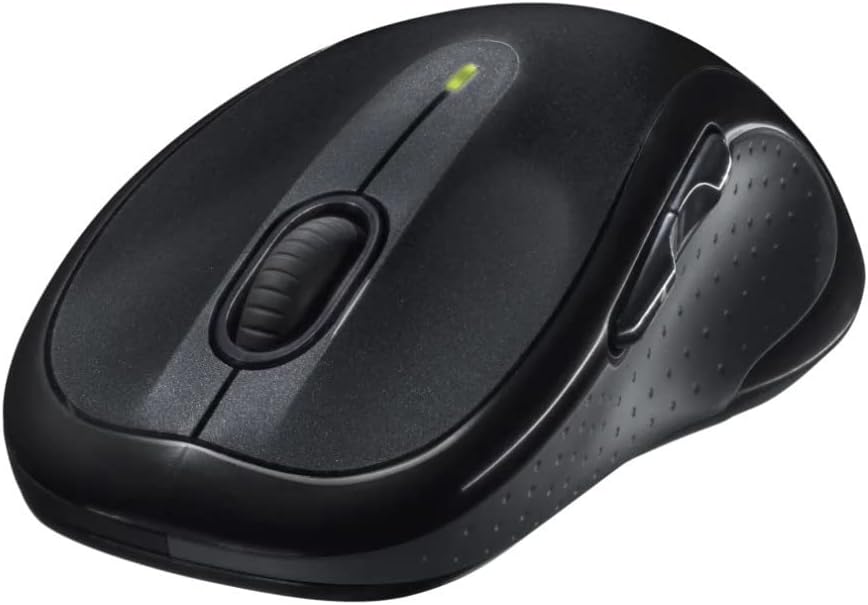
Сүрөт: бурчтуу view of the Logitech M510 Wireless Mouse, highlighting its ergonomic shape and side buttons.
Техникалык тейлөө
Чычканыңызды тазалоо
To ensure optimal performance and hygiene, regularly clean your Logitech M510 mouse:
- Disconnect the mouse from your computer by removing the Unifying Receiver.
- Жумшак, түксүз кездемени жеңил колдонуңуз dampened with water or a mild cleaning solution (e.g., isopropyl alcohol) to wipe down the surface of the mouse.
- For crevices and around buttons, use a cotton swab or a soft brush.
- Avoid getting liquid into the internal components or the optical sensor.
- Allow the mouse to dry completely before re-connecting.
Батареяны алмаштыруу
The Logitech M510 has an average battery life of 18 months. When the battery indicator light (if present) flashes or mouse performance degrades, it's time to replace the batteries.
- Turn off the mouse using the power switch on the underside.
- Батарея уясынын капкагын ачыңыз.
- Эски АА батарейкаларын алып салыңыз.
- Insert two new AA batteries, observing the correct polarity (+/-).
- Батарея уясынын капкагын жабыңыз.
- Turn the mouse back on.
Проблемаларды чечүү
| Көйгөй | Мүмкүн себеп | Чечим |
|---|---|---|
| Чычкан жооп бербей жатат | Low or dead batteries; Unifying Receiver not connected; Mouse power off; Driver issue. | Replace batteries; Ensure Unifying Receiver is securely plugged into a USB port; Turn mouse power switch to 'ON'; Reinstall Logitech Options software or check device manager for driver issues. |
| Lagging or erratic cursor movement | Interference; Dirty optical sensor; Mouse used on unsuitable surface; Low battery. | Move mouse closer to receiver; Clear obstructions; Clean optical sensor; Use a mouse pad or suitable surface; Replace batteries. |
| Капталдагы баскычтар иштебейт | Software not installed or configured; Application does not support custom buttons. | Download and install Logitech Options software from the official Logitech website to customize button functions. Ensure the application you are using supports these functions. |
| Unifying Receiver not recognized | Faulty USB port; Driver issue. | Try a different USB port; Restart your computer; Download and install the Logitech Unifying Software to re-pair the mouse with the receiver. |
Техникалык шарттар
| Өзгөчөлүк | Деталь |
|---|---|
| Бренд | Logitech |
| Модель номери | 910-001822 |
| Сериялар | M510 |
| Байланыш технологиясы | Radio Frequency, USB (via Unifying Receiver) |
| Кыймылды аныктоо технологиясы | Лазер |
| Түс | Кара боз |
| Элемент Салмагы | 4.6 унция (болжол менен 130 грамм) |
| Продукциянын өлчөмдөрү (LxWxH) | 4.38 x 2.5 x 1.75 дюйм (болжол менен 11.13 x 6.35 x 4.45 см) |
| Power Source | Батарея менен иштейт |
| Батареялар талап кылынат | 2 AA батарейка (кошулган) |
| Батареянын орточо иштөө мөөнөтү | 18 ай |
| Аппараттык платформа | Personal Computer, Macbook |
| Операциялык системанын шайкештиги | Windows 10 (and likely earlier versions, macOS) |
| Өзгөчөлүктөр | Battery Life Indicator, Power Saving Mode, Programmable Buttons, Wireless |
| Дата биринчи жеткиликтүү | 7-июнь, 2010-жыл |

Сүрөт: жогорудан төмөнгө view of the Logitech M510 Wireless Mouse showing its approximate dimensions (4.4" length, 2.5" width).
Кепилдик жана колдоо
Кепилдик маалымат
Logitech products typically come with a limited hardware warranty. For specific warranty terms and conditions applicable to your Logitech M510 Wireless Mouse, please refer to the warranty card included with your product or visit the official Logitech webсайт.
Кардарларды колдоо
For further assistance, technical support, or to download the latest software (such as Logitech Options or Unifying Software), please visit the official Logitech support webсайт:
You may also find helpful resources, FAQs, and community forums on their webсайт.


