1. Киришүү
The SilverStone SST-AP181 Air Penetrator is a high-performance 180mm computer case cooling fan designed to provide focused airflow for efficient system cooling. Unlike traditional fans that disperse air, the Air Penetrator's unique blade and grille design channels air into a concentrated column, allowing it to effectively pass through obstacles within a computer case. This design is particularly beneficial for intake applications, ensuring optimal cooling performance even at lower fan speeds and noise levels.

1-сүрөт: Бурчтуу view of the SilverStone SST-AP181 Air Penetrator fan, showcasing its unique blade design.
2. Коопсуздук маалыматы
- Ички компоненттерди орнотуудан же техникалык тейлөөдөн мурун, компьютериңизди ар дайым электр кубатынан ажыратыңыз.
- Handle the fan by its frame to avoid damaging the blades or internal components.
- Ensure proper orientation during installation to achieve desired airflow direction.
- Keep fingers and other objects clear of rotating fan blades to prevent injury.
- Do not attempt to disassemble or modify the fan, as this may void the warranty and cause damage.
3. Пакеттин мазмуну
Орнотууну улантуудан мурун пакетте бардык элементтер бар экенин текшериңиз:
- 1 x SilverStone SST-AP181 Air Penetrator 180mm Fan
- Монтаждоо бурамалар
- Anti-vibration Rubber Mounts
- Y-Cable Adapter (for connecting two fans to one power source, if included)

Figure 2: Retail packaging for the SilverStone SST-AP181 fan.
4. Орнотуу жана орнотуу
The SST-AP181 fan is designed for easy installation in standard computer cases that support 180mm fan mounts. It is particularly effective as an intake fan due to its air channeling capabilities.
- Компьютериңизди даярдаңыз: Power off your computer and disconnect it from the power outlet. Open the computer case to access the fan mounting locations.
- Монтаждоо ордун аныктоо: Locate an available 180mm fan mount in your computer case. Consider the desired airflow direction (typically intake for this fan type).
- Желдеткичти орнотуу:
- Align the fan with the mounting holes.
- Secure the fan using the provided mounting screws or anti-vibration rubber mounts. If using rubber mounts, carefully pull them through the fan and case holes to avoid tearing.
- Кубатты туташтыруу: The SST-AP181 uses a 3-pin or 4-pin power connector. Connect the fan's power cable to an available fan header on your motherboard or a fan controller.

3-сүрөт: Мисample of a fan power connector and an optional speed switch (if included with your case).
Important Note on Starting Voltage: The SST-AP181 may require approximately 10.8 Volts to start at its low speed setting. Some fan controllers or motherboard BIOS settings might not supply sufficient voltage at low temperatures, causing the fan to not spin up. If this occurs:
- Adjust the fan speed or temperature settings within your motherboard's BIOS to ensure a higher starting voltage.
- If your case has a fan speed switch, set it to the "high" position to enable a lower starting voltage for the fan.
- Кабелдик башкаруу: Башка компоненттерге же аба агымына тоскоол болбоо үчүн желдеткичтин кабелин тыкан жайгаштырыңыз.
- Корпусту жаап, күйгүзүңүз: Once the fan is securely installed and connected, close your computer case and reconnect the power. Power on your computer and verify that the fan is operating correctly.

Figure 4: Visual representation of the Air Penetrator fan's focused airflow compared to a traditional fan's dispersed airflow.
5. Желдеткичти иштетүү
The SilverStone SST-AP181 fan operates continuously once powered. Its speed can be controlled via a compatible motherboard fan header (PWM or voltage control) or an external fan controller, if available. At lower voltages (e.g., 5 Volts), the fan speed will be approximately 500 RPM, resulting in nearly inaudible operation while still providing effective airflow.
- Ылдамдыкты көзөмөлдөө: Adjust fan speed through your motherboard's BIOS settings or dedicated fan control software for optimal balance between cooling and noise.
- Аба агымынын багыты: Ensure the fan is oriented to draw cool air into the case (intake) for best performance, especially when utilizing its air channeling capabilities.
6. Техникалык тейлөө
Үзгүлтүксүз техникалык тейлөө желдеткичиңиздин оптималдуу иштешин жана узак мөөнөттүү иштешин камсыз кылууга жардам берет.
- Чаңды тазалоо: Periodically clean dust from the fan blades and grille using compressed air or a soft brush. Ensure the fan is powered off and stationary before cleaning.
- Текшерүү: Check for any obstructions around the fan or signs of wear on the cables.
7. Кыйынчылыктарды
| Көйгөй | Мүмкүн себеп | Чечим |
|---|---|---|
| Fan does not spin or spins intermittently. |
|
|
| Fan is unusually loud or making a buzzing noise. |
|
|
| Муздатуу начар иштейт. |
|
|
8. Техникалык шарттар
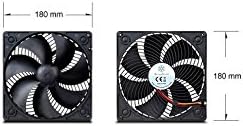
Figure 5: Diagram showing the 180mm x 180mm dimensions of the SilverStone SST-AP181 fan.
| Өзгөчөлүк | Деталь |
|---|---|
| Модель номери | SST-AP181 |
| Өлчөмдөрү (LxWxH) | 7.09" x 7.09" x 1.26" (180 мм x 180 мм x 32 мм) |
| Материал | Поликарбонат |
| Кубат туташтыргычынын түрү | 3-Pin or 4-Pin |
| Тtage | 10.8 Volts (starting), 12 Volts (operating) |
| Ватtage | 5.4 ватт |
| Муздатуу ыкмасы | Аба |
| Ызы-чуу деңгээли | 20 Decibels (at specified conditions) |
| Максималдуу айлануу ылдамдыгы | 1500 RPM |
| Аба агымынын кубаттуулугу | 0.08 Cubic Meters Per Second |
| Шайкеш түзмөктөр | Үстөл компьютерлери |
9. Кепилдик жана колдоо
SilverStone Technology Co., Ltd. provides a limited warranty for its products. For specific warranty terms and conditions, please refer to the warranty card included with your product or visit the official SilverStone website. For technical support, product inquiries, or warranty claims, please contact SilverStone customer service through their official channels.
Официалдуу Webсайт: www.silverstonetek.com


