Introduction
Welcome to the Greenlee DM-810A True RMS Digital Multimeter user manual. This document provides essential information for the safe and effective operation, maintenance, and troubleshooting of your device. The DM-810A is designed for accurate measurement of AC/DC voltage, AC/DC current, resistance, capacitance, frequency, and continuity, making it a versatile tool for electrical professionals.
Коопсуздук маалыматы
Эсептегичтин коопсуз иштешин жана тейлөөсүн камсыз кылуу үчүн, ушул көрсөтмөлөрдү аткарыңыз. Бул эскертүүлөрдү сактабоо оор жаракатка же өлүмгө алып келиши мүмкүн.
- Always read and understand the entire instruction manual before using the meter.
- Эч бир функция үчүн киргизүүнүн максималдуу чегинен ашпаңыз.
- Том менен иштөөдө этият болуңузtag30V AC RMS, 42V пик же 60V DC жогору. Бул томtagшок коркунучун жаратат.
- Always use the proper terminals, function, and range for your measurements. The DM-810A features a Beep-Jack audible and visible warning to guard against improper A and mA terminal plug-in.
- Inspect test leads for damaged insulation or exposed metal before each use. Replace if damaged.
- Do not use the meter if it appears damaged or if the case is open.
- Иштөө алдында батареянын капкагы бекем жабылганын текшериңиз.
- Adhere to local and national safety codes. Use personal protective equipment (PPE) such as approved safety glasses and electrically insulated gloves when necessary.
Продукт бүттүview
This section identifies the key parts and controls of your Greenlee DM-810A multimeter.

1-сүрөт: Фронт view of the Greenlee DM-810A Digital Multimeter, showing the display, function selector dial, and input jacks.
- Дисплей: Large LCD for clear readings, often with dual display capability.
- Функция тандоо баскычы: Used to select the desired measurement function (e.g., V~, V-, A~, A-, Ω, CAP, Hz, Continuity).
- Киргизүү уячалары:
- COM: Бардык өлчөөлөр үчүн жалпы (терс) киргизүү.
- VΩHz: Том үчүн оң киргизүүtagд, каршылык, жыштык жана сыйымдуулук өлчөө.
- mAμA: Positive input for milliampere жана микроampучурдагы өлчөөлөр.
- A: Positive input for ampучурдагы өлчөөлөр.
- Баскычтар:
- ТАНДОО: Toggles between functions on a single dial position (e.g., AC/DC voltagд, диод/үзгүлтүксүздүк).
- RANGE: Manually selects measurement range or returns to auto-ranging.
- △: Delta function for relative measurements.
- КОЛДО: Учурдагы дисплейдеги окууну токтотот.
Жайгашуу
Батарея орнотуу
The Greenlee DM-810A requires batteries for operation. Refer to the back of the meter for the battery compartment. Use a screwdriver to open the compartment, insert the specified batteries (typically AA or 9V, check the compartment label), observing correct polarity, and then securely close the cover.
Тесттин жыйынтыгын туташтыруу
Өлчөөлөрдү жүргүзүүдөн мурун, ар дайым сыноо зымдары туура туташтырылганын текшериңиз.
- Кара сыноо өткөргүчтү орнотуңуз COM (жалпы) киргизүү уячасы.
- Insert the red test lead into the appropriate positive input jack based on the measurement you intend to make:
- Том үчүнtage, resistance, capacitance, or frequency, use the VΩHz джек.
- Милли үчүнampere or microampere current, use the mAμA джек.
- үчүн ampere current, use the A джек.
- The meter's Beep-Jack feature will provide an audible and visible alert if the function selector is set to a current measurement (A or mA) but the test lead is incorrectly plugged into a voltage/resistance jack, or vice-versa. This helps prevent damage to the meter and ensures correct setup.
Иштөө нускамалары
This section details how to perform various measurements with your DM-810A multimeter.
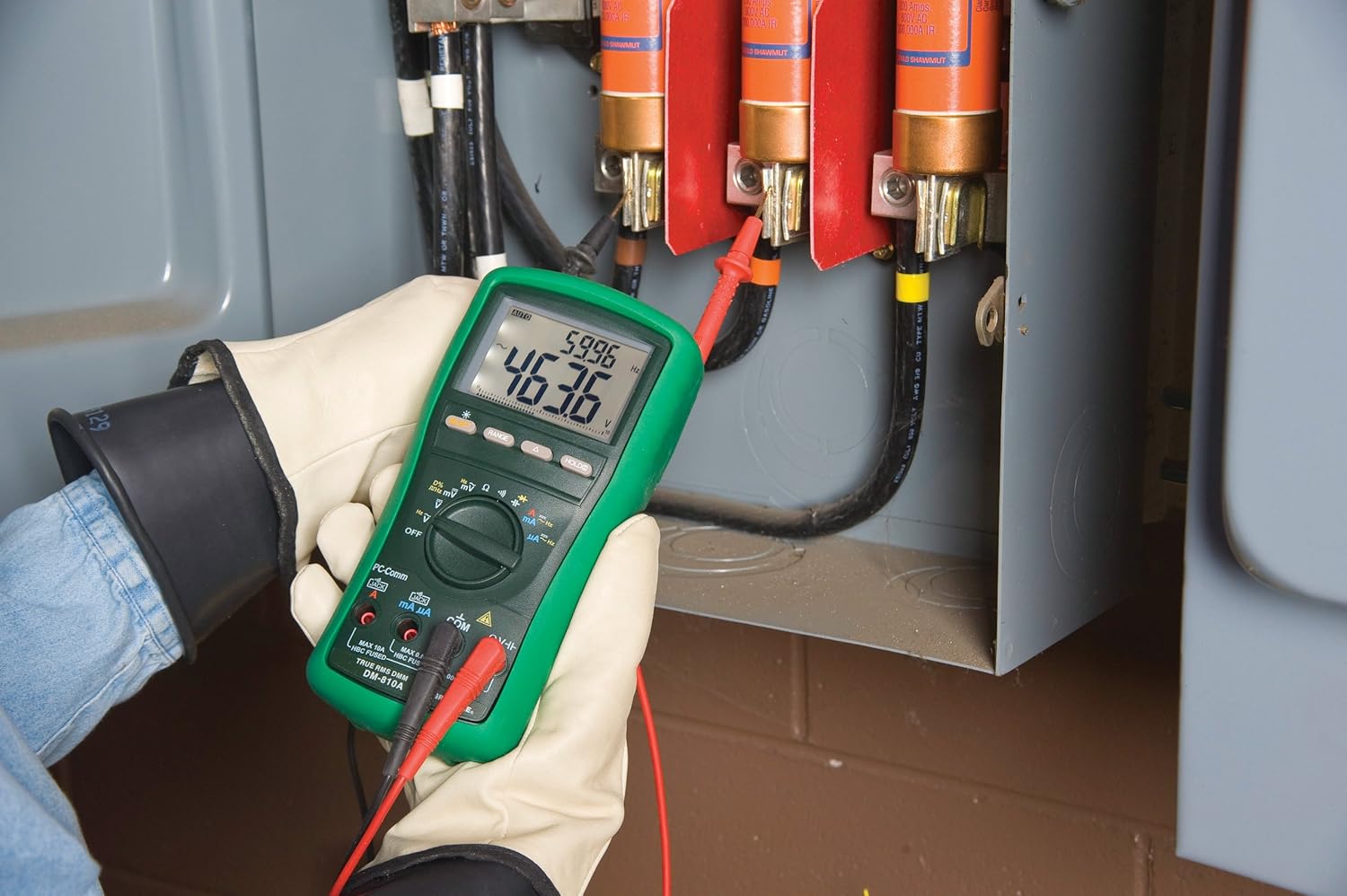
2-сүрөт: The Greenlee DM-810A Digital Multimeter being used to take measurements within an electrical panel, demonstrating practical application.
Өлчөө AC/DC Voltage
- Set the function selector to V~ (AC Voltagд) же V- (ТК көлөмүtage). Use the SELECT button to toggle if both are on one position.
- Кара сыноо тилкесин туташтырыңыз COM and the red test lead to VΩHz.
- Connect the test probes in parallel across the circuit or component to be measured.
- Томду окуңузtage мааниси дисплейде.
AC/DC токту өлчөө
Маанилүү: Current measurements require the meter to be connected in series with the circuit. Ensure the circuit is de-energized before connecting the meter.
- Схеманы энергиядан ажыратыңыз.
- Set the function selector to A~ (AC Current) or A- (DC Current), or mA~ / mA-.
- Кара сыноо тилкесин туташтырыңыз COM. Connect the red test lead to mAμA for small currents or A for larger currents (up to 10A). The Beep-Jack warning will activate if leads are in the wrong jacks for the selected function.
- Open the circuit where the current is to be measured and connect the meter in series.
- Re-energize the circuit and read the current value.
- De-energize the circuit before disconnecting the meter.
Measuring Resistance (Ω)
- De-energize the circuit or component.
- Set the function selector to Ω.
- Кара сыноо тилкесин туташтырыңыз COM and the red test lead to VΩHz.
- Сыноо зонддорун компоненттин үстүнө туташтырыңыз.
- Каршылык маанисин окуңуз.
Measuring Capacitance (CAP)
- Өлчөөнүн алдында конденсатордун толук зарядсыздангандыгын текшериңиз.
- Set the function selector to CAP.
- Кара сыноо тилкесин туташтырыңыз COM and the red test lead to VΩHz.
- Сыноочу зонддорду конденсатордун терминалдарына туташтырыңыз.
- Сыйымдуулуктун маанисин окуңуз.
Өлчөө жыштыгы (Гц)
- Set the function selector to Hz.
- Кара сыноо тилкесин туташтырыңыз COM and the red test lead to VΩHz.
- Сыноо зонддорун сигнал булагы аркылуу туташтырыңыз.
- Жыштыктын маанисин окуу.
Үзгүлтүксүздүк тести
- De-energize the circuit or component.
- Set the function selector to the continuity symbol (often shared with diode test, use SELECT to toggle).
- Кара сыноо тилкесин туташтырыңыз COM and the red test lead to VΩHz.
- Connect the test probes across the circuit path or component.
- An audible beep indicates continuity (low resistance). The display will show the resistance value.
Техникалык тейлөө
Тазалоо
Жарнама менен эсептегичти сүртүңүзamp кездеме жана жумшак жуугуч. Абразивдерди же эриткичтерди колдонбоңуз. Колдонуудан мурун эсептегич толугу менен кургатылганын текшериңиз.
Батареяны алмаштыруу
When the battery indicator appears on the display, replace the batteries immediately to ensure accurate readings. Follow the battery installation steps outlined in the Setup section.
Фузерди алмаштыруу
If the current measurement functions cease to work, the internal fuses may need replacement. Refer to the meter's internal diagram (usually accessible by opening the battery compartment or back casing) for fuse specifications and replacement instructions. Always replace fuses with those of the specified type and rating to maintain safety and performance.
Проблемаларды чечүү
This section provides solutions for common issues encountered during the operation of your DM-810A multimeter.
| Көйгөй | Мүмкүн себеп | Чечим |
|---|---|---|
| Дисплей жок же күңүрт дисплей | Өлгөн же аз батареялар | Батареяларды алмаштырыңыз. |
| Туура эмес окуулар | Incorrect function/range selected; Damaged test leads; External interference | Verify function and range; Inspect and replace test leads; Move away from strong electromagnetic fields. |
| Учурдагы өлчөө иштебей жатат | Blown fuse; Incorrect lead connection | Check and replace fuses; Ensure leads are in the correct A or mA jacks. |
| Beep-Jack warning active | Test leads connected to incorrect input jacks for the selected function | Adjust test lead connections to match the selected function on the dial. |
| Continuity test not beeping | Open circuit; High resistance | Ensure the circuit is closed; Check for breaks in the circuit or component. |
Техникалык мүнөздөмөлөр
The following table outlines the key technical specifications for the Greenlee DM-810A Digital Multimeter.
| Өзгөчөлүк | Нарк |
|---|---|
| Бренд | Гринли |
| Модел | DM-810A |
| Өлчөө түрү | Чыныгы RMS санариптик мультиметр |
| Power Source | Батарея менен иштейт |
| Стиль | Санарип |
| Элемент Салмагы | 16 унция (1 фунт) |
| Продукциянын өлчөмдөрү (L x W x Y) | 10 x 10 x 12 дюйм |
| Сертификаттар | CE, CSA, UL |
| UPC | 783310087434 |
Кепилдик жана колдоо
Кепилдик маалымат
The Greenlee DM-810A Digital Multimeter comes with a 1 жылдык өндүрүүчүнүн кепилдиги. Бул кепилдик нормалдуу колдонуудагы материалдардагы жана жасалгадагы кемчиликтерди камтыйт. Кепилдик дооматтары үчүн сатып алганыңыздын далилин сактап коюңуз.
Кардарларды колдоо
For technical assistance, warranty service, or to inquire about replacement parts, please contact Greenlee customer support. Refer to the official Greenlee webакыркы байланыш маалыматы үчүн сайт же продукт таңгак.


