1. Киришүү
The D-Link DGS-1008G 8-Port Gigabit Ethernet Switch provides an excellent solution for expanding your Gigabit network. This plug-and-play device offers 8 Gigabit ports, enabling high-speed data transfer up to 10 times faster than a 100Mbps Fast Ethernet connection. It is designed for quiet operation with a fanless desktop form factor and incorporates D-Link Green technology for energy conservation. Quality of Service (QoS) support ensures clear VoIP calls and smooth online gaming by prioritizing network traffic.
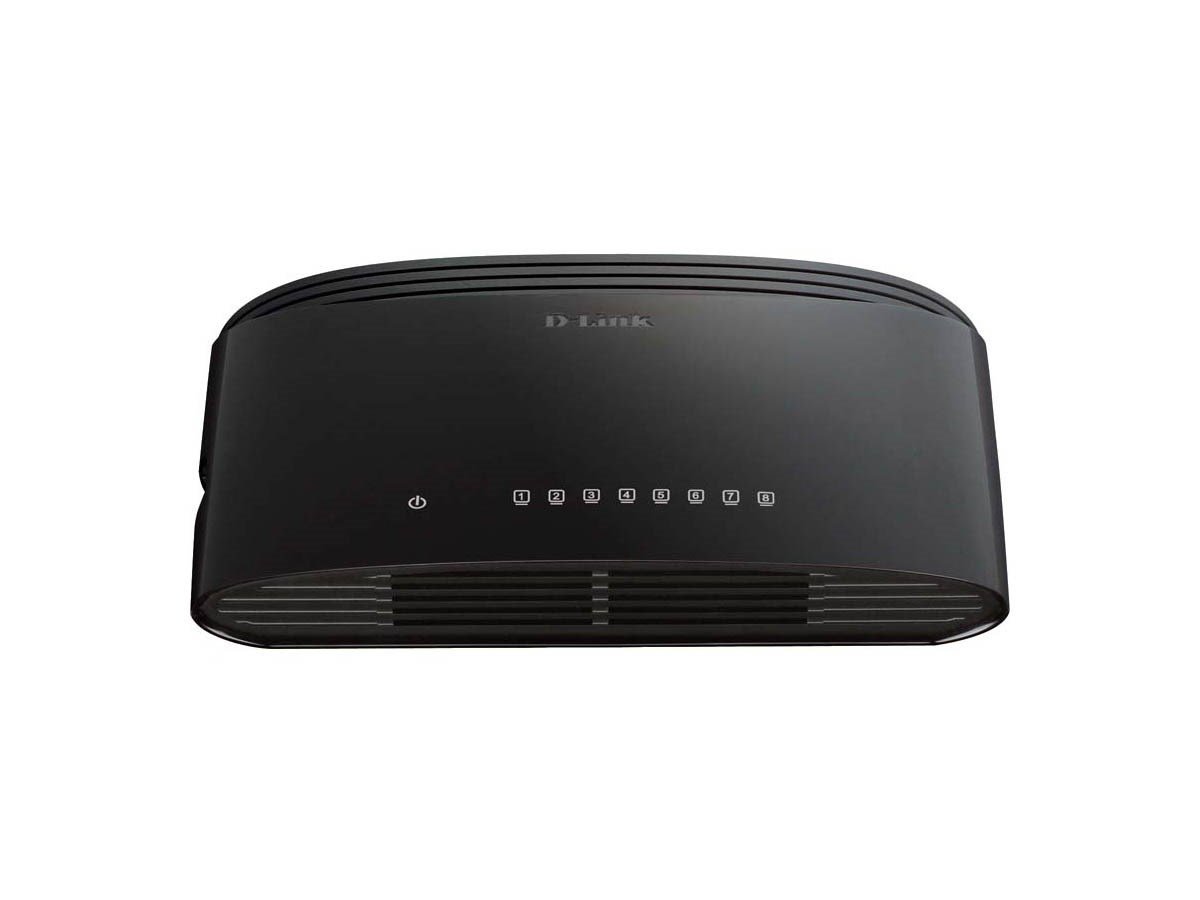
Figure 1: D-Link DGS-1008G 8-Port Gigabit Ethernet Switch, compact black design.
2. Кутуда эмне бар
Пакетти ачканда, сиз төмөнкү нерселерди табышыңыз керек:
- DGS-1008G Device: The 8-Port Gigabit Ethernet Switch unit.
- Кубаттуу адаптер: For connecting the switch to an electrical outlet.
- Ыкчам баштоо боюнча колдонмо: Provides basic setup instructions.
- Дубалга орнотуу комплекти: Includes screws and anchors for optional wall mounting.
- Резина буттары: For desktop placement to prevent slipping and protect surfaces.
3. Орнотуу
The DGS-1008G switch is designed for plug-and-play installation, requiring no software configuration. Follow these steps to set up your switch:
- Жайгашкан жери: Choose a suitable location for your switch. Ensure it is on a stable surface or mounted securely to a wall.
- Туташуу кубаты: Plug the power adapter into the switch's power input port and then into a standard electrical outlet. The Power LED on the switch will illuminate.
- Тармакка туташуу: Connect an Ethernet cable from your router or modem to any of the 8 Gigabit ports on the DGS-1008G switch. The corresponding Link/Act LED for that port will light up, indicating a successful connection.
- Түзмөктөрдү туташтыруу: Connect your network devices (e.g., computers, network-attached storage, gaming consoles, smart TVs) to the remaining Ethernet ports on the switch using standard Ethernet cables. The Link/Act LEDs for these ports will also illuminate.
The switch automatically detects the network speed (10/100/1000 Mbps) and adjusts accordingly. If the Link/Act LED is blinking, it indicates active data transmission.
Video 1: A demonstration of how to connect and utilize the D-Link 8-Port Gigabit Ethernet Switch to expand your network and split your router's Wi-Fi signal. This video highlights the plug-and-play functionality and ease of setup for various devices.
4. Иштөө
The DGS-1008G is an unmanaged switch, meaning it operates automatically without requiring user configuration for basic network functions. Key operational features include:
- Гигабит ылдамдыгы: All 8 ports support Gigabit Ethernet (1000 Mbps), providing high-speed connectivity for bandwidth-intensive tasks.
- Plug-and-Play: No software or complex setup is required. Simply connect your devices, and the switch will automatically detect and configure the optimal connection speed.
- D-Link Green Technology: This feature helps conserve energy by automatically detecting link status and cable length, adjusting power usage accordingly.
- Кызматтын сапаты (QoS): Prioritizes network traffic to ensure smooth performance for critical applications like VoIP calls and online gaming.
- желдеткичсиз дизайн: Ensures silent operation, making it suitable for quiet environments like homes and small offices.
5. Техникалык тейлөө
To ensure optimal performance and longevity of your D-Link DGS-1008G switch, consider the following maintenance tips:
- Аны таза кармаңыз: Periodically wipe the exterior of the switch with a soft, dry cloth to remove dust. Ensure ventilation holes are not obstructed.
- Туура желдетүү: Place the switch in a location with adequate airflow to prevent overheating, especially given its fanless design.
- Кабелдик башкаруу: Keep Ethernet cables organized and free from kinks or excessive bending to prevent signal degradation.
- Power Cycle (if needed): If you experience network issues, try power cycling the switch by unplugging it from the power source for 10-15 seconds and then plugging it back in.
6. Кыйынчылыктарды
If you encounter issues with your DGS-1008G switch, refer to the following common troubleshooting steps:
- Кубат жок: Ensure the power adapter is securely connected to both the switch and a working electrical outlet. Check if the Power LED is illuminated.
- Шилтеме жок/Аракет: Verify that Ethernet cables are securely plugged into both the switch and the connected device. Try using a different Ethernet cable or port. Ensure the connected device is powered on and functioning correctly.
- Жай тармак ылдамдыгы: Confirm that all connected devices and cables support Gigabit Ethernet (Cat5e or Cat6 cables are recommended for Gigabit speeds). Check for excessive network traffic or interference.
- Үзгүлтүксүз туташуу: Inspect all cable connections for looseness or damage. Try restarting the switch and connected devices.
- Түзмөк аныкталган жок: Ensure the device's network adapter is enabled and configured correctly.
7. Техникалык шарттар
| Өзгөчөлүк | Спецификация |
|---|---|
| Модель номери | DGS-1008G |
| Бренд | D-Link |
| Порттардын саны | 8 Гигабит Ethernet (RJ45) |
| Interface Type | RJ45 |
| Маалыматтарды өткөрүү ылдамдыгы | Секундасына 2000 Мегабит (Толук дуплекс) |
| Иштин материалы | Металл |
| Түс | Кара |
| Элементтин өлчөмдөрү (LxWxH) | 5.5 x 3.37 x 1.31 дюйм |
| Элемент Салмагы | 9 унция (0.56 фунт) |
| Тtage | 5 вольт |
| Учурдагы рейтинг | 1 Amps |
| Күйөрмансыз дизайн | Ооба |
| QoS колдоо | Ооба |
| D-Link Green Technology | Ооба |
8. Кепилдик жана колдоо
For warranty information and technical support, please refer to the documentation included in your product package or visit the official D-Link website. D-Link provides resources and customer service to assist with any product-related inquiries or issues.


