1. Киришүү
This manual provides essential instructions for the safe and effective use of your Olympus E-5 Digital SLR Camera. Please read this manual thoroughly before using the camera and keep it in a safe place for future reference. The Olympus E-5 is a robust DSLR camera designed for professional use, featuring a 12.3-megapixel Live MOS sensor, a TruePic V+ image processing engine, and a durable, weather-sealed body.
2. Коопсуздук маалыматы
- Камераны узак убакыт бою өтө жогорку температурага, нымдуулукка же түз күн нуруна дуушар кылбаңыз.
- Камераны жерге түшүрүүдөн же катуу тийүүдөн сактаныңыз.
- Keep the camera away from water and other liquids, unless specifically designed for underwater use. While the E-5 is dustproof and splashproof, it is not submersible.
- Use only genuine Olympus accessories or approved compatible products.
- Камераны ажыратууга же өзгөртүүгө аракет кылбаңыз. Бардык тейлөөлөрдү квалификациялуу кызматкерлерге тапшырыңыз.
- Батареяларды балдар жетпеген жерде сактаңыз.
3. Орнотуу
3.1. Батареяны орнотуу
The Olympus E-5 uses a Lithium-Ion battery (BLM-5). Ensure the battery is fully charged before first use.
- Камеранын ылдый жагында жайгашкан батарея бөлүкчөсүнүн капкагын ачыңыз.
- Insert the battery with the contacts facing the correct direction, as indicated inside the compartment.
- Батарея бөлүкчөсүнүн капкагын чыкылдагыча бекем жабыңыз.
3.2. Эстутум картасын салуу
The E-5 supports both CompactFlash (CF) and SD memory cards.
- Камеранын капталындагы эстутум картасынын уячасынын капкагын ачыңыз.
- Insert the CF card into the CF slot or the SD card into the SD slot until it clicks. Ensure the card is oriented correctly.
- Эстутум картасынын уячасынын капкагын бекем жабыңыз.

Figure 3.2.1: Right side of the Olympus E-5, illustrating the memory card compartment and various port covers.
3.3. Объективди бекитүү
The E-5 uses a Four Thirds lens mount.
- Камерадан корпустун капкагын жана линзадан арткы капкагын алып салыңыз.
- Align the mounting index (red dot) on the lens with the mounting index on the camera body.
- Insert the lens into the camera mount and rotate it clockwise until it locks into place with a click.

Сүрөт 3.3.1: Алдыңкы view of the Olympus E-5 camera body, showing the Four Thirds lens mount.
3.4. Баштапкы күйгүзүү жана негизги жөндөөлөр
- Кубат өчүргүчтү "ON" абалына буруңуз.
- The first time you power on the camera, you may be prompted to set the date, time, and language. Follow the on-screen instructions using the control dial and buttons.
4. Камераны иштетүү
4.1. Негизги атуу режимдери
The E-5 offers various exposure control modes:
- Программанын автоматтык режими (P): The camera automatically sets both aperture and shutter speed.
- Aperture Priority (A/Av): Сиз диафрагманы орнотуп, камера тиешелүү жабуунун ылдамдыгын тандайт.
- Shutter Priority (S/Tv): Сиз жабуунун ылдамдыгын орнотуп, камера тиешелүү диафрагманы тандайт.
- Кол менен (M): Сиз диафрагманы жана жабуунун ылдамдыгын көзөмөлдөйсүз.
- Авто: Жөнөкөй "көрсөтүп, атуу" операциясы үчүн толук автоматтык режим.
Select your desired mode using the mode dial on the top of the camera.
4.2. Фокустоо
The E-5 features an 11-point autofocus system. You can switch between autofocus (AF) and manual focus (MF) using the switch on the lens or camera body.
- Автофокус: Press the shutter button halfway to activate autofocus. The camera will focus on the subject within the selected AF points.
- Кол менен Фокус: Rotate the focus ring on the lens to adjust focus manually.
4.3. Сүрөттү турукташтыруу
The E-5 incorporates digital image stabilization to reduce blur caused by camera shake. This feature is automatically active and can be configured in the camera's menu system if needed.
4.4. Using the Swiveling LCD Monitor
The 3.0-inch HyperCrystal LCD monitor can swivel 270 degrees, allowing for flexible shooting angles and easy composition for both still images and HD videos.
- Gently pull the LCD monitor away from the camera body.
- Rotate it to your desired angle for comfortable viewing.
- To close, fold the LCD back into its original position until it clicks.
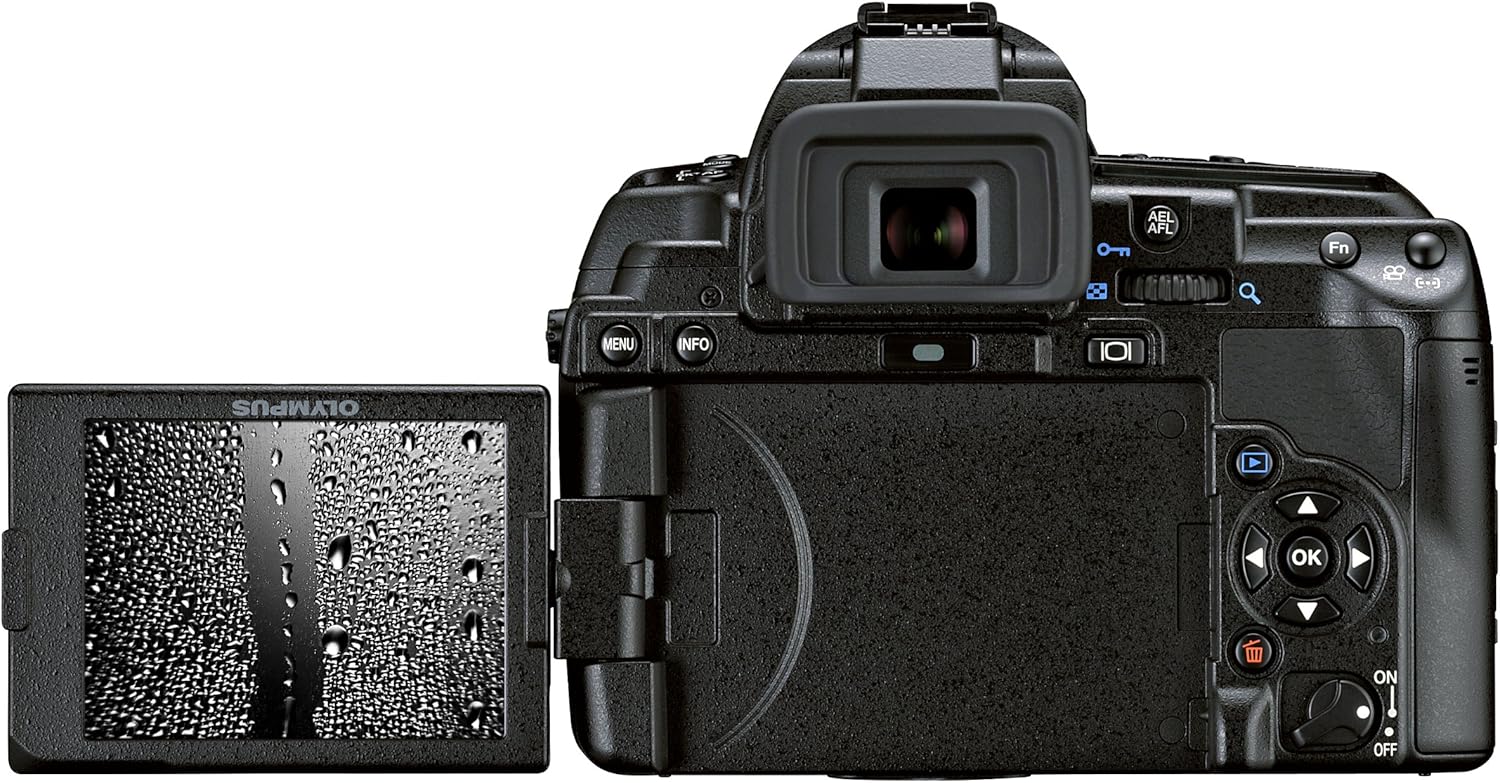
4.4.1-сүрөт: Арткы view of the Olympus E-5, showing the LCD monitor swiveled out for flexible viewing.
4.5. Видео жаздыруу
The E-5 can record video at 1080p resolution.
- Switch the camera to movie mode (refer to your camera's specific button layout or menu).
- Жазууну баштоо жана токтотуу үчүн кино жаздыруу баскычын басыңыз.
4.6. Сүрөттү ойнотуу
үчүн view captured images and videos, press the playback button (usually marked with a triangle icon).
- Сүрөттөрдү карап чыгуу үчүн багыттоочу баскычты колдонуңуз.
- Use the zoom buttons to enlarge or view бир нече сүрөттөр.
4.7. Байланыш
The E-5 features USB connectivity for transferring files to a computer. It also supports Wi-Fi for wireless transfer or remote control with compatible accessories.

Figure 4.7.1: Left side of the Olympus E-5, showing the covers for USB, HDMI, and other ports.
5. Техникалык тейлөө
5.1. Камераны тазалоо
- Камеранын корпусу: Wipe the camera body with a soft, dry cloth. For stubborn dirt, use a slightly damp чүпүрөк, анан кылдат кургатуу.
- Объектив жана Viewтапкыч: Чаңды кетирүү үчүн линза щеткасын же үйлөгүчтү колдонуңуз. Тактарды кетирүү үчүн линзаны тазалоочу эритмени жана микрофибра кездемени колдонуңуз.
- Сүрөт сенсору: The E-5 features a Supersonic Wave Filter for automatic dust reduction. If dust spots persist, consult a professional service center for sensor cleaning.
5.2. Батареяга кам көрүү
- Батареяларды колдонбогондо салкын, кургак жерде сактаңыз.
- Батареянын иштөө мөөнөтүн узартуу үчүн бат-баттан толук зарядсыздануудан качыңыз.
- Камера узак убакыт бою колдонулбаса, батареяны чыгарып алыңыз.
5.3. Сактоо
Store the camera in a dry, well-ventilated area, preferably in a camera bag, to protect it from dust and physical damage.
6. Кыйынчылыктарды
| Көйгөй | Мүмкүн себеп | Чечим |
|---|---|---|
| Камера күйбөйт. | Батарея түгөнүп калган же туура эмес салынган. | Батареяны заряддаңыз же туура кыстарыңыз. |
| Сүрөткө тартуу мүмкүн эмес. | Эстутум картасы толуп, кулпуланган же кыстарылган эмес. | Insert a new card, unlock the card, or ensure it is properly inserted. |
| Сүрөттөр бүдөмүк. | Туура эмес фокус, камеранын солкулдашы же кир линза. | Check focus settings, use image stabilization, or clean the lens. |
| Автофокус жай же так эмес. | Low light conditions, low contrast subject, or lens not properly attached. | Use an external light source, focus manually, or re-attach the lens. |
7. Техникалык шарттар
| Өзгөчөлүк | Деталь |
|---|---|
| Бренд | Олимп |
| Модель аты | E-5 |
| Сенсор түрү | 12.3 MP High-Speed Live MOS |
| Сүрөт процессору | TruePic V+ |
| Линза орнотуу | Төрт Үчтөн |
| Image Stabilization | Санарип |
| Дисплей | 3.0-inch 920,000-dot HyperCrystal Swiveling LCD |
| Автофокус чекиттери | 11 |
| Video Resolution | 1080p |
| Сактагыч медиа | SD Card, CompactFlash (CF) |
| Байланыш | USB, Wi-Fi (with compatible accessories) |
| Салмагы | 0.8 Kilograms (body only) |
| Экологиялык мөөр | Dustproof, Splashproof |
8. Кепилдик маалыматы
This product is typically covered by a manufacturer's warranty. For specific details regarding your Olympus E-5 camera, please refer to the warranty card included with your purchase or visit the official Olympus support website. A 90-day parts and labor warranty may apply to certain purchases, as indicated by the seller.
9. Кардарларды колдоо кызматы
For further assistance, technical support, or service inquiries, please contact Olympus customer support through their official website or the contact information provided in your product documentation. You can visit the Amazon'догу Olympus дүкөнү кошумча продукт маалымат жана ресурстар үчүн.


