Introduction
This manual provides essential information for the safe and effective use of your Lexmark E360, E460, E462 Series High Yield Return Program Toner Cartridge (Part Number E360H11A). This genuine Lexmark product is designed to deliver consistent, high-quality monochrome laser prints with an estimated yield of 9,000 pages. Please read this manual thoroughly before installation and use.
Коопсуздук маалыматы
- Тонер картридждерин балдар жетпеген жерде сактаңыз.
- Do not incinerate toner cartridges. Residual toner dust can ignite.
- Avoid inhaling toner dust. If toner gets on your skin or clothing, wash it off immediately with soap and cold water.
- Тонер картриджин бөлүктөргө ажыратууга аракет кылбаңыз.
- Store cartridges in their original packaging in a cool, dry place away from direct sunlight.
Кутуда эмне бар
Сиздин пакетиңиз төмөнкү нерсени камтышы керек:
- One (1) Lexmark E360, E460, E462 Series High Yield Return Program Toner Cartridge (Part Number E360H11A)
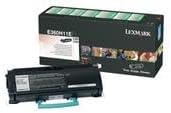
This image displays the Lexmark E360H11A High Yield Return Program Toner Cartridge alongside its retail packaging. The cartridge is black with a light blue handle, and the box features Lexmark branding and product details.
Орнотуу жана орнотуу
Follow these steps to properly install the toner cartridge in your Lexmark E360, E460, or E462 series printer:
- Принтерди өчүрүү: Ensure your printer is turned off and unplugged from the power outlet before beginning the installation process.
- Алдыңкы капкакты ачуу: Open the front cover of your Lexmark printer to access the toner cartridge compartment.
- Эски картриджди алып салуу (эгер бар болсо): If replacing an old cartridge, carefully pull it straight out of the printer. Place it in a protective bag for recycling.
- Жаңы картриджди таңгактан чыгаруу: Remove the new Lexmark E360H11A toner cartridge from its packaging. Avoid touching the green drum surface.
- Картриджди чайкаңыз: Gently shake the new cartridge horizontally 5-6 times to distribute the toner evenly.
- Коргоочу пломбаларды алып салуу: Carefully remove any protective tapes or seals from the cartridge as indicated in your printer's specific manual.
- Жаңы картридж салыңыз: Align the new cartridge with the guides inside the printer and push it firmly until it clicks into place.
- Алдыңкы капкакты жабуу: Принтердин алдыңкы капкагын жабыңыз.
- Принтерди күйгүзүү: Plug in and turn on your printer. The printer will typically perform a self-test and recognize the new cartridge.
Refer to your specific Lexmark printer's user manual for detailed instructions and illustrations.
Иштөө нускамалары
Once the Lexmark E360H11A toner cartridge is installed, your printer is ready for operation. The cartridge functions automatically as part of the printing process.
- Басып чыгаруу: Initiate print jobs from your computer or device as you normally would. The printer will draw toner from the cartridge to create monochrome prints.
- Тонер деңгээлин көзөмөлдөө: Most Lexmark printers provide a way to monitor toner levels through the printer's control panel or software utility. Monitor these levels to know when a replacement cartridge will be needed.
- Басып чыгаруу сапаты: If print quality degrades (e.g., faded prints, streaks), it may indicate a low toner level or an issue with the cartridge. Refer to the Troubleshooting section.
Техникалык тейлөө
Туура колдонуу жана сактоо тонер картриджиңиздин иштөө мөөнөтүн жана иштешин узартат:
- Сактагыч: Store unused cartridges in their original sealed packaging in a cool, dry environment, away from direct sunlight and extreme temperatures.
- Колдонуу: Always handle the cartridge by its designated handles or edges. Avoid touching the imaging drum.
- Жок кылуу/кайра иштетүү: This is a Lexmark Return Program Toner Cartridge. Please return the empty cartridge to Lexmark for proper recycling. Instructions for return are typically included with the new cartridge or can be found on the official Lexmark website. Do not dispose of cartridges in regular waste.
Проблемаларды чечүү
Тонер картриджиңизде көйгөйлөргө туш болсоңуз, төмөнкү жалпы чечимдерди карап көрүңүз:
| Көйгөй | Мүмкүн себеп | Чечим |
|---|---|---|
| Өңү өчкөн же ачык түстөгү басылмалар | төмөн тонер деңгээли; бир калыпта эмес тонер бөлүштүрүү. | Gently shake the cartridge horizontally. If problem persists, replace the cartridge. |
| Басмалардагы сызыктар же сызыктар | Dirty imaging drum; damaged cartridge. | Do not touch the drum. If the cartridge is new, ensure all seals are removed. If problem persists, replace the cartridge. |
| "Тонер аз" же "Картриджди алмаштыруу" билдирүүсү | Toner is genuinely low; cartridge not seated correctly. | Reseat the cartridge firmly. If message persists, replace with a new cartridge. |
| Cartridge Not Recognized | Improper installation; faulty cartridge. | Remove and reinsert the cartridge, ensuring it clicks into place. Restart the printer. If issue continues, contact Lexmark support. |
For more complex issues, consult your printer's specific user manual or the Lexmark support webсайт.
Техникалык шарттар
| Өзгөчөлүк | Деталь |
|---|---|
| Продукт түрү | Тонер картридж |
| Бренд | Lexmark |
| Бөлүмдүн номери | E360H11A |
| Шайкештик | Lexmark E360, E460, E462 Series Monochrome Laser Printers |
| Басып чыгаруу технологиясы | Монохромдук лазер |
| Барактын кирешелүүлүгү | Up to 9,000 pages (ISO/IEC 19752) |
| Өзгөчө өзгөчөлүк | High Yield, Return Program Cartridge |
| Камтылган компоненттер | Тонер картридж |
| ASIN | B00434R3GI |
| Дата биринчи жеткиликтүү | 15-сентябрь, 2010-жыл |
Кепилдик маалымат
Lexmark toner cartridges are manufactured to high quality standards. For specific warranty terms and conditions applicable to your Lexmark E360H11A toner cartridge, please refer to the documentation included with your printer or visit the official Lexmark website. Warranty coverage typically addresses defects in materials and workmanship under normal use.
Колдоо
If you require further assistance or have questions regarding your Lexmark E360, E460, E462 Series High Yield Return Program Toner Cartridge, please contact Lexmark Customer Support:
- Lexmark Official Webсайт: www.lexmark.com/support
- Онлайн ресурстар: Access FAQs, drivers, and troubleshooting guides.
- Байланыш маалыматы: Find phone numbers or chat options for direct support on the Lexmark support webсайт.
When contacting support, please have your printer model and toner cartridge part number (E360H11A) ready.


