1. Киришүү
This manual provides essential information for the safe and efficient operation, setup, and maintenance of your Amewi Buggy Booster Pro Brushless RC Buggy. Please read this manual thoroughly before operating the vehicle to ensure proper use and to prevent damage.
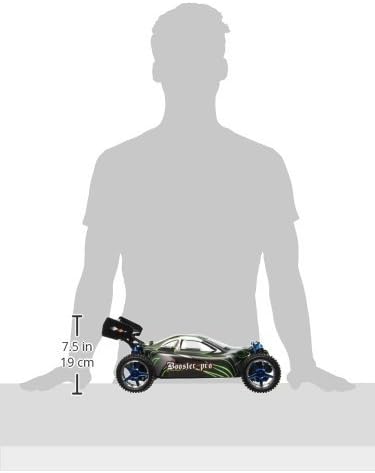
The Amewi Buggy Booster Pro is a fast and powerful 1:10 scale 4WD RC Buggy, designed for both indoor and outdoor use. It features a brushless motor, 2.4 GHz proportional remote control, and durable construction.
2. Коопсуздук маалыматы
WARNING: Small parts. Choking hazard. Not suitable for children under 14 years.
- Always operate the RC buggy in open areas, away from people, pets, and obstacles.
- Do not operate near public roads or in crowded areas.
- Колдорду, чачтарды жана бош кийимдерди кыймылдуу бөлүктөрдөн алыс кармаңыз.
- Ensure the battery is correctly installed and charged according to instructions.
- Do not expose the vehicle or remote control to water or extreme temperatures.
- Колдонулбаган учурда унааны жана пультту дайыма өчүрүңүз.
- 18 жашка чыга элек колдонуучуларга чоңдордун көзөмөлү сунушталат.
3. Пакеттин мазмуну
Төмөндө тизмеленген нерселердин баары пакетиңизге камтылганын текшериңиз:
- Amewi Buggy Booster Pro RC Buggy (Model 22033)
- 2.4 GHz Proportional Pistol Remote Control
- Brushless Motor (pre-assembled)
- Speed Controller (pre-assembled)
- 2.4 GHz Receiver (pre-assembled)
- 7.4V 3000mAh LiPo батареясы
- LiPo батарея заряддагыч
- Толук нускама

4. Орнотуу
4.1 LiPo батареясын кубаттоо
- Connect the provided LiPo battery charger to a suitable power source.
- Connect the 7.4V 3000mAh LiPo battery to the charger.
- Observe the charger's indicator lights for charging status. Do not leave charging batteries unattended.
- Толук заряддалгандан кийин, батареяны заряддагычтан ажыратыңыз.
4.2 Алыстан башкаруу пультуна батареяларды орнотуу
Алыстан башкаруу пульту үчүн 8 AA батарейкасы керек (кошулмага кирбейт).
- Пульттун ылдый жагындагы батарея отсегин табыңыз.
- Батарея уясынын капкагын ачыңыз.
- Туура полярдуулукту (+/-) камсыз кылуу менен 8 AA батарейкасын салыңыз.
- Батарея уясынын капкагын бекем жабыңыз.

4.3 Installing the LiPo Battery in the Buggy
- Carefully remove the buggy's body shell.
- Locate the battery compartment or tray within the chassis.
- Insert the charged 7.4V 3000mAh LiPo battery into the compartment.
- Connect the battery to the vehicle's speed controller (ESC) connector, ensuring correct polarity.
- Secure the battery if a strap or retainer is present.
- Reattach the buggy's body shell.


5. Иштөө нускамалары
5.1 Күйгүзүү
- Turn on the remote control first. The indicator light should illuminate.
- Turn on the power switch on the RC buggy. The vehicle's electronics will initialize.
- Wait for the remote control and buggy to establish a connection (binding). This usually takes a few seconds, indicated by a solid light on both devices.
5.2 Негизги башкаруу каражаттары
- дроссель триггери: Pull the trigger to move forward. Push the trigger to brake or reverse. The throttle is proportional, allowing for variable speed control.
- Руль: Turn the steering wheel left to turn the buggy left, and right to turn the buggy right. Steering is proportional for precise control.
5.3 Айдоо боюнча кеңештер
- Башкаруу элементтери менен таанышуу үчүн жай ылдамдыктан баштаңыз.
- Avoid sudden acceleration or braking, especially at high speeds, to maintain control.
- The 4WD system provides excellent traction on various terrains.
- Be mindful of battery life. When the vehicle starts to slow down significantly, it's time to recharge the battery.


6. Техникалык тейлөө
6.1 Тазалоо
- After each use, especially in dusty or dirty conditions, clean the buggy.
- Use a soft brush or compressed air to remove dirt and debris from the chassis, motor, and suspension components.
- Wipe the body shell with a damp кездеме. Катуу химиялык заттарды колдонбоңуз.
6.2 Компоненттерди текшерүү
- Бардык бурамалар менен бекиткичтердин бекемдигин үзгүлтүксүз текшерип туруңуз.
- Дөңгөлөктөрдүн эскиргендигин жана бузулгандыгын текшериңиз.
- Check the suspension components (oil-filled shock absorbers) for leaks or damage.
- Руль механизминин үзгүлтүксүз иштешин камсыз кылыңыз.
6.3 Батареяга кам көрүү
- Always store LiPo batteries in a cool, dry place, away from direct sunlight and heat.
- LiPo батарейкаларын ашыкча заряддабаңыз же ашыкча разряддабаңыз.
- If storing for extended periods, charge the LiPo battery to a storage voltage (typically around 3.8V per cell).
7. Кыйынчылыктарды
- Унаа жооп бербей жатат:
- Check if both the remote control and buggy are powered on.
- Ensure the LiPo battery in the buggy is charged and correctly connected.
- Алыстан башкаруу пультундагы AA батарейкаларын алмаштырыңыз.
- Re-bind the remote control and buggy if necessary (refer to specific binding instructions if provided separately).
- Төмөндөтүлгөн аткаруу/ ылдамдык:
- The LiPo battery may be low; recharge it.
- Check for debris obstructing moving parts or drivetrain.
- Inspect motor and ESC for overheating (allow to cool down).
- Руль менен башкаруу маселелери:
- Check for damage to steering linkages or servo.
- Ensure the steering trim on the remote control is centered.
8. Техникалык шарттар
| Модель аты | Amewi Buggy Booster Pro Brushless 4WD Buggy |
| Модель номери | 22033 |
| Масштаб | 1:10 |
| Мотор | 3300 KV Brushless, Air-cooled |
| Электр камсыздоо | 7.4V 3000mAh LiPo батареясы |
| Максималдуу ылдамдык | 70 км/саатка чейин |
| Өлчөмдөрү (L x W x Y) | 400 x 250 x 160 мм |
| Салмагы | 1.41 кг |
| Drive System | Эки дөңгөлөктүү башкаруу системасы (4WD) |
| Алыстан башкаруу | 2.4 GHz Proportional Pistol Grip |
| Токтотуу | Aluminum Oil-filled Shock Absorbers |
| Шасси | Шарлуу подшипниктер |
| Дене материалы | Crash-resistant Lexan |
| Шиналар | Rubber All-Terrain |
| Сунушталган Жаш | 14 жаш жана андан жогору |
9. Кепилдик жана колдоо
For warranty claims or technical support, please contact your retailer or the manufacturer, Amewi, directly. Retain your proof of purchase for warranty validation. Information regarding spare parts availability may be obtained through the manufacturer's support channels.


