Introduction
This manual provides comprehensive instructions for the operation and maintenance of your Pentax SF10 35mm film camera, equipped with a Takumar F ZOOM 28-80mm lens. The Pentax SF10 is an advanced autofocus SLR camera designed for ease of use while offering creative control for film photography enthusiasts.
Please read this manual thoroughly before using your camera to ensure proper handling and to maximize its performance and longevity.

1-сүрөт: Алдыңкы-оң view of the Pentax SF10 camera with the Takumar 28-80mm lens attached. The camera body is black, and a black neck strap is visible.
Жайгашуу
1. Батареяны орнотуу
The Pentax SF10 requires two CR-P2 lithium batteries. Ensure the camera is powered off before installing or replacing batteries.
- Батарея бөлүмүн камеранын корпусунун астыңкы жагына жайгаштырыңыз.
- Батарея бөлүмүнүн капкагын кулпуну жылдырып ачыңыз.
- Insert the two CR-P2 batteries according to the polarity indicators (+/-) inside the compartment.
- Батарея бөлүкчөсүнүн капкагын чыкылдагыча бекем жабыңыз.
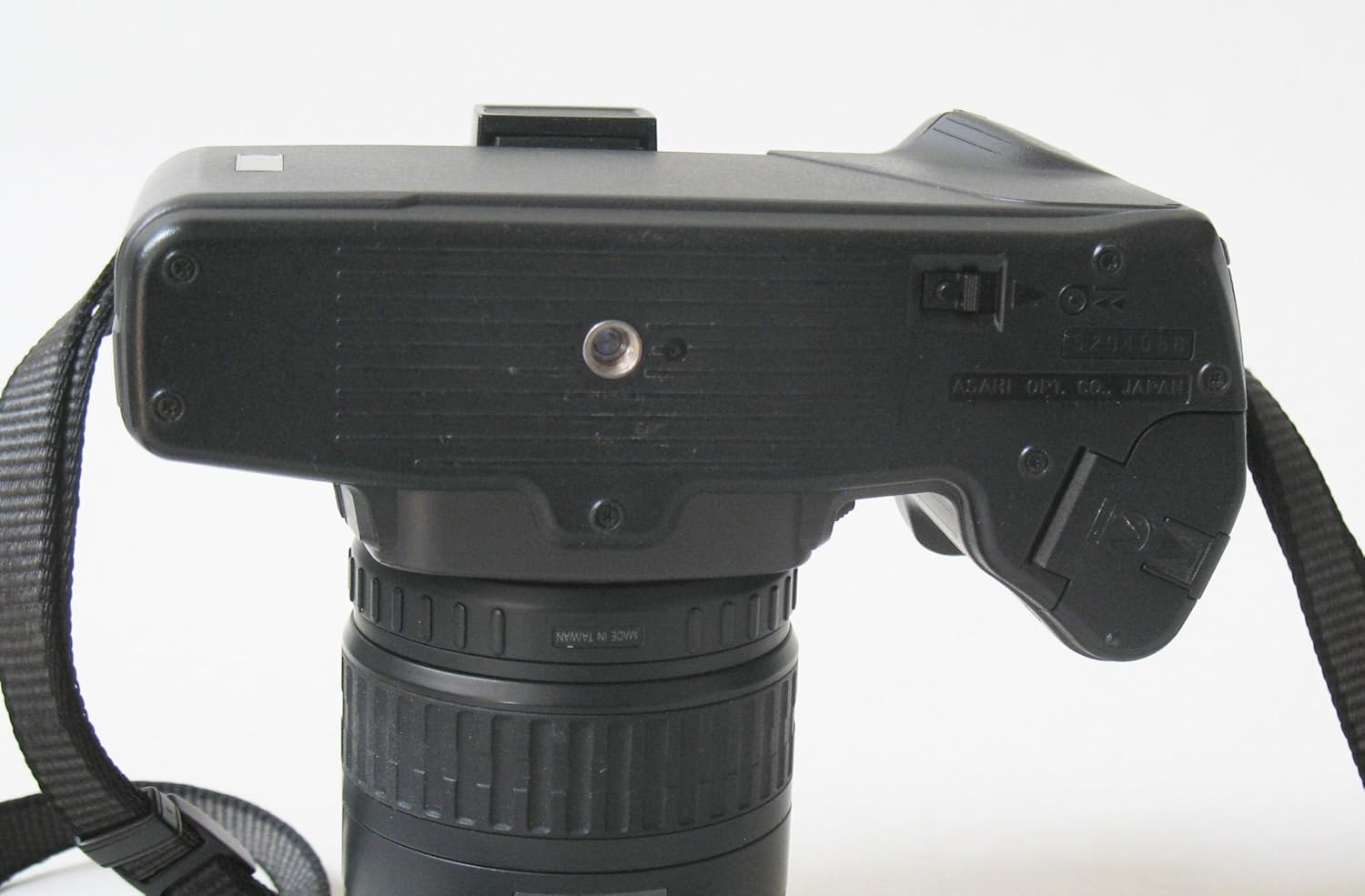
Figure 2: The bottom of the Pentax SF10 camera, illustrating the location of the battery compartment door and the tripod mounting thread.
2. Объективдин тиркемеси
Your camera comes with a Takumar F ZOOM 28-80mm lens. Follow these steps to attach it:
- Арткы линзанын капкагын жана камера корпусунун капкагын алып салыңыз.
- Линзанын цилиндриндеги кызыл чекитти камеранын линза бекиткичиндеги кызыл чекит менен тегиздеңиз.
- Insert the lens into the camera mount and turn it clockwise until it locks into place with a click.
- Линзаны алып салуу үчүн камеранын корпусундагы линзаны чыгаруу баскычын басып, линзаны саат жебесине каршы буруңуз.

3-сүрөт: деталдуу view of the Takumar 28-80mm lens, showing the focal length markings (28, 35, 50, 80mm) and aperture scale (3.5 to 22).
3. Фильмди жүктөө
The Pentax SF10 features automatic film loading. Use standard 35mm film cartridges.
- Тасманы артка түртүүчү баскычты тартып камераны кайра ачыңыз.
- Place a new film cartridge into the film chamber.
- Pull the film leader across to the orange mark on the take-up spool.
- Close the camera back firmly. The camera will automatically advance the film to the first frame. The frame counter on the top LCD panel will display '1'.

Figure 4: The rear of the Pentax SF10 camera, showing the film door and the viewfinder eyepiece. A small plastic cover is detached, possibly for an accessory.
4. Боо тиркеме
Attach the provided neck strap to the strap lugs on either side of the camera body for secure carrying.
Камераны иштетүү
1. Күйгүзүү / Өчүрүү
The main power switch is located on the top plate of the camera. Slide it to the 'ON' position to power on the camera and to 'OFF' to power it down.

5-сүрөт: Жогорку view of the Pentax SF10 camera, highlighting the LCD panel displaying "AUTO PROG. 2 EX.", the mode button, and the power switch.
2. Экспозиция режимдери
The SF10 offers several exposure modes, selectable via the MODE button and control dial:
- Программаланган AE (P): Камера оптималдуу экспозиция үчүн диафрагманы жана жабуунун ылдамдыгын автоматтык түрдө орнотот.
- Жабуу артыкчылыгы бар AE (ТВ): You select the shutter speed, and the camera sets the appropriate aperture.
- Диафрагма-Артыкчылыктуу AE (Орточо): You select the aperture, and the camera sets the appropriate shutter speed.
- Кол менен экспозиция (M): You set both aperture and shutter speed independently.
3. Фокустоо
The camera features an autofocus system. To focus:
- аркылуу карап viewfinder and center the subject within the autofocus frame.
- Press the shutter release button halfway down. The camera will autofocus, and a focus confirmation light will appear in the viewтапкыч.
- For manual focus, switch the lens to 'MF' (Manual Focus) and rotate the focusing ring on the lens until the image in the viewfinder is sharp.
4. Орнотулган жаркылдаткыч
The SF10 has a built-in pop-up flash. To activate it, press the flash release button. The flash will automatically fire in low-light conditions when in Programmed AE mode, or can be manually controlled in other modes.

6-сүрөт: Алдыңкы-оң view of the Pentax SF10 camera with the integrated pop-up flash in the raised position, ready for use.

Figure 7: A close-up of the top-left section of the Pentax SF10 camera, showing the flash release button and the mode selection controls.
5. Сүрөткө тартуу
- Камераны күйгүзүңүз.
- Select your desired exposure mode.
- Кадрыңыз аркылуу кадрыңыз viewтапкыч.
- Press the shutter release button halfway to activate autofocus and exposure metering.
- Press the shutter release button fully to take the picture. The film will automatically advance to the next frame.
6. Film Rewinding
Once all frames on the film roll have been exposed, the camera will automatically rewind the film into the cartridge. If you need to rewind film mid-roll, locate the manual rewind button (usually on the bottom of the camera) and press it, then slide the rewind switch (if available) or follow specific instructions in the camera's original manual for manual mid-roll rewind.
The Pentax SF10 also supports a remote shutter release for stable shots, especially useful for long exposures or when avoiding camera shake.

Figure 8: A Pentax wired remote shutter release, which can be connected to the camera for remote operation, reducing camera shake.
Техникалык тейлөө
1. Камераны жана линзаны тазалоо
- Камеранын корпусу: Камеранын корпусун сүртүү үчүн жумшак, кургак чүпүрөктү колдонуңуз. өжөр кир үчүн, бир аз гampen the cloth with water. Avoid using solvents.
- Объектив: Чаңды кетирүү үчүн линза щеткасын же үйлөөнү колдонуңуз. Булгануулар үчүн атайын линзаларды тазалоочу эритмени жана микрофибер чүпүрөктү колдонуңуз. Линзанын бетине манжаларыңыз менен эч качан тийбеңиз.
- Viewfinder/LCD: Use a soft, dry cloth. Avoid excessive pressure.
2. Батареяга кам көрүү
- Камера агып кетпеши үчүн узак убакыт бою колдонулбай турган болсо, батареяларды алып салыңыз.
- Батареяларды салкын, кургак жерде сактаңыз.
3. Сактоо
When not in use, store the camera in a cool, dry, and dust-free environment. It is recommended to keep the lens attached with both front and rear caps on, and the camera body cap on if the lens is removed. Avoid direct sunlight and high humidity.
Проблемаларды чечүү
- Камера күйбөйт:
- Кубат баскычы "ON" абалында экенин текшериңиз.
- Ensure batteries are correctly installed with correct polarity.
- Replace batteries with new ones if they are depleted.
- Кино алдыга жылбайт:
- Verify that the film leader is properly engaged with the take-up spool.
- Ensure the film door is securely closed.
- Check if the film cartridge is empty or incorrectly loaded.
- Autofocus is not working:
- Линзанын 'AF' (Автофокус) режимине коюлганын текшериңиз.
- Тема боюнча жетиштүү жарык бар экенин текшериңиз.
- Ensure the subject is within the camera's focusing range.
- Pictures are too dark/light:
- Check the selected exposure mode and settings (aperture, shutter speed).
- Ensure the film ISO setting (if manually set) matches the film in use.
- Verify flash operation in low light conditions.
Техникалык шарттар
| Өзгөчөлүк | Деталь |
|---|---|
| Модель аты | SF10 |
| Бренд | Pentax |
| Элемент Салмагы | 2.3 фунт |
| Чоңойтуу түрү | колдонмо |
| Экспозицияны башкаруу түрү | Автоматтык |
| Өндүрүүчү | Pentax |
| Дата биринчи жеткиликтүү | 6-октябрь, 2010-жыл |
| Пакеттин өлчөмдөрү | 6.8 x 6.1 x 4.6 дюйм |
Кепилдик жана колдоо
For information regarding warranty coverage, service, or technical support for your Pentax SF10 camera, please refer to the warranty card included with your product or visit the official Pentax (Ricoh Imaging) website. Contact details for customer support are typically provided in the product packaging or on the manufacturer's webсайт.

Figure 9: The original instruction booklet for the Pentax SF10 camera, which contains detailed information on operation and warranty.


