Introduction
This manual provides comprehensive instructions for the safe and efficient use of your BlackBerry HS-300 Wireless Bluetooth Headset. Please read this manual thoroughly before operating the device and retain it for future reference. The BlackBerry HS-300 is designed for hands-free communication with compatible Bluetooth-enabled devices.
Пакеттин мазмуну
Пакетиңизде төмөнкү заттар бар экенин текшериңиз:
- BlackBerry HS-300 Wireless Bluetooth Headset
- Ear hook (optional, for secure fit)
- Ear gels/tips (various sizes for comfort)
- Заряддоо кабели
- Колдонуучунун Колдонмосу (бул документ)
Түзмөк бүттүview
Familiarize yourself with the components of your BlackBerry HS-300 headset.
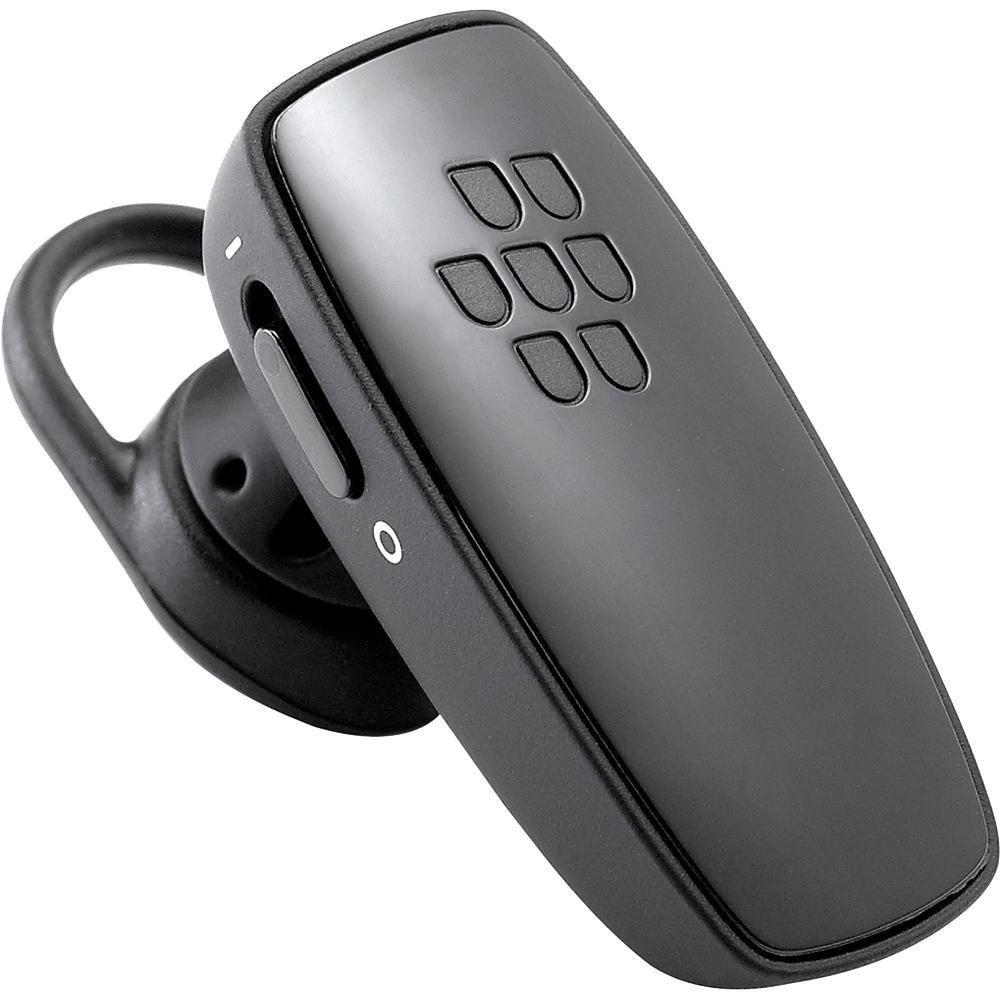
Сүрөт 1: Фронт view of the BlackBerry HS-300 Wireless Bluetooth Headset. The image displays the main body of the headset, featuring the BlackBerry logo (seven-dot pattern) on the front surface. A slender button, likely for volume control or multi-function, is visible on the side. An ear hook is attached, designed to secure the headset over the ear. A small indicator light is also present near the button.
- Көп функциялуу баскыч: Used for answering/ending calls, voice commands, and pairing.
- Үндү башкаруу баскычтары: Adjusts call and media volume.
- LED көрсөткүч жарыгы: Абалды көрсөтөт (кубат, жупташтыруу, кубаттоо).
- Микрофон: Captures your voice during calls.
- Кубат которгучу: Гарнитураны күйгүзөт же өчүрөт.
- Заряддоо порту: Connects to the charging cable.
Жайгашуу
1. Гарнитураны заряддоо
Before initial use, fully charge your headset. The HS-300 features rapid charge capabilities.
- Connect the charging cable to the headset's charging port and to a compatible USB power source.
- The LED indicator will show the charging status (e.g., solid red for charging, solid blue for fully charged).
- A full charge provides up to 4 hours of talk time.
2. Bluetooth түзмөгү менен жупташуу
To use your headset, it must be paired with a Bluetooth-enabled phone or device.
- Гарнитура өчүрүлгөнүн текшериңиз.
- Press and hold the Multi-function Button until the LED indicator flashes blue and red alternately. This indicates pairing mode.
- On your phone, enable Bluetooth and search for new devices.
- Select "BlackBerry HS-300" from the list of available devices.
- Эгер өткөрүүчү код суралса, "0000" (төрт нөл) киргизиңиз.
- Once paired, the LED indicator will flash blue periodically.
Иштөө нускамалары
Күйгүзүү/өчүрүү
- Күйгүзүү үчүн: Slide the Power Switch to the 'On' position. The LED indicator will flash blue.
- Өчүрүү үчүн: Slide the Power Switch to the 'Off' position. The LED indicator will turn off.
Чалууларды кабыл алуу жана кабыл алуу
- Чалууга жооп берүү: Көп функциялуу баскычты бир жолу басыңыз.
- Чалууну аяктоо: Чалуу учурунда көп функциялуу баскычты бир жолу басыңыз.
- Чалуудан баш тартуу: Көп функциялуу баскычты болжол менен 2 секунд басып туруңуз.
- Чакыруу: Dial the number on your phone. The call will automatically transfer to the headset if connected.
- Үн менен терүү (эгер телефондо колдоого алынса): Press the Multi-function Button once when not on a call.
Үндү көзөмөлдөө
- Use the Volume Control Buttons on the headset to adjust the call or media volume.
Техникалык тейлөө
- Гарнитураны дайыма жумшак, кургак чүпүрөк менен тазалаңыз.
- Avoid exposing the headset to extreme temperatures, moisture, or corrosive substances.
- Колдонбогондо гарнитураны салкын, кургак жерде сактаңыз.
- Гарнитураны бөлүктөргө бөлүүгө же өзгөртүүгө аракет кылбаңыз, анткени бул кепилдикти жокко чыгарып, зыян келтириши мүмкүн.
Проблемаларды чечүү
| Көйгөй | Чечим |
|---|---|
| Гарнитура күйбөйт. | Ensure the headset is charged. Connect it to a power source using the charging cable. |
| Cannot pair the headset with my phone. |
|
| Аудио жок же аудио сапаты начар. |
|
| Гарнитура бат-баттан ажыратылат. |
|
Техникалык шарттар
| Өзгөчөлүк | Деталь |
|---|---|
| Модель номери | HS-300 |
| Байланыш | Bluetooth Wireless (Version 2.1) |
| Talk Time | 4 саатка чейин |
| Заряддоо | Rapid charge capable |
| Controls | Volume control, Multi-function button |
| Микрофон | Интеграцияланган |
| Форма фактору | On-ear (single ear) |
| Салмагы | Болжол менен 3.2 унция |
| Өлчөмдөр | 2.5 x 2 x 6.5 дюйм (болжол менен) |
Кепилдик жана колдоо
For warranty information and technical support, please refer to the documentation provided at the time of purchase or visit the official BlackBerry support webсайт. Кепилдик дооматтар үчүн сатып алганыңыздын далилин сактаңыз.
Онлайн колдоо: www.blackberry.com/support


