1. Продукт бүтүп калдыview
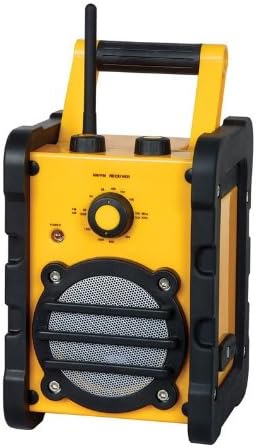
The Marquant MHDR-1 is a durable and portable radio designed for reliable audio reception. Its robust construction and simple controls make it suitable for various environments, from workshops to outdoor activities. This manual provides essential information for setting up, operating, and maintaining your MHDR-1 radio.
Негизги өзгөчөлүктөрү:
- Түсү: кара жана сары
- Портативдик дизайн
- Көлөмдүн айлануусун контролдоо
- 3.5 mm Audio Jack Output (for speaker/headphones)
- Operates on 1.5V (supports 4 batteries)
- Compact Dimensions: 250 x 170 x 180 mm
2. Орнотуу
2.1 Батареяны орнотуу
- Радионун артындагы же астындагы батарейка уясынын капкагын табыңыз.
- Капкакты жылдырып же ачуу менен ачыңыз.
- Insert four (4) 1.5V 'C' type batteries, ensuring the correct polarity (+/-) as indicated inside the compartment.
- Батарея уясынын капкагын бекем жабыңыз.
Эскертүү: Always use fresh batteries and replace all four batteries at the same time for optimal performance. Remove batteries if the radio will not be used for an extended period.
2.2 Антеннаны тууралоо
For best reception, extend the telescopic antenna fully. You may need to rotate or adjust the angle of the antenna to improve signal clarity, especially for FM stations.
3. Иштөө нускамалары
3.1 Күйгүзүү жана өчүрүү
Rotate the volume control knob clockwise until you hear a click and the power indicator light illuminates. To turn off the radio, rotate the volume control knob counter-clockwise until it clicks off.
3.2 Tuning the Radio
Use the large rotary tuning dial on the front panel to select your desired radio station. The dial is marked with frequency ranges for both AM and FM bands. Slowly turn the dial until you find a clear signal.
3.3 Үндү башкаруу
Adjust the listening volume by rotating the volume control knob. Turn clockwise to increase volume and counter-clockwise to decrease volume.
3.4 Using the Headphone/Speaker Jack
The radio is equipped with a 3.5 mm audio output jack. You can connect headphones for private listening or an external speaker for enhanced audio output. Plugging in a device to this jack will typically mute the radio's internal speaker.
4. Техникалык тейлөө
4.1 Тазалоо
Радионун сыртын жумшак, d менен сүртүңүзamp cloth. Do not use abrasive cleaners or solvents, as these may damage the finish. Ensure no liquid enters the radio's internal components.
4.2 Батареяны алмаштыруу
When the sound becomes distorted or the power indicator light dims, it is time to replace the batteries. Follow the battery installation steps in Section 2.1.
4.3 Сактоо
Store the radio in a cool, dry place away from direct sunlight and extreme temperatures. If storing for an extended period, remove the batteries to prevent leakage.
5. Кыйынчылыктарды
| Көйгөй | Мүмкүн себеп | Чечим |
|---|---|---|
| Кубат жок / Радио күйбөйт | Батареялар өлүп калган же туура эмес орнотулган. | Батареянын полярдуулугун текшериңиз. Жаңы батареялар менен алмаштырыңыз. |
| Начар кабыл алуу / Статикалык | Antenna not extended or positioned correctly. Weak signal in the area. | Fully extend and adjust the antenna. Try moving the radio to a different location. |
| Динамиктен үн жок | Volume is too low. Headphones are plugged in. | Increase volume. Disconnect headphones from the 3.5mm jack. |
If you experience issues not covered here, or if the problem persists, please refer to the support information in Section 7.
6. Техникалык шарттар
| Модель номери | MHDR-1 |
| Бренд | Марквант |
| Түс | Кара, Сары |
| Өлчөмдөрү (W x D x H) | 250 x 170 x 180 mm (or 17 x 25 x 18 cm) |
| Power Source | 4 x 1.5V 'C' Batteries |
| Тtage | 1.5 вольт |
| Аудио чыгаруу | 3.5 mm Headphone/Speaker Jack |
| Үндү көзөмөлдөө | Ротари |
7. Кепилдик жана колдоо
Marquant products are manufactured to high quality standards. For information regarding warranty coverage, please refer to the warranty card included with your purchase or visit the official Marquant webсайт.
For technical support, troubleshooting assistance beyond this manual, or spare parts, please contact Marquant customer service through their official channels. Keep your purchase receipt and model number (MHDR-1) ready when contacting support.


