Introduction
The Logitech Z906 is a 5.1 surround sound speaker system designed to deliver an immersive audio experience. Certified by THX and featuring digital decoding for Dolby Digital and DTS encoded soundtracks, this system provides powerful and detailed sound for various entertainment needs. It offers versatile connectivity options and integrated controls for a customizable listening experience.
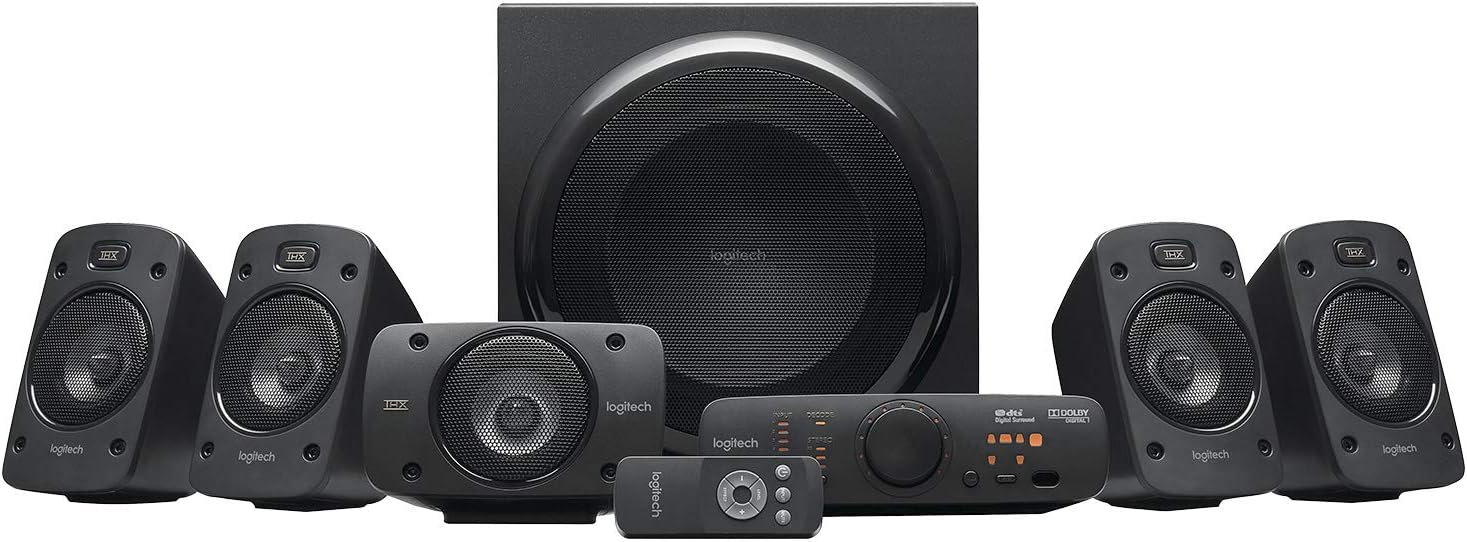
Figure 1: ашыкview of the Logitech Z906 5.1 Surround Sound Speaker System, including the subwoofer, five satellite speakers, control console, and wireless remote.
Жайгашуу
Follow these steps to correctly set up your Logitech Z906 speaker system.
1. Кутудан чыгаруу жана компоненттер
Carefully remove all components from the packaging. The box contains:
- 1 Сабвуфер
- 5 Satellite Speakers (4 for surround, 1 for center)
- 1 Control Console
- 1 Wireless Remote Control (requires 3 AAA batteries)
- Динамик кабельдер
- Audio Cables (e.g., 3.5mm, RCA)

2-сүрөт: Logitech Z906 пакетине кирген бардык компоненттер.
2. Спикердин жайгашуусу
For optimal 5.1 surround sound, position the speakers as follows:
- Борбордук спикер: Directly in front of your listening position, usually above or below your display.
- Алдыңкы Сол/Оң динамиктер: To the left and right of your display, equidistant from the center speaker and your listening position.
- Арткы сол/оң динамиктер: To the left and right of your listening position, slightly behind you.
- ЛГурченко: On the floor, preferably in a corner or near a wall for enhanced bass response. Experiment with placement for best results.

3-сүрөт: Мисample of a 5.1 surround sound speaker setup with the Logitech Z906 system.
3. Спикерлерди туташтыруу
Connect the satellite speakers to the subwoofer using the provided color-coded speaker cables. Ensure correct polarity (red to red, black to black) for each speaker.

Figure 4: Rear panel of the Z906 subwoofer showing speaker terminals and input connections. Connect the satellite speakers to the corresponding terminals.
4. Аудио булактарын туташтыруу
The Z906 system offers multiple input options for various devices:
- Санариптик оптикалык: For high-quality audio from TVs, Blu-ray/DVD players, game consoles.
- Санариптик коаксиалдуу: Another digital option for compatible devices.
- Six-Channel Direct: For connecting to a 5.1 sound card in a PC.
- RCA: Standard stereo connection for various audio devices.
- 3.5mm Auxiliary: For connecting smartphones, tablets, or other portable devices.
Connect your desired audio sources to the corresponding inputs on the control console or directly to the subwoofer's rear panel.

Figure 5: The Z906 control console with various input options for connecting multiple devices.
5. Power Connection
Connect the subwoofer's power cable to a wall outlet. The system is now ready for operation.
Кутудан чыгуучу видео
Video 1: An unboxing demonstration of the Logitech Z906 speaker system, showing the contents and initial setup steps.
Иштеп жатат
1. Control Console Functions
The control console provides easy access to all system functions:
- Кубат баскычы: Системаны күйгүзөт же өчүрөт.
- Киргизүүнү тандоо: Cycle through available audio inputs (Optical, Coaxial, Six-Channel Direct, RCA, Aux).
- Үндү көзөмөлдөө: Large rotary knob to adjust overall system volume.
- Эффект тандоо: Choose between various sound effects like Stereo 3D, 4.1, 2.1, or no effect.
- Деңгээлди тууралоо: Adjust individual speaker levels (front, rear, center, subwoofer) for balanced surround sound.
- Үнсүз баскычы: Аудионун үнүн өчүрөт же ачат.

Figure 6: Close-up of the Z906 control console, highlighting the main controls and indicators.
2. Зымсыз алыстан башкаруу
The included wireless remote provides convenient control from a distance. It duplicates most functions available on the control console, including power, volume, input selection, and sound effects.

Figure 7: The wireless remote control for the Logitech Z906 system.
3. Headphone Usage
A headphone jack is available on the control console for private listening. Plugging in headphones will automatically mute the speakers and divert audio to your headphones.
Техникалык тейлөө
To ensure the longevity and optimal performance of your Logitech Z906 speaker system, follow these maintenance guidelines:
- Тазалоо: Use a soft, dry cloth to clean the speaker surfaces. Avoid abrasive cleaners or solvents.
- Жайгашкан жери: Keep speakers away from direct sunlight, heat sources, and excessive moisture. Ensure adequate ventilation for the subwoofer.
- Кабелдик башкаруу: Бардык кабелдердин бекем туташтырылганын жана кысылбаганын же чыңалбаганын текшериңиз.
- Алыскы батареялар: Replace AAA batteries in the wireless remote when performance degrades.
Проблемаларды чечүү
If you encounter issues with your Z906 system, refer to the following common solutions:
- Үн жок:
- Check all cable connections, including power, speaker wires, and audio input cables.
- Ensure the correct input source is selected on the control console.
- Verify that the system is not muted and the volume is turned up.
- If using a PC, check your computer's sound settings and ensure the Z906 is selected as the output device.
- Distorted Sound/Static:
- Reduce the volume of the audio source or the speaker system.
- Кабелдик туташуулардын боштугун текшериңиз.
- Ensure the audio source is not sending a distorted signal.
- If static occurs when adjusting the volume knob, this may indicate wear over time.
- No Surround Sound:
- Ensure your audio source is providing a 5.1 signal (e.g., Dolby Digital, DTS).
- Select the appropriate sound effect mode on the control console (e.g., Stereo 3D, 4.1, 2.1).
- Verify correct speaker placement and connections.
- Алыстан башкаруу иштебейт:
- AAA батареяларын алмаштырыңыз.
- Ensure there are no obstructions between the remote and the control console.
Техникалык шарттар
| Өзгөчөлүк | Спецификация |
|---|---|
| Бренд | Logitech |
| Модель аты | Z906 |
| Элемент моделинин номери | 980-000469 |
| Динамик түрү | 5.1 Айлана үн |
| Total Watts (RMS) | 500 Вт |
| Чоку күч | 1000 Ватт |
| Frequency Response | 20 Гц - 20 КГц |
| Ызы-чуунун катышы | 6E+1 дБ |
| Байланыш технологиясы | Optical, Coaxial, Six-Channel Direct, RCA, 3.5mm |
| Башкаруу ыкмасы | Алыстан |
| Зымсыз байланыш технологиясы | Bluetooth (Note: Product specifications list Bluetooth, but primary connectivity is wired for 5.1 audio) |
| Сабвуфердин диаметри | 29.2 сантиметр (11.5 дюйм) |
| Элемент Салмагы | 8.54 килограмм (18.79 фунт) |
| Продукциянын өлчөмдөрү | 11.02"D x 13.78"W x 11.5"H |
| Батареялар талап кылынат | 3 AAA батарейка (алыстан үчүн) |

Figure 8: The Logitech Z906 system is capable of 1000 Watts Peak Power output.

Figure 9: The Logitech Z906 speaker system is THX Certified for premium sound quality.
Кепилдик жана колдоо
For warranty information, technical support, or service inquiries, please refer to the official Logitech website or contact Logitech customer support directly. Keep your purchase receipt for warranty claims.


