1. Киришүү
This manual provides detailed instructions for the installation, operation, and maintenance of your JVC KDR820BT Wireless Bluetooth Dual USB-CD Receiver. Please read this manual thoroughly before using the unit to ensure proper operation and to prevent damage.
The JVC KDR820BT is designed to provide versatile audio playback and communication features in your vehicle. It includes built-in Bluetooth for hands-free calling and audio streaming, dual USB ports for device connectivity, and CD playback capabilities. The unit also features a customizable display with variable color options.
2. Пакеттин мазмуну
Орнотууну баштоодон мурун пакетте бардык элементтер бар экенин текшериңиз:
- JVC KDR820BT Head Unit
- Wireless Remote Control (RM-RK52)
- USB Bluetooth адаптери
- Зымдуу микрофон
- Электр зымдары
- Монтаждоочу жабдык
- Колдонуучунун колдонмосу (бул документ)
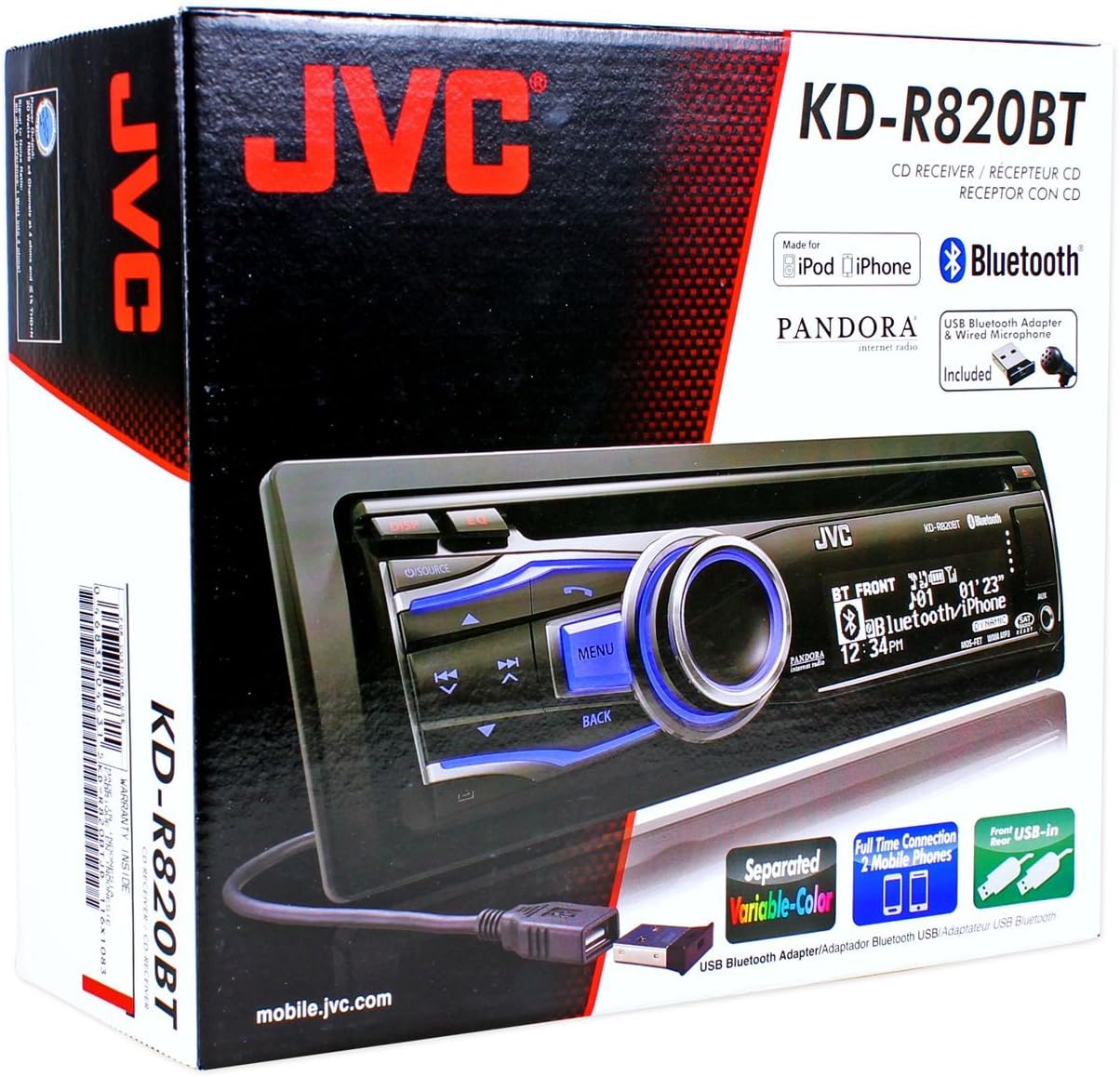
Figure 2.1: JVC KDR820BT Product Packaging. The box illustrates the main unit, remote, USB Bluetooth adapter, and wired microphone.
3. Орнотуу
Professional installation is recommended. Ensure the vehicle's battery is disconnected before starting installation to prevent electrical damage.
3.1 Зымдарды туташтыруу
Connect the wiring harness to the vehicle's electrical system and speakers. Refer to your vehicle's wiring diagram for specific connections.
- Сары зым: Туруктуу 12V кубаттуулукка туташтырыңыз.
- Кызыл зым: Connect to switched 12V accessory power.
- Кара зым: Унаанын шасси жерге туташтыруу.
- Көк/Ак зым: Кубаттуу антеннага туташуу же ampкөтөргүчтү алыстан иштетүү.
- Динамиктердин зымдары: Унаа динамиктерине туташуу (туура полярдуулукту камсыз кылуу).
- RCA Pre-out Jacks: Тышкы туташтыруу үчүн ampкөтөргүчтөр (алдыңкы, арткы, сабвуфер).
- Микрофон киргизүү: Connect the supplied wired microphone for hands-free calling.
- USB порттору: Front USB for general connectivity, Rear USB for additional devices or the Bluetooth adapter.

Figure 3.1: Rear Panel Connections. This image displays the rear of the receiver with its wiring harness, RCA pre-outs, and antenna input.
3.2 Агрегатты монтаждоо
Install the mounting sleeve into the vehicle's dashboard opening. Secure the unit by sliding it into the sleeve until it locks into place. Attach the trim ring.
3.3 Connecting the Bluetooth Adapter
The supplied USB Bluetooth adapter must be connected to one of the USB ports (front or rear) for Bluetooth functionality. For a cleaner installation, the rear USB port is often preferred.
4. Баштапкы орнотуу
After installation, reconnect the vehicle battery. The unit will power on. Follow these steps for initial configuration:
- Баштапкы күйгүзүү: басыңыз БУЛАК баскычты басуу менен
- Саатты жөндөө: Access the system menu to set the current time.
- Аудио жөндөөлөрү: Adjust basic audio settings such as bass, treble, balance, and fader.
- Дисплейдин түсү: Customize the display and button illumination colors using the variable color settings.
5. Иштөө нускамалары

Сүрөт 5.1: Алдыңкы панелдин үстүндөview. This image shows the main controls and display of the JVC KDR820BT.

Figure 5.2: Receiver with Remote Control. The image displays the head unit and the included wireless remote control (RM-RK52).
5.1 Негизги башкаруу каражаттары
- Кубат/Булак баскычы: Press to turn on/off or change audio source (FM/AM, CD, USB, Bluetooth Audio, AUX).
- Үн баскычы: Rotate to adjust volume. Press to mute/pause audio.
- Меню баскычы: Access system settings and advanced options.
- Артка баскычы: Return to the previous menu or display.
- Өткөрүп жиберүү/Издөө баскычтары: Navigate tracks, radio stations, or menu options.
5.2 Радио операциясы (AM/FM)
- Басыңыз БУЛАК to select FM or AM.
- колдонуу Издөө buttons to find stations automatically.
- Кол менен жөндөө үчүн, баскычын басып кармап туруңуз Издөө баскычтар.
- To store a preset, tune to the desired station, then press and hold a preset number button (1-6).
5.3 CD ойнотуу
- CD дискти диск уячасына салыңыз. Түзмөк автоматтык түрдө CD булагына которулуп, ойнотууну баштайт.
- колдонуу Өткөрүп жибер тректерди өзгөртүү үчүн баскычтар.
- басыңыз Көлөм баскычы to pause/play.
- басыңыз Чыгаруу CDди алып салуу үчүн баскычты басыңыз.
5.4 USB Device Playback
- Connect a USB device (flash drive, iPod/iPhone, digital audio player) to either the front or rear USB port.
- Басыңыз БУЛАК USB тандоо үчүн.
- колдонуу Өткөрүп жибер тректерди өтүү үчүн баскычтар.
- басыңыз Меню button to browse folders and files.
5.5 Bluetooth функциялары
Ensure the USB Bluetooth adapter is connected to the unit.
5.5.1 Bluetooth түзмөгүн жупташтыруу
- Мобилдик түзмөгүңүздө Bluetooth'ду күйгүзүңүз.
- On the JVC KDR820BT, select the Bluetooth source.
- Издөө available devices on your mobile phone. Select "JVC unit" (or similar) from the list.
- Enter the PIN code (usually "0000") if prompted.
- Once paired, the Bluetooth indicator on the receiver will illuminate. The unit supports connecting two phones simultaneously.
5.5.2 Hands-Free чалуу
- Чакыруу: Use your phone's voice dial feature (if supported) or dial directly from your phone. The audio will transfer to the receiver.
- Чалууга жооп берүү: басыңыз Телефон button on the receiver when an incoming call is detected.
- Чалууну аяктоо: басыңыз Телефон Чакырууну токтотуу үчүн дагы бир жолу баскычты басыңыз.
- Phone Book Access: The unit supports Phone Book Access Profile (PBAP) for transferring contacts.
5.5.3 Bluetooth аудио агымы
- Булак катары Bluetooth Audio тандаңыз.
- Play audio from your paired mobile device. The receiver will stream the audio wirelessly.
- колдонуу Өткөрүп жибер buttons on the receiver to control playback (play/pause, skip track).
- The unit supports Pandora Internet Radio control from an iPhone.
5.6 Үн орнотуулары
- 3 тилкелүү параметрдик iEQ: Access the sound menu to adjust the equalizer settings for customized audio output.
- MOS-FET 50W x 4 Ampөмүр берүүчү: Provides powerful audio output.
- TI/Burr-Brown 24-bit DAC: Ensures high-quality digital-to-analog audio conversion.
5.7 Дисплей орнотуулары
- Separated Variable Color: Customize the illumination color of the keys and LCD panel from over 30,000 choices. Access this setting through the system menu.
- Жарыктыкты көзөмөлдөө: Adjust display brightness for day and night viewing.
6. Техникалык тейлөө
- Агрегатты тазалоо: Алдыңкы панелди сүртүү үчүн жумшак, кургак чүпүрөктү колдонуңуз. өжөр кир үчүн, dampкездемени суу менен сүртүңүз. Абразивдүү тазалоочу каражаттардан же эриткичтерден алыс болуңуз.
- CD ойноткучка кам көрүү: Keep the disc slot free of dust and debris. Use only clean, scratch-free CDs.
- Faceplate алып салуу: The detachable faceplate can be removed for security. Store it in a protective case.
7. Кыйынчылыктарды
Review the following common issues and solutions before seeking service.
| Көйгөй | Мүмкүн болгон себеп / Чечим |
|---|---|
| Күч жок | Check power and ground wiring connections. Ensure the vehicle's ignition is on. Check vehicle fuses. |
| Үн жок | Check speaker wiring. Ensure volume is not muted or too low. Verify the power antenna/remote wire is connected if using an external ampөмүрлүү. |
| Bluetooth echo during calls | Adjust microphone gain settings. Reposition the microphone away from reflective surfaces (e.g., windshield). Reduce the receiver's volume during calls. |
| Bluetooth түзмөгү жупташтырылбай жатат | Ensure the USB Bluetooth adapter is securely connected. Make sure Bluetooth is enabled on your mobile device and the receiver is in pairing mode. Delete previous pairings from your phone and try again. |
| Unit loses settings after power off | The yellow constant 12V power wire may not be connected correctly or is losing power. This can also occur if the vehicle battery is disconnected. |
| Display text is truncated or difficult to read | The display has limited character space. Some long names may be truncated. There is no option to increase scroll speed for folder/file аттары. |
| Buttons or rotary knob are unresponsive | Ensure the faceplate is securely attached. Clean around the buttons to remove any debris. If the issue persists, it may indicate a hardware malfunction. |
8. Техникалык шарттар
| Өзгөчөлүк | Спецификация |
|---|---|
| Модель номери | KDR820BT |
| Чыгуу күчү | MOS-FET 50W x 4 (20W RMS x 4) |
| DAC | TI/Burr-Brown 24-bit |
| Эквалайзер | 3-Band Parametric iEQ |
| Байланыш | Bluetooth, Dual USB (Front & Rear), AUX Input |
| Bluetooth өзгөчөлүктөрү | Hands-Free Call, Audio Streaming, Phone Book Access Profile, Text Message Receipt Notification, Connects 2 Phones |
| Медиа ойнотуу | CD, MP3, WMA, WAV |
| Дисплей түрү | LCD with Separated Variable Color |
| Preamp Тtage | 2 вольт |
| Шасси өлчөмү | Толук DIN |
| Өлчөмдөрү (W x Y x D) | 7.19 x 2.06 x 6.25 дюйм (болжол менен) |
| Салмагы | 4 фунт (болжол менен) |
| Колдоого алынган Интернет кызматтары | Pandora Internet Radio |
| Башкаруу ыкмасы | Remote Control, Android (via USB) |
9. Кепилдик жана колдоо
JVC products are manufactured to high-quality standards. For specific warranty information, please refer to the warranty card included with your product or visit the official JVC webсайт. Сатып алуу квитанциясын кепилдик дооматтары үчүн сатып алуунун далили катары сактаңыз.
For technical support, service, or inquiries regarding your JVC KDR820BT receiver, please contact JVC customer service or visit their official support channels. Contact information can typically be found on the JVC webсайтында же продуктунун таңгагында.


