Introduction
This manual provides essential information for the safe and efficient operation of your Time DPA-195 portable media player. Please read it thoroughly before using the device and keep it for future reference.
Коопсуздук маалыматы
- Ачыкка чыгарбаңыз the device to extreme temperatures, direct sunlight, or high humidity.
- түшүрүүдөн сактаныңыз or subjecting the device to strong impacts.
- Бөлүп салууга аракет кылбаңыз or repair the device yourself. Refer all servicing to qualified personnel.
- Колдонуу гана the recommended accessories and power adapters.
- Үндү тууралоо to a moderate level to prevent hearing damage.
Пакеттин мазмуну
Пакетте бардык буюмдар бар экенин текшериңиз:
- Time DPA-195 Portable Media Player
- USB заряддоо кабели
- Наушник
- Колдонуучунун Колдонмосу (бул документ)
Продукт бүттүview
Familiarize yourself with the various parts of your DPA-195 player.
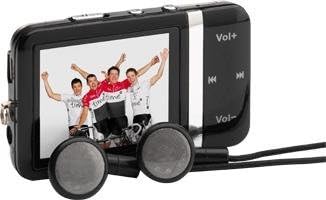
Image: The Time DPA-195 player, showing its compact black body, LCD screen displaying an image, and attached wired earphones. Buttons for volume and navigation are visible on the side.
Башкаруу каражаттары жана порттор:
- 1. ЖК экраны: Displays menus, playback information, and settings.
- 2. Vol+ Button: Үнүн көбөйтөт.
- 3. Көлөм баскычы: Үн көлөмүн азайтат.
- 4. Ойнотуу/Тындыруу баскычы: Ойнотууну баштайт же тындырат.
- 5. Next/Fast Forward Button: Skips to the next track or fast forwards.
- 6. Previous/Rewind Button: Skips to the previous track or rewinds.
- 7. Menu/Back Button: Navigates through menus or returns to the previous screen.
- 8. Power/Hold Switch: Turns the device on/off or locks/unlocks buttons.
- 9. Наушник уячасы: Connects earphones.
- 10. USB порт: Заряддоо жана маалыматтарды өткөрүү үчүн.
- 11. miniSD Card Slot: Сактоо көлөмүн кеңейтүү үчүн.
Жайгашуу
1. Аппаратты заряддоо
Before first use, fully charge the DPA-195 player.
- Connect the small end of the USB charging cable to the USB port on the player.
- Connect the large end of the USB cable to a powered USB port on a computer or a compatible USB wall adapter (not included).
- Экран кубаттоо абалын көрсөтөт. Толук кубаттоо адатта болжол менен 2-3 саатты талап кылат.
- Заряддоо аяктагандан кийин кабелди ажыратыңыз.
2. Inserting a miniSD Card (Optional)
The DPA-195 has 4096 MB of integrated memory. You can expand storage using a miniSD card.
- Locate the miniSD card slot on the device.
- Gently insert the miniSD card into the slot with the metal contacts facing down until it clicks into place.
- To remove, gently push the card in until it clicks, then release, and it will eject slightly.
Иштөө нускамалары
1. Күйгүзүү/өчүрүү
To power on the device, slide the Power/Hold switch to the 'On' position. To power off, slide it to 'Off'.
2. Менюларды башкаруу
Use the navigation buttons (Next/Previous) to scroll through menu options. Press the Play/Pause button to select an option. Press the Menu/Back button to return to the previous screen.
3. MP3 Playback
- From the main menu, select "Music" or "MP3".
- Navigate to the desired folder or track.
- Ойнотууну баштоо үчүн Play/Pause баскычын басыңыз.
- Тректерди өткөрүп жиберүү үчүн Кийинки/Мурунку баскычтарын колдонуңуз.
- Press and hold Next/Previous to fast forward or rewind.
- Adjust volume using the Vol+ and Vol- buttons.
4. Радио функциясы
The DPA-195 includes an FM radio tuner.
- Connect the earphones, as they act as the antenna for the radio.
- From the main menu, select "Radio" or "FM".
- Use the navigation buttons to scan for stations or select a preset.
- Press Play/Pause to mute/unmute the radio.
5. Маалыматтарды өткөрүү
To transfer music or other files to your DPA-195:
- USB кабелин колдонуп, аппаратты компьютериңизге туташтырыңыз.
- Түзмөк компьютериңизде алынуучу диск катары көрсөтүлөт.
- Сүйрөп барып таштаңыз files into the appropriate folders on the device's internal memory or miniSD card.
- USB кабелин ажыратуудан мурун, түзмөктү компьютериңизден коопсуз сууруп алыңыз.
Техникалык тейлөө
Тазалоо
Wipe the device with a soft, dry, lint-free cloth. Do not use liquid cleaners or abrasive materials.
Сактагыч
When not in use for extended periods, store the device in a cool, dry place away from direct sunlight and extreme temperatures. Ensure the battery is partially charged before storing.
Проблемаларды чечүү
| Көйгөй | Мүмкүн себеп | Чечим |
|---|---|---|
| Түзмөк күйбөйт. | Батарея түгөнүп калды. | Аппаратты толук заряддаңыз. |
| Наушниктен үн чыкпайт. | Volume is too low or muted; earphones not properly connected; faulty earphones. | Increase volume; check earphone connection; try different earphones. |
| Которуу мүмкүн эмес files. | USB cable issue; device not recognized by computer. | Try a different USB port or cable; ensure device is powered on and connected correctly. |
| Радио кабыл алуу начар. | Earphones not connected or acting as antenna; weak signal. | Ensure earphones are connected; try moving to an area with better signal. |
Техникалык шарттар
| Өзгөчөлүк | Деталь |
|---|---|
| Модел | DPA-195 |
| Бренд | Убакыт |
| Продукт Салмагы | 51 г |
| Flash эс тутум түрү | miniSD Card |
| Эс тутум технологиясы | Интеграцияланган эс тутум |
| Катуу дисктин сыйымдуулугу | 4096 MB |
| Башка өзгөчөлүктөр | MP3, Radio |
| Дисплей технологиясы | LCD |
| Screen Size | 2 дюйм |
| Дисплей түрү | LCD |
| Батареялар камтылган | Жок |
| Медиа түрү колдоого алынат | AVI, WAV, WMA |
Кепилдик жана колдоо
For warranty information and technical support, please refer to the documentation provided at the time of purchase or visit the official Time brand webсайт. Кепилдик дооматтар үчүн сатып алганыңыздын далилин сактаңыз.
For further assistance, please contact Time customer service.


