1. Introduction and Overview
This manual provides essential information for the proper setup, operation, and maintenance of your ViewSonic VA2231WM-LED 22-inch widescreen LED monitor. Please read these instructions carefully before using your monitor.

Сүрөт 1.1: Алдыңкы view -ныкы ViewSonic VA2231WM-LED monitor displaying an environmental message.
Негизги өзгөчөлүктөрү:
- 22-inch (21.5-inch viewable) Full HD 1080p widescreen display.
- Mercury-free LED backlight for energy efficiency.
- 10,000,000:1 Dynamic Contrast Ratio for enhanced image depth.
- Automatic Aspect Ratio Adjustment to prevent image stretching.
- Integrated stereo speakers for multimedia audio.
- DVI and VGA input options for versatile connectivity.
- VESA mountable (100mm x 100mm) for flexible installation.
- Eco-mode function for up to 35% energy savings.
- ENERGY STAR 5.0 and EPEAT Silver certified.
2. Орнотуу нускамалары
2.1 Мониторду таңгактан чыгаруу
Carefully remove the monitor and all components from the packaging. Ensure all items listed in the packing list are present. Retain the original packaging for future transport or service needs.

2.1-сүрөт: Каптал view of the monitor, showcasing анын ичке дизайны.
2.2 Стендди бекитүү
- Чийип кетпеши үчүн мониторду жумшак, таза бетке ылдый каратып кой.
- Align the stand base with the monitor's neck and secure it according to the diagram provided in the quick start guide (not included in this document).
- Ensure the stand is firmly attached before placing the monitor upright.
2.3 Туташтыруучу кабельдер
Керектүү кабелдерди монитордун жана компьютериңиздин артындагы тиешелүү портторго туташтырыңыз.

Figure 2.2: Rear panel connections including power input, audio input, DVI, and VGA ports.
- Кубат кабели: Кубат кабелин монитордун кубат киресине, анан жерге туташтырылган электр розеткасына туташтырыңыз.
- Video Cable (DVI or VGA):
- For digital signal, connect a DVI cable from your computer's DVI output to the monitor's DVI input.
- For analog signal, connect a VGA cable from your computer's VGA output to the monitor's VGA input.
- Аудио кабели: If using the integrated speakers, connect an audio cable from your computer's audio output to the monitor's audio input.
2.4 VESA орнотуу
The VA2231WM-LED monitor is VESA compliant (100mm x 100mm), allowing for alternative mounting solutions such as wall mounts or monitor arms.
- Ensure the monitor is powered off and disconnected from all cables.
- Carefully detach the original stand by unscrewing the four screws located on the back of the monitor.
- Attach your VESA-compatible mount using the appropriate screws (typically M4 x 10mm, not included).
- Follow the instructions provided with your VESA mounting kit for secure installation.
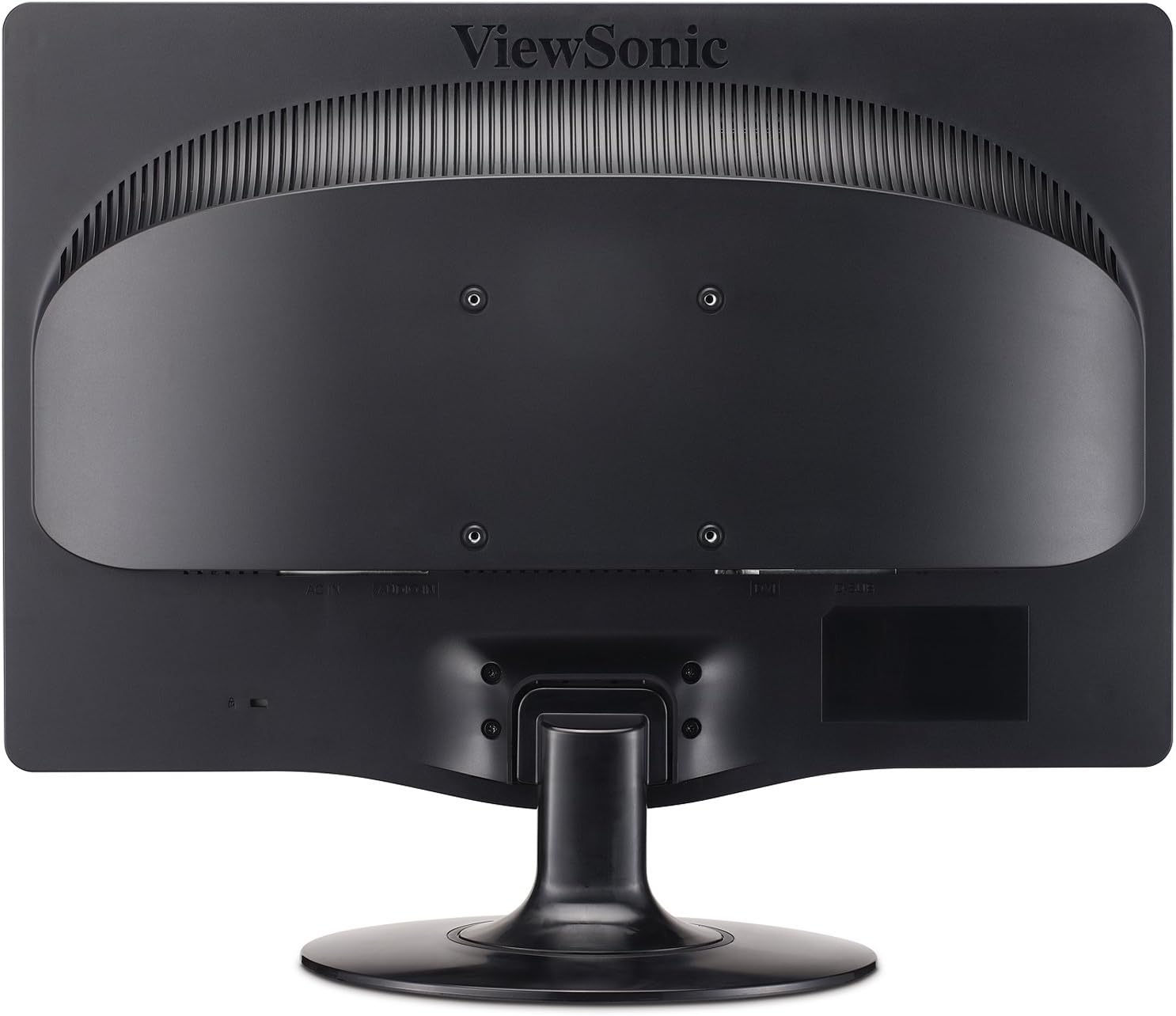
2.3-сүрөт: Арткы view highlighting the 100mm x 100mm VESA mounting pattern.
3. Иштөө нускамалары
3.1 Күйгүзүү/өчүрүү
- Press the power button located on the front bezel of the monitor to turn it on or off.
- The power indicator light will illuminate when the monitor is on.
3.2 Экрандагы дисплей (OSD) менюсу
The OSD menu allows you to adjust various display settings. Use the control buttons located on the front bezel to navigate and select options.
- Меню баскычы: OSD менюсун ачат.
- Өйдө/төмөн жебелер: Меню параметрлери боюнча чабыттоо.
- Тандоо баскычы: Тандоону ырастайт же кошумча менюга кирет.
- Чыгуу баскычы: Учурдагы менюдан же OSDден чыгат.
3.3 Дисплей орнотууларын тууралоо
- Жарыктык/Контраст: Бул орнотууларды чөйрөңүз үчүн сүрөттүн көрүнүүсүн оптималдаштыруу үчүн тууралаңыз.
- Эко режими: Select "Optimize" or "Conserve" to reduce power consumption and prolong lamp life. This can save up to 35% energy.
- Аспект катышы: The monitor features automatic aspect ratio adjustment. For 4:3 input signals, the image will be centered with sidebars, preventing stretching.
- Киргизүүнү тандоо: Manually switch between DVI and VGA inputs if auto-detection does not select the correct source.
- Аудио: Adjust the volume for the integrated stereo speakers.
4. Техникалык тейлөө
4.1 Мониторду тазалоо
- Тазалоодон мурун ар дайым мониторду өчүрүп, электр шнурун сууруп коюңуз.
- Жумшак, түксүз кездемени жеңил колдонуңуз dampсуу же жумшак, абразивдүү эмес экран тазалагыч менен иштетиңиз.
- Тазалоочу каражатты түз экранга чачпаңыз. Алгач аны кездемеге сүйкөңүз.
- Avoid using benzene, thinner, ammonia-based cleaners, or abrasive cleaning agents, as these can damage the display surface.
4.2 Жалпы кам көрүү
- Мониторду күн нурунан, ашыкча ысыктан же нымдуулуктан алыс кармаңыз.
- Ашыкча ысып кетүүдөн сактануу үчүн монитордун айланасында жетиштүү желдетүүнү камсыз кылыңыз.
- Монитор же анын кабелдерине оор нерселерди коюудан алыс болуңуз.
- Do not attempt to disassemble the monitor; refer all servicing to qualified personnel.
5. Кыйынчылыктарды
Мониторуңузда көйгөйлөргө туш болсоңуз, төмөнкү жалпы көйгөйлөрдү чечүү кадамдарын караңыз.
| Көйгөй | Мүмкүн себеп | Чечим |
|---|---|---|
| Күч жок | Power cable not connected; power outlet not active; monitor power button off. | Ensure power cable is securely connected. Check power outlet with another device. Press the monitor's power button. |
| Сигнал жок | Video cable not connected; incorrect input source selected; computer not powered on. | Verify video cable (DVI/VGA) is securely connected to both monitor and computer. Use OSD to select correct input source. Ensure computer is powered on and outputting video. |
| Сүрөт бүдөмүк же бурмаланган | Incorrect resolution; loose video cable; OSD settings incorrect. | Set computer's display resolution to 1920x1080. Check video cable connection. Adjust OSD settings like 'Auto Adjust' (for VGA) or 'Phase/Clock'. |
| Өлүк пикселдер | Manufacturing characteristic of LCD panels. | кайрылыңыз ViewSonic's pixel performance policy for warranty coverage regarding dead pixels. |
6. Техникалык шарттар
| Өзгөчөлүк | Деталь |
|---|---|
| Модель номери | VA2231WM-LED |
| Screen Size | 22 дюйм (21.5" viewжөндөмдүү) |
| Резолюция | 1920 x 1080 (Full HD 1080p) |
| Аспект катышы | 16:9 |
| Панел түрү | LED арткы жарык LCD |
| Динамикалык контраст катышы | 10,000,000:1 |
| Жооп убактысы | 5 мс (типтүү) |
| Байланыш | 1x DVI, 1x VGA |
| Аудио | Integrated Stereo Speakers, Audio In |
| VESA тоосуна шайкеш келет | 100мм x 100мм |
| Өлчөмдөрү (LxWxH) | 7.7 x 20.2 x 15.3 дюйм (стенд менен) |
| Салмагы | 8.6 фунт (стенд менен) |
| Энергияны керектөө | Eco-mode for reduced consumption |
| Сертификаттар | ENERGY STAR 5.0, EPEAT Silver |
7. Кепилдик жана колдоо
7.1 Чектелген Кепилдик
The ViewSonic VA2231WM-LED monitor is backed by a 3 жылдык чектелген кепилдик. Бул кепилдик нормалдуу колдонуудагы материалдардагы жана жасалгадагы кемчиликтерди камтыйт. Кепилдик дооматтары үчүн сатып алганыңыздын далилин сактап коюңуз.
7.2 Pixel Performance Policy
ViewSonic is committed to using high-grade panels and offers an industry-leading pixel performance policy. For detailed information regarding acceptable pixel anomalies and warranty coverage, please refer to the official ViewSonic webсайтка же кардарларды колдоо менен байланышыңыз.
7.3 Кардарларды колдоо
For technical assistance, warranty service, or further information, please visit the official ViewSonic website or contact their customer support department. Contact details can typically be found on the ViewSonic webсайтында же буюмдун баштапкы документтеринде.


